












 Azure to Azure Local Migration
One Monitoring Platform for Both Sides of Your Migration
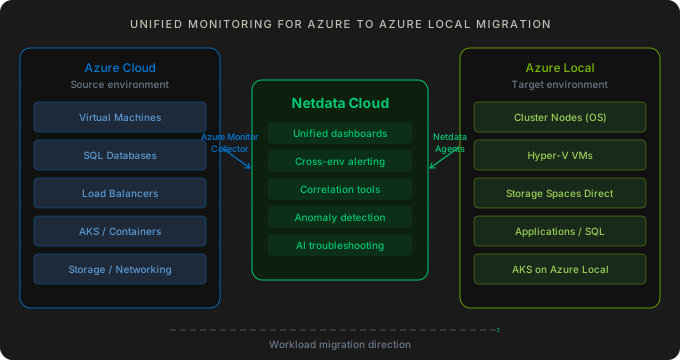
Moving workloads from Azure to Azure Local (formerly Azure Stack HCI)? Netdata gives you unified per-second visibility into your Azure cloud resources and your on-prem Azure Local infrastructure from a single dashboard — before, during, and after migration. No stitching tools together. No blind spots during cutover.


Why Migration Teams Choose Netdata
A single platform that covers Azure cloud services and on-prem Azure Local infrastructure with the same depth and the same timeline.
Azure Monitor Collector
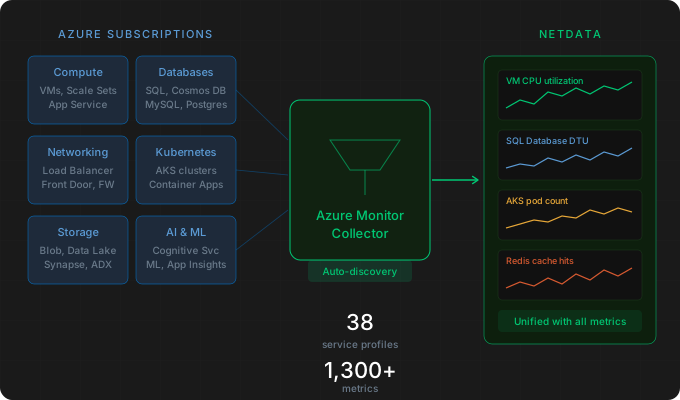
Connects to the Azure Monitor Metrics API and automatically discovers your resources. VMs, SQL databases, load balancers, AKS clusters, storage accounts, and 30+ other Azure services covered out of the box. Multi-subscription support included.
Azure Local Coverage
Lightweight agents on cluster nodes collect OS metrics at per-second granularity, Hyper-V VM performance, Storage Spaces Direct health and capacity, and applications running on guest workloads — under 1% CPU overhead.

Single Pane of Glass
Both environments appear in Netdata Cloud together. Build custom dashboards that show source and destination side by side, with the same alerting and correlation tools across cloud and on-prem.
Anomaly Detection on Day One
Every metric on both sides gets ML-based anomaly detection automatically. Especially useful in the post-migration period when normal baselines are still being established on the new hardware.
800+ Application Collectors
Whatever services you’re migrating from Azure — SQL Server, IIS, Active Directory, containers, custom apps — Netdata likely already has a collector. Monitoring coverage carries over from cloud to on-prem.
No Per-Metric Pricing
Azure Local generates a lot of metrics across cluster nodes, VMs, storage, and applications. Predictable per-node pricing means you monitor everything without cost anxiety as you scale workloads onto the new platform.
Trusted by teams running hybrid Azure infrastructure








































Deployment Architecture on Azure Local
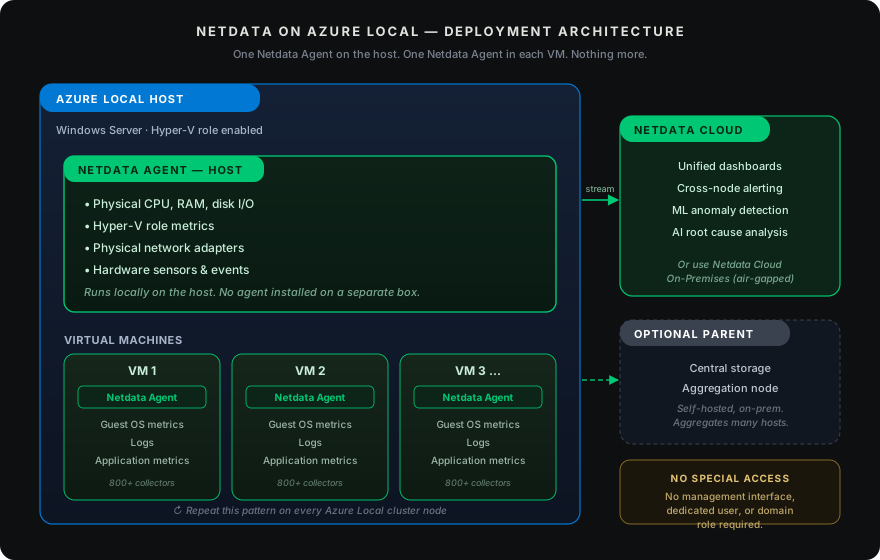
How Netdata is deployed
Two agents per node: host and guest, no special access required
No special access needed. You don’t need to open up any management interface, create dedicated users, or grant domain roles to monitor any of this. The agents run locally on each system and report through Netdata Cloud (or to an optional Parent for centralized storage and aggregation).
Host metrics + VM metrics + apps — from one platform
Try Netdata on Azure Local
Coverage Through Every Phase of Migration
Before Migration — Baseline and Validate
Per-second baselines
See live demo


During Migration — Parallel Visibility
Same timeline, both sides
Read the blog


After Migration — Ongoing Operations
Zero re-deployment
Hybrid cloud monitoring



The Migration Monitoring Choice
Netdata vs Azure Monitor + a Separate On-Prem Tool
Most teams default to Azure Monitor for the cloud side and a separate tool (or nothing) for the on-prem side. That split is exactly what hurts during migration. Here is what changes when both sides land in one platform.
Capability
Netdata (unified)
Azure Monitor + Separate On-Prem Tool
Source + destination on one timeline
✅ Single dashboard for Azure resources and Azure Local nodes
Direct side-by-side comparison during cutover
❌ Console switching between products
Manual timeline alignment, mental bridges across tools
Granularity for cutover windows
✅ Per-second metrics on both sides
Catch issues during minutes-long cutovers
⚠️ Per-minute Azure Monitor + variable on-prem
Cutover problems hidden in averages
Hyper-V and Storage Spaces Direct
✅ Native collectors for both
Per-VM resource and per-pool S2D health out of the box
⚠️ Depends on second tool’s coverage
Often shallow on cluster internals
Application monitoring carry-over
✅ 800+ collectors that run on both
Same monitoring for SQL Server, IIS, AD, containers — Azure or on-prem
⚠️ Two separate setups
Rebuilding app-level checks on the on-prem side
Anomaly detection on new hardware
✅ ML on every metric, automatic
Surfaces issues even before you know normal looks like
❌ Threshold-only on the on-prem side
No baseline = no signal during stabilization
Cost model for Azure Local volume
✅ Predictable per-node
No per-metric tax on cluster-heavy environments
❌ Volume-based ingest fees
Azure Monitor metric ingestion adds up across nodes/VMs
Agent overhead on cluster nodes
✅ <1% CPU per node
Doesn’t compete with workloads on right-sized hardware
⚠️ Heavier agents common
Especially when adding APM on top
Migration → steady state
✅ Same setup transitions automatically
Dashboards and alerts persist after cutover
⚠️ Tooling reshuffles post-migration
Second project to consolidate on-prem stack
What Gets Monitored on Azure Local
Per-Second Coverage of Every Cluster Node
CPU per core, memory usage and pressure, disk I/O and latency per device, network throughput and errors per interface, filesystem usage — hundreds of OS metrics at per-second granularity across every Azure Local cluster node. The foundation you need to know your new infrastructure is healthy before, during, and after workloads arrive.
The same depth you had in the cloud, on the hardware you now own
Linux monitoring


Why This Combination Works for Migration
Six capabilities that make Netdata fit the shape of an Azure → Azure Local migration.
Unified From Day One
Azure cloud and Azure Local appear in the same dashboard, on the same timeline, with the same alerting model. No stitching tools together at the moment when stitching costs you the most.

Per-Second Resolution
Cutover windows are often measured in minutes. Per-second metrics give you the resolution to spot issues during cutover instead of finding them after, in averaged data.

Lightweight on Cluster Nodes
Under 1% CPU overhead per agent. Azure Local hardware is sized for your production workloads, not for monitoring tax. Netdata stays out of the way.

800+ Application Collectors
SQL Server, IIS, Active Directory, containers, custom apps — whatever you ran on Azure is likely already covered. Re-point and monitoring coverage carries over.

Anomaly Detection Without Tuning
Every metric on both sides gets ML-based anomaly detection automatically. Especially useful while your team is still learning what ’normal’ looks like on the new hardware.

Predictable Pricing
Predictable per-node pricing for infrastructure monitoring, with no charges for metrics volume, Logs Monitoring (querying logs in place), users, data retention or containers. Azure Local generates a lot of telemetry across cluster nodes, VMs, storage, and apps.
Setup & Documentation
Cross-references to Netdata Learn for the components you’ll deploy on the Azure side and the Azure Local side.
Azure Monitor Collector
Configure the collector that pulls platform metrics from Azure subscriptions. Multi-subscription, KQL-scoped discovery, 38 built-in service profiles.
Install Netdata on Windows
Step-by-step Windows installation for Azure Local host nodes and Windows VMs. Native Windows agent, no WSL required.

Windows Machine Monitoring
What the Windows agent collects out of the box: CPU, memory, disk, network, services, and hundreds of perflib counters.

Windows Event Logs
Direct collection of Windows Event Logs (WEL/ETW/TL) with full-text search and field filtering — no log pipeline required.

Hyper-V Collector
Per-VM and per-host Hyper-V metrics for the workloads running on your Azure Local cluster nodes.

Netdata Parents
Set up an optional Parent for central storage and aggregation across all your Azure Local cluster nodes and Azure cloud agents.
May 11, 2026
Azure Local Migration: Monitor Both Sides In One View
Monitor your Azure to Azure Local migration from one Netdata dashboard, watching cloud and on-prem infrastructure side by side. Read the full guide now!
April 27, 2026
Azure Monitor Collector: Monitor Azure Infrastructure
Meet Netdata's Azure Monitor collector: automatic resource discovery, 38 service profiles, and 1,300+ metrics across subscriptions. Read the guide now!
October 23, 2024
12 Benefits You Get by Scaling with Netdata
Monitor large-scale infrastructures seamlessly with Netdata's real-time insights, scalability, and advanced anomaly detection.