
Monitor agent usage with OpenTelemetry
This article describes how to enable and configure OpenTelemetry monitoring for Copilot Chat agent interactions in VS Code.
Copilot Chat can export traces, metrics, and events via OpenTelemetry (OTel), giving you visibility into agent interactions, LLM calls, tool executions, and token usage. All signal names and attributes follow the OTel GenAI Semantic Conventions, so the data works with any OTel-compatible backend.
For an interactive view of the cache metrics without setting up an OTel backend, use the Cache Explorer to inspect prompt cache hit rates directly in VS Code.
What gets collected
Copilot Chat emits three types of OTel signals: traces, metrics, and events.
Attribute namespaces
Copilot Chat emits OTel attributes under three namespaces:
Legacy copilot_chat.* keys continue to emit indefinitely so existing collectors, dashboards, and downstream consumers keep working without changes. There is no sunset date. The tables in this section mark dual-emitted rows as Legacy with a pointer to the preferred key.
Traces
Each agent interaction produces a hierarchical span tree that captures the full execution flow:
invoke_agent copilot                           [~15s]
  ├── chat gpt-4o                              [~3s]  (LLM requests tool calls)
  ├── execute_tool readFile                    [~50ms]
  ├── execute_tool runCommand                  [~2s]
  ├── chat gpt-4o                              [~4s]  (LLM generates final response)
  └── (span ends)
When an agent invokes a subagent (for example, through the runSubagent tool), the trace context is automatically propagated. The subagent's invoke_agent span appears as a child of the parent agent's execute_tool span, producing a connected trace tree across async boundaries.
invoke_agent span
Wraps the entire agent orchestration, including all LLM calls and tool executions.
| Attribute | Description |
|---|---|
gen_ai.operation.name |
Always invoke_agent |
gen_ai.provider.name |
Provider (for example, github) |
gen_ai.agent.name |
Agent name (for example, copilot, copilotcli, claude) |
gen_ai.conversation.id |
Conversation session ID |
gen_ai.request.model |
Requested model |
gen_ai.response.model |
Resolved model |
gen_ai.usage.input_tokens |
Total input tokens across the session |
gen_ai.usage.output_tokens |
Total output tokens across the session |
gen_ai.usage.cache_read.input_tokens |
Cache-read input tokens, when available |
gen_ai.usage.cache_creation.input_tokens |
Cache-creation input tokens, when available |
github.copilot.agent.type |
builtin, custom, or plugin |
github.copilot.git.repository |
Repository remote URL, when in a Git repo |
github.copilot.git.branch |
Active branch, when in a Git repo |
github.copilot.git.commit_sha |
Current commit, when in a Git repo |
github.copilot.github.org |
GitHub org owner, for GitHub remotes only |
copilot_chat.repo.remote_url |
Legacy. Prefer github.copilot.git.repository |
copilot_chat.repo.head_branch_name |
Legacy. Prefer github.copilot.git.branch |
copilot_chat.repo.head_commit_hash |
Legacy. Prefer github.copilot.git.commit_sha |
copilot_chat.turn_count |
LLM round-trips in this session |
error.type |
Error class, on failure |
gen_ai.input.messages |
Full prompt messages (content capture only) |
gen_ai.output.messages |
Full response messages (content capture only) |
gen_ai.tool.definitions |
Tool schemas (content capture only) |
chat span
One span per LLM API call.
| Attribute | Description |
|---|---|
gen_ai.operation.name |
Always chat |
gen_ai.provider.name |
Provider name |
gen_ai.request.model |
Requested model |
gen_ai.response.model |
Resolved model |
gen_ai.response.finish_reasons |
Stop reasons (for example, ["stop"]) |
gen_ai.request.max_tokens |
Max output tokens |
gen_ai.request.temperature |
Temperature, when set |
gen_ai.request.top_p |
Top-p, when set |
gen_ai.usage.input_tokens |
Input tokens for this call |
gen_ai.usage.output_tokens |
Output tokens for this call |
gen_ai.usage.cache_read.input_tokens |
Cache-read input tokens, when available |
gen_ai.usage.cache_creation.input_tokens |
Cache-creation input tokens, when available |
gen_ai.usage.reasoning.output_tokens |
Reasoning tokens, when available |
gen_ai.usage.reasoning_tokens |
Legacy. Prefer gen_ai.usage.reasoning.output_tokens |
copilot_chat.time_to_first_token |
Time to first SSE token (milliseconds) |
server.address |
API hostname |
error.type |
Error class, on failure |
execute_tool span
One span per tool invocation.
| Attribute | Description |
|---|---|
gen_ai.operation.name |
Always execute_tool |
gen_ai.tool.name |
Tool name (for example, readFile) |
gen_ai.tool.type |
function or extension (MCP tools) |
gen_ai.tool.call.id |
Tool call identifier |
github.copilot.tool.parameters.edit_type |
For edit tools: create, update, str_replace, or insert |
github.copilot.tool.parameters.skill_name |
For skill invocations |
github.copilot.tool.parameters.mcp_server_name_hash |
For MCP tools: SHA-256 of the server name |
github.copilot.tool.parameters.mcp_tool_name |
For MCP tools: invoked tool name |
github.copilot.tool.parameters.command |
For shell tools (content capture only, truncated) |
github.copilot.tool.parameters.file_path |
For file tools (content capture only) |
github.copilot.tool.parameters.mcp_server_name |
For MCP tools (content capture only) |
error.type |
Error class, on failure |
gen_ai.tool.call.arguments |
Tool input arguments (content capture only) |
gen_ai.tool.call.result |
Tool output (content capture only) |
execute_hook span
One span per hook execution (for example, PreToolUse, Stop).
| Attribute | Description |
|---|---|
gen_ai.operation.name |
Always execute_hook |
github.copilot.hook.decision |
pass, block, or non_blocking_error |
github.copilot.hook.duration |
Hook execution duration (seconds) |
github.copilot.hook.tool_names |
Tools the hook is scoped to, as a JSON array |
copilot_chat.hook_type |
Hook event (for example, PreToolUse) |
copilot_chat.hook_result_kind |
success, error, or non_blocking_error |
copilot_chat.hook_input |
Hook input payload (truncated) |
copilot_chat.hook_output |
Hook stdout, on success (truncated) |
error.type |
Error class, on failure |
Metrics
GenAI semantic-convention metrics:
| Metric | Type | Description |
|---|---|---|
gen_ai.client.operation.duration |
Histogram | LLM API call duration (seconds) |
gen_ai.client.token.usage |
Histogram | Token counts (input and output) |
Extension-specific metrics:
| Metric | Type | Description |
|---|---|---|
copilot_chat.tool.call.count |
Counter | Tool invocations by name and success |
copilot_chat.tool.call.duration |
Histogram | Tool execution latency (milliseconds) |
copilot_chat.agent.invocation.duration |
Histogram | Agent end-to-end duration (seconds) |
copilot_chat.agent.turn.count |
Histogram | LLM round-trips per agent invocation |
copilot_chat.session.count |
Counter | Chat sessions started |
copilot_chat.time_to_first_token |
Histogram | Time to first SSE token (seconds) |
Agent activity and outcome metrics track agentic code changes across all surfaces (inline chat, local agents, Copilot agents, Claude agents, and Copilot cloud agents):
| Metric | Type | Description |
|---|---|---|
copilot_chat.edit.acceptance.count |
Counter | Edit accept and reject decisions (inline chat, chat editing, hunk-level) |
copilot_chat.chat_edit.outcome.count |
Counter | File-level chat editing session outcomes (accepted, rejected, saved) |
copilot_chat.lines_of_code.count |
Counter | Lines of code added or removed by accepted agent edits |
copilot_chat.edit.survival.four_gram |
Histogram | 4-gram text similarity survival score (0-1) |
copilot_chat.edit.survival.no_revert |
Histogram | No-revert survival score (0-1) |
copilot_chat.user.action.count |
Counter | User engagement actions: copy, insert, apply, followup |
copilot_chat.user.feedback.count |
Counter | Thumbs up and thumbs down votes on chat responses |
copilot_chat.agent.edit_response.count |
Counter | Agent edit responses by success or error |
copilot_chat.agent.summarization.count |
Counter | Context summarization outcomes (applied, failed) |
copilot_chat.pull_request.count |
Counter | Pull requests created via the Copilot agent |
copilot_chat.cloud.session.count |
Counter | Cloud and remote agent sessions by partner agent |
copilot_chat.cloud.pr_ready.count |
Counter | Remote agent job PR-ready notifications |
Metrics include attributes for filtering, such as gen_ai.request.model, gen_ai.provider.name, gen_ai.tool.name, copilot_chat.edit.source, and error.type.
Events
| Event | Description |
|---|---|
gen_ai.client.inference.operation.details |
Full LLM call metadata with model, tokens, and finish reason |
copilot_chat.session.start |
Emitted when a new chat session begins |
copilot_chat.tool.call |
Per-tool invocation with timing and error details |
copilot_chat.agent.turn |
Per-turn LLM round-trip with token counts |
copilot_chat.edit.feedback |
User accepted or rejected a file-level agent edit |
copilot_chat.edit.hunk.action |
User accepted or rejected an individual hunk |
copilot_chat.inline.done |
Inline chat edit was accepted or rejected |
copilot_chat.edit.survival |
Periodic measurements of how much AI-generated code survives after acceptance |
copilot_chat.user.feedback |
User voted on a chat response (thumbs up or down) |
copilot_chat.cloud.session.invoke |
A cloud or remote agent session was started |
Resource attributes
All signals carry these resource attributes:
| Attribute | Value |
|---|---|
service.name |
copilot-chat (configurable with OTEL_SERVICE_NAME) |
service.version |
Extension version |
session.id |
Unique per VS Code window |
Add custom resource attributes with OTEL_RESOURCE_ATTRIBUTES to filter by team, department, or other organizational boundaries:
export OTEL_RESOURCE_ATTRIBUTES="team.id=platform,department=engineering"
Identity capture
For Local harness sessions, identity capture can attribute agent activity to an individual developer and machine. When enabled, telemetry includes:
user.nameon agent invocation spans, including subagent and inline chat spans.process.user.nameandhost.nameas resource attributes.
Enable identity capture with
github.copilot.chat.otel.captureIdentity
or COPILOT_OTEL_CAPTURE_IDENTITY=true. This control is independent of content capture.
Identity attributes can identify a developer and their machine. Enable identity capture only when your organization has an appropriate purpose, access controls, and retention policy for this data.
Identity capture currently applies only to Local harness sessions. Telemetry from the Agent Host process doesn't include these identity attributes.
Content capture
By default, no prompt content, responses, or tool arguments are captured. Only metadata like model names, token counts, and durations are included.
To capture full content, enable the
github.copilot.chat.otel.captureContent
setting or set COPILOT_OTEL_CAPTURE_CONTENT=true. This populates span attributes with full prompt messages, response messages, system prompts, tool schemas, tool arguments, and tool results.
Content capture can include sensitive information such as code, file contents, and user prompts. Only enable this in trusted environments.
Enable OTel monitoring
OTel activates when any of the following conditions is true:
-
github.copilot.chat.otel.enabled
is
true -
github.copilot.chat.otel.dbSpanExporter.enabled
is
true COPILOT_OTEL_ENABLED=trueOTEL_EXPORTER_OTLP_ENDPOINTis set
VS Code settings
Open Settings (⌘, (Windows, Linux Ctrl+,)) and search for copilot otel:
| Setting | Type | Default | Description |
|---|---|---|---|
| github.copilot.chat.otel.enabled | boolean | false |
Enable OTel emission |
| github.copilot.chat.otel.exporterType | string | "otlp-http" |
otlp-http, otlp-grpc, console, or file |
| github.copilot.chat.otel.otlpEndpoint | string | "http://localhost:4318" |
OTLP collector endpoint |
| github.copilot.chat.otel.captureContent | boolean | false |
Capture full prompt and response content |
| github.copilot.chat.otel.captureIdentity | boolean | false |
Capture the authenticated account name, operating system username, and machine hostname for Local harness sessions |
| github.copilot.chat.otel.maxAttributeSizeChars | integer | 0 |
Maximum characters per content attribute (prompts, tool args, tool results). 0 disables truncation. Set a positive value to match your backend's per-attribute size limit. |
| github.copilot.chat.otel.outfile | string | "" |
File path for JSON-lines output |
| github.copilot.chat.otel.dbSpanExporter.enabled | boolean | false |
Persist OTel spans to a local SQLite database for the Chat: Export Agent Traces DB command. Implicitly enables OTel. |
Environment variables
Environment variables always take precedence over VS Code settings. When your organization mandates OTel configuration through Copilot managed settings, those managed values override user settings. In the Copilot Chat extension, OTel environment variables can still override managed values.
| Variable | Default | Description |
|---|---|---|
COPILOT_OTEL_ENABLED |
false |
Enable OTel. Also enabled when OTEL_EXPORTER_OTLP_ENDPOINT is set. |
COPILOT_OTEL_ENDPOINT |
OTLP endpoint URL (takes precedence over OTEL_EXPORTER_OTLP_ENDPOINT) |
|
OTEL_EXPORTER_OTLP_ENDPOINT |
Standard OTel OTLP endpoint URL | |
OTEL_EXPORTER_OTLP_PROTOCOL |
http/protobuf |
OTLP protocol. Only grpc changes behavior. |
COPILOT_OTEL_PROTOCOL |
Override OTLP protocol (grpc or http). Takes precedence over OTEL_EXPORTER_OTLP_PROTOCOL. |
|
OTEL_SERVICE_NAME |
copilot-chat |
Service name in resource attributes |
OTEL_RESOURCE_ATTRIBUTES |
Extra resource attributes (key1=val1,key2=val2) |
|
COPILOT_OTEL_CAPTURE_CONTENT |
false |
Capture full prompt and response content |
COPILOT_OTEL_CAPTURE_IDENTITY |
false |
Capture developer and machine identity for Local harness sessions |
COPILOT_OTEL_MAX_ATTRIBUTE_SIZE_CHARS |
0 |
Override the max character size for content attributes. 0 disables truncation. Takes precedence over the maxAttributeSizeChars setting. |
COPILOT_OTEL_LOG_LEVEL |
info |
Minimum log level: trace, debug, info, warn, or error. |
COPILOT_OTEL_FILE_EXPORTER_PATH |
Write all signals to this file as JSON lines. | |
COPILOT_OTEL_HTTP_INSTRUMENTATION |
false |
Enable HTTP-level OTel instrumentation. |
OTEL_EXPORTER_OTLP_HEADERS |
Static HTTP headers for the collector. For managed Agent Host sessions, see dynamic headers. |
Commands
When
github.copilot.chat.otel.dbSpanExporter.enabled
is true, Copilot Chat persists OTel spans to a local SQLite database. This is useful for offline inspection or sharing trace data without running an OTLP backend.
| Command | Description |
|---|---|
Chat: Export Agent Traces DB (github.copilot.chat.otel.exportAgentTracesDB) |
Export the local SQLite span database to a .db file. Only available when the dbSpanExporter.enabled setting is true. |
Manage OTel configuration for your organization
Enterprises can mandate OTel export configuration centrally through Copilot enterprise-managed settings, without each developer setting OTEL_* environment variables. Managed telemetry configuration applies to both the Copilot Chat extension and the Agent Host process. In addition to collector export, Copilot Agent Host sessions support a managed file destination.
For delivery methods, configuration fields, client support, and precedence, see telemetry in the enterprise-managed settings reference. For the behavior specific to VS Code, see Apply managed telemetry in VS Code.
For Local harness sessions, VS Code automatically tries once per editor session to restart the extension hosts when a managed OTel configuration that enables export arrives after Copilot Chat starts. The restart can interrupt other extensions. If the automatic restart can't complete, or for later policy changes, select Reload Window when prompted.
When a managed telemetry value is configured, it overrides user settings. Managed identity capture also overrides COPILOT_OTEL_CAPTURE_IDENTITY, and managed resource attributes override OTEL_RESOURCE_ATTRIBUTES. Remove other conflicting OTel environment variables from managed devices to ensure that the enterprise configuration takes effect in the Copilot Chat extension.
Export managed telemetry to a file
Starting with VS Code 1.143, administrators can set telemetry.filePath to save Copilot Agent Host telemetry as JSON Lines (JSONL), without running an OTLP collector or requiring developers to opt in through personal OTel settings. This managed destination is separate from the Copilot Chat extension's file exporter.
For a local Agent Host, add the following telemetry block to the device-wide managed-settings.json file, not your editor settings JSON:
| Platform | Managed settings file |
|---|---|
| macOS | /Library/Application Support/GitHubCopilot/managed-settings.json |
| Linux | /etc/github-copilot/managed-settings.json |
| Windows | %ProgramFiles%\GitHubCopilot\managed-settings.json |
{
  "telemetry": {
    "filePath": "~/copilot-telemetry/copilot-otel.jsonl",
    "captureContent": false,
    "capture": {
      "identity": false
    }
  }
}
Choose an absolute or home-relative output path that the Agent Host can write to. Paths refer to the machine that exports the telemetry. The ~/ prefix expands to that machine's user home directory. Environment-variable references such as $HOME or %USERPROFILE% in filePath are not expanded and are rejected.
Setting filePath enables Agent Host OTel export without enabled: true. An explicit managed telemetry.enabled: false takes precedence and turns off export.
After VS Code resolves a managed telemetry change, it restarts the local Agent Host automatically. Start a new Copilot Agent Host session and send a prompt, then check the destination file for spans such as invoke_agent and vscode.agent_host.session.
The exporter creates missing parent directories and appends one span per line. If it cannot resolve the path or write to the file, the Agent Host logs an error without blocking chat. It does not fall back to a collector. Apply your organization's access and retention controls to the exported files.
A managed filePath takes precedence over collector configuration. While it is configured, Agent Host telemetry goes to the file instead of the collector, and dynamic headers do not apply. Include the file configuration in the highest-precedence managed telemetry block.
To remove the managed file destination, remove telemetry.filePath from the effective managed configuration. After the change is applied, another configured collector or personal Agent Host exporter can become effective again. Removing filePath stops all export only when no other exporter is configured. To turn off Agent Host OTel export through managed settings, set telemetry.enabled to false.
Configure dynamic headers
Starting with VS Code 1.143, administrators can configure telemetry.headersProvider for Copilot Agent Host sessions to generate and refresh HTTP headers for OTLP export. The Agent Host runs a helper executable to obtain header values, so developers don't need to update them manually. Use these headers to supply collector-specific metadata, route telemetry, or authenticate with the collector.
Configure the provider through Copilot enterprise-managed settings, not your editor settings JSON. For example, deploy the following telemetry block in managed-settings.json:
{
  "telemetry": {
    "enabled": true,
    "endpoint": "https://<collector-host>:4318",
    "protocol": "http/protobuf",
    "captureContent": false,
    "capture": {
      "identity": false
    },
    "headers": {
      "x-organization": "<organization-id>"
    },
    "headersProvider": {
      "path": "<absolute-path-to-header-helper>",
      "args": [],
      "refreshIntervalMs": 1740000
    }
  }
}
Replace the endpoint, organization ID, and helper path with your deployment values. Install the helper and its dependencies on the machine where the Agent Host runs. For remote sessions, the executable and paths must exist on the remote host.
The helper runs from the execution host's home directory, with the arguments in args passed without shell evaluation. It must finish within 30 seconds and write a JSON object with string values to standard output:
{
  "x-team": "platform",
  "x-environment": "production"
}
The helper can also return an Authorization header when the collector requires authentication.
The provider refreshes headers every 29 minutes by default. Set refreshIntervalMs to match how often your header values need to be refreshed. Returning {} clears dynamic headers. If a refresh fails, exports that require dynamic headers are blocked until the provider refreshes successfully.
Headers returned by the provider take precedence over managed static telemetry.headers values with the same name. Nonconflicting static headers remain in the request. Managed headers also take precedence over user-provided headers.
The provider requires an endpoint in the same telemetry block and supports HTTP OTLP export with http/protobuf or http/json, not gRPC. Managed export does not require developers to opt in through personal OTel settings.
Higher-precedence managed sources replace the entire telemetry block. Include all required fields in the winning source rather than splitting the endpoint and provider across delivery methods. See managed-settings delivery precedence and the header provider reference for more information.
Trace structure by harness
When OTel is enabled, the Copilot and Claude integrations described in this section are automatically instrumented. The same settings used for Local harness session traces also enable traces for these integrations.
Copilot harness
The shared runtime for Copilot harness sessions runs in the same VS Code process as the chat extension and produces a rich trace hierarchy that includes subagents, permissions, hooks, and tool calls. The extension wrapper span (invoke_agent copilotcli, service copilot-chat) parents the runtime's native spans (service github-copilot). Both appear in the same trace in your collector.
Copilot harness sessions also show the full runtime trace hierarchy in the Agent Debug Logs panel in VS Code, identical to what appears in your trace viewer. The debug panel works even when OTel export is disabled, because the runtime's internal tracing is always active for the panel.
When OTel export is disabled, the debug panel automatically captures full prompt and response content. When OTel export is enabled, the github.copilot.chat.otel.captureContent setting controls content capture for both the debug panel and OTLP export.
Copilot CLI (terminal session)
When you run a Copilot CLI session in the terminal (New Copilot CLI Session), it runs in a separate process. When OTel is enabled, the extension forwards COPILOT_OTEL_ENABLED and OTEL_EXPORTER_OTLP_ENDPOINT to the terminal process. Terminal traces appear as independent root traces under service github-copilot and are not linked to extension traces.
The CLI runtime only supports otlp-http. When otlp-grpc is configured, the terminal CLI still uses HTTP. Backends that serve both protocols on the same port (such as the Aspire Dashboard) work transparently.
Claude agent
The Claude harness is disabled when Copilot enterprise-managed settings apply, including managed telemetry settings. Contact the IT team that deployed the settings to discuss access.
When OTel is enabled, Claude agent sessions produce extension-level spans under service copilot-chat that follow the GenAI semantic conventions. The extension creates spans by intercepting Claude SDK messages and proxying LLM calls through a local HTTP server.
The invoke_agent claude root span wraps each user request, with nested chat, execute_tool, and execute_hook spans. When the tool is Agent (a Claude subagent invocation), child chat and execute_tool spans are nested underneath, giving full subagent visibility.
Filter by agent type
In your trace viewer, filter by service.name to see traces from specific agent runtimes:
service.name |
Source |
|---|---|
copilot-chat |
Foreground agent, CLI wrapper, and Claude agent spans (extension-emitted) |
github-copilot |
Shared Copilot runtime spans and CLI terminal sessions |
claude-code |
Claude Code subprocess SDK telemetry (when CLAUDE_CODE_ENABLE_TELEMETRY is forwarded) |
Within the copilot-chat service, distinguish agent types by gen_ai.agent.name:
gen_ai.agent.name |
Agent type |
|---|---|
GitHub Copilot Chat |
Foreground agent (agent mode) |
copilotcli |
Copilot wrapper span |
claude |
Claude agent |
Use with observability backends
Copilot Chat's OTel output works with any backend that supports the OTLP protocol. Point the
github.copilot.chat.otel.otlpEndpoint
setting or OTEL_EXPORTER_OTLP_ENDPOINT environment variable at the backend's OTLP ingestion URL, and configure the exporter type to match the backend's protocol (otlp-http or otlp-grpc).
Aspire Dashboard
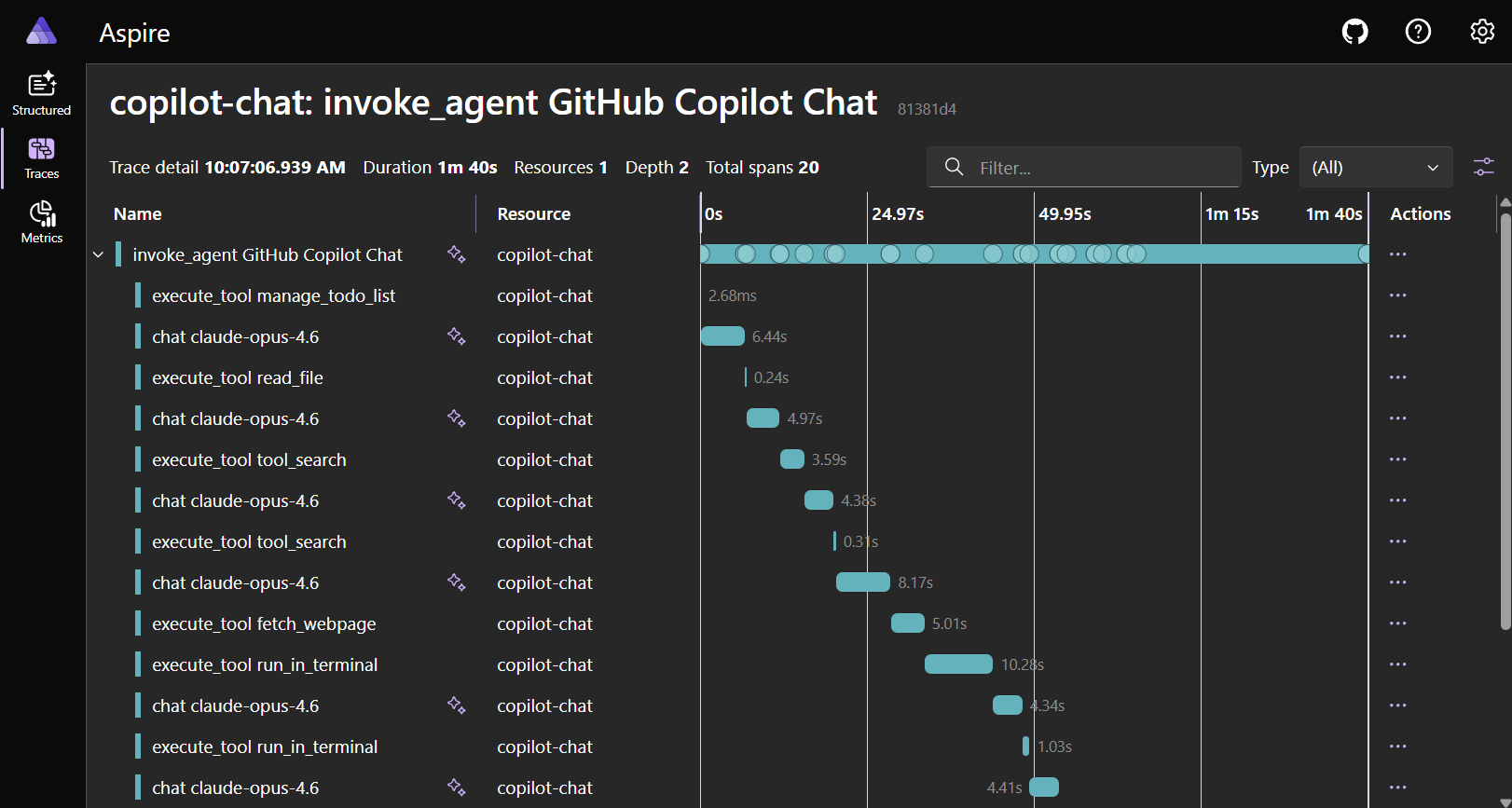
The Aspire Dashboard is the simplest option for local development. It is a single app with a built-in OTLP endpoint and trace viewer, and requires no cloud account.
You can start the dashboard using the Aspire CLI:
aspire dashboard run
Or run the same standalone dashboard from its Docker container image:
docker run --rm -d -p 18888:18888 -p 4318:18890 --name aspire-dashboard \
  mcr.microsoft.com/dotnet/aspire-dashboard:latest
VS Code configuration:
{
  "github.copilot.chat.otel.enabled": true,
  "github.copilot.chat.otel.captureContent": true
}
Open http://localhost:18888 and go to Traces to view your agent interaction spans.
Jaeger
Jaeger is an open-source distributed tracing platform that accepts OTLP directly.
docker run -d --name jaeger -p 16686:16686 -p 4318:4318 jaegertracing/jaeger:latest
VS Code configuration:
{
  "github.copilot.chat.otel.enabled": true,
  "github.copilot.chat.otel.otlpEndpoint": "http://localhost:4318"
}
Open http://localhost:16686, select service copilot-chat, and select Find Traces.
Azure Application Insights
Use an OTel Collector with the Azure Monitor exporter to forward Copilot Chat telemetry to Application Insights. Point the VS Code github.copilot.chat.otel.otlpEndpoint setting at the collector's OTLP endpoint, and configure the collector to export to your Application Insights connection string.
For an end-to-end setup with a ready-made dashboard, see Monitor AI coding agents with Grafana. The guide walks through running the OTel Collector, pointing VS Code at it, and importing a prebuilt Azure Managed Grafana dashboard. The dashboard visualizes Copilot operations, input and output tokens, chat sessions, tool calls, and per-model response time and TTFT from Application Insights.
Langfuse
Langfuse is an open-source LLM observability platform with native OTLP ingestion and support for OTel GenAI Semantic Conventions.
VS Code configuration:
{
  "github.copilot.chat.otel.enabled": true,
  "github.copilot.chat.otel.otlpEndpoint": "http://localhost:3000/api/public/otel",
  "github.copilot.chat.otel.captureContent": true
}
Set the auth header with the OTEL_EXPORTER_OTLP_HEADERS environment variable. See the Langfuse OTel docs for details.
Other backends
Any OTLP-compatible backend works, including Grafana Tempo, Honeycomb, and Datadog. Refer to each backend's documentation for OTLP ingestion setup.
Other exporter examples
The default exporter is otlp-http. You can switch to otlp-grpc, console, or file to fit your backend or debugging workflow.
OTLP/gRPC:
{
  "github.copilot.chat.otel.enabled": true,
  "github.copilot.chat.otel.exporterType": "otlp-grpc",
  "github.copilot.chat.otel.otlpEndpoint": "http://localhost:4317"
}
Console output (quick debugging):
{
  "github.copilot.chat.otel.enabled": true,
  "github.copilot.chat.otel.exporterType": "console"
}
File-based output from the Copilot Chat extension (offline or CI):
{
  "github.copilot.chat.otel.enabled": true,
  "github.copilot.chat.otel.exporterType": "file",
  "github.copilot.chat.otel.outfile": "/tmp/copilot-otel.jsonl"
}
For organization-managed output from Copilot Agent Host sessions, see Export managed telemetry to a file.
For static HTTP headers, set OTEL_EXPORTER_OTLP_HEADERS. Administrators can also configure managed static headers and, for Copilot Agent Host sessions, dynamic headers.
Security and privacy
OTel monitoring is off by default. You or your organization must configure monitoring before data is exported. For managed deployments, your organization controls what is collected and where it goes.
Related content
- AI settings reference
- Manage AI settings in enterprise environments
- Troubleshoot AI in VS Code
- Diagnose prompt caching with the Cache Explorer
- OTel GenAI Semantic Conventions
- Inside the LLM Call: GenAI Observability with OpenTelemetry
- Aspire Dashboard standalone docs
- Video: Tracing agent sessions with OpenTelemetry and Aspire