
Seamless Microsoft Teams Migration Tool
Migrate Teams data from one tenant to another with CloudBik. Our Microsoft Teams to Teams Migration Tool makes it simple to move your chats, channels, files, and more. Whether you're merging organizations or restructuring, we ensure a smooth Migration with minimal downtime. Our web application is capable of handling small to large data efficiently.
Book a Free Demo
How We Work?
Our Seamless Approach to Teams Migration
Understanding the Requirement
We start by listening to your needs. Our team works closely with you to understand your current Microsoft Teams setup, data volume, and migration goals. Whether it’s Teams Chat Migration, Teams Meeting Chat Migration, or moving entire channels, we map out a clear plan to migrate Teams from one tenant to another, ensuring no detail is missed.
Executing the Migration
Using our advanced Microsoft Teams Migration Tool, we carry out the migration with precision. We migrate teams chat history, channels, tabs, files, settings and more securely and efficiently, keeping you informed at every step. Our process minimizes downtime, so your team can continue collaborating without interruption.
Everything You Need for a Complete Teams Migration
What We Migrate ?
CloudBik’s Microsoft Teams Migration Tool provides everything you need for a complete and hassle-free Microsoft Teams Tenant to Tenant migration. From transferring all your 1-on-1 chats, group chats, and meeting chats to migrating channels, files, documents, and metadata, our tool ensures no detail is overlooked. Find out what data type we migrate:

Teams Chat Migration
- 1 on 1 Chats
- Group Chats
- Meeting Chats
- Attachments
- Emojis and Reactions
- Mentions
- Timestamps
- Pinned Messages
- Chat Metadata
Migrate Teams from One Tenant to Another
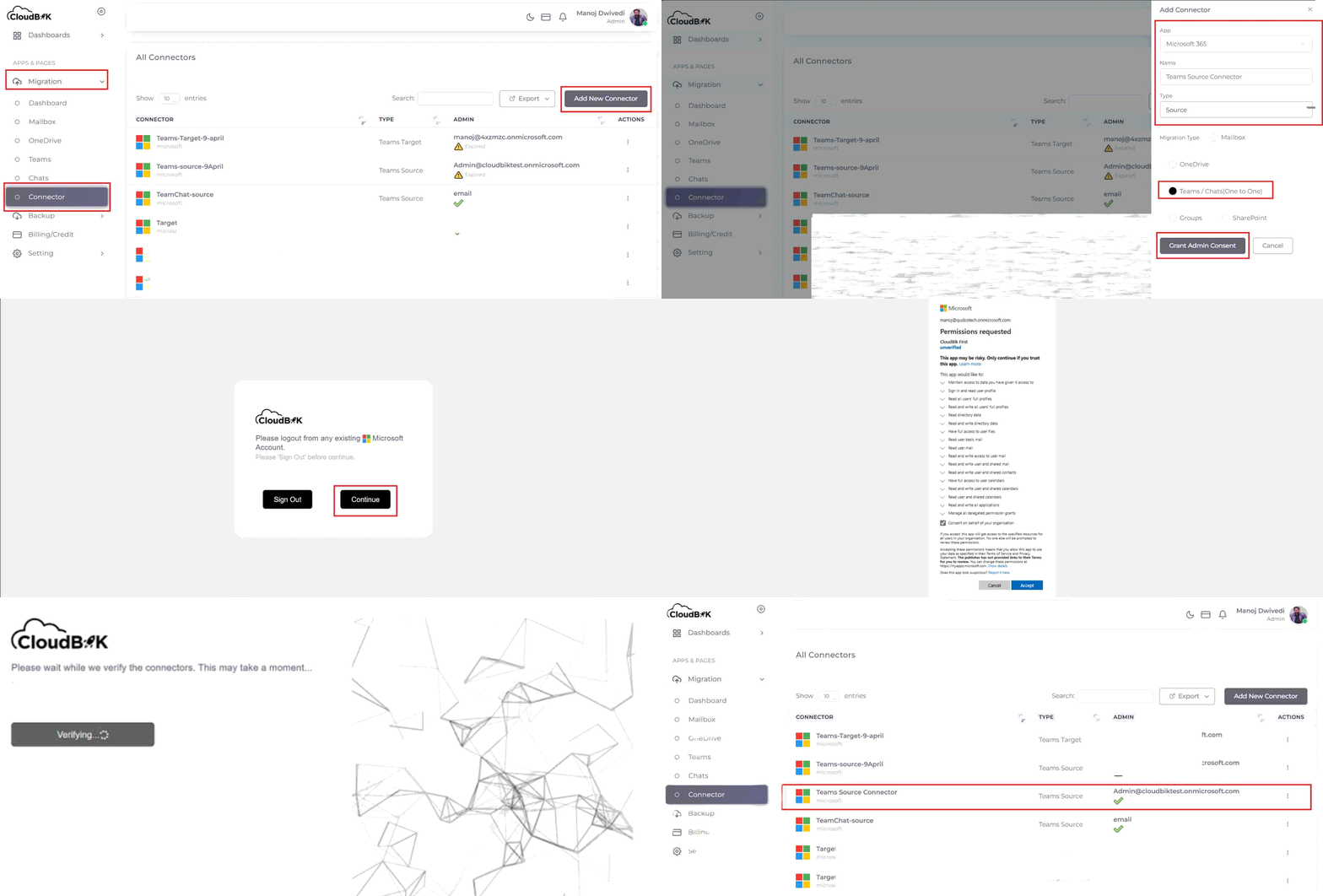
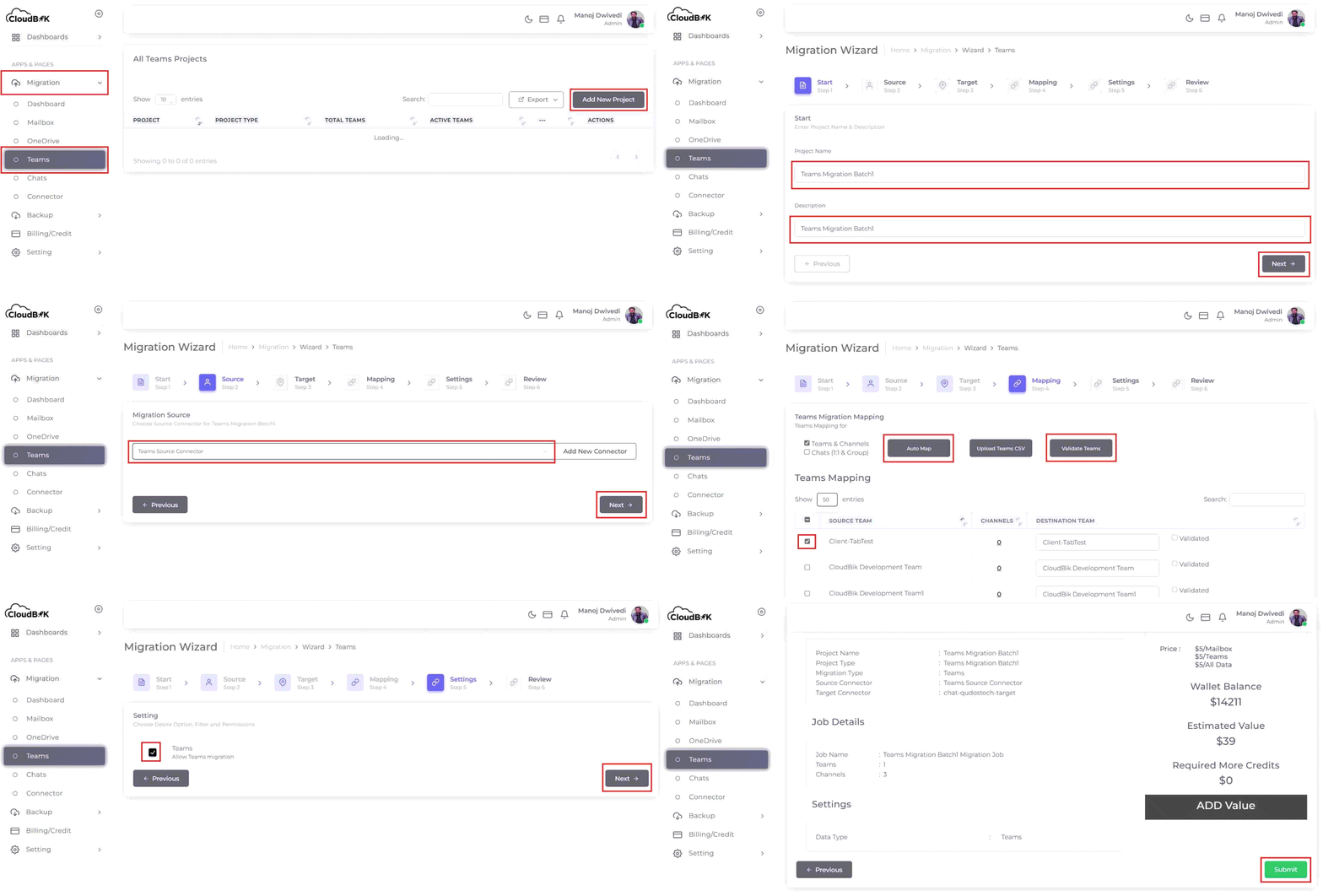
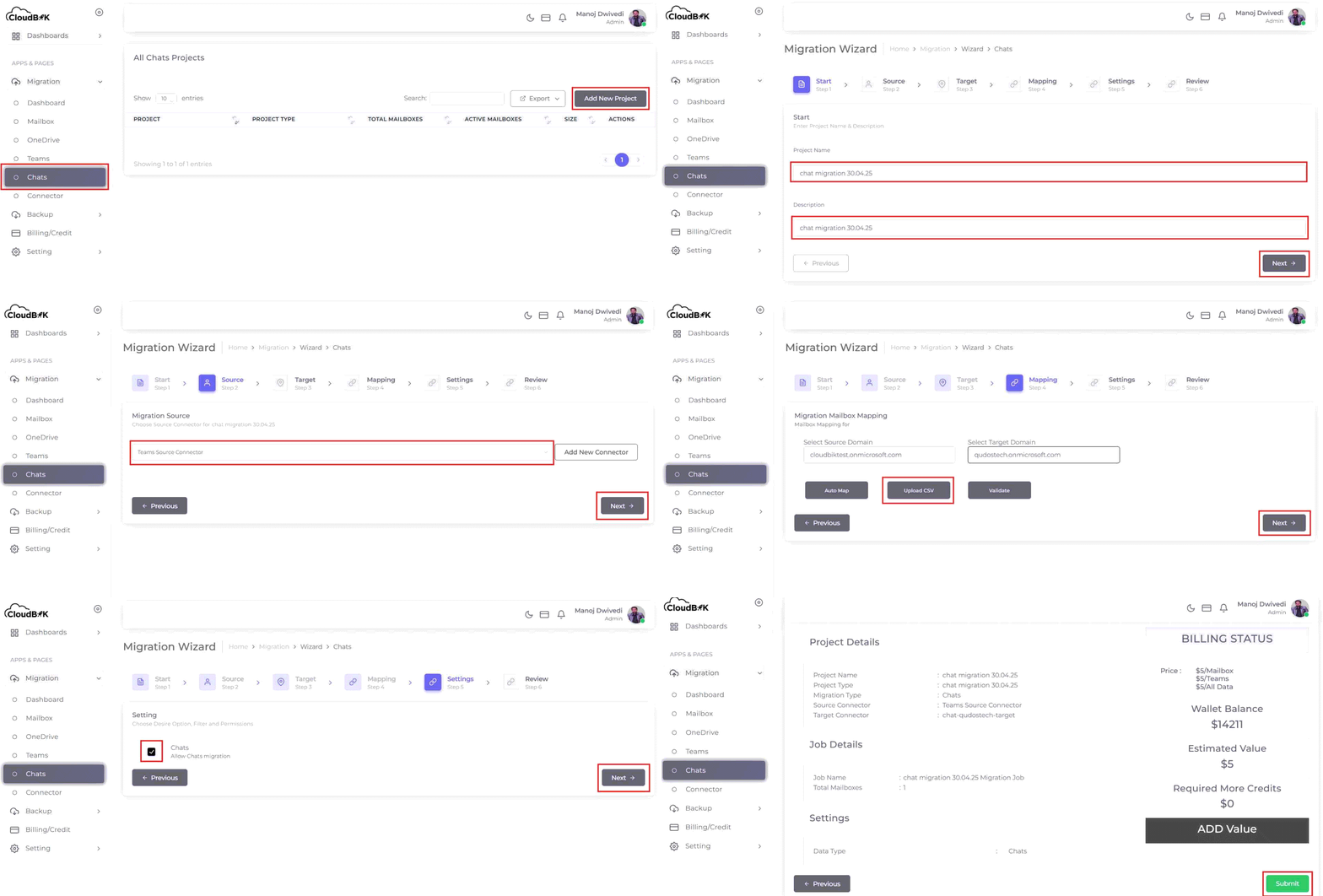
Microsoft Teams to Teams Migration Step by Step
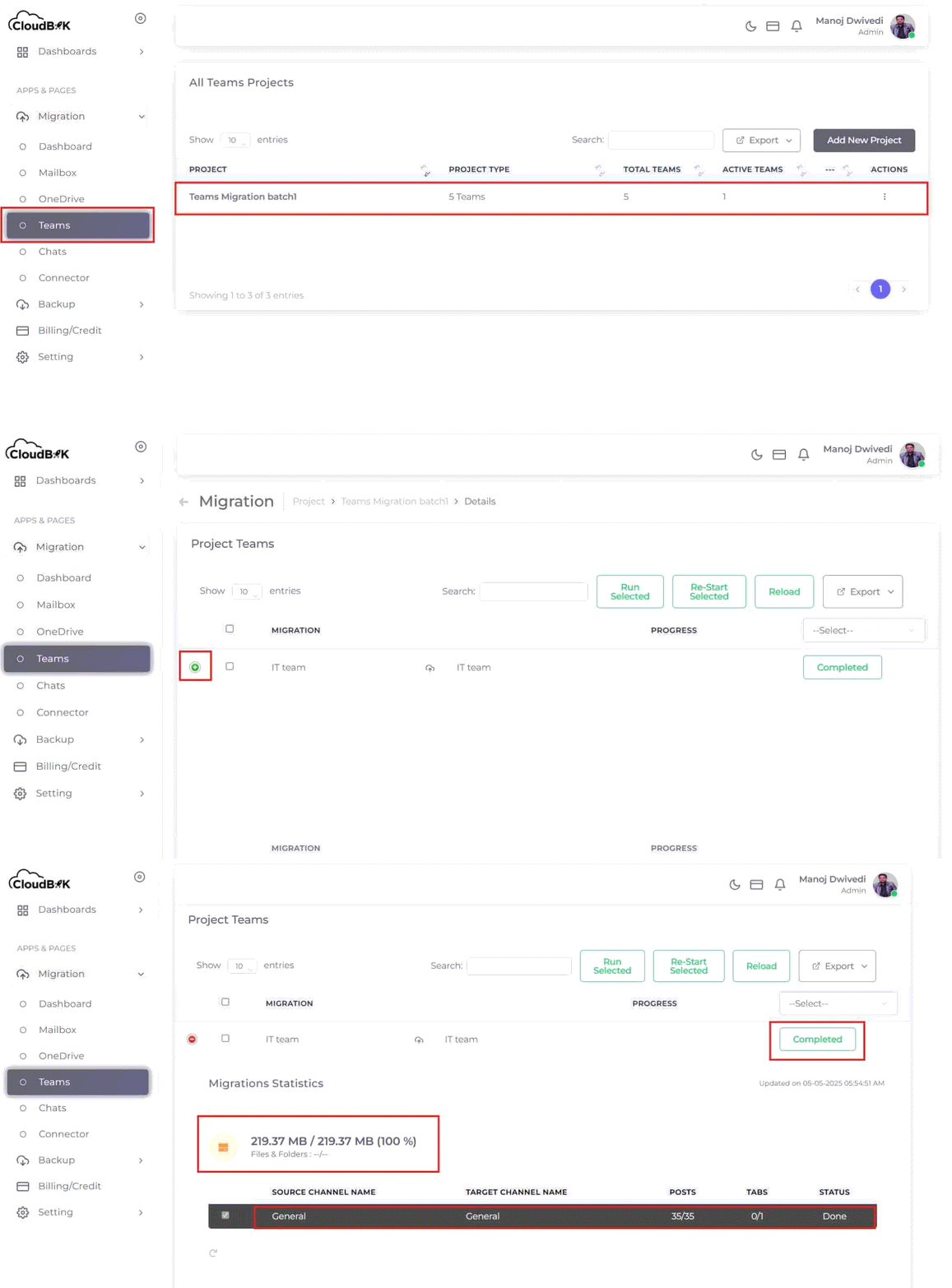
CloudBik's advanced web-based application makes migrating Microsoft Teams from one Office 365 tenant to another incredibly easy. We start by reviewing your current Teams setup, including channels, chats, and files. Then, our tool securely transfers everything to the new tenant with minimal effort.
Why CloudBik
Unlock a Seamless Teams Migration with CloudBik!
Transitioning your Microsoft Teams to a new tenant has never been simpler. With CloudBik, migrating your Teams is as easy as a few clicks, ensuring a hassle-free experience that keeps your workflow unstoppable. Discover why CloudBik is your ultimate choice for cross tenant Teams migration:
- Effortless Data Transfer: CloudBik migrates all your chats, files, and settings accurately to the new tenant. Your team can resume work seamlessly, with everything intact and ready.
- Virtually No Downtime: The migration runs efficiently in the background, minimizing disruptions to your operations. Your team stays productive throughout the process.
- Round-the-Clock Support: Our experts are available whenever needed to assist you at every step. Help is always just a call away, ensuring a smooth experience.
- Perfect for Any Team Size: CloudBik adapts to fit teams of any scale, from startups to enterprises. It’s a flexible solution tailored to your organization’s needs.
- Proven Expertise You Can Trust: Our experienced team has a track record of successful tenant to tenant migrations. You can rely on us for a precise and dependable transition.
Advanced Features
Features of CloudBik’s Teams Migration Tool
Discover the robust features of CloudBik’s Microsoft Teams Migration Tool, designed to simplify your Teams tenant-to-tenant migration. Whether you’re moving chats, channels, files, or permissions, our tool ensures a seamless, secure, and efficient transfer with minimal downtime. Optimized for businesses of all sizes, our solution guarantees a smooth transition, making CloudBik the go-to choice for migrating Teams data.
Chat Migration

Channel Migration

File and Documents

Metadata and Permissions

User Mapping

Lists and Planner Tasks

Bulk Migration

Intuitive Dashboard

Audit Logs

Incremental Migration

Selective Migration

Scalability
Testimonial
What Our Clients Say
At CloudBik, we make Microsoft Teams migrations easy and stress-free, and our clients love the results! Businesses from all kinds of industries have shared amazing feedback about our work. Check out what our clients have to say!
We were worried about losing data during our Teams move, but CloudBik handled everything perfectly. Our team was back to work in no time, and it felt like nothing changed!
Sarah Thompson
IT Manager
The CloudBik team was amazing! They moved our entire Teams setup, including all our channels and permissions, so fast and without any hiccups.
Emily Rodriguez
HR Lead
CloudBik made our Teams migration a breeze! They moved all our chats and files without any issues, and their support team was always there to answer our questions.
Michael Chen
Operations Director
Move Your Microsoft Teams the Easy Way with CloudBik
CloudBik makes switching your Microsoft Teams to a new place super simple, without losing any of your chats, files, or settings. Our friendly team ensures everything moves quickly and safely, so your work keeps going without any disturbance. Choose CloudBik for a worry-free Teams migration that’s done right.
Connect With UsFAQ
Frequently Asked Questions
-
What types of data can I migrate with CloudBik's Team Migration tool?
Our tool supports comprehensive Teams Migration, including Teams Chat Migration, channel structures, files, documents, metadata, permissions, meeting chats, and even emojis and reactions.
-
Can CloudBik handle Teams Chat Migration?
Yes, CloudBik seamlessly migrates all 1-on-1, group, and meeting chats, preserving messages, attachments, and reactions for uninterrupted communication.
-
Can I migrate Teams from one tenant to another with CloudBik?
Absolutely! CloudBik specializes in tenant to tenant Teams migration, moving all your Teams data, including channels, files, and permissions, to a new tenant effortlessly.
-
How long does a Teams Migration take with CloudBik?
The duration depends on data volume, but CloudBik’s efficient Microsoft Teams Migration Tool minimizes downtime, often completing migrations in hours or overnight for smaller setups.
-
Does CloudBik support large-scale Teams migrations?
Our Teams migration tool is highly scalable, handling migrations for small startups to large enterprises with thousands of users, ensuring consistent performance.
-
How does CloudBik handle user mapping during migration?
Our tool automatically maps user accounts between tenants using email or UPN, ensuring seamless access to Teams data in the new tenant without manual effort.
-
Is there a dashboard to track migration progress?
CloudBik’s intuitive dashboard offers real-time insights into your Microsoft Teams tenant to tenant migration, showing progress, task status, and any alerts for easy management.
-
Does CloudBik preserve channel tabs during Teams Migration?
Absolutely, we migrate all channel tabs, such as Planner, OneNote, or custom apps, preserving their configurations so your team’s tools remain functional in the new tenant.
-
What kind of training does CloudBik provide for its Teams Migration Tool?
CloudBik offers comprehensive documentation, video tutorials, and live demo sessions to help your team master the tool and execute a successful migration.
-
Does CloudBik provide other services besides Teams Migration?
Yes, at CloudBik, we offer complete Office 365 tenant to tenant migration services. In addition to our robust Teams Migration Tool, we provide solutions for migrating other Microsoft 365 services, such as SharePoint, Mailboxes and OneDrive Migration.