
Cross Tenant OneDrive Migration Tool
Seamlessly migrate your Office 365 OneDrive Data to another Office 365 OneDrive account using OneDrive Migration Tool. At CloudBik, we specialize in delivering hassle-free OneDrive for Business migration solutions. Whether you are merging or consolidating accounts, or transitioning to another Microsoft 365 Tenant, our OneDrive Migration Tool ensures your OneDrive data is transferred securely and structured.
Book a Free Demo
How We Work?
Tailored OneDrive for Business Migration Solution
Understanding Requirements
At CloudBik, we believe that the foundation of a successful OneDrive for Business migration lies in understanding the unique needs of your organization. That’s why our migration process begins with a thorough discovery and planning phase designed to align with your specific goals and challenges.
Execute the Migration
At CloudBik, executing your OneDrive to OneDrive Migration is a seamless process driven by precision, security, and efficiency. With a tailored strategy in place, we use advanced tools and industry best practices to transfer your files, folders, permissions, and metadata while maintaining data integrity.
Microsoft 365 Migration Services
What We Migrate ?
At CloudBik, we deliver a seamless and comprehensive Tenant-to-Tenant OneDrive migration, transferring all your organization’s OneDrive data with precision and care. Our expertise ensures that every file, folder, and permission is accurately migrated to your new OneDrive for Business environment. Find out below what we migrate in detail:

Files and Folders
- Documents
- Spreadsheets
- Presentations
- Images
- Videos
- Audio Files
- Compressed Files
- Code and Scripts
- Collaboration Files

Migrate OneDrive Business Data
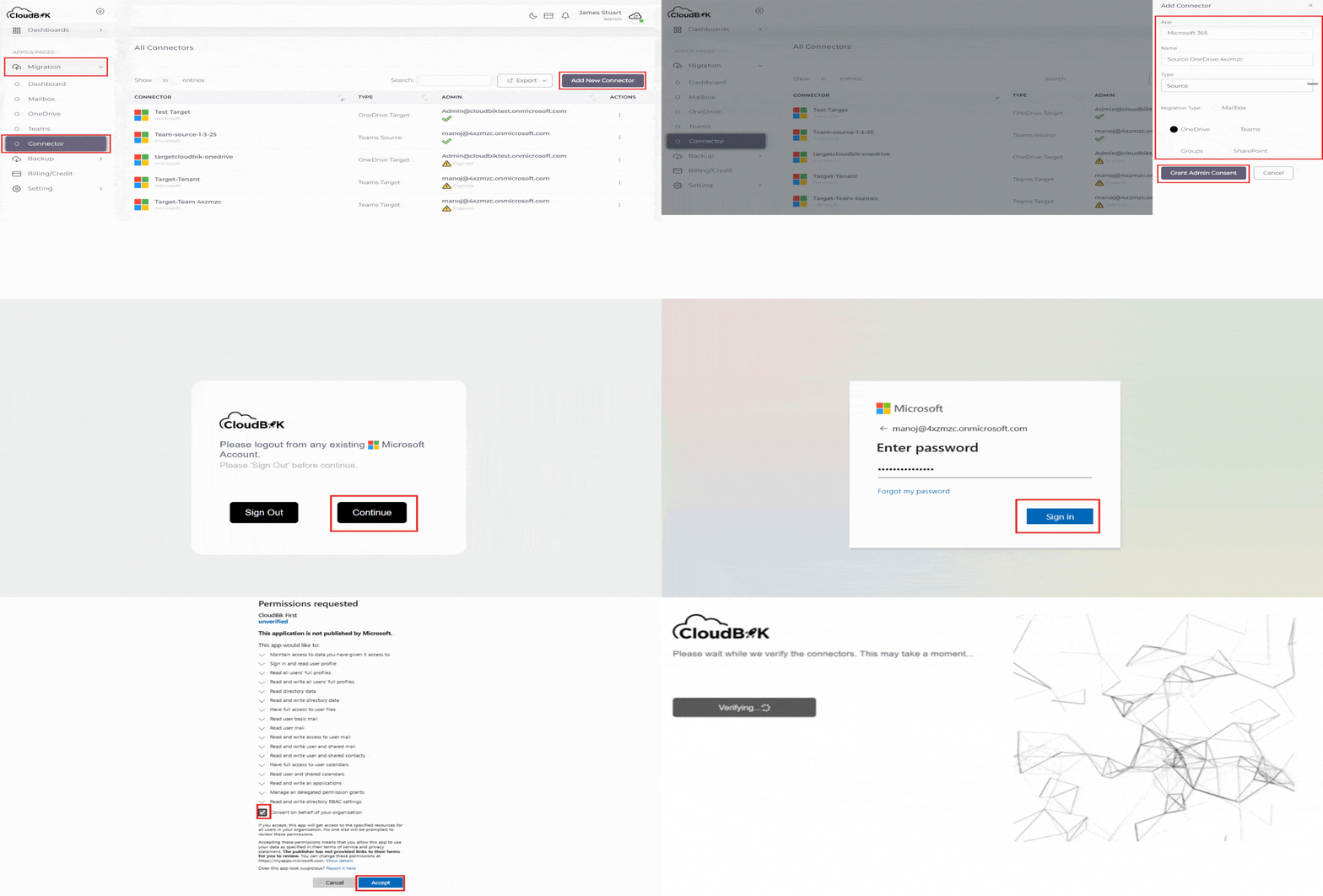
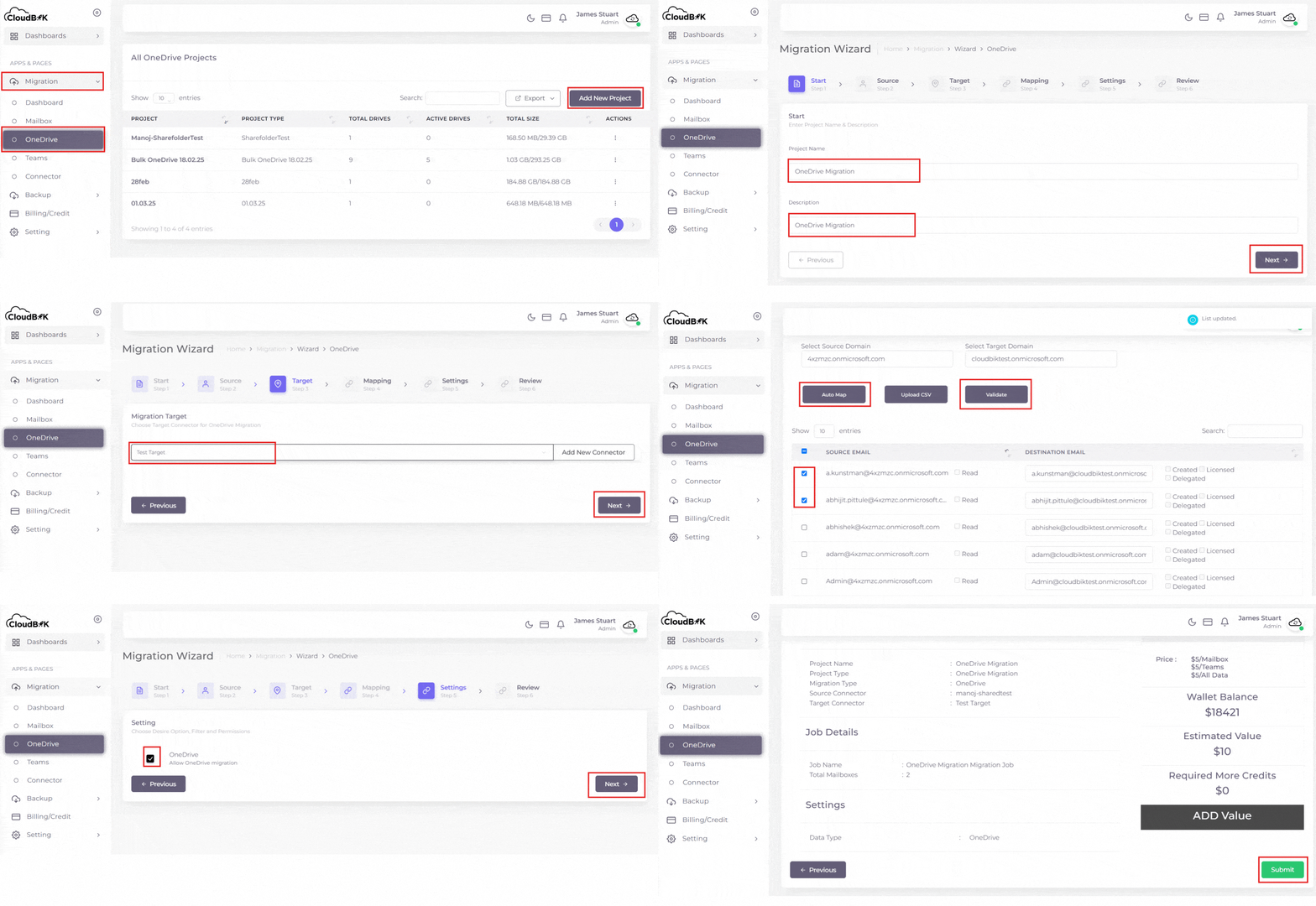
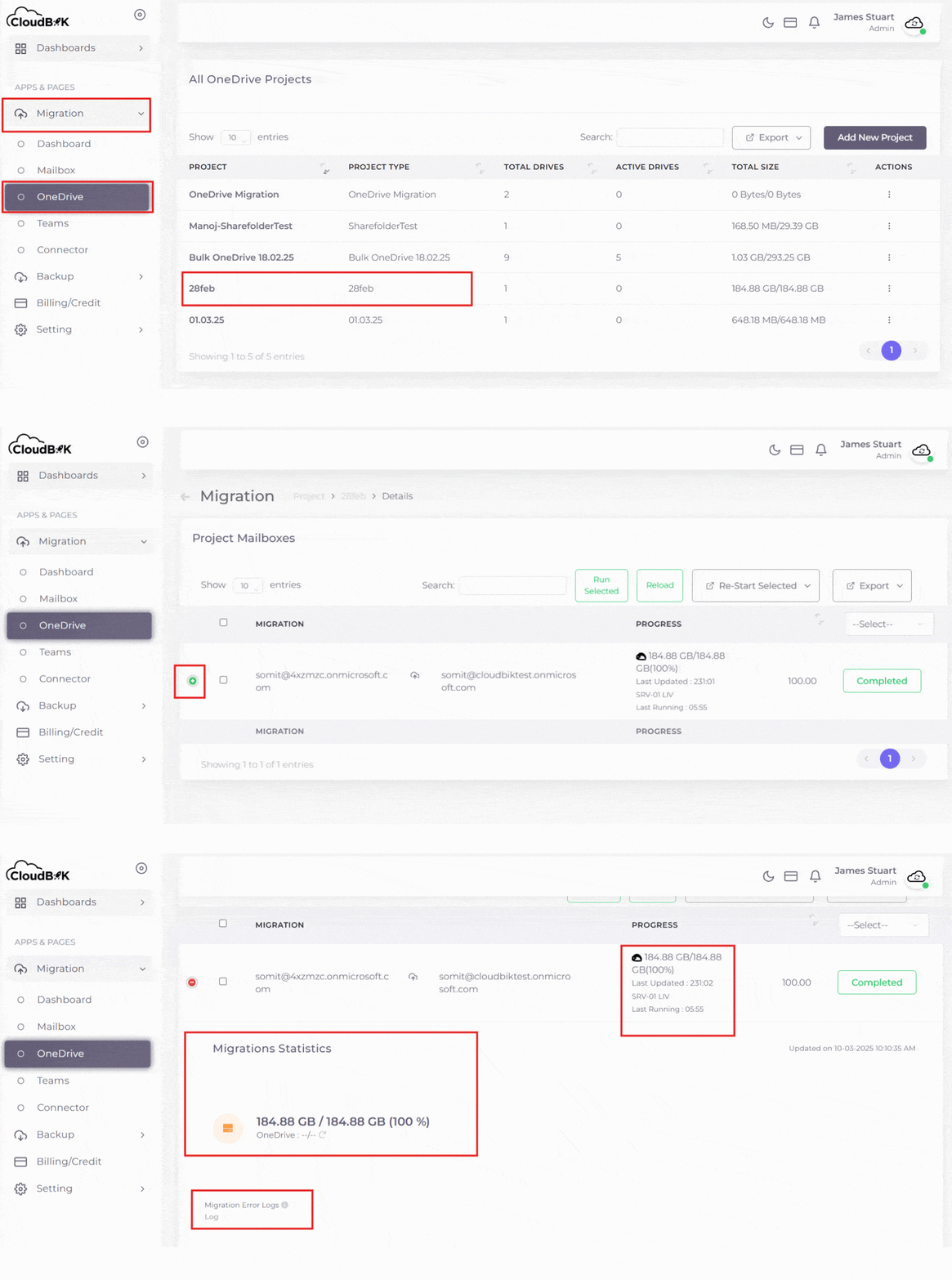
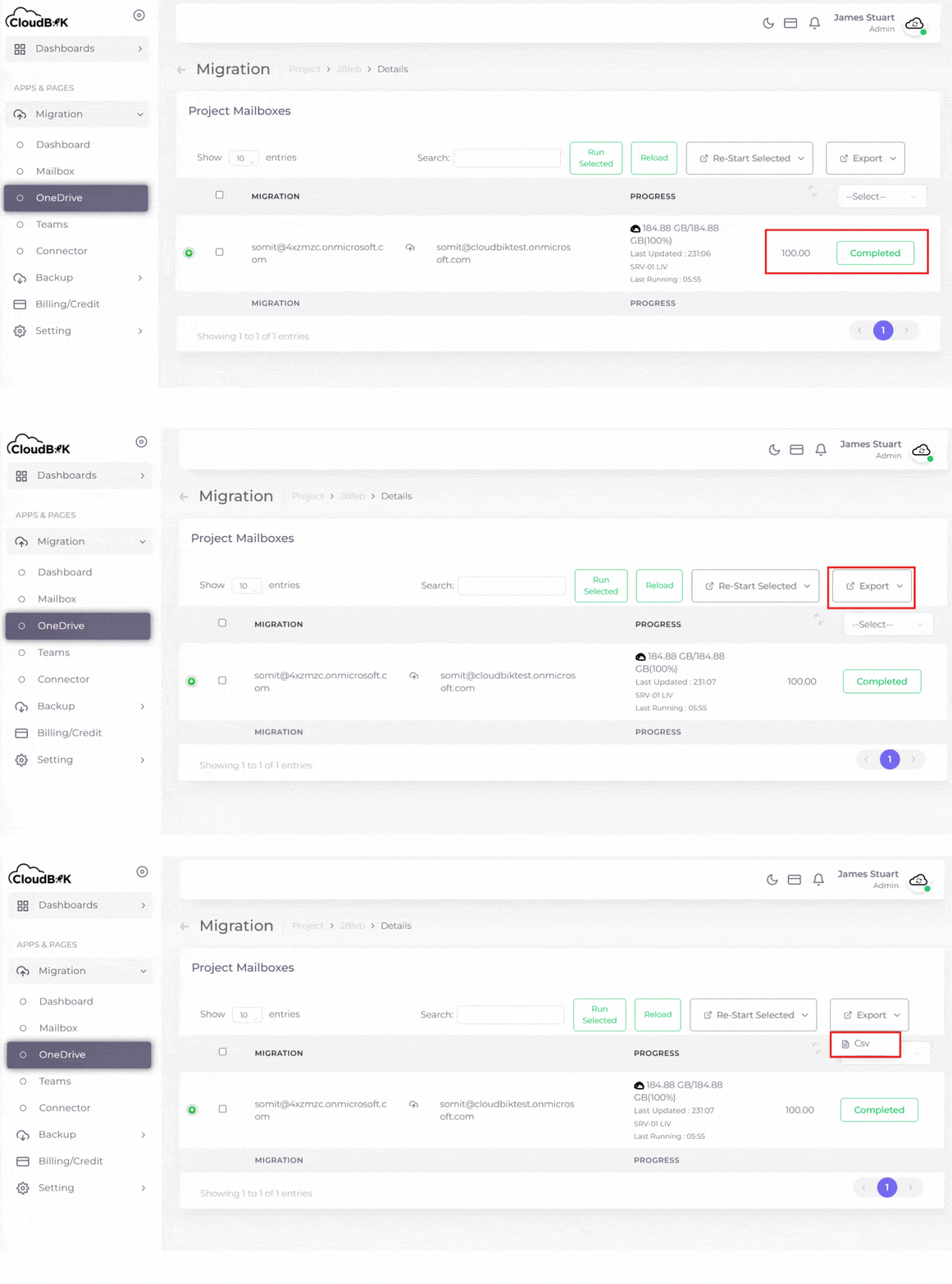
OneDrive to OneDrive Migration Step by Step
At CloudBik, we simplify the complex task to Migrate OneDrive for Business accounts using our solution. Our advanced tools and experienced team guarantee data security, minimal downtime, and complete accuracy throughout the process. We make sure your OneDrive to OneDrive migration is smooth, reliable, and tailored to your unique needs.
Why CloudBik
Key Benefits of Our OneDrive Migration Services
Migrating your OneDrive data can be typical, but with CloudBik, we make it a seamless and hassle-free experience. Our OneDrive migration solutions are designed to offer maximum efficiency and minimal downtime. Here are the key benefits of choosing CloudBik for your OneDrive migration:
- Seamless Data Transition: We ensure that your files, folders, and metadata are transferred smoothly, without any data loss or corruption.
- Minimal Downtime: CloudBik uses efficient migration techniques to minimize downtime, ensuring your business operations continue with minimal disruption.
- Ongoing Support: Our dedicated support team is available throughout the migration process to provide assistance and address any issues that may arise
- Scalability: Our OneDrive to OneDrive migration Tool is designed to handle projects of any scale, from small teams to large enterprises
- Expertise You Can Trust: Our experienced migration specialists handle every step of the process, ensuring your migration is executed flawlessly.
Advanced Features
Comprehensive Features of Our OneDrive Migration Tool
Our OneDrive to OneDrive migration solution is designed to provide a seamless, secure, and efficient migration experience for organizations of all sizes. Each feature is crafted to address unique business needs, minimize disruptions, and ensure data integrity throughout the migration process. Here’s a detailed breakdown of the advanced features that make CloudBik the trusted choice for OneDrive for Business migration:
Complete File Migration
Delta Migration

Version Histories

Metadata Retention

Parallel Migration

Shared Link Retention

Retry Mechanisms

User Identity Mapping

Scalability

Dedicated Support Team

Automated Validation

Audit Logs and Reporting
Testimonial
Clients Reviews
At CloudBik, we take pride in delivering exceptional OneDrive for Business Tenant Migration services, earning glowing reviews from clients across various industries. Don’t just take our word for it. Read what our clients say and discover why CloudBik is the trusted partner to Migrate OneDrive Business Data.
CloudBik made what seemed like an overwhelming task completely seamless. Our OneDrive for Business Tenant Migration was executed flawlessly, with zero data loss or disruption to our team. Their attention to detail and clear communication were exceptional. I highly recommend them to any business considering a migration.
Sarah Morgan
IT Manager
We were impressed with CloudBik’s expertise and professionalism throughout the migration process. Their team ensured all files, metadata, and permissions were retained accurately, and they resolved issues promptly when they arose. Thanks to their support, our transition was completed on schedule and under budget.
David Chen
Chief Technology Officer
The CloudBik team exceeded our expectations by delivering a smooth and secure OneDrive to OneDrive migration. The comprehensive reporting and their ability to handle complex requirements, like retaining version histories and shared links, made all the difference. Our staff was up and running in no time, with minimal downtime.
Jessica Rivera
Operations Director
Seamlessly Migrate OneDrive Files with CloudBik
At CloudBik, we make it easy to migrate OneDrive files with minimal downtime and zero data loss. Our specialized OneDrive for Business migration services ensure a smooth, secure, and efficient transfer of all your data. Trust CloudBik to handle your OneDrive migration with the expertise and care your business deserves.
Connect With UsFAQ
Frequently Asked Questions
-
Can I migrate my OneDrive files to a different tenant without losing data?
Yes, with CloudBik’s Tenant to Tenant OneDrive migration, all your OneDrive files, folders, metadata, permissions, and version histories are securely migrated to the target tenant, ensuring no data loss or corruption.
-
How does CloudBik handle shared files and links during migration?
We migrate OneDrive files complete data including all shared files and links from the source account to the destination account, so your team’s collaborations remain uninterrupted.
-
Do I need to pause work during the migration process?
Not necessarily. In our OneDrive Migration Tool, we have integrated delta migration option, so that your team can continue working with minimal downtime or disruptions to daily operations.
-
Will permissions and access levels remain intact after migration?
Yes, CloudBik ensures that all permissions, including shared access settings and user roles, are retained during the OneDrive for Business Migration process, maintaining your data’s integrity and security.
-
How secure is my data during the migration?
Data security is our top priority. We use encrypted connections and adhere to strict compliance standards to ensure your data is protected throughout the OneDrive for Business Tenant Migration process.
-
Does CloudBik support large-scale migrations?
Yes, our scalable OneDrive for Business Migration Tool is designed to handle migrations of any size. We offer complete tenant to tenant migration to both small and large enterprises.
-
How can I monitor the migration process?
Our platform provides real-time progress tracking and detailed reports, allowing you to monitor every stage of the migration between OneDrive for Business accounts and verify its success.
-
Can I migrate OneDrive data between different Office 365 subscriptions?
Yes, CloudBik specializes in migrating OneDrive data across different Office 365 subscriptions or tenants, making transitions between environments seamless and efficient.
-
How long does the OneDrive migration process take?
The duration of a Cross-Tenant OneDrive migration depends on the volume of data being transferred, the complexity of your file structure, and the tools used.
-
Do I need to install software to use CloudBik’s services?
No. Our web-based platform makes it easy to Migrate OneDrive Business Data without requiring software installations or complex setups.
-
How does CloudBik validate the migration?
We perform comprehensive post-migration validation checks to ensure all files, folders, permissions, and links are accurately transferred and accessible in the destination account when you Migrate OneDrive for Business.
-
What kind of support does CloudBik provide during migration?
We offer dedicated support throughout the migration process. Our team is available to answer questions, troubleshoot issues, and ensure your OneDrive to OneDrive Migration is completed smoothly.