

- Download the Arduino library for Makeblock https://github.com/Makeblock-official/Makeblock-Libraries/archive/master.zip
- Copy the makeblock folder to your arduino default library. Your Arduino library folder should now look like this
- (on Windows):
[x:\Users\XXX\Documents]\Arduino\libraries\makeblock\src - (on Mac OSX):
[\Users\XXX\Documents]\Arduino\libraries\makeblock\src
- (on Windows):
- Open Arduino IDE, choose the firmware from File>Examples.
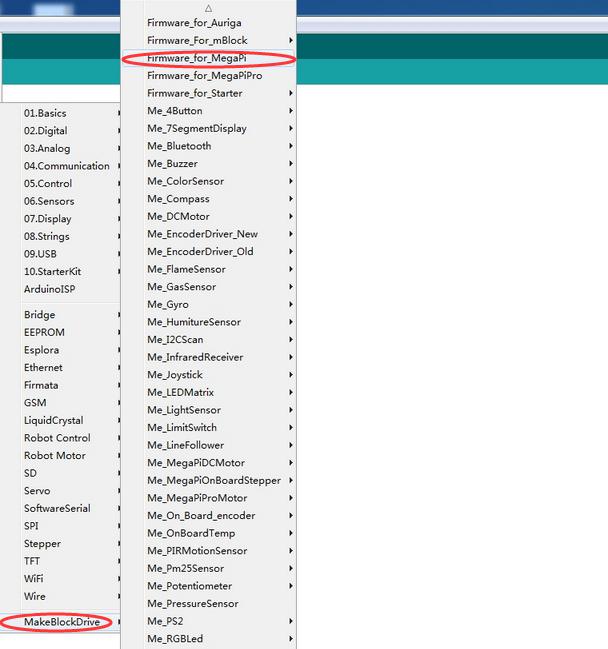
- Compile and upload firmware according to your board type.

- On your Raspberry Pi, disable the login prompt from Desktop->Menu->Preferences->Raspberry Pi Configuration.

- If you are using raspberry 3 B+,since the Bluetooth function takes up the ttyAMA0 port, You have two ways to solve this problem.
-
Disable the pi3 bluetooth and restore UART0/ttyAMA0 over GPIOs 14&15
-
Switch pi3 blutooth function to use the mini-UART(ttyS0) and restore UART0/ttyAMA0 over GPIOs 14&15.
- Here, I disable the pi3 bluetooth as an example
- Search
pi3-disable-btin file/boot/overlays/README, it will show you, how to disable the bluetooth, if you want switch the bluetooth to mini-UART(ttyS0), you can searchpi3-miniuart-bt

- Modify the file
/boot/config.txt, At the end of the file, add the following content
#Enable uart
enable_uart=1
dtoverlay=pi3-disable-bt

-
reboot the raspberry pi
-
open the Terminal and input the command
sudo systemctl disable hciuart -
Now you can use ttyAMA0 as UART over GPIOs 14&15
- install python library for Makeblock
sudo pip install megapi
- the initial code for python.
 from megapi import *
 bot = MegaPi()
 bot.start() #if using usb cable, need to call bot.start('/dev/ttyACM0')
- python your code
- Using MegaPi
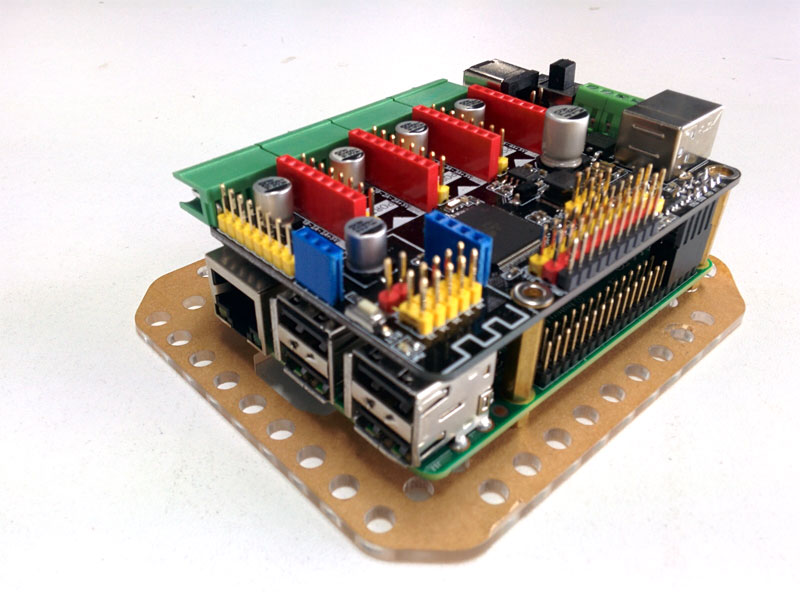
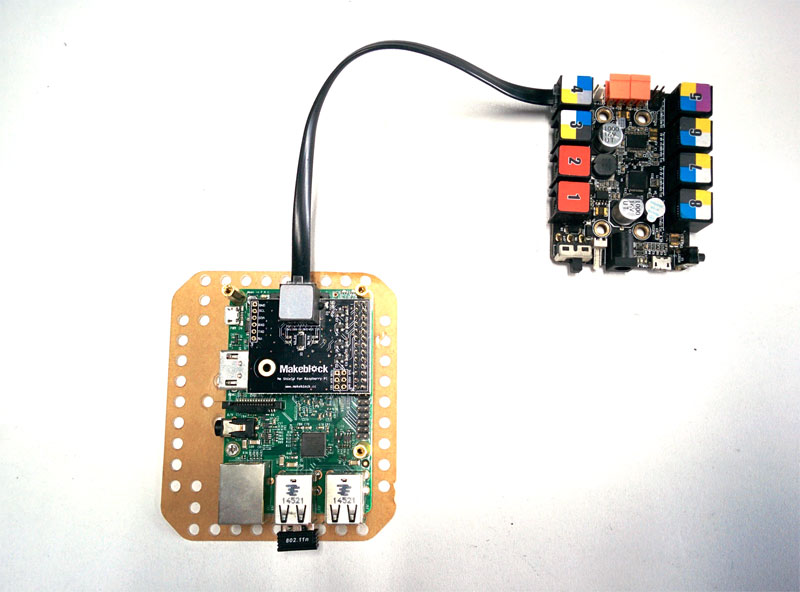
- Using Me Shield for Raspberry Pi and RJ25 cable for Me Orion or Me Baseboard.
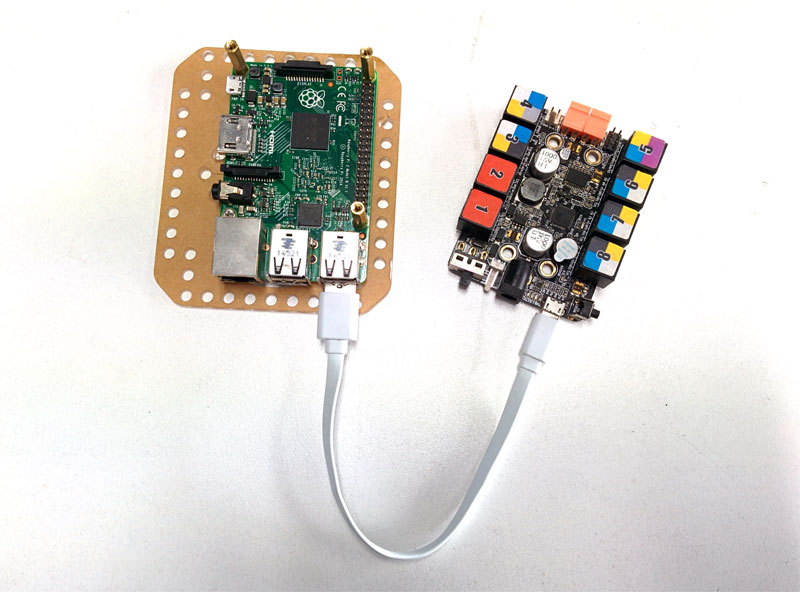
- Using USB Cable for Me Orion or Me Baseboard


-
Start
- MegaPi()
- start()
-
GPIO
- digitalWrite( pin, level )
- pwmWrite( pin, pwm )
- digitalRead( pin, def onResult )
- analogRead( pin, def onResult )
-
Motion
- DC Motor
- motorRun( port, speed )
- motorMove( leftspeed, rightspeed )
- Servo Motor
- servoRun( port, slot, angle )
- Encoder Motor
- encoderMotorRun( port, speed )
- encoderMotorMove( port, speed, distance, def onFinish )
- encoderMotorMoveTo( port, speed, position, def onFinish )
- encoderMotorSetCurPosZero( slot )
- encoderMotorPosition( slot, def onResult)
- encoderMotorSpeed( slot, def onResult)
- Stepper Motor
- stepperMotorRun( port, speed )
- stepperMotorMove( port, speed, distance, def onFinish )
- stepperMotorMoveTo( port, speed, position, def onFinish )
- DC Motor
-
Sensors
- Ultrasonic Sensor
- ultrasonicSensorRead ( port, def onResult )
- LineFollow Sensor
- lineFollowerRead ( port, def onResult )
- Light Sensor
- lightSensorRead ( port, def onResult )
- Sound Sensor
- soundSensorRead ( port, def onResult )
- Temperature Sensor
- temperatureRead ( port, def onResult )
- PIR Motion Sensor
- pirMotionSensorRead ( port, def onResult )
- Touch Sensor
- touchSensorRead ( port, def onResult )
- LimitSwitch
- limitSwitchRead ( port, slot, def onResult )
- Humiture Sensor
- humitureSensorRead ( port, type, def onResult )
- Gas Sensor
- gasSensorRead ( port, def onResult )
- Flame Sensor
- flameSensorRead ( port, def onResult )
- Button
- buttonRead ( port, def onResult )
- Potentiometer
- potentiometerRead ( port, def onResult )
- Joystick
- joystickRead ( port, axis, def onResult )
- 3-Axis Accelerometer and Gyro Sensor
- gyroRead ( port,axis, def onResult )
- Compass
- compassRead ( def onResult )
- Pressure Sensor for BMP085 and BMP180
- pressureSensorBegin ( )
- pressureSensorRead ( type, def onResult ) #1:Pressure #2:Temperature #3:Altitude #4:Real altitude #5:Sealevel Pressure
- Ultrasonic Sensor
-
Display
- RGB Led
- rgbLedSetColor ( port, slot, index, r, g, b )
- rgbLedShow ( port, slot )
- rgbLedDisplay ( port, slot, index, r, g, b )
- 7-segment Display
- sevenSegmentDisplay ( port, value )
- Led Matrix Display
- ledMatrixDisplayMessage ( port, x, y, msg )
- ledMatrixDisplayRaw ( port, buffer )
- Serial LCD Display
- lcdDisplay ( string )
- RGB Led
-
Others
- DSLR Shutter
- shutterOn ( port )
- shutterOff ( port )
- focusOn ( port )
- focusOff ( port )
- DSLR Shutter
###Learn more from Makeblock official website: www.makeblock.com