
Skip to main content


Chat
Model selection
Enterprise
Qodo IDE Plugin lets you choose between multiple AI models, each with different strengths in speed, reasoning, and context handling.
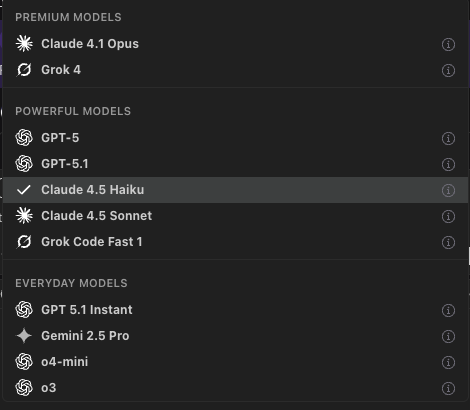
Available models
- GPT
- GPT 5.1 OpenAI Latest, advanced reasoning model for complex tasks
- GPT 5.1 Instant OpenAI Latest, fast, conversational instruction-following model
- GPT 5 medium-fast general purpose; great default for coding + reasoning when a bit of latency is OK.
- Claude
- Sonnet 4.5 Claude’s fast, responsive variant—excellent for interactive chat and frequent short prompts where latency matters most.
- Haiku 4.5 Lightweight model for rapid coding and low-latency workflows.
- Opus 4.1 Premium Model More reasoning depth than Sonnet with moderate latency; solid for multi-file refactors and detailed code edits.
- Gemini 2.5 Pro Strong at large-context and multimodal work; good when you need to reason over many files or combine text with images.
- Grok (XAI) Premium Model Fast, witty, and concise. Well-suited for brainstorming, natural language exploration, and lighter reasoning tasks. Good option when you want responsiveness with personality, though not as strong for very large context or enterprise-grade coding.
- OpenAI o-series (o3, o4-mini) Reasoning-focused models trained to “think longer” before responding.
- o3 – higher-end reasoning for hard problems; good when you want strong tool use and stepwise problem solving.
- o4-mini – smaller, faster while still strong at coding/math/visual tasks; great when you want low latency + good reasoning.
Using model selection
Select a model from the dropdown menu on the bottom left below the chatbox. The selected model will be used for your next query.