
CellRange.Item[Int32] Property
Gets an individual cell by its index in the range of cells.
Namespace: DevExpress.Spreadsheet
Assembly: DevExpress.Spreadsheet.v26.1.Core.dll
Declaration
Parameters
Property Value
Remarks
In the cell range, cells are indexed starting with the top left cell, ordered from left to right, then down.
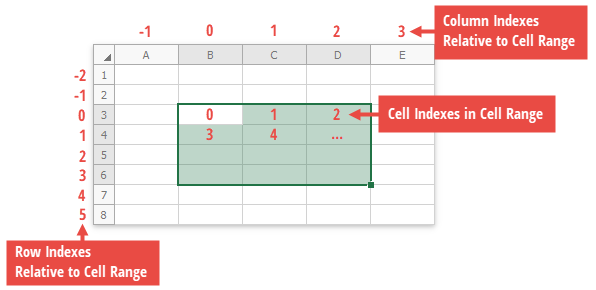
Example
This example demonstrates several ways to access individual cells.
- By row and column indexes of a cell via the Worksheet.Item property.
- By a cell reference (for example, A1, B2, etc.) or by row and column indexes from the worksheet’s collection of cells. Use the CellCollection.Item property.
By a column index or column heading from the specified row. Use the Row.Item property.
By a row index or row heading from the specified column. Use the Column.Item property.
See the How to: Access a Row or Column example to learn how to get an individual row or column.
- By a cell index from the specified range of cells, or by row and column offsets relative to the cell range. Use the CellRange.Item property. See the How to: Access a Range of Cells document to learn how to access an individual range of cells in a worksheet.
using DevExpress.Spreadsheet;
// ...

IWorkbook workbook = spreadsheetControl1.Document;
Worksheet worksheet = workbook.Worksheets[0];

Cell cellA1 = worksheet[0, 0]; // Cell A1

Cell cellB2 = worksheet.Cells["B2"]; // Cell B2
Cell cellC2 = worksheet.Cells[1, 2]; // Cell C2

Cell cellD3 = worksheet.Cells[2, 3]; // Cell D3
Cell cellE4 = worksheet.Rows[3]["E"]; // Cell E4
Cell cellF4 = worksheet.Rows["4"][5]; // Cell F4

Cell cellG5 = worksheet.Columns[6][4]; // Cell G5
Cell cellH6 = worksheet.Columns["H"][5]; // Cell H6
Cell cellI7 = worksheet.Columns["I"]["7"]; // Cell I7

// Access a cell from the range of cells.
Cell cellB5 = worksheet.Range["B3:D6"][6]; // Cell B5
Cell cellD6 = worksheet.Range["B3:D6"][3, 2]; // Cell D6
See Also