
WorksheetHeaderFooterOptions Interface
Allows you to specify headers and footers for a worksheet or chart sheet.
Namespace: DevExpress.Spreadsheet
Assembly: DevExpress.Spreadsheet.v26.1.Core.dll
Declaration
Related API Members
The following members return WorksheetHeaderFooterOptions objects:
Remarks
Use the WorksheetHeaderFooterOptions object’s properties to add headers and footers to printed pages.
The following example shows how to specify the header and footer for the first page.
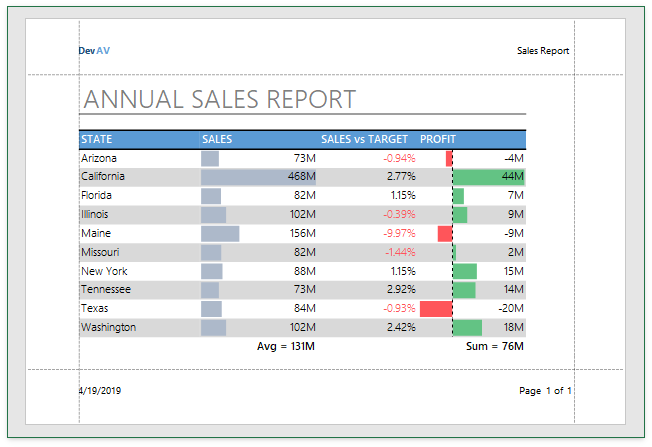
WorksheetHeaderFooterOptions options = worksheet.HeaderFooterOptions;

// Specify that the first page has a unique header and footer.
options.DifferentFirst = true;

// Insert the rich formatted text into the header's left section.
options.FirstHeader.Left = string.Format("{0}&BDev{1}AV", HeaderFooterCode.FontColor(4, -50), HeaderFooterCode.FontColor(4,10));

// Insert the sheet name into the header's right section.
options.FirstHeader.Right = "&A";

// Insert the current date into the footer's left section.
options.FirstFooter.Left = "&D";

// Insert the current page number into the footer's right section.
options.FirstFooter.Right = string.Format("Page {0} of {1}", "&P", "&N");
See Also