

KeyValue
The KeyValue field makes it easy to edit flat key-value pairs stored in JSON format in the database.
field :meta, as: :key_value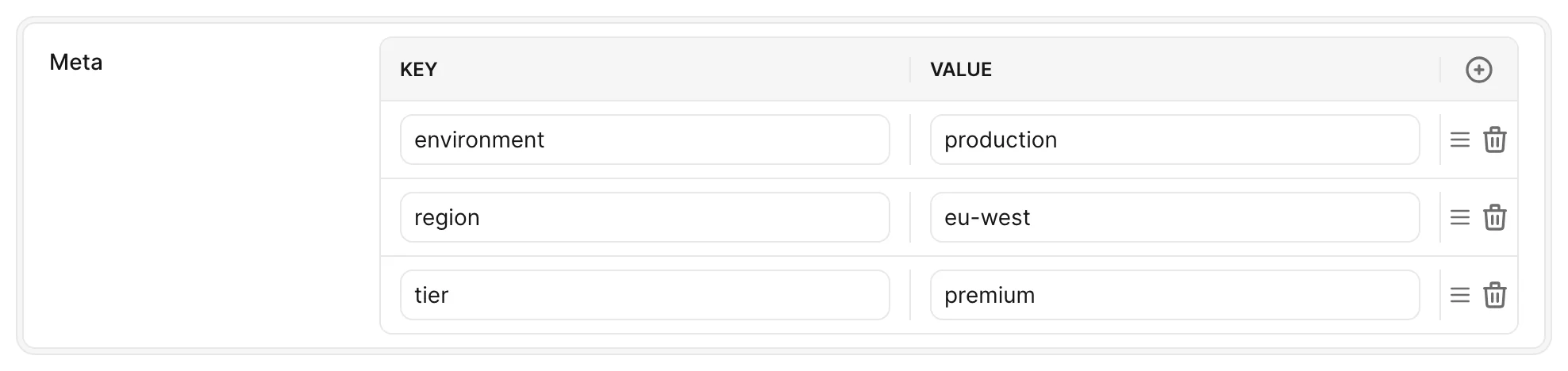
Options
-> key_label
Customize the label for the key header.
Default value
I18n.translate("avo.key_value_field.key")
Possible values
Any string value.
-> value_label
Customize the label for the value header.
Default value
I18n.translate("avo.key_value_field.value")
Possible values
Any string value.
-> action_text
Customize the label for the add row button tooltip.
Default value
I18n.translate("avo.key_value_field.add_row")
Possible values
Any string value.
-> delete_text
Customize the label for the delete row button tooltip.
Default value
I18n.translate("avo.key_value_field.delete_row")
Possible values
Any string value.
-> reorder_text
Set a custom label for the tooltip on the reorder by drag-and-drop row button.
Default value
I18n.translate("avo.key_value_field.reorder_row")
Possible values
Any string value.
-> disabled
Toggle on/off the ability to disable editing keys, editing values, adding rows, and deleting rows for that field.
Default value
false
Possible values
true, false
-> disable_editing_keys
Toggle on/off the ability to edit the keys for that field. Turning this off will allow the user to customize only the value fields.
Default value
false
Possible values
true, false
-> disable_editing_values
Toggle on/off the ability to edit the values for that field. Turning this off will allow the user to customize only the key fields.
Default value
false
Possible values
true, false
-> disable_adding_rows
-> disable_deleting_rows
Toggle on/off the ability to delete rows from that field. Turning this on will prevent the user from deleting existing rows.
Default value
false
Possible values
true, false
-> suggestions
Keys, and optionally values for each key, suggested in a dropdown under the input while editing. Suggestions are never saved unless the user picks or types them.
Default value
nil
Possible values
- An array of keys:
["Content-Type", "Accept"] - A hash of keys to arrays of values:
{"Content-Type" => ["application/json", "text/html"]} - A block that returns either of the above. It has access to
record,resource, andview.
Customizing the labels
You can easily customize the labels displayed in the UI by mentioning custom values in key_label, value_label, action_text, and delete_text properties when defining the field.
field :meta, # The database field ID
  as: :key_value, # The field type.
  key_label: "Meta key", # Custom value for key header. Defaults to 'Key'.
  value_label: "Meta value", # Custom value for value header. Defaults to 'Value'.
  action_text: "New item", # Custom value for button to add a row. Defaults to 'Add'.
  delete_text: "Remove item" # Custom value for button to delete a row. Defaults to 'Delete'.
Suggest common keys and values
Since v4.3.1If your users keep typing the same keys, pass suggestions to offer them in a dropdown as the user types. Give a hash to also suggest values for each key. Once a row has a key, its value input suggests that key's values. Users can pick with the mouse or the arrow keys and Enter.
field :headers,
  as: :key_value,
  suggestions: {
    "Content-Type" => ["application/json", "text/html"],
    "Accept" => ["application/json", "*/*"],
    "Authorization" => []
  }
Suggestions are only hints. Nothing is added to the record unless the user picks or types it, so an ignored suggestion never saves as an empty entry like {"Content-Type": ""}.
If you only want to suggest keys, pass an array. If the suggestions depend on the record, pass a block.
field :headers, as: :key_value, suggestions: ["Content-Type", "Accept"]

field :headers, as: :key_value, suggestions: -> { record.default_headers }
Suggestions don't show on keys or values whose editing is disabled, and keys already used by another row aren't suggested again.
Enforce restrictions
You can enforce some restrictions by removing the ability to edit the field's key or value by setting disable_editing_keys or disable_editing_values to true respectively. If disable_editing_keys is set to true, be aware that this option will also disable adding rows as well. You can separately remove the ability to add a new row by setting disable_adding_rows to true. Deletion of rows can be enforced by setting disable_deleting_rows to true.
Avo applies these restrictions again when the form is saved, so editing the submitted value directly can't get around them.
field :meta, # The database field ID
  as: :key_value, # The field type.
  disable_editing_keys: false, # Option to disable the ability to edit keys. Implies disabling to add rows. Defaults to false.
  disable_editing_values: false, # Option to disable the ability to edit values. Defaults to false.
  disable_adding_rows: false, # Option to disable the ability to add rows. Defaults to false.
  disable_deleting_rows: false # Option to disable the ability to delete rows. Defaults to false.
Setting disabled: true enforces all restrictions by disabling editing keys, editing values, adding rows, and deleting rows collectively.
field :meta, # The database field ID
  as: :key_value, # The field type.
  disabled: true, # Option to disable editing keys, editing values, adding rows, and deleting rows. Defaults to false.
KeyValue is hidden on the Index view.