

SQL Syntax
Query Syntax of SQL Query Language
This page describes the syntax of SQL. Each select statement in SQL follows precise syntactical and structural rules. The following statement is the minimum structure and syntax required for an SQL SELECT statement.
SELECT [DISTINCT | ALL] {* | select_list}
 FROM {table_name [alias] | view_name}
An SQL statement is a valid combination of tokens introduced by a keyword. Tokens include keywords, identifiers, operators, literals, and punctuation symbols.
Contents:
SQL Keywords
Keywords (e.g. SELECT, GRANT, DELETE, or CREATE ) are words that SQL reserves and they have a predefined meaning in the language. Using a keyword outside its specific context causes an error. In practice, you can use keywords in upper or lower case letters. Following three statements are equal.
SELECT * FROM EMPLOYEES;
Select * FROM EMPLOYEES;
select * FROM EMPLOYEES;
In some cases, keywords can be abbreviated. For example, DESCRIBE can be used as either DESC or DESCRIBE. If we execute following commands, in both cases it will show the structure of the employees tables.
DESCRIBE EMPLOYEES;
DESC EMPLOYEES;
Identifiers
Identifiers are the names given by database designer or system users to database objects such as tables, columns, aliases, indexes, views and other objects as well as the database itself. In the last example 'EMPLOYEES' is an identifier and 'SELECT' is the keyword. Keywords and identifiers have the same lexical structure, i.e. one cannot know whether a token is an identifier or a keyword without knowing the language. The rules to create an identifier is vendor specification. See the following table.
Naming conventions
There are various naming conventions that are all valid when creating tables, attributes, queries and other objects in a SQL database. The SQL standard has no comment on naming conventions, you can follow these basic guidelines :
- Select a name that is meaningful, significant, and descriptive. For example a table name should be employee not emp, column name of first name in employee table should be first_name not fname though both 'emp' and 'fname' are valid identifiers.
- Maintain same case throughout. Use either all uppercase or all lowercase for all objects in a SQL database as some database servers are case-sensitive.
SQL Literals
The terms literal refer to a fixed data value. SQL evaluates four type of literal values numeric, character string, date or time, or Boolean value though SQL database offers a variety of literal values in a SQL program. For example 100, -120, 544.03, -458.25, 3E2, 5E-2 are valid numeric literals. 'USA', '2000', 'SQL Syntax', 'Jan 01, 1981' are valid character string (should enclosed by by single quotation marks (' ')). Boolean and date literals look like TRUE and 'JAN-28-1976 21:12:40:00'
Operators
An operator manipulates individual data items and returns a result. Operators are used in various SQL operations like SELECT, INSERT, UPDATE or DELETE or in various database objects creation like functions, views, triggers and stored procedures. SQL supports various types of operators though all databases do not support all operators. See the following tables :
| Operators | Works in |
|---|---|
| Arithmetic operators | All databases |
| Assignment operators | All databases |
| Bitwise operators | Microsoft SQL Server |
| Comparison operators | All databases |
| Logical operators | DB2, Oracle, SQL Server, and PostgreSQL |
| Unary operators | DB2, Oracle, and SQL Server |
In the next session, we have discussed all the operators in detail with examples.
Operator precedence
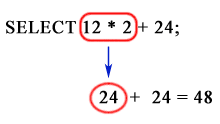
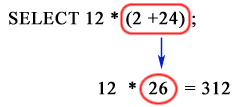
Precedence is the order in which database evaluates different operators in the same expression. When evaluating an expression containing multiple operators (e.g. +, -, /), operator precedence evaluates operators with higher precedence before evaluating those with lower precedence. Operator precedence evaluates operators with equal precedence from left to right within an expression. If there are parentheses within the expression then it evaluated first and the rest part which are outside the parentheses are evaluated next. The following table lists the levels of precedence among SQL operators from high to low.
| Precedence order |
|---|
| ( ) (parenthetical expressions) |
| +, -, ~ (unary operators) |
| *, /, % (mathematical operators) |
| +, - (arithmetic operators) |
| =, >, <, >=, <=, <>, !=, !>, !< (comparison operators) |
| I^ (Bitwise Exclusive OR), & (Bitwise AND), | (Bitwise OR) |
| NOT |
| AND |
| ALL, ANY, BETWEEN, IN, LIKE, OR, SOME |
| = (variable assignment) |
The following expression in MySQL query return different results :
SELECT 12 * 2 + 24;
Output:
| 12 * 2 + 24 |
|---|
| 48 |
Operator precedence
SELECT 12 * (2 + 24)
Output:
| 12 * (2 + 24) |
|---|
| 312 |
Operator precedence
SQL Comments Whitespaces
A comment is an optional text that describes what a program does and how, or why the code was modified. The compiler always ignores comments. A comment is introduced by double dashes followed by a space e.g.:
-- This is SQL comment
Alternatively, C-style block comments can be used :
/* This is the first line comment
This is the second line comment */ .
Whitespaces
Whitespaces are generally ignored in SQL statements, which makes easier to format SQL code for readability.
The following chart shows some SQL language elements that compose a single statement :

List of SQL Keyword :
Check out our 1000+ SQL Exercises with solution and explanation to improve your skills.
PREV : SQL Data Types
NEXT : Codd's 12-Rule Relational Database Definition