

Python String Encode Method
In python, the string encode() method is useful to encode the given string based on the specified encoding type, such as utf-8, ascii, etc. If the encoding type is not specified, by default, it will consider using the utf-8 type.
Generally, the encoding process will convert the string characters into a set of bytes. Following is the pictorial representation of the string encode() method functionality in python.
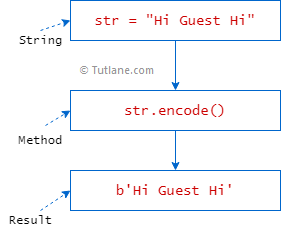
If you observe the above diagram, we are trying to encode the given string “Hi Guest Hi” using python's encode function.
String Encode Method Syntax
Following is the syntax of defining a string encode() method in python.
If you observe the above syntax, the encode() method accepts two parameters (encoding, errors), and these two parameters are optional.
- encoding - It’s optional and used to specify the encoding type. By default, it's
utf-8. - errors - It’s optional and used to specify the type of response to return when the encoding fails. By default, it's
strict, and in python 6 types of error responses are available; those are - ostrict - Its default error response. It will raise an error on failure.
- oignore - It ignores the unencodable characters from the result.
- oreplace - It will replace the unecodable character with a question mark (?).
- onamereplace - It replaces the unecodable character with a \ \N{…} text that explain the character.
- oBackslashreplace - It replaces the unecodable character with a backslash.
- oXmlcharrefreplace - It replaces the unecodable character with an XML character reference.
String Encode Method Example
Following is the example of encoding the given string using the string encode() method in python.
print(msg.encode())
print(msg.encode("ascii","ignore"))
print(msg.encode("ascii","replace"))
print(msg.encode("ascii","namereplace"))
print(msg.encode("ascii","backslashreplace"))
print(msg.encode("ascii","xmlcharrefreplace"))
If you observe the above example, we are encoding the given strings using the encode() method.
When you execute the above python program, you will get the result as shown below.
b'Hi Gust Hi'
b'Hi Gu?st Hi'
b'Hi Gu\\N{LATIN SMALL LETTER E WITH ACUTE}st Hi'
b'Hi Gu\\xe9st Hi'
b'Hi Guést Hi'
This is how you can use the string encode() method in python to encode the given strings based on your requirements.