
Skip to main content


Build with code
MCP and coding agents
Connect Skyvern’s hosted MCP server to Claude Code, Cursor, Codex, Grok Build, Claude Desktop, ChatGPT, Windsurf and other clients with browser sign-in or an API key, run it locally over stdio, or give coding agents the Skyvern skill and CLI.
Skyvern’s MCP server gives your AI client 117 browser and automation tools. Your assistant can open a cloud browser, click and type, extract data, log in with stored credentials, and build and run agents, all from a chat or a coding session.
The hosted server is at:
Most clients connect with browser sign-in (OAuth) and need no API key or install. The rest use your API key.
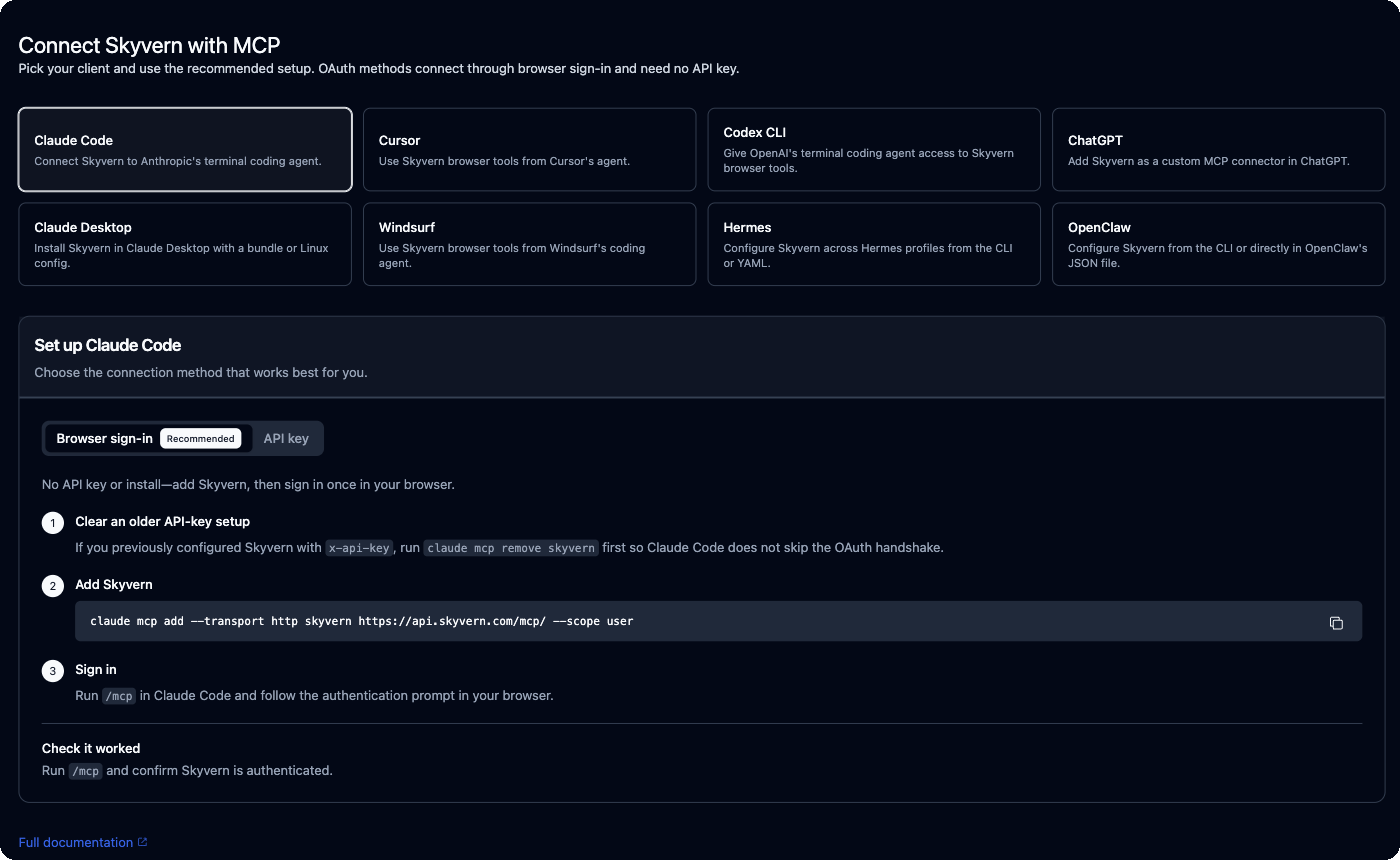
Fastest setup: the MCP page in the app
In the app, go to Integrations → MCP (app.skyvern.com/integrations/mcp). Pick your client and follow the steps. The page marks the recommended method for each client, and API-key snippets come pre-filled with your key.Sign in with your browser (OAuth)
Use this for Claude Code, Cursor, Codex CLI, Grok Build, ChatGPT and Claude custom connectors. There is no API key in the config. The client opens your browser, you sign in to Skyvern, and the client stores the token.- Claude Code
- Cursor
- Codex CLI
- Grok Build
- ChatGPT
- Claude (custom connector)
/mcp in Claude Code and follow the authentication prompt. Run /mcp again to confirm Skyvern is authenticated.If you set Skyvern up earlier with an x-api-key header, run claude mcp remove skyvern first. A static key makes Claude Code skip the sign-in.Use an API key
Use this for Windsurf, Hermes, OpenClaw, the Claude Desktop bundle, headless servers and CI, or any client without MCP sign-in support. Copy your key from Settings → API keys.- Claude Code
- Claude Desktop
- Cursor
- Windsurf
- Codex CLI
- Hermes
- OpenClaw
- Other clients
Configure clients from the CLI
Theskyvern CLI detects the AI tools on your machine and writes their config for you:
skyvern setup claude-code, skyvern setup claude (Claude Desktop), cursor, windsurf, hermes, openclaw, opencode or mcporter. Add --dry-run to preview the change.
To change the API key or server in configs you already have, run skyvern mcp switch. It shows which apps have a Skyvern entry, lets you pick which to update, and writes a backup first. Restart your client afterwards.
What the tools do
Your assistant picks tools from your request. “Go to Hacker News and get the top post title” becomesskyvern_browser_session_create, skyvern_navigate, skyvern_extract and skyvern_browser_session_close.
Other tools cover tabs, iframes, file upload, network and console inspection, browser profiles, folders and stored browser state.
Limit the tool list with scopes
117 tools is a lot of context for some clients. A scope serves a smaller set:
On the hosted server, use a scoped URL such as
https://api.skyvern.com/mcp/x/operate, or keep the normal URL and send the header X-Skyvern-Scope: operate. For a local server, pass --scope operate to skyvern run mcp.
Run the server locally (stdio)
Use local mode when you self-host Skyvern and want the MCP server to talk to your own instance. Set up the server first with Self-host, then install the server extra in the same Python environment:--local writes a stdio config that runs python -m skyvern run mcp with the active Python interpreter. To write the config by hand:
which python3 in the environment where Skyvern is installed. Append "--scope", "operate" (or another scope) to args to narrow the tools. Because the browser runs on your machine, localhost sites work directly.
To drive the Chrome you already use, with its logins, see Browsers.
Coding agents: the Skyvern skill and CLI
Besides MCP, coding agents can drive Skyvern through theskyvern CLI. The bundled skyvern skill teaches the agent which command to use for each kind of task and to log in with stored credentials instead of typing passwords.
1
Install the CLI with browser support
The
skyvern browser commands need the local extra:2
Sign in
SKYVERN_API_KEY to a local .env file. You can also export SKYVERN_API_KEY yourself.3
Copy the skills into your project
skyvern skill list to see the bundled skills. Point other agents at the copied folder, or at the path from skyvern skill path skyvern.skyvern setup claude-code, run inside a project, also installs the bundled skills into .claude/skills/, including /qa. /qa reads your git diff, writes browser tests for the change and runs them against your dev server.
To have a coding agent write SDK code instead, use the prompt in Hand it to your coding agent.
Troubleshooting
401 or invalid API key
401 or invalid API key
Copy the key again from Settings → API keys and check for spaces or newlines. After a key rotation, run
skyvern mcp switch or update the config by hand, then restart the client.Browser sign-in never starts or never finishes
Browser sign-in never starts or never finishes
A static
x-api-key header stops the client from starting OAuth. Remove the old entry (claude mcp remove skyvern, codex mcp remove skyvern, or delete it from ~/.cursor/mcp.json) and add it again without headers.If the browser opens but the client stays unauthenticated, check that you can sign in to app.skyvern.com in that browser, then start authentication again from the client rather than reloading the page. Strict privacy extensions can interrupt the flow.Tokens expire. When they do, run the client’s authentication flow again.Tools time out
Tools time out
A new browser session takes a few seconds to start, so the first call is the slowest. Retry once. If timeouts continue, check that your account has credits on the Billing page.
Local mode: client doesn't see Skyvern, or connection refused
Local mode: client doesn't see Skyvern, or connection refused
Use the absolute path to a Python 3.11 to 3.14 interpreter in
command, not just python3. Re-running skyvern setup <client> --local from the right environment rewrites it.Connection refused means the Skyvern server isn’t running. Start it (skyvern run server) and check that SKYVERN_BASE_URL matches its port.Privacy
To run what you ask, Skyvern processes your prompts, URLs, page content, screenshots, files, agent definitions and any credentials you connect, and stores runs, artifacts and browser state as needed. Connect only accounts and sites you are allowed to automate. See the Privacy Policy.Next
Credentials and 2FA
Store logins so your assistant never handles passwords.
Browser automation
Write the same automations as SDK code.
Build in Studio
Open and edit agents your assistant created.