

Created with over a decade of experience.

JavaScript while and do...while Loop
JavaScript while Loop
The while loop repeatedly executes a block of code as long as a specified condition is true.
The syntax of the while loop is:
while (condition) {
    // body of loop
}
Here,
- The
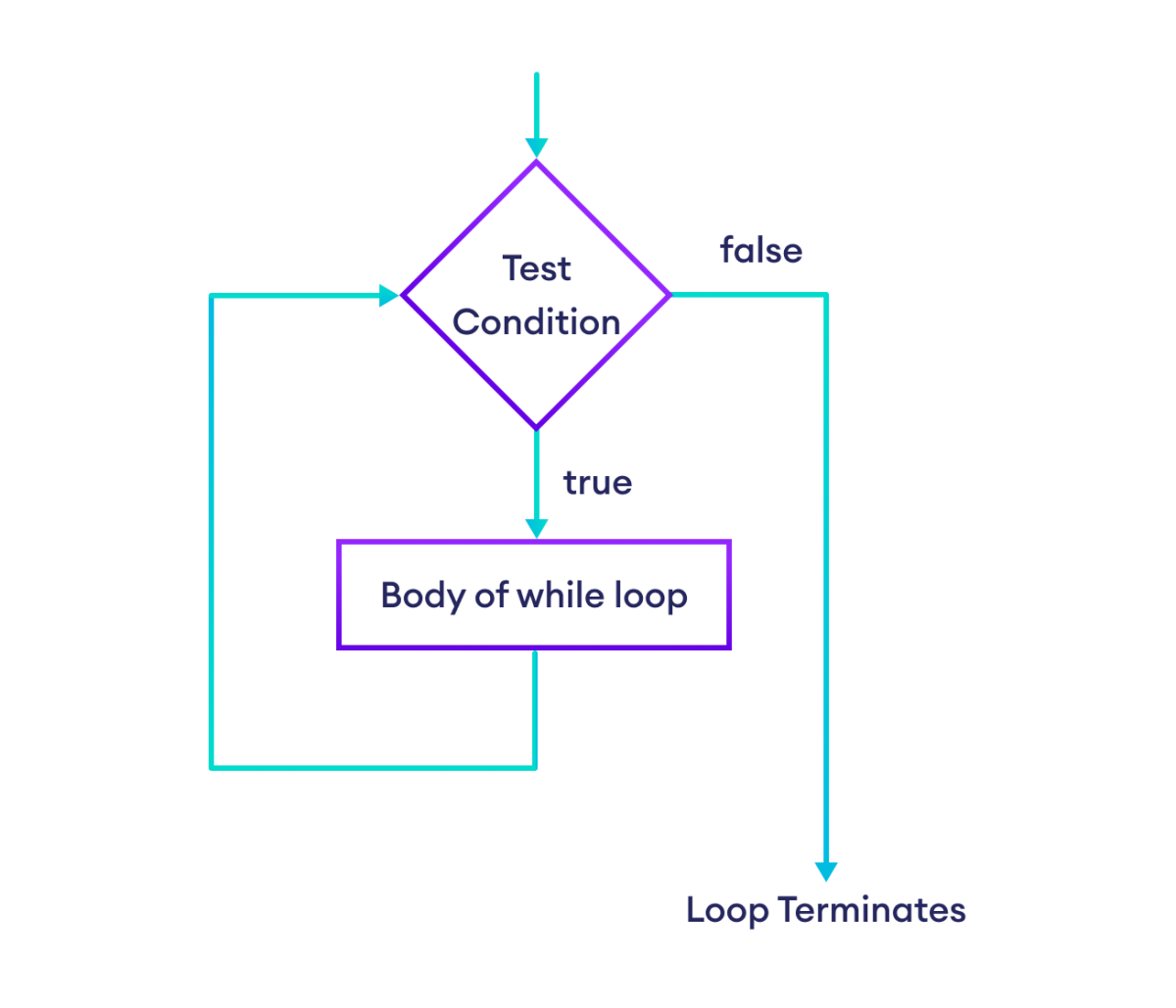
whileloop first evaluates the condition inside( ). - If the condition evaluates to
true, the code inside{ }is executed. - Then, the condition is evaluated again.
- This process continues as long as the condition evaluates to
true. - If the condition evaluates to
false, the loop stops.
Flowchart of while Loop
Example 1: Display Numbers From 1 to 3
// initialize variable i
let i = 1;

// loop runs until i is less than 4
while (i < 4) {
    console.log(i);
    i += 1;
}
Output
1
2
3
Here is how the above program works in each iteration of the loop:
To learn more about loop conditions, visit JavaScript Comparison and Logical Operators.
Example 2: Sum of Only Positive Numbers
let num = 0, sum = 0;

// loop as long as num is 0 or positive
while (num >= 0) {

    // add all positive numbers
    sum += num;

    // take input from the user
    num = parseInt(prompt("Enter a number: "));
}

// last, display sum
console.log(`The sum is ${sum}`);
Output
Enter a number: 2
Enter a number: 4
Enter a number: -3
The sum is 6
The above program prompts the user to enter a number.
Since JavaScript prompt() only takes inputs as string, parseInt() converts the input to a number.
As long as we enter positive numbers, the while loop adds them up and prompts us to enter more numbers.
So when we enter a negative number, the loop terminates.
Finally, we display the total sum of positive numbers.
Note: When we add two or more numeric strings, JavaScript treats them as strings. For example, "2" + "3" = "23". So, we should always convert numeric strings to numbers to avoid unexpected behaviors.
JavaScript do...while Loop
The do...while loop executes a block of code once, then repeatedly executes it as long as the specified condition is true.
The syntax of the do...while loop is:
do {
    // body of loop
} while(condition);
Here,
- The
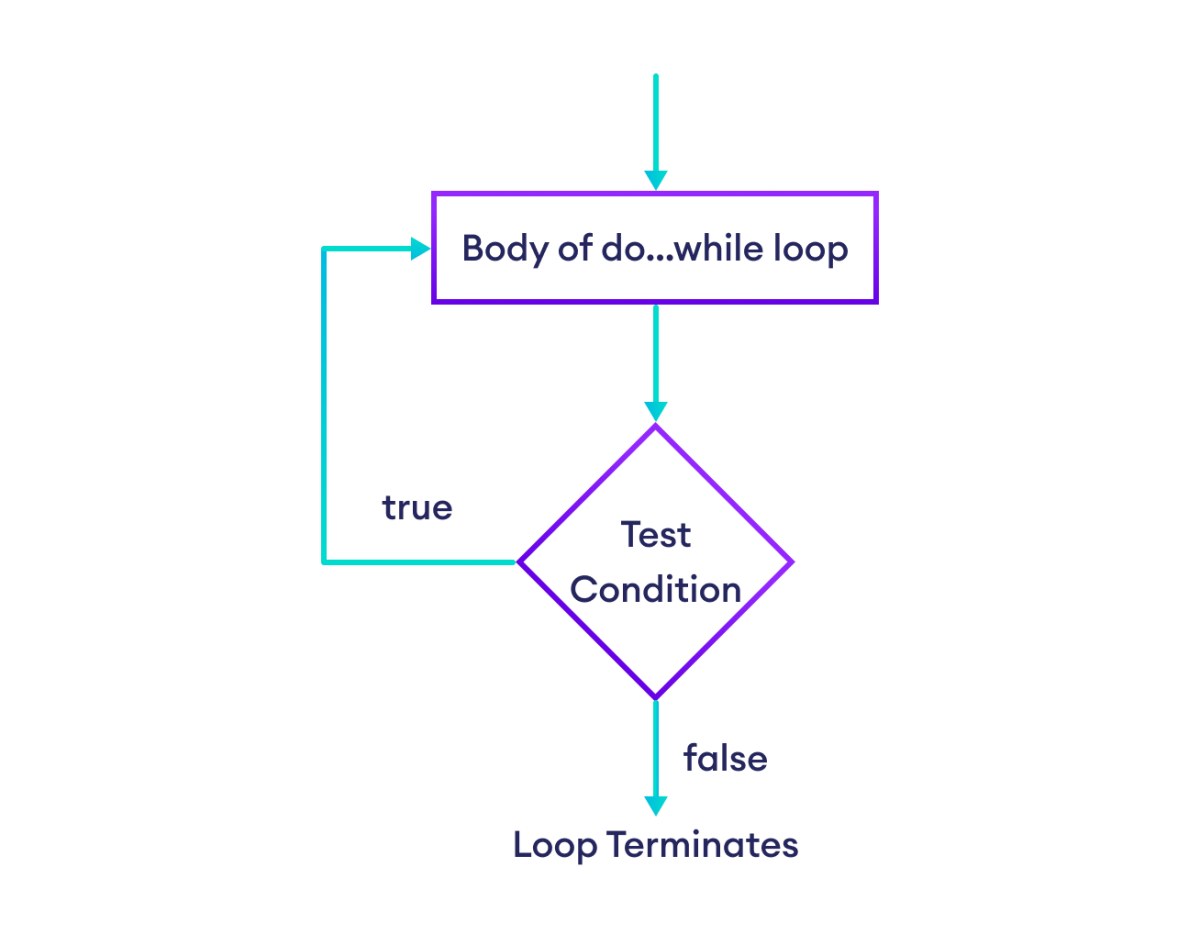
do…whileloop executes the code inside{ }. - Then, it evaluates the condition inside
( ). - If the condition evaluates to
true, the code inside{ }is executed again. - This process continues as long as the condition evaluates to
true. - If the condition evaluates to
false, the loop terminates.
Flowchart of do...while Loop
Example 3: Display Numbers from 3 to 1
let i = 3;

// do...while loop
do {
    console.log(i);
    i--;
} while (i > 0);
Output
3
2
1
Here, the initial value of i is 3. Then, we used a do...while loop to iterate over the values of i. Here is how the loop works in each iteration:
The difference between while and do...while is that the do...while loop executes its body at least once. For example,
let i = 0;

// false condition
// body executes once
do {
    console.log(i);
} while (i > 1);

// Output: 0
On the other hand, the while loop doesn't execute its body if the loop condition is false. For example,
let i = 0;

// false condition
// body not executed
while (i > 1) {
    console.log(i);
};
Example 4: Sum of Positive Numbers
let sum = 0, num = 0;

do {

    // add all positive numbers
    sum += num;

    // take input from the user
    num = parseInt(prompt("Enter a number: "));

    // loop terminates if num is negative
} while (num >= 0);

// last, display sum
console.log(`The sum is ${sum}`);
Output
Enter a number: 2
Enter a number: 4
Enter a number: -3
The sum is 6
In the above program, the do...while loop prompts the user to enter a number.
As long as we enter positive numbers, the loop adds them up and prompts us to enter more numbers.
If we enter a negative number, the loop terminates without adding the negative number.
More on JavaScript while and do...while Loops
An infinite while loop is a condition where the loop runs infinitely, as its condition is always true. For example,
let i = 1;

// always true condition
while(i < 5) {
    console.log(i);
}
Also, here is an example of an infinite do...while loop,
let i = 5;

// always true condition
do {
    console.log(i);
} while (i > 1);
In the above program, the condition 1 > 1 is always true, which causes the loop body to run forever.
Note: Infinite loops can cause your program to hang. So, avoid creating them unintentionally.
We use a for loop when we need to perform a fixed number of iterations. For example,
// display hi 3 times

for (let i = 1; i <= 3; i++) {
    console.log("hi");
}

console.log("bye");
Output
hi
hi
Hi
bye
Meanwhile, we use a while loop when the termination condition can vary. For example,
// display hi as long as user wants
let isDisplay = true;
let userChoice = "";

while (isDisplay) {
    console.log("hi");

    userChoice = prompt("print hi again? y for yes: ");
    if (userChoice != "y")
        isDisplay = false;
}

console.log("bye");
Output
hi
print hi again? y for yes: y
hi
print hi again? y for yes: y
hi
print hi again? y for yes: n
bye
In the above program, we let the user print hi as much as they desire.
Since we don't know the user's decision, we use a while loop instead of a for loop.
Also Read: