A flow chart that depicts the User Alignment Critic: a trusted component that vets each action before it reaches the browser.
The User Alignment Critic runs after the planning is complete to double-check each proposed action. Its primary focus is task alignment: determining whether the proposed action serves the user’s stated goal. If the action is misaligned, the Alignment Critic will veto it. This component is architected to see only metadata about the proposed action and not any unfiltered untrustworthy web content, thus ensuring it cannot be poisoned directly from the web. It has less context, but it also has a simpler job — just approve or reject an action.
This is a powerful, extra layer of defense against both goal-hijacking and data exfiltration within the action step. When an action is rejected, the Critic provides feedback to the planning model to re-formulate its plan, and the planner can return control to the user if there are repeated failures.
Enforcing stronger security boundaries with Origin Sets
Site Isolation and the same-origin policy are fundamental boundaries in Chrome’s security model and we’re carrying forward these concepts into the agentic world. By their nature, agents must operate across websites (e.g. collecting ingredients on one site and filling a shopping cart on another). But if an unrestricted agent is compromised and can interact with arbitrary sites, it can create what is effectively a Site Isolation bypass. That can have a severe impact when the agent operates on a local browser like Chrome, with logged-in sites vulnerable to data exfiltration. To address this, we’re extending those principles with Agent Origin Sets. Our design architecturally limits the agent to only access data from origins that are related to the task at hand, or data that the user has chosen to share with the agent. This prevents a compromised agent from acting arbitrarily on unrelated origins.
For each task on the web, a trustworthy gating function decides which origins proposed by the planner are relevant to the task. The design is to separate these into two sets, tracked for each session:
Read-only origins are those from which Gemini is permitted to consume content. If an iframe’s origin isn’t on the list, the model will not see that content.
Read-writable origins are those on which the agent is allowed to actuate (e.g., click, type) in addition to reading from.
This delineation enforces that only data from a limited set of origins is available to the agent, and this data can only be passed on to the writable origins. This bounds the threat vector of cross-origin data leaks. This also gives the browser the ability to enforce some of that separation, such as by not even sending to the model data that is outside the readable set. This reduces the model’s exposure to unnecessary cross-site data. Like the Alignment Critic, the gating functions that calculate these origin sets are not exposed to untrusted web content. The planner can also use context from pages the user explicitly shared in that session, but it cannot add new origins without the gating function’s approval. Outside of web origins, the planning model may ingest other non-web content such as from tool calls, so we also delineate those into read-vs-write calls and similarly check that those calls are appropriate for the task.
Iframes from origins that aren’t related to the user’s task are not shown to the model.
Page navigations can happen in several ways: If the planner decides to navigate to a new origin that isn’t yet in the readable set, that origin is checked for relevancy by a variant of the User Alignment critic before Chrome adds it and starts the navigation. And since model-generated URLs could exfiltrate private information, we have a deterministic check to restrict them to known, public URLs. If a page in Chrome navigates on its own to a new origin, it’ll get vetted by the same critic.
Getting the balance right on the first iteration is hard without seeing how users’ tasks interact with these guardrails. We’ve initially implemented a simpler version of origin gating that just tracks the read-writeable set. We will tune the gating functions and other aspects of this system to reduce unnecessary friction while improving security. We think this architecture will provide a powerful security primitive that can be audited and reasoned about within the client, as it provides guardrails against cross-origin sensitive data exfiltration and unwanted actions.
Transparency and control for sensitive actions
We designed the agentic capabilities in Chrome to give the user both transparency and control when they need it most. As the agent works in a tab, it details each step in a work log, allowing the user to observe the agent's actions as they happen. The user can pause to take over or stop a task at any time.
This transparency is paired with several layers of deterministic and model-based checks to trigger user confirmations before the agent takes an impactful action. These serve as guardrails against both model mistakes and adversarial input by putting the user in the loop at key moments.
First, the agent will require a user confirmation before it navigates to certain sensitive sites, such as those dealing with banking transactions or personal medical information. This is based on a deterministic check against a list of sensitive sites. Second, it’ll confirm before allowing Chrome to sign-in to a site via Google Password Manager – the model does not have direct access to stored passwords. Lastly, before any sensitive web actions like completing a purchase or payment, sending messages, or other consequential actions, the agent will try to pause and either get permission from the user before proceeding or ask the user to complete the next step. Like our other safety classifiers, we’re constantly working to improve the accuracy to catch edge cases and grey areas.
Illustrative example of when the agent gets to a payment page, it stops and asks the user to complete the final step.
Detecting “social engineering” of agents
In addition to the structural defenses of alignment checks, origin gating, and confirmations, we have several processes to detect and respond to threats. While the agent is active, it checks every page it sees for indirect prompt injection. This is in addition to Chrome’s real-time scanning with Safe Browsing and on-device AI that detect more traditional scams. This prompt-injection classifier runs in parallel to the planning model’s inference, and will prevent actions from being taken based on content that the classifier determined has intentionally targeted the model to do something unaligned with the user’s goal. While it cannot flag everything that might influence the model with malicious intent, it is a valuable layer in our defense-in-depth.
Continuous auditing, monitoring, response
To validate the security of this set of layered defenses, we’ve built automated red-teaming systems to generate malicious sandboxed sites that try to derail the agent in Chrome. We start with a set of diverse attacks crafted by security researchers, and expand on them using LLMs following a technique we adapted for browser agents. Our continuous testing prioritizes defenses against broad-reach vectors such as user-generated content on social media sites and content delivered via ads. We also prioritize attacks that could lead to lasting harm, such as financial transactions or the leaking of sensitive credentials. The attack success rate across these give immediate feedback to any engineering changes we make, so we can prevent regressions and target improvements. Chrome’s auto-update capabilities allow us to get fixes out to users very quickly, so we can stay ahead of attackers.
Collaborating across the community
We have a long-standing commitment to working with the broader security research community to advance security together, and this includes agentic safety. We’ve updated our Vulnerability Rewards Program (VRP) guidelines to clarify how external researchers can focus on agentic capabilities in Chrome. We want to hear about any serious vulnerabilities in this system, and will pay up to $20,000 for those that demonstrate breaches in the security boundaries. The full details are available in VRP rules.
Looking forward
The upcoming introduction of agentic capabilities in Chrome brings new demands for browser security, and we've approached this challenge with the same rigor that has defined Chrome's security model from its inception. By extending some core principles like origin-isolation and layered defenses, and introducing a trusted-model architecture, we're building a secure foundation for Gemini’s agentic experiences in Chrome. This is an evolving space, and while we're proud of the initial protections we've implemented, we recognize that security for web agents is still an emerging domain. We remain committed to continuous innovation and collaboration with the security community to ensure Chrome users can explore this new era of the web safely.
I use affected certificates for my internal enterprise network, do I need to do anything?
Beginning in Chrome 127, enterprises can override Chrome Root Store constraints like those described in this blog post by installing the corresponding root CA certificate as a locally-trusted root on the platform Chrome is running (e.g., installed in the Microsoft Certificate Store as a Trusted Root CA).
How do enterprises add a CA as locally-trusted?
Customer organizations should use this enterprise policy or defer to platform provider guidance for trusting root CA certificates.
What about other Google products?
Other Google product team updates may be made available in the future.
App-Bound Encryption relies on a privileged service to verify the identity of the requesting application. During encryption, the App-Bound Encryption service encodes the app's identity into the encrypted data, and then verifies this is valid when decryption is attempted. If another app on the system tries to decrypt the same data, it will fail.
Because the App-Bound service is running with system privileges, attackers need to do more than just coax a user into running a malicious app. Now, the malware has to gain system privileges, or inject code into Chrome, something that legitimate software shouldn't be doing. This makes their actions more suspicious to antivirus software – and more likely to be detected. Our other recent initiatives such as providing event logs for cookie decryption work in tandem with this protection, with the goal of further increasing the cost and risk of detection to attackers attempting to steal user data.
Enterprise Considerations
Since malware can bypass this protection by running elevated, enterprise environments that do not grant their users the ability to run downloaded files as Administrator are particularly helped by this protection - malware cannot simply request elevation privilege in these environments and is forced to use techniques such as injection that can be more easily detected by endpoint agents.
App-Bound Encryption strongly binds the encryption key to the machine, so will not function correctly in environments where Chrome profiles roam between multiple machines. We encourage enterprises who wish to support roaming profiles to follow current best practices. If it becomes necessary, App-Bound encryption can be configured using the new ApplicationBoundEncryptionEnabled policy.
To further help detect any incompatibilities, Chrome emits an event when a failed verification occurs. The Event is ID 257 from 'Chrome' source in the Application log.
Conclusion
App-Bound Encryption increases the cost of data theft to attackers and also makes their actions far noisier on the system. It helps defenders draw a clear line in the sand for what is acceptable behavior for other apps on the system. As the malware landscape continually evolves we are keen to continue engaging with others in the security community on improving detections and strengthening operating system protections, such as stronger app isolation primitives, for any bypasses.
In 2023, the Android VRP achieved significant milestones, reflecting our dedication to securing the Android ecosystem. We awarded over $3.4 million in rewards to researchers who uncovered remarkable vulnerabilities within Android and increased our maximum reward amount to $15,000 for critical vulnerabilities. We also saw a sharpened focus on higher severity issues as a result of our changes to incentivize report quality and increasing rewards for high and critical severity issues.
Expanding our program’s scope, Wear OS has been added to the program to further incentivize research in new wearable technology to ensure users’ safety.
Working closely with top researchers at the ESCAL8 conference, we also hosted a live hacking event for Wear OS and Android Automotive OS which resulted in $70,000 rewarded to researchers for finding over 20 critical vulnerabilities!
We would also like to spotlight the hardwear.io security conferences. Hardwear.io gave us a platform to engage with top hardware security researchers who uncovered over 50 vulnerabilities in Nest, Fitbit, and Wearables, and received a total of $116,000 last year!
A huge thank you to the researchers who made our program such a success. A special shout out to Zinuo Han (@ele7enxxh) of OPPO Amber Security Lab and Yu-Cheng Lin (林禹成) (@AndroBugs) for your hard work and continuing to be some of the top researchers contributing to Android VRPs!
Chrome
2023 was a year of changes and experimentation for the Chrome VRP. In Chrome Milestone 116, MiraclePtr was launched across all Chrome platforms. This resulted in raising the difficulty of discovery of fully exploitable non-renderer UAFs in Chrome and resulted in lower reward amounts for MiraclePtr-protected UAFs, as highly mitigated security bugs. While code and issues protected by MiraclePtr are expected to be resilient to the exploitation of non-renderer UAFs, the Chrome VRP launched the MiraclePtr Bypass Reward to incentivize research toward discovering potential bypasses of this protection.
The Chrome VRP also launched the Full Chain Exploit Bonus, offering triple the standard full reward amount for the first Chrome full-chain exploit reported and double the standard full reward amount for any follow-up reports. While both of these large incentives have gone unclaimed, we are leaving the door open in 2024 for any researchers looking to take on these challenges.
In 2023, Chrome VRP also introduced increased rewards for V8 bugs in older channels of Chrome, with an additional bonus for bugs existing before M105. This resulted in a few very impactful reports of long-existing V8 bugs, including one report of a V8 JIT optimization bug in Chrome since at least M91, which resulted in a $30,000 reward for that researcher.
All of this resulted in $2.1M in rewards to security researchers for 359 unique reports of Chrome Browser security bugs. We were also able to meet some of our top researchers from previous years who were invited to participate in bugSWAT as part of Google’s ESCAL8 event in Tokyo in October. We capped off the year by publicly announcing our 2023 Top 20 Chrome VRP reporters who received a bonus reward for their contributions.
Thank you to the Chrome VRP security researcher community for your contributions and efforts to help us make Chrome more secure for everyone!
To help AI-focused bughunters know what’s in scope and what’s not, we recently published our criteria for bugs in AI products. This criteria aims to facilitate testing for traditional security vulnerabilities as well as risks specific to AI systems, and is one way that we are implementing the voluntary AI commitments that Google made at the White House in July.
Looking Forward
We remain committed to fostering collaboration, innovation, and transparency with the security community. Our ongoing mission is to stay ahead of emerging threats, adapt to evolving technologies, and continue to strengthen the security posture of Google’s products and services. We look forward to continuing to drive greater advancements in the world of cybersecurity.
A huge thank you to our bug hunter community for helping to make Google products and platforms more safe and secure for our users around the world!
Thank you to Adam Bacchus, Dirk Göhmann, Eduardo Vela, Sarah Jacobus, Amy Ressler, Martin Straka, Jan Keller, Tony Mendez.
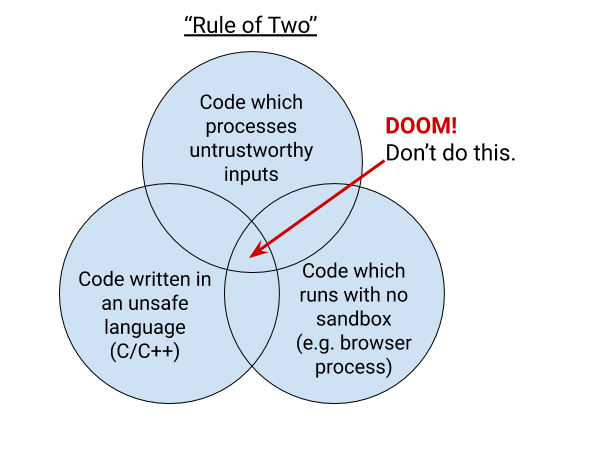
Chrome is primarily written in the C and C++ languages, which are vulnerable to memory safety bugs. Mistakes with pointers in these languages can lead to memory being misinterpreted. Chrome invests in an ever-stronger multi-process architecture built on sandboxing and site isolation to help defend against memory safety problems. Android-specific features can be written in Java or Kotlin. These languages are memory-safe in the common case. Similarly, we’re working on adding support to write Chrome code in Rust, which is also memory-safe.
Much of Chrome is sandboxed, but the sandbox still requires a core high-privilege “broker” process to coordinate communication and launch sandboxed processes. In Chrome, the broker is the browser process. The browser process is the source of truth that allows the rest of Chrome to be sandboxed and coordinates communication between the rest of the processes.
If an attacker is able to craft a malicious input to the browser process that exploits a bug and allows the attacker to achieve remote code execution (RCE) in the browser process, that would effectively give the attacker full control of the victim’s Chrome browser and potentially the rest of the device. Conversely, if an attacker achieves RCE in a sandboxed process, such as a renderer, the attacker's capabilities are extremely limited. The attacker cannot reach outside of the sandbox unless they can additionally exploit the sandbox itself.
Without sandboxing, which limits the actions an attacker can take, and without memory safety, which removes the ability of a bug to disrupt the intended control flow of the program, the rule of two requires that the browser process does not handle untrustworthy inputs. The relative risks between sandboxed processes and the browser process are why the browser process is only allowed to parse trustworthy inputs and specific IPC messages.
Trustworthy inputs are defined extremely strictly: A “trustworthy source” means that Chrome can prove that the data comes from Google. Effectively, this means that in situations where the browser process needs access to data from external sources, it must be read from Google servers. We can cryptographically prove that data came from Google servers if that data comes from:
The component updater and the variations framework are services specific to Chrome used to ship data-only updates and configuration information. These services both use asymmetric cryptography to authenticate their data, and the public key used to verify data sent by these services is shipped in Chrome.
However, Chrome is a feature-filled browser with many different use cases, and many different features beyond just updating itself. Certain features, such as Sign-In and the Discover Feed, need to communicate with Google. For features like this, that communication can be considered trustworthy if it comes from a pinned HTTPS server.
When Chrome connects to an HTTPS server, the server says “a 3rd party you trust (a certification authority; CA) has vouched for my identity.” It does this by presenting a certificate issued by a trusted certification authority. Chrome verifies the certificate before continuing. The modern web necessarily has a lot of CAs, all of whom can provide authentication for any website. To further ensure that the Chrome browser process is communicating with a trustworthy Google server we want to verify something more: whether a specific CA is vouching for the server. We do this by building a map of sites → expected CAs directly into Chrome. We call this key pinning. We call the map the pin set.
What is Key Pinning?
Key pinning was born as a defense against real attacks seen in the wild: attackers who can trick a CA to issue a seemingly-valid certificate for a server, and then the attacker can impersonate that server. This happened to Google in 2011, when the DigiNotar certification authority was compromised and used to issue malicious certificates for Google services. To defend against this risk, Chrome contains a pin set for all Google properties, and we only consider an HTTPS input trustworthy if it’s authenticated using a key in this pin set. This protects against malicious certificate issuance by third parties.
Key pinning can be brittle, and is rarely worth the risks. Allowing the pin set to get out of date can lead to locking users out of a website or other services, potentially permanently. Whenever pinning, it’s important to have safety-valves such as not enforcing pinning (i.e. failing open) when the pins haven't been updated recently, including a “backup” key pin, and having fallback mechanisms for bootstrapping. It's hard for individual sites to manage all of these mechanisms, which is why dynamic pinning over HTTPS (HPKP) was deprecated. Key pinning is still an important tool for some use cases, however, where there's high-privilege communication that needs to happen between a client and server that are operated by the same entity, such as web browsers, automatic software updates, and package managers.
Security Benefits of Key Pinning in Chrome, Now on Android
By pinning in Chrome, we can protect users from CA compromise. We take steps to prevent an out-of-date pinset from unnecessarily blocking users from accessing Google or Google's services. As both a browser vendor and site operator, however, we have additional tools to ensure we keep our pin sets up to date—if we use a new key or a new domain, we can add it to the pin set in Chrome at the same time. In our original implementation of pinning, the pin set is directly compiled into Chrome and updating the pin set requires updating the entire Chrome binary. To make sure that users of old versions of Chrome can still talk to Google, pinning isn't enforced if Chrome detects that it is more than 10 weeks old.
Historically, Chrome enforced the age limit by comparing the current time to the build timestamp in the Chrome binary. Chrome did not enforce pinning on Android because the build timestamp on Android wasn’t always reflective of the age of the Chrome pinset, which meant that the chance of a false positive pin mismatch was higher.
Without enforcing pins on Android, Chrome was limiting the ways engineers could build features that comply with the rule of two. To remove this limitation, we built an improved mechanism for distributing the built-in pin set to Chrome installs, including Android devices. Chrome still contains a built-in pin set compiled into the binary. However, we now additionally distribute the pin set via the component updater, which is a mechanism for Chrome to dynamically push out data-only updates to all Chrome installs without requiring a full Chrome update or restart. The component contains the latest version of the built-in pin set, as well as the certificate transparency log list and the contents of the Chrome Root Store. This means that even if Chrome is out of date, it can still receive updates to the pin set. The component also includes the timestamp the pin list was last updated, rather than relying on build timestamp.This drastically reduces the false positive risk of enabling key pinning on Android.
After we moved the pin set to component updater, we were able to do a slow rollout of pinning enforcement on Android. We determined that the false positive risk was now in line with desktop platforms, and enabled key pinning enforcement by default since Chrome 106, released in September 2022.
This change has been entirely invisible to users of Chrome. While not all of the changes we make in Chrome are flashy, we're constantly working behind the scenes to keep Chrome as secure as possible and we're excited to bring this protection to Android.
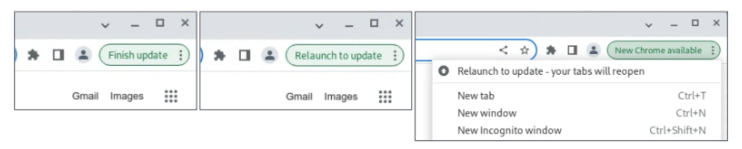
Other Chromium-based browsers have varying patch gaps. Chrome does not control the update cadence of other Chromium browsers. The change described here is only applicable to Chrome. If you are using other Chromium browsers, you may want to explore the security update cadence of those browsers.
The rest is on us – with this change we’re dedicated to continuing to work to get security fixes to you as fast as possible.
By having control over extensions, organizations can maintain a secure and stable browsing environment, safeguard sensitive data, and protect their overall digital infrastructure. There are several ways IT and security teams can set and enforce controls over extensions:
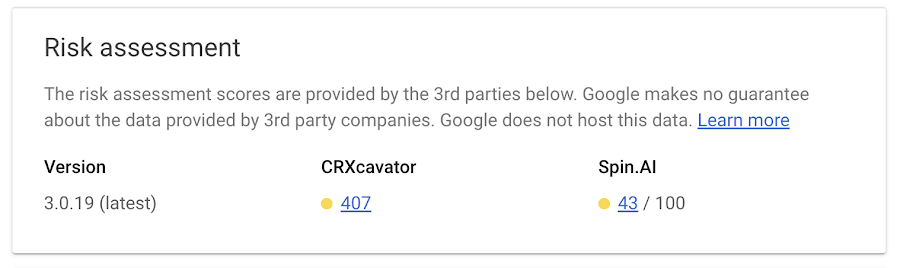
Organizations can control whether users can install apps or extensions based on the information an extension can access—also known as permissions. For example, you might want to prevent users from installing any extension that wants permission to see a device location.
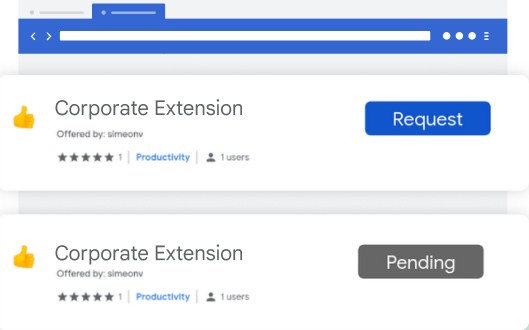
Extension workflow allows end users to request extensions for review. From there, IT can either approve or deny them. This is a great approach for teams that want to control the extensions in their environment, but allow end users to have some say over the extensions they use.
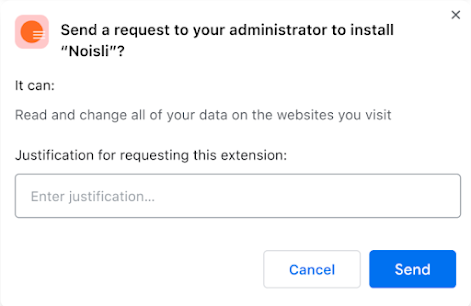
We recently added a prompt for business justification for documenting why users are requesting the extension. This gives admins more information as to why the extension may or may not be helpful for their workforce, and can help speed approvals for business users.
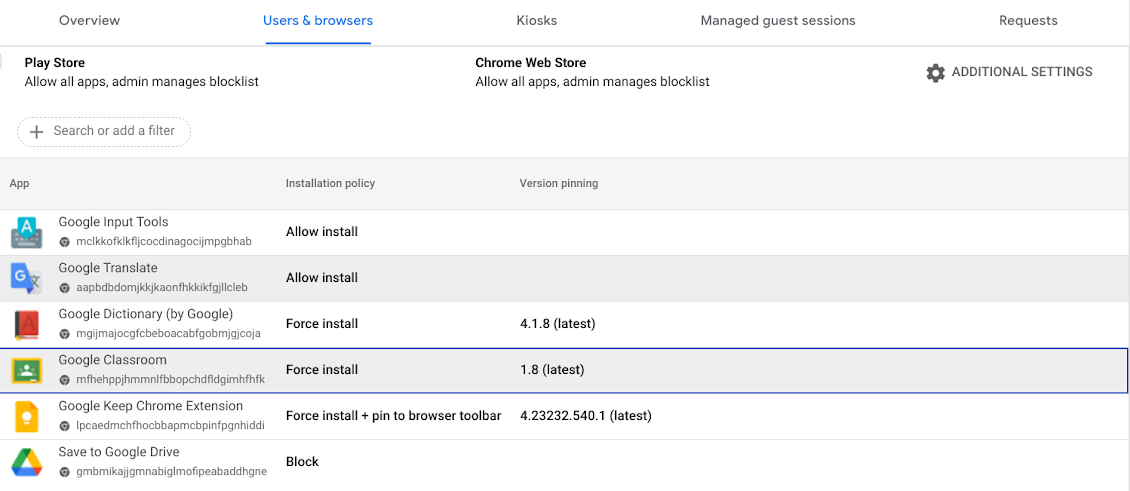
3. Force install/block extensions In the requests tab, you can select a requested extension, and approve that extension request and force install it, so the extension shows up automatically on all the managed browsers in that specific Organizational Unit or group.
Admins also have the ability to block extensions in their browser environment.
Admins have the ability to pin extensions to specific versions. As a result, the pinned extensions will not be upgraded unless the admin explicitly changes the version. This gives organizations the ability to evaluate new extension versions before they decide to allow them in their environment.
Extensions play a huge role in user productivity for many organizations, and Chrome is committed to help enterprises securely take advantage of them. If you haven’t already, you can sign up for Chrome Browser Cloud Management and start managing extensions being used in your organizations at no additional cost.
If you’re already using Chrome Browser Cloud Management, but want to see how you can get the most out of it, check out our newly released Beyond Browsing demo series where Chrome experts share demos on some of our frequently asked management questions.
If a user downloads a malicious file after bypassing a Chrome “Dangerous File” message their managed browser/managed CrOS device should be quarantined.
Setting up Chrome Browser Cloud Management and Splunk Integration
Please follow the guide here to set up Chrome Browser Cloud Management and Splunk® integration.
Setting up Chrome Browser Cloud Management API access
To call the Chrome Browser Cloud Management API, use a service account properly configured in the Google admin console. Create a (or use an existing) service account and download the JSON representation of the key.
Create a (or use an existing) role in the admin console with all the “Chrome Management” privileges as shown below.
Assign the created role to the service account using the “Assign service accounts” button.
Setting up Chrome Browser Cloud Management App in Splunk®
Install the App i.e. Alert Action from our Github page. You will notice that the Splunk App uses the below directory structure. Please take some time to understand the directory structure layout.
Setting up a Quarantine OU in Chrome Browser Cloud Management
Create a “Quarantine” OU to move managed browsers into. Apply restrictive policies to this OU which will then be applied to managed browsers and managed CrOS devices that are moved to this OU. In our case we set the below policies for our “Quarantine” OU called Investigate.These policies ensure that the quarantined CrOS device/browser can only open a limited set of approved URLS.
Start with a search for the Chrome Browser Cloud Management events in the Google Chrome Add-on for Splunk App. For our instance we used the below search query to search for known malicious file download events.
Save the search as an alert. The alert uses the saved search to check for events. Adjust the alert type to configure how often the search runs. Use a scheduled alert to check for events on a regular basis. Use a real-time alert to monitor for events continuously. An alert does not have to trigger every time it generates search results. Set trigger conditions to manage when the alert triggers. Customize the alert settings as per enterprise security policies. For our example we used a real time alert with a per-result trigger. The setup we used is as shown below.
As seen in the screenshot we have configured the Chrome Browser Cloud Management Remediation Alert Action App with
The OU Path of the Quarantine OU i.e. /Investigate
The Customer Id of the workspace domain
Service Account Key JSON value
Test the setup
Use the testsafebrowsing website to generate sample security events to test the setup.
Click the link for line item 4 under the Desktop Download Warnings section i.e. “Should show an "uncommon" warning, for .exe”
You will see a Dangerous Download blocked warning giving you two options to either Discard or Keep the downloaded file. Click on Keep
This will trigger the alert action and move your managed browser or managed CrOS device to the “Quarantine” OU (OU name Investigate in our example) with restricted policies.
Conclusion
Security remediation is vital to any organization’s security program. In this blog we discussed configuring automated security remediation of Chrome Browser Cloud Management security events using Splunk alert actions. This scalable approach can be used to protect a company from online security threats by detecting and quickly responding to high fidelity Chrome Browser Cloud Management security events thereby greatly reducing the time to respond.








 Follow