
Transformation Libraries
- free
- growth
- enterprise
6 minute read
RudderStack’s transformation libraries feature lets you reuse the same code in multiple transformations.


Required permissions
- Admins have full access to manage transformation libraries.
- Members must have the Transformation Libraries permission in their workspace policy.
Click here to see how these permissions appear in the workspace policy.
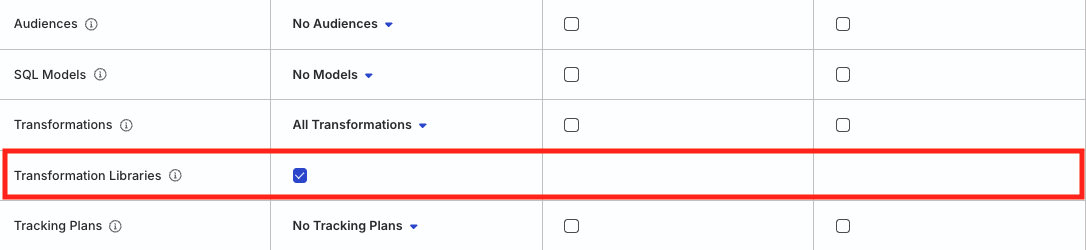
Permissions for legacy RBAC system
In the legacy Permissions Management (RBAC) system:
- Org Admins can edit transformation libraries
- Members must have the Grant edit access permission in Transformations and Library toggled on to edit transformation libraries

Add transformation library
- In the RudderStack dashboard, go to Collect > Transformations and click the Libraries tab. Then, click Create Library.

- Add the library Name, Description and select the language to write the library function. You can also add multiple functions in a single library.
RudderStack supports Python libraries only in the RudderStack Growth and Enterprise plans.

JavaScript transformation libraries run in an isolated environment — no Node.js modules (likefs,require) or browser APIs (likewindow,btoa) are available. Only standard JavaScript features are supported.


- Click Run Test to ensure the library code has the correct syntax. A Test Passed message pops up once the test runs successfully.

Use libraries in transformations
To use the libraries in your existing transformations, note the library name listed in the Import library name column in the RudderStack dashboard:

RudderStack converts the library name into camel case without spaces; this becomes your library handle which you can use across multiple transformations. For example, if your library name isSample Transformation Library, then the library handle would besampleTransformationLibrary.
You can then use the library in a transformation with a simple import statement. Refer to the below use case for more information.
Use case
Suppose you want to filter the events that don’t contain an email address with the RudderStack domain. To do so, you can import a rudderEmail function from the transformation library isRudderEmail.
The rudderEmail function containing the filtering logic is shown below:
The following snippets demonstrate how you can import this function in a transformation:
On clicking Run Test, a sample event not containing the RudderStack email domain is filtered out:

Import multiple functions from single library
The following snippets highlight how to correctly import functions from a library:
The following snippets highlight the incorrect way of importing the library functions:
Delete library
You cannot delete a library that is referenced or imported in a transformation.
To delete a library, go to Collect > Transformations > Libraries and click the Delete button next to the library that you want to delete.
Default RudderStack libraries
RudderStack provides some default libraries that you can import in your transformations for implementing various use cases like encrypting, decrypting, or hashing PII, parsing user agent, and using the localized version of Apple’s device mode information in your events.
See the GitHub codebase for the code and implementation-specific details for these libraries.
Currently, these predefined RudderStack libraries are available only for JavaScript.
Use the following structure to import the RudderStack libraries:
@rs/<libraryname>/v1
A sample import statement is shown below:
import { JSEncrypt } from "@rs/encrypt/v1";
The following table lists the default RudderStack libraries and their usage:
FAQ
How can I use a npm package not provided by RudderStack in my transformations?
To use a different library (other than the default libraries provided by RudderStack) in your transformations:
- Add a pure vanilla script as a transformation library.
All the imports and functions referenced in the code must have their implementation in the same file — essentially, a self-sufficient minified JavaScript implementation of the required package.
- Import the library in your transformation.
Example
Suppose you want to use the blueimp/JavaScript-MD5 library to hash your PII.
- Your MD5 function looks as follows:
! function(n) {"use strict";function d(n, t) {var r = (65535 & n) + (65535 & t);return (n >> 16) + (t >> 16) + (r >> 16) << 16 | 65535 & r} ... ... module.exports = t : n.md5 = t}(this);
For this example, note that:
The
min.jsfile is readily available — hence no other action is required. Otherwise, you will need to write a.jsfile separately.The method used as the entry point method is
md5and it uses the MD5 (hexadecimal), MD5 (raw), HMAC-MD5 (hexadecimal), and HMAC-MD5 (raw) functions — make sure to include these function implementations in the file.
- The above functions may also reference other methods — make sure to include their implementations in the file, and so on.
Include only minimal and relevant code in the file to avoid performance issues.
- Add the above code in a new transformation library, for example,
md5Library. - Import the above library in your transformation to hash sensitive PII:
// Import the MD5 function from your library
// Assuming the library handle is 'md5Library'

import { md5 } from "md5Library";

export function transformEvent(event) {
  // Get email from event properties
  const email = event.properties?.email;

  if (email) {
    // Hash the email using MD5
    event.properties.email = md5(email);
  }

  return event;
}
This transformation will hash any email address in the event properties using the provided MD5 algorithm.


