
Skip to main content


Using Data Stores
In Node.js (JavaScript) code steps, you can also store and retrieve data within code steps without connecting a 3rd party database.
Add data stores to steps as props. By adding the store as a prop, it’s available under
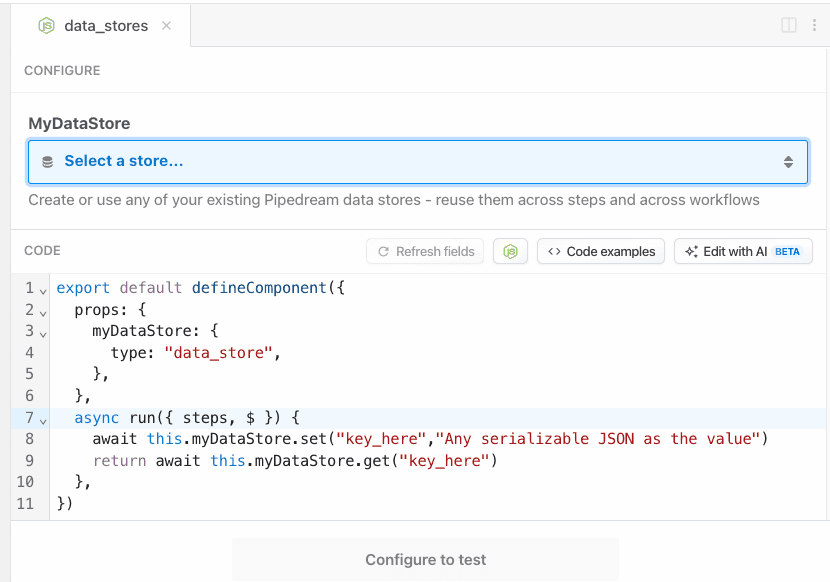
this.
For example, you can define a data store as a dataStore prop, and reference it at this.dataStore:
props injects variables into this. See how we declared the dataStore prop in the props object, and then accessed it at this.dataStore in the run method.Using the data store
Once you’ve defined a data store prop for your component, then you’ll be able to create a new data store or use an existing one from your account.Saving data
Data Stores are key-value stores. Save data within a Data Store using thethis.dataStore.set method. The first argument is the key where the data should be held, and the second argument is the value assigned to that key.
Setting expiration (TTL) for records
You can set an expiration time for a record by passing a TTL (Time-To-Live) option as the third argument to theset method. The TTL value is specified in seconds:
Updating TTL for existing records
You can update the TTL for an existing record using thesetTtl method:
Retrieving keys
Fetch all the keys in a given Data Store using thekeys method:
Checking for the existence of specific keys
If you need to check whether a specifickey exists in a Data Store, you can pass the key to the has method to get back a true or false:
Retrieving data
You can retrieve data with the Data Store using theget method. Pass the key to the get method to retrieve the content that was stored there with set.
Retrieving all records
Use an async iterator to efficiently retrieve all records or keys in your data store:Deleting or updating values within a record
To delete or update the value of an individual record, use theset method for an existing key and pass either the new value or '' as the second argument to remove the value but retain the key.
Deleting specific records
To delete individual records in a Data Store, use thedelete method for a specific key:
Deleting all records from a specific Data Store
If you need to delete all records in a given Data Store, you can use theclear method. Note that this is an irreversible change, even when testing code in the workflow builder.
Viewing store data
You can view the contents of your data stores in your Pipedream dashboard. From here you can also manually edit your data store’s data, rename stores, delete stores or create new stores.Using multiple data stores in a single code step
It is possible to use multiple data stores in a single code step, just make a unique name per store in theprops definition. Let’s define 2 separate customers and orders data sources and leverage them in a single code step:
Workflow counter example
You can use a data store as a counter. For example, this code counts the number of times the workflow runs:Dedupe data example
Data Stores are also useful for storing data from prior runs to prevent acting on duplicate data, or data that’s been seen before. For example, this workflow’s trigger contains an email address from a potential new customer. But we want to track all emails collected so we don’t send a welcome email twice:TTL use case: temporary caching and rate limiting
TTL functionality is particularly useful for implementing temporary caching and rate limiting. Here’s an example of a simple rate limiter that prevents a user from making more than 5 requests per hour:- Session tokens with automatic expiration
- Short-lived feature flags
- Temporary access grants
- Time-based promotional codes
Supported data types
Data stores can hold any JSON-serializable data within the storage limits. This includes data types including:- Strings
- Objects
- Arrays
- Dates
- Integers
- Floats