


Out now · macOS 14+ · Apple Silicon
One SVG in. Every asset out.
Recolor an icon visually, export every raster and app-icon preset for Web, iOS and Android, and generate code for 11 UI stacks. Without your artwork ever leaving your Mac.
Pay once, use it on four Macs, free updates through 2.x. Shipping since 2016; v2 is a ground-up rebuild.
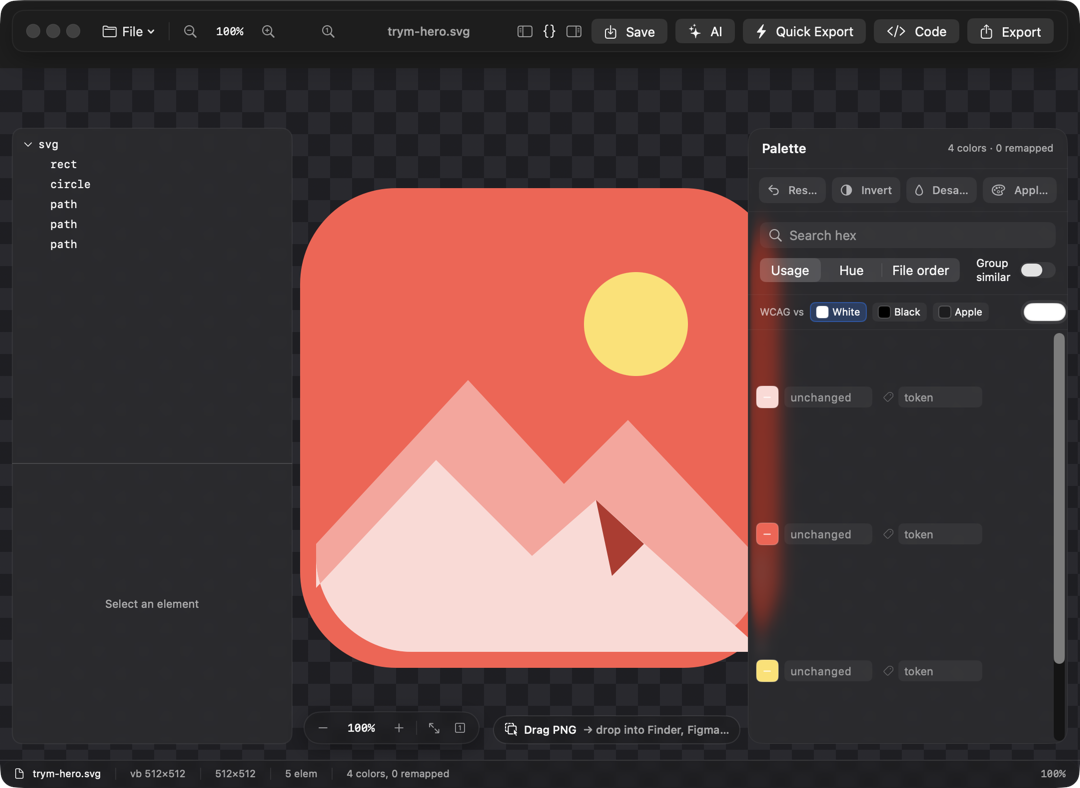
Trym is a native macOS studio that turns one SVG into every asset your product needs: remap its palette visually, export raster sets for Web, iOS, and Android, generate production code for 11 UI stacks, and shrink files with the built-in optimizer. Runs entirely on your Mac. macOS 14 or newer, Apple Silicon. $14.99 once, sold right here.
Recolor & theme
Click a color. The whole document follows.
- —Remap any color across the whole document in one click: fills, strokes, gradients, CSS.
- —Theme variants: export light, dark, and brand palettes in one run, each with its own
tokens.json. - —Import DTCG design tokens and snap colors to your system, ΔE-matched.
- —Color-blindness preview: deuteranopia, protanopia, tritanopia.
This is the whole idea, live in your browser. The app does it to real files.
Export everything
Every size. Every platform. One export.
Presets for Web, iOS, and Android: @1x/@2x/@3x rasters, drawable densities, xcassets image sets and app icons, adaptive icons, favicon + ICO. Output as PNG, JPG, AVIF, or true vector PDF. One-click Quick Export drops everything into your chosen folder.
Batch mode: drop a folder, apply a palette, export hundreds of icons in one run.
icon.svg
  → web/       PNG @1x @2x · favicon 16–512 + .ico
  → ios/       Assets.xcassets image set + AppIcon
  → android/   mdpi…xxxhdpi + adaptive icon
  → icon.pdf   true vector

  · light / dark / brand — every preset × every theme
Generate code
Ship the source, not just the pixels.
Token-bound output: colors arrive as theme references, not constants. Generated files are marked and diffed, never clobbered.
// Generated by Trym
struct BoltIcon: View {
    var tint: Color = .Token.brandPrimary   // token: brand/primary
    var body: some View {
        Canvas { ctx, size in
            ctx.fill(boltPath(in: size), with: .color(tint))
        }
    }
}Under the hood
Private by default.
Smaller before it ships.
SVGO-style cleanup passes strip junk before export, with a live byte-savings readout. Typical icons come out 20–60% smaller.
Describe the edit. Nothing leaves your Mac.
“Make the background transparent and the strokes brand blue.” Done. The assistant runs on-device with Apple Intelligence (macOS 26), or with your own API key for a cloud model. The key stays in your Keychain. Privacy page →
Signed and notarized.
Developer ID signed, notarized by Apple. Trym only touches the files you open and the folder you export to. No account, no telemetry. Its only network calls are license activation and the AI endpoint you configure, if any.
trym-cli
The same engine, headless.
A companion CLI for CI pipelines. Deterministic output: same input, same bytes, clean diffs.
$ trym-cli export  --preset "Web Favicon" --out dist icon.svg
$ trym-cli codegen --target reactTSX --out src/icons icons/*.svg
Trym 2.0 for macOS
$14.99. Once.
One key, four Macs, free updates for all of 2.x. No subscription, no account. Pay through PayPal; the key is on the next page and in your inbox within a minute.
macOS 14+, Apple Silicon. Already own Trym 1? Download 2.0 and enter the key you have. Refunds within 30 days by email.
FAQ
Common questions.
What does Trym do?
Trym turns one SVG into every asset your product needs. Drop an icon on the canvas, remap its palette visually, and export raster sets, app icons, or production-ready source code for 11 UI stacks — entirely on your Mac. A built-in SVGO-style optimizer shrinks files before export.
What macOS version does Trym require?
macOS 14 (Sonoma) or newer on Apple Silicon. Trym 2 is a ground-up rebuild and targets modern Macs only.
Does the AI assistant send my artwork to the cloud?
Not by default. The assistant runs on-device with Apple Intelligence foundation models, which requires macOS 26 with Apple Intelligence. On any supported Mac you can instead add your own API key for a cloud model — requests then go only to the endpoint you configure, and the key stays in your macOS Keychain. Beyond that, the only network call Trym makes is license activation.
What formats can Trym export?
PNG, JPG, AVIF, and true vector PDF, plus complete presets: Web @1x/@2x, favicon sets with ICO and manifest, iOS image sets and app icons, Android density buckets and adaptive icons. Batch mode applies a palette and exports whole folders in one run.
Which code targets does Trym generate?
Eleven: SwiftUI, Jetpack Compose, React, React Native, Vue, Flutter, Android Vector Drawable, SF Symbols, CSS-variable SVG, asset catalogs, and DTCG tokens.json. Output is token-bound — colors arrive as theme references, not hard-coded constants.
Is this the same Trym from 2016?
Same name, same maker, new app. The original Trym — an SVG optimizer and PNG exporter — has shipped since 2016. Trym 2 is a complete rewrite: recoloring, theming, code generation, batch export, and an AI assistant, built for modern macOS. If you bought Trym 1, your key works in Trym 2: download it and enter the key you already have.
Why does Trym ask for permission to open files or folders?
macOS asks before any app reads your Desktop, Documents or Downloads folders, and Trym is no exception. It only touches the files you open or drop on it and the folder you export to. Trym is signed with a Developer ID and notarized by Apple. Nothing is uploaded anywhere.
Is there a command-line version?
Yes — trym-cli, a companion for CI pipelines. It runs the same export, codegen, and optimizer engine headlessly, with deterministic output: same input, same bytes, clean diffs.
How does buying work?
Pay once through PayPal, with a card or your PayPal balance. Your license key shows on the confirmation page and arrives by email within a minute. Download Trym, enter the key in Settings, done. One key activates four Macs, and updates are free for the whole 2.x line.
What if I lose my key or want a refund?
Enter the address you paid with on the support page and every key comes straight back by email. Refunds: within 30 days of purchase, by email to dmytro@kontentapps.com with your PayPal order ID.