


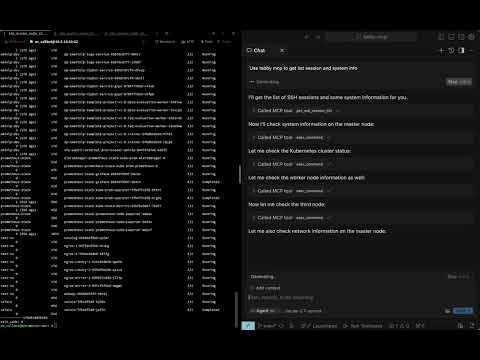
A Tabby Terminal plugin that exposes your active terminal sessions through the Model Context Protocol (MCP). It lets MCP-compatible AI clients discover terminal tabs, execute commands, read terminal buffers, and retrieve long command output.
Tabby stays the terminal UI. Your AI client connects to Tabby through MCP.
- MCP server inside Tabby — exposes an SSE endpoint at
http://localhost:3001/sse - Terminal session discovery — list local and SSH-backed Tabby terminal sessions
- Command execution — run commands in a selected Tabby terminal tab
- Robust output capture — simple marker protocol with exit-code parsing
- Terminal buffer access — read visible/history buffer ranges from a tab
- Long output pagination — retrieve full command output by
outputId - Pair programming mode — optional confirmation dialogs and user feedback
- Docker-based build — reproducible local plugin builds for Tabby
- Requirements
- Installation
- Quick Start
- Connecting MCP Clients
- Tools
- Configuration
- Development
- License
- Tabby Terminal installed and running
- Docker, for local builds
- macOS for the provided install script path
- An MCP-compatible client with SSE support, such as Claude Code, Cursor, Windsurf, Codex, or another SSE-capable MCP client
- Open Tabby
- Go to Settings → Plugins
- Install Tabby MCP
- Restart Tabby
- Open Settings → Plugins → MCP and confirm the server configuration
git clone https://github.com/thuanpham582002/tabby-mcp-server.git
cd tabby-mcp-server

make build-dist
bash scripts/copy_to_plugin_folder.sh
The install script copies the plugin to:
~/Library/Application Support/tabby/plugins/node_modules/tabby-mcp
Restart Tabby after installing or updating the plugin.
If your local Tabby installation requires bundled plugin dependencies, build the full package:
make build-dist-with-deps
bash scripts/copy_to_plugin_folder.sh- Start or restart Tabby
- Open at least one terminal tab
- Verify the MCP server is running:
curl http://localhost:3001/health
# OK- List Tabby terminal sessions:
curl -X POST http://localhost:3001/api/tool/get_ssh_session_list \
  -H 'Content-Type: application/json' \
-d '{}'- Execute a command in a session:
curl -X POST http://localhost:3001/api/tool/exec_command \
  -H 'Content-Type: application/json' \
-d '{"command":"pwd","tabId":"0"}'Tabby-MCP provides:
SSE endpoint:    http://localhost:3001/sse
Health endpoint: http://localhost:3001/health
HTTP test API:   http://localhost:3001/api/tool/<tool-name>
The Tabby plugin must be running before clients can connect.
Use this configuration for clients that support SSE MCP servers directly:
{
  "mcpServers": {
    "tabby-mcp": {
      "type": "sse",
      "url": "http://localhost:3001/sse"
    }
  }
}
For Cursor-style clients, place it in the MCP config file, for example:
~/.cursor/mcp.json
If your Claude Code version supports SSE MCP servers:
claude mcp add --transport sse tabby-mcp http://localhost:3001/sseIf your setup uses JSON config, use the SSE clients configuration.
Use the SSE MCP server configuration supported by your Codex client:
{
  "mcpServers": {
    "tabby-mcp": {
      "type": "sse",
      "url": "http://localhost:3001/sse"
    }
  }
}
For TOML-based configs, map the same SSE URL using your client's supported SSE MCP syntax.
Default plugin configuration:
{
  "mcp": {
    "enabled": true,
    "startOnBoot": true,
    "port": 3001,
    "serverUrl": "http://localhost:3001",
    "enableDebugLogging": true,
    "pairProgrammingMode": {
      "enabled": true,
      "showConfirmationDialog": true,
      "autoFocusTerminal": true
    }
  }
}
Configure these options in Tabby under Settings → Plugins → MCP.
Pair Programming Mode adds safety prompts when an AI client executes commands:
- confirmation before command execution
- optional terminal auto-focus
- command rejection with feedback
- command result dialog and history tracking
Clone and build:
git clone https://github.com/thuanpham582002/tabby-mcp-server.git
cd tabby-mcp-server
make build-dist
Install into local Tabby:
bash scripts/copy_to_plugin_folder.shRestart Tabby and verify:
curl http://localhost:3001/healthmake build-dist # Build dist only
make build-dist-with-deps # Build dist and copy node_modules
make help # Show available targetsMIT — see LICENSE.
Made with ❤️ by Pham Tien Thuan