

Ship production-ready backends and radically extensible back-office apps in minutes.
Own your data, own your code. The absolute easiest way to build on PostgreSQL.
Live Demo • Documentation • Features • Discord


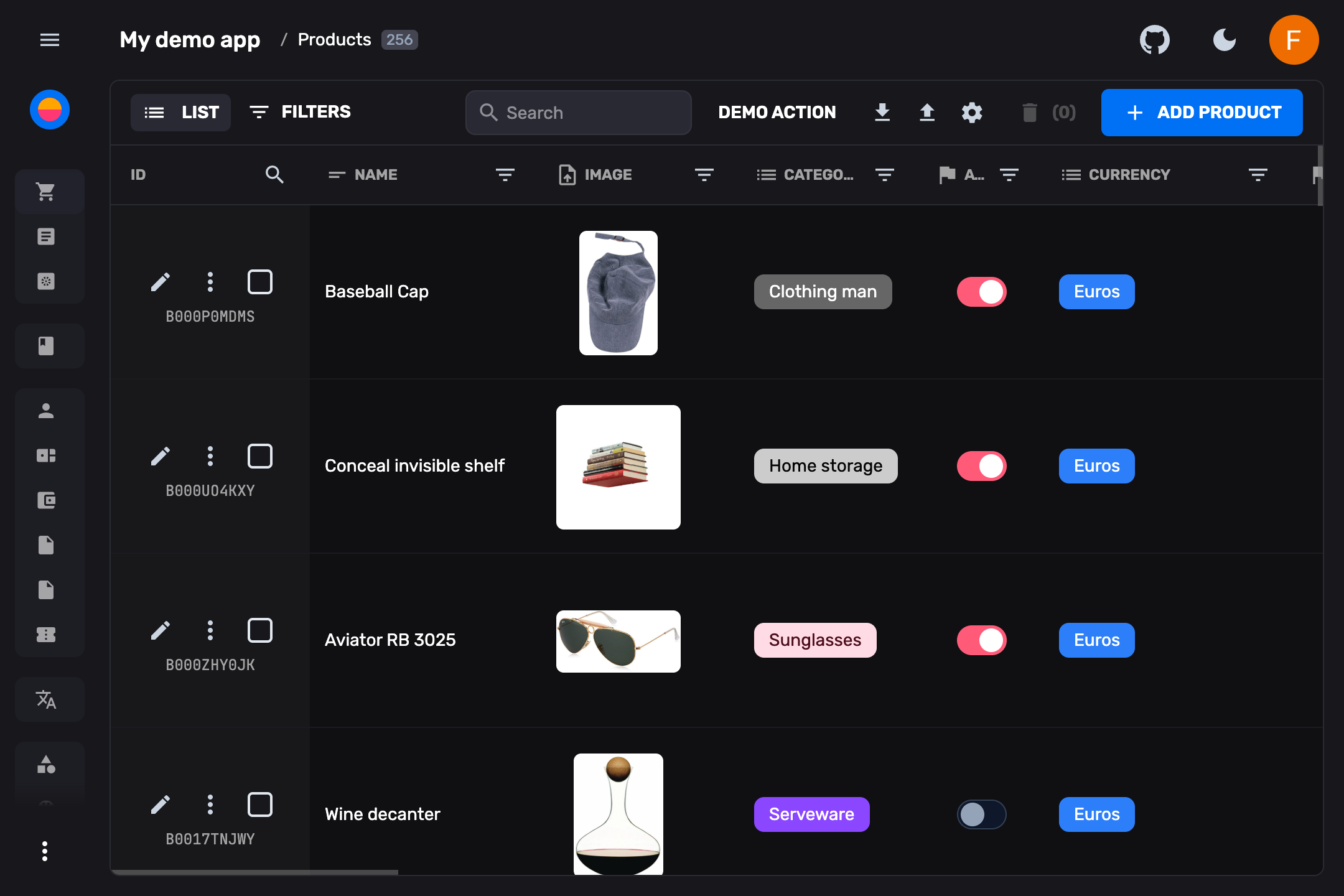
Rebase is a developer-first, open-source headless CMS and admin panel framework built with React and TypeScript. It gives you a complete backend-as-a-service layer on top of PostgreSQL — including authentication, S3-compatible storage, a full admin UI, and auto-generated APIs — while letting you extend every layer with custom React components, serverless functions, and scripts. It's fully self-hosted and agent-native, with a built-in MCP server for AI-assisted development.
- 🔓 No Vendor Lock-in — Self-host anywhere. Full control over your infrastructure, code, and database.
- ⚡ Instant Setup —
npx @rebasepro/cli initscaffolds a production-ready project in seconds. - 🗄️ PostgreSQL First — First-class Postgres support with Drizzle ORM, schema introspection, and automatic migrations.
- 🧩 Radical Extensibility — Not constrained to pre-built widgets. If you can build it in React, you can build it in Rebase.
- 🎨 Premium UI — Fast, accessible design system built on Tailwind CSS v4 and Radix UI.
- 🤖 AI-Ready — MCP server for AI-assisted database management, plus data enhancement and insights plugins.
Scaffold a complete, self-hosted Rebase application connected to your database:
npx @rebasepro/cli init my-rebase-app
cd my-rebase-app
Start the database, push the schema, and launch:
docker compose up -d db
pnpm run db:push
pnpm run dev
Your admin panel is running at http://localhost:5173 and the API at http://localhost:3001.
An incredibly fast, windowed spreadsheet view to manage your database with inline editing, real-time updates, filtering, sorting, and text search. Switch between multiple view modes:
- Spreadsheet table — Inline editing, column reordering, drag-and-drop
- Card grid — Visual overview with image previews
- List view — Compact, scannable layout
- Custom views — Build any React component as a collection view
Define your data models using pure TypeScript collections. Rebase automatically generates your Drizzle ORM schema, handles PostgreSQL migrations, and keeps your live database perfectly in sync using built-in tooling like rebase doctor.
Built-in authentication with multiple providers:
- Email/Password — With password reset flow
- Google OAuth — One-click sign-in
- Anonymous — For guest access
Granular role-based access control (RBAC) with customizable permissions per collection, field, and action.
Native S3-compatible file storage with:
- Drag-and-drop uploads with progress tracking
- Automatic image resizing and optimization
- File metadata management
- Storage browser in Studio
A full developer environment built into the admin panel:
| Tool | Description |
|---|---|
| SQL Editor | Write and execute SQL queries directly against your database with schema-aware autocomplete |
| RLS Policy Editor | Visual editor for PostgreSQL Row-Level Security policies |
| Schema Visualizer | Interactive ER diagram of your database with relationship mapping |
| JS/TS Editor | In-browser code editor for scripts and functions |
| API Explorer | Browse and test your auto-generated REST API endpoints |
| Cron Jobs | Schedule and monitor recurring tasks |
| Storage Browser | Browse and manage files in your S3-compatible storage |
A full WebSocket engine built into every Rebase backend:
- Live data subscriptions — Subscribe to collection queries or individual entities. Changes propagate instantly with RLS-aware security.
- Broadcast channels — Send typed messages between connected clients. Build chat, notifications, or collaborative features.
- Presence tracking — Track who's online, sync user state across clients (typing indicators, cursor positions, online status).
- Auto-reconnect — Exponential backoff, automatic resubscription, and token refresh on reconnect.
Drop custom Hono routes or scheduled tasks into the functions/ and crons/ directories. Rebase auto-loads them with database access and JWT authentication middleware injected automatically.
Auto-generate fully typed TypeScript SDKs from your collection definitions. Use them in any frontend, script, or service to interact with your Rebase backend with complete type safety.
npx @rebasepro/cli generate-sdkA built-in Model Context Protocol server that enables AI assistants to:
- Query and manage your database schema
- Create, read, update, and delete documents
- Manage users and roles
- Introspect your data model
Point Rebase at an existing PostgreSQL database and automatically generate collection definitions from your tables — including types, relations, validation constraints, and more.
Import data from CSV, JSON, and Excel with an intuitive field mapper. Export your data in multiple formats with configurable column selection.
Extend the admin experience with first-party plugins:
- Data Enhancement — AI-powered field suggestions and auto-fill
- Insights — Analytics dashboards and usage metrics
Write standalone data manipulation scripts that connect directly to your running backend using the @rebasepro/client SDK. The CLI persists the dev server URL to .rebase-dev-url for zero-config local development.
Build entirely custom views — dashboards, previews, charts — and drop them into the main navigation or as entity-level tabs. Use built-in hooks to interact with Rebase's internal state.
Built entirely on modern, battle-tested web standards:
| Technology | What we use it for |
|---|---|
| 💙 TypeScript 5.x | End-to-end type safety |
| ⚛️ React 19 | Component-driven UI |
| 🌊 Tailwind CSS v4 | Utility-first styling |
| 🔌 WebSockets | Real-time synchronization |
| 🗄️ Drizzle ORM | Type-safe SQL migrations and queries |
| 🧱 Radix UI | Accessible UI primitives |
| 📝 ProseMirror | Rich text editing engine |
| 🌐 Hono | Ultrafast HTTP server framework |
Rebase is structured as a modular monorepo — install only the layers you need:
Rebase exposes its design system as a completely independent library. Fully typed, accessible, and customizable via Tailwind CSS v4:
npm install @rebasepro/uiExplore a live interactive sandbox with all features — data resets periodically:
Rebase is designed from the ground up to be AI-agent ready. When developing a Rebase project using AI coding assistants (like Cursor, Windsurf, or Copilot):
Every new project scaffolded with rebase init automatically includes a pre-configured .cursorrules file at the root. This instructs your AI agent on:
- Using the Rebase SDK instead of raw SQL / direct Drizzle queries (which ensures data validation, RLS, and lifecycle callbacks run correctly).
- The two-step schema migration workflow (
rebase schema generate->rebase db push). - Structuring custom functions and cron jobs.
Rebase runs a Model Context Protocol (MCP) server that connects your AI assistant directly to your live Rebase schemas and databases for automated schema discovery, entity management, and data migrations.
If your AI coding agent or database role permissions cause a permission denied for table <table_name> error when executing queries in the Rebase Studio SQL Editor:
- Add
DISABLE_DB_ROLE_SWITCHING=trueto your.envfile. - This forces the SQL Editor queries to execute under the default connection owner user (e.g.
rebase) rather than trying to perform a PostgreSQL role switch to a non-existent database-level role.
If you find Rebase useful, please consider giving us a star on GitHub — it helps more developers discover the project!
Rebase is open-source and licensed under the MIT License. See the full License for details.