
{{ message }}
Repository navigation
Axis area and the axis title area property in axis class #1949
Description

Hi,
I'm building an WPF application for analyzing measurement data. The frontend used OxyPlot to display the data. The user is able to select any part of the plot to change the properties over the suitable controls in the menu bar. By selecting a plot part (i.e. series, legends, annotations) it is highlighted with a dotted border with a padding. I can select almost everything but the axes, as the axes area seams not to be captured as area? Or am I blind? :-)
Feature description
It would help to have a area property in the axis class for the axis area and the axis title area to be able to check a screenpoint is within.
Best regards
Chris
Activity
VisualMelon commentedon Nov 27, 2022
Yes, this would be useful.
You can perform hit-testing for axes with the
PlotModel.GetAxesFromPointmethod at the moment, but it's not quite what you describe (would need a bit of fudging).ChrisCC6 commentedon Nov 28, 2022
I already implemented this in the my fork. I currently have two different areas for the axes area and for the title area. Filling the two areas with two different colors looks pretty fine for all available examples.
Maybe you can have a look?
VisualMelon commentedon Nov 28, 2022
I'd be glad to if you can throw me a link: I don't see it in your fork, but I might just be missing something.
ChrisCC6 commentedon Nov 29, 2022
Forgot to push... My fault. Sorry

Works for all examples in the solution. Show case: filling the areas on rendering.
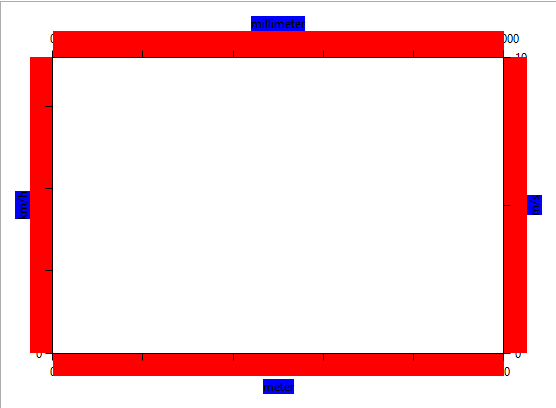
For the AngleAxisRenderer as well.
VisualMelon commentedon Dec 2, 2022
Some interesting stuff in there, couple of notes from a quick scan:
AnnulusoverHypoid(I think hypoid is a more specific concept? feel free to correct me)GetAxesFromPointmethod (and so make it easier to add new axis types)IShapemight not be the best name, but I can't think of a better one right nowFeel free to open a PR for this: will make it easier for us to discuss specifics
ChrisCC6 commentedon Dec 6, 2022
Regarding your points:
HypoidtoAnnulus-> valid point: doneAxisAreatoAxisLineArea(green) -> capturesjust theAxisLine,TitleArea(blue) stays the same and added anotherAxisArea(red) for the whole AxisIShapemight be betterIContour, but this would be a minor oneTickStyleisNoneand the there are no labels drawn due some use case specific reason. This would result that theAxisLineAreawould be equal the line stroke dimensions. For user interaction maybe not the best, as it will be very hard to select it with the mouse (e.g. my application is mainly driven by mouse interaction to select an configure -> all elements are wrapped in separate viewmodels).Add AxisArea, AxisLineArea and AxisTitleArea property in Axis class (o…