
EnvironmentMapEffect
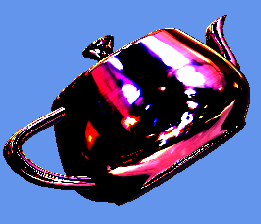
This is a native Direct3D 12 implementation of the built-in EnvironmentMapEffect from XNA Game Studio 4 (Microsoft.Xna.Framework.Graphics.EnvironmentMapEffect) which supports environment mapping with texture mapping, vertex or per-pixel lighting, and fogging.
See also Effects
classDiagram
class EffectFlags{
    <<enumeration>>
    Fog
    PerPixelLighting
    BiasedVertexNormals
    Fresnel
    Specular
}
class Mapping{
    <<enumeration>>
    Mapping_Cube
    Mapping_Sphere
    Mapping_DualParabola
}
class IEffect{
    <<Interface>>
    +Apply()
}
class IEffectMatrices{
    <<Interface>>
    +SetWorld()
    +SetView()
    +SetProjection()
    +SetMatrices()
}
class IEffectLights{
    <<Interface>>
    +SetAmbientLightColor()
    +SetLightEnabled()
    +SetLightDirection()
    +SetLightDiffuseColor()
    +EnableDefaultLighting()
}
class IEffectFog{
    <<Interface>>
    +SetFogEnabled()
    +SetFogStart()
    +SetFogEnd()
    +SetFogColor()
}
class EnvironmentMapEffect{
    +SetDiffuseColor()
    +SetEmissiveColor()
    +SetAlpha()
    +SetColorAndAlpha()
    +SetTexture()
    +SetEnvironmentMap()
    +SetEnvironmentMapAmount()
    +SetEnvironmentMapSpecular()
    +SetFresnelFactor()
}
EnvironmentMapEffect .. EffectFlags
EnvironmentMapEffect .. Mapping
EnvironmentMapEffect --|> IEffect
EnvironmentMapEffect --|> IEffectMatrices
EnvironmentMapEffect --|> IEffectLights
EnvironmentMapEffect --|> IEffectFog
class DirectX::EnvironmentMapEffect :
    public DirectX::IEffect,
    public DirectX::IEffectMatrices,
    public DirectX::IEffectLights,
public DirectX::IEffectFog#include <Effects.h>Related tutorials: Using advanced shaders
Construction requires a Direct3D 12 device, optional effect flags, and state description:
std::unique_ptr<EnvironmentMapEffect> effect;

RenderTargetState rtState(m_deviceResources->GetBackBufferFormat(),
    m_deviceResources->GetDepthBufferFormat());

EffectPipelineStateDescription pd(
    &InputLayout,
    CommonStates::Opaque,
    CommonStates::DepthDefault,
    CommonStates::CullCounterClockwise,
    rtState);

effect = std::make_unique<EnvironmentMapEffect>(device, EffectFlags::Fresnel, pd);
In addition to the usual effect flags, this effect also supports EffectFlags::Fresnel and EffectFlags::Specular. There is an additional defaulted parameter to control the mapping of the environment texture as cubic, sphere, or dual-parabolic.
EnvironmentMapEffect(_In_ ID3D12Device* device, uint32_t effectFlags,
    const EffectPipelineStateDescription& pipelineDescription,
    Mapping mapping = Mapping_Cube);
For exception safety, it is recommended you make use of the C++ RAII pattern and use a std::unique_ptr or std::shared_ptr
Older versions of the library used
, bool fresnelEnabled = true, bool specularEnabled = false);as the final parameters to the ctor instead ofMapping mapping = Mapping_Cube). These are replaced withEffectFlagsnow. To get the equivalent of the old ctor defaults, useEffectFlags::Fresnel.
EnvironmentMapEffect supports IEffect, IEffectMatrices, IEffectLights, and IEffectFog. EffectFlags::Fog is required to enable fogging.
This effect requires SV_Position, NORMAL and TEXCOORD.
-
SetDiffuseColor: Sets the diffuse color of the effect. Defaults to white (1,1,1). Alpha channel (.w component) is ignored.
-
SetEmissiveColor: Sets the emissive color of the effect. Defaults to black (0,0,0).
-
SetAlpha: Sets the alpha (transparency) of the effect. Defaults to 1 (fully opaque). This value is also used for binning opaque vs. transparent geometry.
-
SetColorAndAlpha: Sets the diffuse color of the effect and the alpha (transparency).
-
SetTexture: Associates a texture and sampler descriptor with the effect for the diffuse layer. Can optionally include an alpha channel as well.
-
SetEnvironmentMap: Associates the environment texture and sampler descriptor with the effect. For the cubic mapping (
Mapping_Cube), this should be a cubemap. For sphere mapping (Mapping_Sphere), this is a single texture. For dual-parabolic mapping (Mapping_DualParabola), this is a 2D texture array with two items: front and back. -
SetEnvironmentMapAmount: Controls the diffuse vs. environment map blending percentage, and ranges from 0 to 1. It defaults to 1.
-
SetEnvironmentMapSpecular: Sets the specular color for the environment map if the instance was created with
EffectFlags::Specular. Defaults to black (0,0,0). -
SetFresnelFactor: Sets the Frensel factor for the environment map if the instance was created with
EffectFlags::Fresnel. Defaults to 1.
The ctor can throw std::bad_alloc or std::invalid_argument.
Apply can throw std::runtime_error for if there's no texture or sampler set.
The methods SetLightEnabled, SetLightDirection, SetLightDiffuseColor, and SetMode can throw std::invalid_argument.
The other property methods of this implementation do not throw C++ exceptions.
EnvironmentMapEffect computes all specular effects using the environment map and specular factor, and always performs vertex (EffectFlags::Lighting) or per-pixel lighting (EffectFlags::PerPixelLighting).
For the sphere and dual-parabolic mapping modes, EffectFlags::PerPixelLighting is always in effect.
The EffectFlags::BiasedVertexNormals is supported by this effect. This flag should be used if the vertex data contains normals encoded as biased data such as DXGI_FORMAT_R10G10B10A2_UNORM.
This effect always performs texturing, so if 'untextured' rendering is desired you must provide texture coordinates, and a 1x1 texture with white (1,1,1,1).
Both EffectFlags::Lighting and EffectFlags::Texture are always enabled for this effect, so use or absence of these flags are ignored for this effect.
The SetLightSpecularColor method is ignored.

See Microsoft Docs

See Microsoft Docs
Blinn & Newell, "Texture and Reflection in Computer Generated Images", Communications of the ACM. 1976. link
Greene, "Environment Mapping and Other Applications of World Projections", IEEE Computer Graphics and Applications., 1986. link
Heidrich & Seidel, “View-independent Environment Maps”, Eurographics Workshop on Graphics Hardware, 1998. link