Make the Qt interactive zoom rectangle black & white. by anntzer · Pull Request #16798 · matplotlib/matplotlib · GitHub
Skip to content

Make the Qt interactive zoom rectangle black & white. - #16798

Merged
QuLogic merged 1 commit into
matplotlib:masterfrom
anntzer:qtzoom
May 1, 2020
Merged

Make the Qt interactive zoom rectangle black & white.#16798
QuLogic merged 1 commit into
matplotlib:masterfrom
anntzer:qtzoom

Conversation

@anntzer

@anntzer anntzer commented Mar 16, 2020

Copy link
Copy Markdown
Contributor

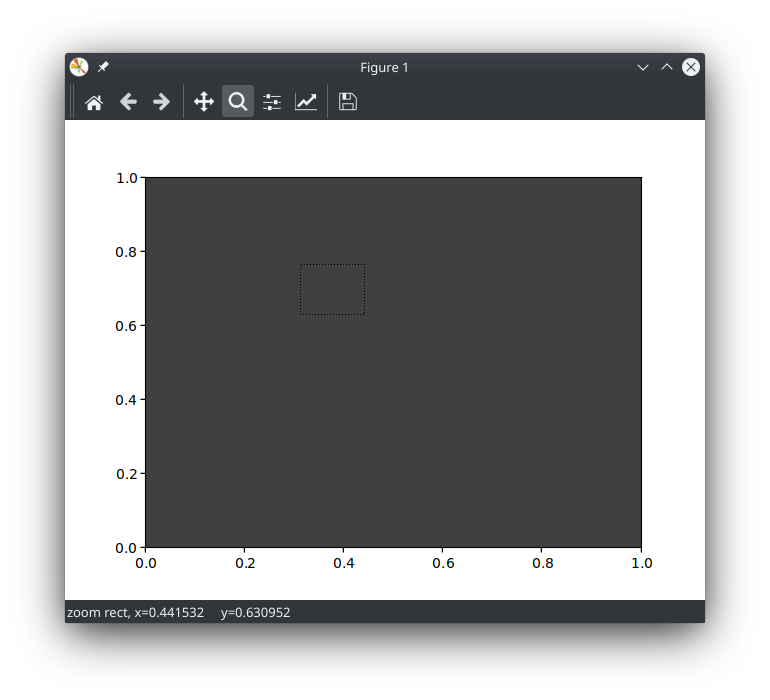
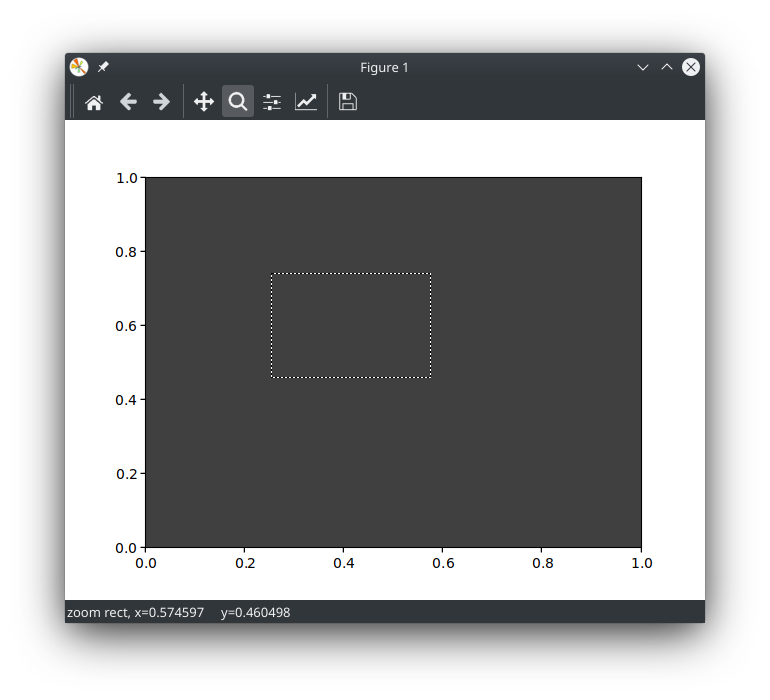
Explicitly drawing white segments makes it visible even over dark
backgrounds.

before (but imagine even darker backgrounds (typically, an image using a black-to-white cmap)):
old
after:
new

PR Summary

PR Checklist

  • Has Pytest style unit tests
  • Code is Flake 8 compliant
  • New features are documented, with examples if plot related
  • Documentation is sphinx and numpydoc compliant
  • Added an entry to doc/users/next_whats_new/ if major new feature (follow instructions in README.rst there)
  • Documented in doc/api/api_changes.rst if API changed in a backward-incompatible way

@anntzer anntzer added this to the v3.3.0 milestone Mar 16, 2020

@dstansby dstansby left a comment

Copy link
Copy Markdown
Member

Choose a reason for hiding this comment

The reason will be displayed to describe this comment to others. Learn more.

I think this is (just about) exciting enough to warrant a what's new entry

@anntzer

anntzer commented Mar 17, 2020

Copy link
Copy Markdown
Contributor Author

@timhoffm

timhoffm commented Mar 17, 2020

Copy link
Copy Markdown
Member

Not sure I like an alternating color selection rectangle. It looks good on whitish and blackish backgrounds, but may be odd on other background colors. I'm not aware of any other application using this. Other applications often use a semi-transparent fill color for increased visibility.

OTOH, most people use white background, in which case it does not make a difference. Not a big fan, but I also won't block.

@anntzer

anntzer commented Mar 17, 2020

Copy link
Copy Markdown
Contributor Author

I'm not particularly wedded to black-and-white, but the current status (black and transparent) is basically useless on dark background (in my case, microscopy images). If you have a better solution, I'm happy to try it.

@tacaswell

Copy link
Copy Markdown
Member

I have also personally had this problem (also with mircoscopy images). Seeing this PR was a light bulb of "Why didn't I think of that 7 years ago!".

This will also help visibility on top of a mostly "low" viridis purple.

@QuLogic

QuLogic commented Mar 18, 2020

Copy link
Copy Markdown
Member

Can you set the pen to draw in XOR mode? That might work for any background.

I was going to say that's what GIMP does, but either they changed it or never did it like that. They have a 3-pixel wide selection stroke: 3 pixels black, and center pixel white/black alternating.

@tacaswell

Copy link
Copy Markdown
Member

That is a good idea! Looks like you can: https://doc.qt.io/qt-5/qpainter.html#setCompositionMode

@timhoffm

Copy link
Copy Markdown
Member

Can you set the pen to draw in XOR mode? That might work for any background.

Sorry to be a bit particular on this 👿. This runs against my aesthetic sense: You would have a rainbow line on false-color plots. Feels like we did this in the 90s. 💿

@anntzer

anntzer commented Mar 18, 2020

Copy link
Copy Markdown
Contributor Author

I agree this will likely look wrong (though I haven't actually tried :))

@timhoffm

Copy link
Copy Markdown
Member

What about

painter.fillRect(*scaled_rect, QtGui.QColor(168, 168, 168, 50))
pen = QtGui.QPen(QtGui.QColor(0, 0, 0, 168), 1 / self._dpi_ratio)
painter.setPen(pen)
painter.drawRect(*scaled_rect)

grafik
grafik

Lightness vs transparency could be fine-tuned further.

@anntzer

anntzer commented Mar 19, 2020

Copy link
Copy Markdown
Contributor Author

That looks pretty good to me (I like it), though it is also a bigger to the previous style so we may get more complaints? ;)

@timhoffm

Copy link
Copy Markdown
Member

I'll play a bit with the colors tonight. I'm not concerned with complaints 😄. This is only temporarily visible and does not change the appearance of the figure.

@anntzer

anntzer commented Mar 19, 2020

Copy link
Copy Markdown
Contributor Author

re: colors: yes, I was wondering where the 168 came from :) (but it looks fine to me)

@timhoffm

Copy link
Copy Markdown
Member

Here are some simulated proposals for rectangle colors:

  • Columns: Make sure it's visible on different common axes backgrounds (white, grey (ggplot), lightblue (seaborn), dark grey, black)
  • Rows: Three proposals for selection colors: grey / blue / orange

Personally, I like blue and orange, the grey selection rectangle is too damp.

grafik

Here's also the code, in case you want to play with the colors further.

import matplotlib.pyplot as plt
from matplotlib.patches import Rectangle

def c(r, g, b, a=255):
    return (r/255, g/255, b/255, a/255)

backgrounds = ['white', c(229, 229, 229), c(234, 234, 242), (0.25, 0.25, 0.25), 'black']
rect_colors = [
    # border, background
    [c(0, 0, 0, 168), c(192, 192, 192, 64)],  
    [c(33, 112, 156), c(127, 167, 189, 64)],  
    [c(202, 121, 0), c(236, 178, 92, 64)],  
]

fig, axs = plt.subplots(len(rect_colors), len(backgrounds), figsize=(15, 12))

for i, (ec, fc) in enumerate(rect_colors):
    for j, bg in enumerate(backgrounds):
        axs[i, j].plot([0.15, 0.5, 0.7, 0.9], [0.5, 0.8, 0.4, 0.3], 'o-')
        axs[i, j].patch.set_facecolor(bg)
        axs[i, j].add_patch(Rectangle((0.2, 0.3), 0.6, 0.4, fc=fc, ec=ec, zorder=4))
        axs[i, j].set_xlim(0, 1)
        axs[i, j].set_ylim(0, 1)

@ImportanceOfBeingErnest

Copy link
Copy Markdown
Member

My vote would be to not fill or shade the interiour of the selection, because that changes the appearance of the part of the image you want to select. Ideally, one would instead shade the outside of the selection, but I suppose that is not that easy and might just be overkill.
So my vote goes for the original proposal of black&white lines.

@QuLogic QuLogic added the status: needs comment/discussion needs consensus on next step label Mar 24, 2020
@tacaswell

Copy link
Copy Markdown
Member

Consensus on call seems to be black and while outline. Decision is between black-and-white dashes and black and white lines.

@timhoffm gets final say on this PR.

@QuLogic

QuLogic commented Apr 27, 2020

Copy link
Copy Markdown
Member

Comment thread lib/matplotlib/backends/backend_qt5.py Outdated
Explicitly drawing white segments makes it visible even over dark
backgrounds.

@timhoffm timhoffm left a comment

Copy link
Copy Markdown
Member

Choose a reason for hiding this comment

The reason will be displayed to describe this comment to others. Learn more.

Anybody can merge after CI pass.

@QuLogic
QuLogic merged commit 015ff47 into matplotlib:master May 1, 2020
Sign up for free to join this conversation on GitHub. Already have an account? Sign in to comment

Labels

Projects

None yet

Development

Successfully merging this pull request may close these issues.

7 participants