
Redis Sentinel
Redis Sentinel is the official recommendation for running a highly available Redis configuration by running a number of additional redis sentinel processes to actively monitor existing redis master and slave instances ensuring they're each working as expected. If by consensus it's determined that the master is no longer available it will automatically failover and promote one of the replicated slaves as the new master. The sentinels also maintain an authoritative list of available redis instances providing clients a centeral repositorty to discover available instances they can connect to.
Support for Redis Sentinel is available with the RedisSentinel class which listens to the available
Sentinels to source its list of available master, slave and other sentinel redis instances which it uses
to configure and maintain the Redis Client Managers, initiating any failovers as they're reported.
To use the new Sentinel support, instead of populating the Redis Client Managers with the connection string
of the master and slave instances you would create a single RedisSentinel instance configured with
the connection string of the running Redis Sentinels:
var sentinelHosts = new[]{ "sentinel1", "sentinel2:6390", "sentinel3" };
var sentinel = new RedisSentinel(sentinelHosts, masterName: "mymaster");
This shows a typical example of configuring a RedisSentinel which references 3 sentinel hosts (i.e.
the minimum number for a highly available setup which can survive any node failing).
It's also configured to look at the mymaster configuration set (the default master group).
Redis Sentinels can monitor more than 1 master / slave group, each with a different master group name.
The default port for sentinels is 26379 (when unspecified) and as RedisSentinel can auto-discover other sentinels, the minimum configuration required is just:
var sentinel = new RedisSentinel("sentinel1");Scanning and auto discovering of other Sentinels can be disabled with
ScanForOtherSentinels=false
Once configured, you can start monitoring the Redis Sentinel servers and access the pre-configured client manager with:
IRedisClientsManager redisManager = sentinel.Start();Which as before, can be registered in your preferred IOC as a singleton instance:
container.Register<IRedisClientsManager>(c => sentinel.Start());RedisSentinel by default manages a configured PooledRedisClientManager instance which resolves both master
Redis clients for read/write GetClient() and slaves for readonly GetReadOnlyClient() API's.
This can be changed to use the newer RedisManagerPool with:
sentinel.RedisManagerFactory = (master,slaves) => new RedisManagerPool(master);The host the RedisSentinel is configured with only applies to that Sentinel Host, you can still use the flexibility of
Redis Connection Strings
to configure the individual Redis Clients by specifying a custom HostFilter:
sentinel.HostFilter = host => "{0}?db=1&RetryTimeout=5000".Fmt(host);This will return clients configured to use Database 1 and a Retry Timeout of 5 seconds (used in new Auto Retry feature).
Whilst the above covers the popular Sentinel configuration that would typically be used, nearly every aspect
of RedisSentinel behavior is customizable with the configuration below:
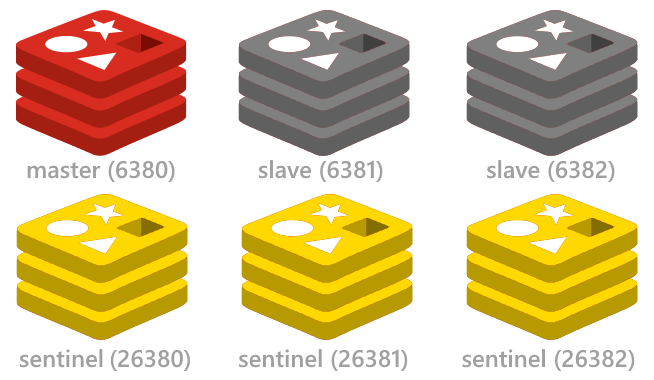
The redis config project simplifies setting up and running a highly-available multi-node Redis Sentinel configuration including start/stop scripts for instantly setting up the minimal highly available Redis Sentinel configuration on a single (or multiple) Windows, OSX or Linux servers. This single-server/multi-process configuration is ideal for setting up a working sentinel configuration on a single dev workstation or remote server.
The redis-config repository also includes the MS OpenTech Windows redis binaries and doesn't require any software installation.
To run the included Sentinel configuration, clone the redis-config repo on the server you want to run it on:
git clone https://github.com/ServiceStack/redis-config.git
Then Start 1x Master, 2x Slaves and 3x Sentinel redis-servers with:
cd redis-config\sentinel3\windows
start-all.cmd
Shutdown started instances:
stop-all.cmd
If you're running the redis processes locally on your dev workstation the minimal configuration to connect to the running instances is just:
var sentinel = new RedisSentinel("127.0.0.1:26380");
container.Register(c => sentinel.Start());The sentinel configuration assumes all redis instances are running locally on 127.0.0.1.
If you're instead running it on a remote server that you want all developers in your network to be
able to access, you'll need to either change the IP Address in the *.conf files to use the servers
Network IP. Otherwise you can leave the defaults and use the RedisSentinel IP Address Map feature
to transparently map localhost IP's to the Network IP that each pc on your network can connect to.
E.g. if this is running on a remote server with a 10.0.0.9 Network IP, it can be configured with:
var sentinel = new RedisSentinel("10.0.0.9:26380") {
    IpAddressMap = {
        {"127.0.0.1", "10.0.0.9"},
    }
};
container.Register(c => sentinel.Start());
Google Cloud - Click to Deploy Redis
The easiest Cloud Service we've found that can instantly set up a multi node-Redis Sentinel Configuration is using Google Cloud's click to deploy Redis feature available from the Google Cloud Console under Deploy & Manage:
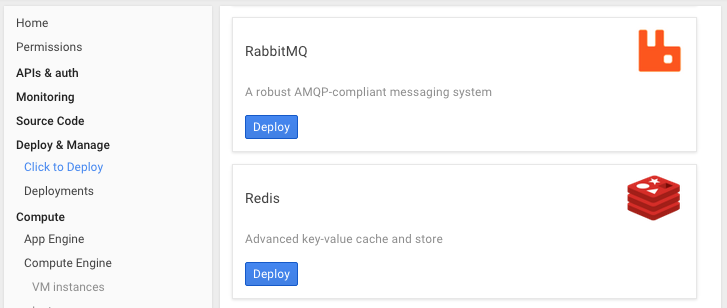
Clicking Deploy button will let you configure the type, size and location where you want to deploy the Redis VM's. See the full Click to Deploy Redis guide for a walk-through on setting up and inspecting a highly-available redis configuration on Google Cloud.