
Secondary project name: VISOR_C_A (V.I.S.O.R. Client Android)
This project is a part of a bigger project, consisting of the following:
Download the most recent release from the Releases.
They say "debug" at the end because they're debug type APKs, meaning you can use Android's logcat to look at what's happening on the app. They're not release type, in which you can't see anything. I'm releasing them as debug type. Why not, anyway.
NOTE: ignore the "app created for old Android version" warning when installing! That enables me to use system features now locked on newer Android releases!
- [Every time] Oreo 8.1 on a Blackview BV9500 (my current phone). This is also the Android version I'm making the app for (can't test it on newer than 8.1 anyway) - though I think most of the app (or everything) works on newer versions due to backwards compatibility, so feel free to install it on newer Android versions.
- [Rarely] KitKat 4.4.2 on my old Wolder miTab Advance tablet
- [Rarely] Jelly Bean 4.1 on an old Acer tablet
- [Not anymore] Lollipop 5.0 on a OnePlus X (the phone with the broken screen that gave reason to the app)
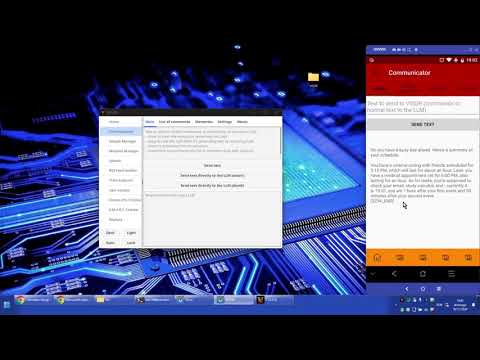
Note: these pictures are outdated. Check the video which is more recent.
NOTE: the commands list picture is outdated. Check below for a complete list.


- Background
- Explanation of the assistant
- Commands list
- Current features (modules and submodules)
- Installation/Usage
- For developers
- About
- Support
- Final notes and contributing
Hi all. This Android version is a project I started in January 2020 when I broke my phone's screen and glass (so I could see and do exactly nothing with the screen and touch - only Vysor and TeamViewer helped/help, but only with a PC nearby) - the PC version started in 2017 a month after I learned what programming was, but it's too no-code to publish XD (I didn't know what a function was by then...). Anyways. As I wasn't gonna switch phone so quickly (bought a new one a year later), I decided to make an assistant for it that would do anything I'd need without the need for me to have a working screen and touch (basically an app for a blind person, I guess). Could only use the Power, Vol Up and Vol Down buttons.
I've now finally decided to make it public, after vastly improving its coding style (<3 IntelliJ's Inspections...) and translating the code to English (was in Portuguese, even though speeches and recognition were already in English).
It's supposed to help handling the phone, even if it has no screen (my original use for the app with an older phone of mine with a broken screen), or even in the future, with time, one of the ideas is to have it knowing exactly where the user is (no sharing of anything, all local - everything will be only local when I create the file to store them) to remind them of something they might need to do (leaving the house, good idea to bring the wallet and the keys, for example. Or going near a supermarket - "You wanted to buy food"). It's all open-source code, so... nothing bad in the background. Don't really trust? - check the code and compile yourself and use it (same app anyways).
Its command recognition submodule is not a simple recognition (have a look on the Advanced Commands Detection module mentioned below in the Notice) - you don't have to say the exact command for it to recognize it. It's not smart either though (it's not ML - yet?). You can say any words in-between some hard-coded command words and it will still recognize the action(s). You can even tell it to don't do something you just told it to do. It's supposed to be an assistant for real-life use.
It's also supposed to work 100% offline. It can use online features, but preferably, only if they're not available offline. If Internet connection goes down, app goes down - doesn't seem a good idea... xD
I should also note that I'm making this app to "think" it's a God. That's why you might see some "abusive" parts on it, like my code ready to force permissions to be granted (though, disabled until I have a way to make it optional). It's supposed to be as secure as I can make it. Check it for yourself though. It has nothing that steals data (decompile the APK if you want, there are tools online for that; or compile it yourself). I might try to keep the app without the Internet permission if I release it to a store, so people can be relaxed about it (it will probably cut features if I do it though).
The app "supports" API 16 at minimum (that's Android 4.1). That's because I like to support as many devices as I can (gomobile, a library I use, is only available from API 16 onwards).
The app is also able to work with root access and system permissions. The prefered way to install the app is with root permissions, installed as a privileged system app, and Device Administration enabled for it (absolute control XD). The app must work without them perfectly, but if some features are only available with one or more of the 3 mentioned ways, they will be added anyways. So to have full functionality, install it that way.
List of all commands and variations available (optional words are in "[...]" and generic descriptions are in "(...)").
(Note: there is more than one way to say a command, with synonyms and random words in between ("switch on the phone's wifi", "what's the current time", "terminate the phone call", "call my friend number 2" (when the contact is just called "friend 2").)
Note 2: all this is listed inside the app.
--> Turn on/off flashlight/lantern
--> (Ask for the time)
--> (Ask for the date)
--> Turn on/off Wi-Fi
--> Turn on/off mobile data
--> Turn on/off bluetooth
--> Answer call
--> End call
--> Turn on/off speaker/speakers
--> Turn on/off airplane mode
--> (Ask for the battery percentage/status/level)
--> Shut down the device/phone
--> [Fast] reboot the device/phone [into recovery/safe mode/bootloader]
--> Take a [frontal] picture/photo
--> Record audio/sound
--> (Ask to repeat what was just said)
--> Call (a contact name)
--> Turn on/off the power/battery saver mode
--> Stop recording [audio/sound]
--> Stop media/song/music/video
--> Pause media/song/music/video
--> Play media/song/music/video"
--> Next media/song/music/video
--> Previous media/song/music/video
--> I do/confirm/approve/certify (confirm action when VISOR requests it)
--> I don't/reject/disapprove (reject action instead)
Here's a list of the modules the assistant currently have and what they do (module names are in bold for ease of read):
Note: not all the modules that appear on Modules Status are here. Some are just for internal management (like Modules Manager, which makes sure all the other modules are working perfectly - this is not really a "feature", so I didn't include it above) or any other minor things.
Install the app either as a perfectly normal app, or as a privileged system app (below KitKat 4.4, in /system/app; on 4.4 and above, in /system/priv-app/). Grant it root access, if you'd like, and also enable Device Administration for it, if you want. Privileged system app + root access + Device Administration will give you full functionality of the app.
After that, currently just click on the permissions button and accept everything (or what you'd like to accept - though I'm not/will not steal anything, so you can accept everything, if you want), and that's it. The app will do everything automatically (there's not much to do manually with it yet - only recording audio is manual for now).
To know what you can do, have a look on the Available commands view on the app. To know what the app can do, have a look on the explanations about its features.
- I'm not sure if other IDEs other than Android Studio can be used to compile an Android app, but that's the one I used. So if you want, use it too.
- Also, to be able to compile this app, you'll need hidden/internal APIs available on Android Studio, or it will throw errors. I decided to compile this app with those libraries since they allow some interesting and useful things to be used here. Have a look here to download and install those libraries: https://github.com/anggrayudi/android-hidden-api and/or https://github.com/Reginer/aosp-android-jar.
- For the new Augmented Reality part of VISOR, 2 other things you need are the OpenCV 3.4.16 Android SDK extracted to the project folder and also NDK v17.2.4988734 downloaded on Android Studio.
-
- You'll probably get a compilation error on line 598 of OpenCV's base.hpp file - just remove the "std::" part from the line and try to compile again. It should work.
Now a small explanation of the app structure:
- All modules are inside the Modules folder. Each module has a folder of its own and all directly related things to it should be on that folder. All modules must also be registered in the ModulesList.java file.
- All utility methods are inside classes started with "Utils". All main utilities are on GlobalUtils. Other utilities may be one specific packages of modules or other folders (depending if the utilities are for global app usage or only for that specific package).
- The main broadcast receivers are on BroadcastRecvs package. I say "main" because other broadcast receivers may be anywhere else on the app code. For example inside classes, like on Speech2 or on MainSrv.
- All modules must implement the IModule classes, which provide "universal" methods to check if a module is working properly or not so that Module Manager can reset it if needed.
- The VoiceEnrollment and VoiceInteraction folders are just experiments of mine to get Google's hotword recognizer to work (which would make it possible to use Google's speech recognition instead of the current PocketSphinx speech recognition, which is worse than Google's, and that's why when VISOR is called, it may not hear it, as opposite to if it were Google's recognition detecting the hotword).
Have a look on the "TODO.md" file (note: it's not always updated. But it has some things there).
Ongoing, but possibly slowly. I may not have that much time to work on this (even though I'd love to have more time) - except on Holidays xD.
This project is licensed under Apache 2.0 License - http://www.apache.org/licenses/LICENSE-2.0.
If you have any questions, try the options below:
- Create an Issue here: https://github.com/DADi590/VISOR---A-better-Android-assistant/issues
- Create a Discussion here: https://github.com/DADi590/VISOR---A-better-Android-assistant/discussions
Hope you like the app! Any new ideas and/or improvements are welcomed! (Just giving the idea and/or making a pull request)