

ComfyUI-Inpaint-CropAndStitch
Copyright (c) 2024-2026, Luis Quesada Torres - https://github.com/lquesada | www.luisquesada.com
Check ComfyUI here: https://github.com/comfyanonymous/ComfyUI
The '✂️ Inpaint Crop' and '✂️ Inpaint Stitch' nodes enable inpainting only on masked area very easily
"✂️ Inpaint Crop" crops the image around the masked area (optionally with a context area that marks all parts relevant to the context), taking care of pre-resizing the image if desired, extending it for outpainting, filling mask holes, growing or blurring the mask, cutting around a larger context area, and resizing the cropped area to a target resolution.
The cropped image can be used in any standard workflow for sampling. It can even be rescaled up with any model (please keep the aspect ratio) and hiRes-fixed and it will be retrofit in the original image.
Then, the "✂️ Inpaint Stitch" node stitches the inpainted image back into the original image without altering unmasked areas.
The main advantages of inpainting only in a masked area with these nodes are:
- It is much faster than sampling the whole image.
- It enables setting the right amount of context from the image for the prompt to be more accurately represented in the generated picture.
- It enables upscaling before sampling in order to generate more detail, then stitching back in the original picture.
- It enables downscaling before sampling if the area is too large, in order to avoid artifacts such as double heads or double bodies.
- It enables forcing a specific resolution (e.g. 1024x1024 for SDXL models).
- It does not modify the unmasked part of the image, not even passing it through VAE encode and decode.
- It takes care of blending automatically.
GenAI is not just for the sake of GenAI, but to unblock creativity and empower humans. I am not only a developer; I use GenAI myself to do more things better than I could otherwise do.
Do you like this node? Check, listen to, or follow my GenAI music project Windlereye on Spotify to support me!

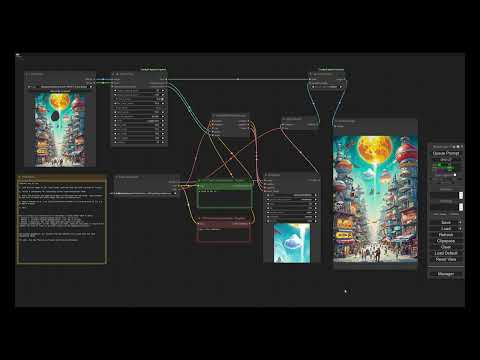
Note: this video tutorial is for the previous version of the nodes, but still it shows how to use them. The parameters are mostly the same.
downscale_algorithmandupscale_algorithm: Which algorithms to use when resizing an image up or down.preresize: Shows options to resize the input image before any cropping: to ensure minimum resolution, to ensure maximum resolution, to ensure both minimum and maximum resolution. This makes it very convenient to ensure that any input images have a certain resolution.mask_fill_holes: Whether to fully fill any holes (small or large) in the mask, that is, mark fully enclosed areas as part of the mask.mask_expand_pixels: Grows the mask by the specified amount of pixels.mask_invert: Whether to fully invert the mask, that is, only keep what was masked, instead of removing what was marked.mask_blend_pixels: Grows the stitch mask and blurs it by the specified amount of pixels, so that the stitch is slowly blended and there are no seams.mask_hipass_filter: Ignores mask values lower than the one specified here. This is to avoid sections in the mask that are almost 0 (black) to count as masked area. Sometimes that leads to confusion, as the user believes the area is not really masked and the node is considering it as masked.extend_for_outpainting: Shows options to extend the mask in any/all directions (up/down/left/right) by a certain factor. >1 extends the image, e.g. 2 extends the image in a direction by the same amount of space the image takes. <1 crops the image, e.g. 0.75 removes 25% of the image on that direction.context_from_mask_extend_factor: Extends the context area by a factor of the size of the mask. The higher this value is, the more area will be cropped around the mask for the model to have more context. 1 means do not grow. 2 means grow the same size of the mask across every direction.output_resize_to_target_size: Forces that the cropped image has a specific resolution. This may involve resizing and extending out of the original image, but the stitch node reverts those changes to integrate the image seamlessly.output_padding: Ensures that the cropped image width and height are a multiple of this padding value. Models require images to be padded to a certain value (8, 16, 32) to function properly.pad_to_max_size: When processing multiple masks, makes every cropped output the same shape so they can be sampled as a batch. Withoutput_resize_to_target_sizeoff, pads each crop up to the largest natural crop size. Withoutput_resize_to_target_sizeon, scales each crop to fit within the target (preserving aspect ratio) and pads the remainder. Pair with the Stitch node'saccumulateto merge the regions back into one image.uniform_scale: Only meaningful whenpad_to_max_sizeandoutput_resize_to_target_sizeare both on. Applies the same scale factor to every crop (chosen to fit the largest crop within the target) so all inpainted regions sample at consistent detail. Off by default — each crop is independently scaled to maximize its own resolution.device_mode:cpu (compatible)should always work but is slow,gpu (much faster)is much faster but may not work in all setups. Default is CPU for compatibility; switch to GPU for a large speedup (30x-100x) if your setup supports it.
accumulate: Combines all inpainted regions into a single output image. Use when you have multiple masks for different regions of the same image and want them merged into one result. Without it, each region is stitched into its own output frame.color_match: Only used whenaccumulateis on. Applies histogram matching against the surrounding original image so the inpainted region's colors blend more naturally with their neighborhood. Helps with color consistency across multiple inpainted regions. On by default.
This example inpaints by sampling on a small section of the larger image, upscaling to fit 512x512, then stitching and blending back in the original image.
Download the following example workflow from here or drag and drop the screenshot into ComfyUI.

This example uses Flux. Requires the GGUF nodes.
Models used:
Flux Dev Q5 GGUFfrom here. Put it in models/unet/.Flux 1. dev controlnet inpainting betafrom here. Put it in models/controlnet/.t5 GGUF Q3_K_Lfrom here. Put it in models/clip/.clip_lfrom here. Put it in models/clip/.ae VAEfrom here. Put it in models/vae/.
Download the following example workflow from here or drag and drop the screenshot into ComfyUI.

This example uses SD 1.5 to sample on a section of the larger image. Then it upscales the sampled image by 4x using an external model and applies a hiRes fix. Then it blends it back into the original image.
Models used:
4x Ultrasharpfrom here.
Download the following example workflow from here or drag and drop the screenshot into ComfyUI.

Install via ComfyUI-Manager or go to the custom_nodes/ directory and run $ git clone https://github.com/lquesada/ComfyUI-Inpaint-CropAndStitch.git
Use an inpainting model e.g. lazymixRealAmateur_v40Inpainting.
Use "InpaintModelConditioning" instead of "VAE Encode (for Inpainting)" to be able to set denoise values lower than 1.
Enable "resize to target size" and set it to a preferred resolution for your model, e.g. 512x512 for SD 1.5, 1024x1024 for SDXL or Flux.
If you mask an area and you can still see the original image through the rendered image, it is very likely that your mask is not fully opaque. Even if it looks fully opaque - the human brain cannot tell a difference between many shades of grey. Please make sure that the mask is 100% opaque, e.g. take a screenshot, check pixel values for 255, 255, 255 or #FFFFFF. If you use mask fill holes, check that the entire boundary is 255, 255, 255 or #FFFFFF e.g. with the fuzzy select tool in Gimp with threshold 0.
If the node is a bottleneck in your workflow (e.g. video inpainting), consider switching from CPU to GPU mode in the crop node, this will make both crop and stitch use GPU and VRAM instead of CPU and RAM, which will be 30x-100x faster - however, the inputs must fit in memory.
To inpaint several masked regions of the same image and get one combined output:
- On Inpaint Crop, enable
pad_to_max_sizeso every region is cropped to the same shape and can be sampled together as a batch. If you also useoutput_resize_to_target_size, turn onuniform_scalewhen you want every region sampled at the same scale (otherwise each region is independently scaled to maximize its own detail). - On Inpaint Stitch, enable
accumulateto merge all regions back into one image. Leavecolor_matchon (the default) so each region's colors blend naturally with their surroundings.
This works whether the masks arrive as a single batched tensor or as separate (non-batched) connections that ComfyUI auto-iterates — running the crop/sample/stitch pipeline once per mask. The Stitch node merges the per-pass results internally, so accumulate produces a single image either way. With accumulate off, the per-pass results are concatenated into one batched image so downstream batching keeps working.
All regions being accumulated must come from the same source image (same dimensions) — accumulate composes them into one buffer the size of that image. Masks may sit anywhere, including against the image border. When masks are auto-iterated one at a time, enable output_resize_to_target_size so every region is sampled at the same resolution (the per-pass crops can't be padded to a common size in that mode); otherwise Stitch will report that the regions have different sizes.
You can feed the cropped image to an external image-generation API node (for example a Gemini image node) and route its result back into Inpaint Stitch instead of a local sampler. Some of these nodes return an RGBA (4-channel) image even when the original photo is RGB (3-channel). Stitch reconciles the channel counts automatically — an extra alpha channel is dropped (and a missing one is padded opaque) so the result matches the original image — so no manual conversion node is needed. The stitched output always keeps the original image's channel layout.
Set the environment variable INPAINT_CROPANDSTITCH_DEBUG=1 before launching ComfyUI to expose a set of extra DEBUG_* image and mask outputs on the Inpaint Crop node. These surface the intermediate result of each processing stage (preresize, fill holes, expand, invert, blur, hipass filter, context selection, canvas placement, blend mask, etc.) and are useful for diagnosing an unexpected crop or mask. Leave the variable unset for normal use, in which case the node exposes only stitcher, cropped_image, and cropped_mask.
This is a fork of lquesada/ComfyUI-Inpaint-CropAndStitch. The entries in this section are the changes made in this fork on top of upstream; the dated entries below are upstream's original changelog.
- Fix:
pad_to_max_sizepasted the inpainted region in the wrong place. When a crop's aspect ratio already matchedoutput_target_width/output_target_height, no padding was needed — and the resized blend mask was only written back to the stitcher on the branch that did pad. Stitch then truncated the stale, full-resolution mask instead of rescaling it, so the region landed offset and mis-scaled (in one test case ~54px off). With the default square target this fires for any roughly-square mask, and it affected both the plain andaccumulatestitch paths. - Fix:
device_mode=gpu (much faster)crashed withPadding size should be less than the corresponding input dimensionwhenever the blur radius or dilation kernel was wider than the image (e.g. a 24x24 image withmask_blend_pixels64). Reflect padding is now applied in passes so any width works, and a 1-pixel-wide dimension falls back to replicate. The CPU path always coped, so device mode no longer decides whether a workflow runs. - Fix:
mask_expand_pixelsgrew the mask off-centre on the CPU path (2px up but 1px down atmask_expand_pixels8), because the scipy dilation footprint was allowed to be even-sized while the GPU path forced it odd. Both paths now force an odd kernel and agree exactly. - Robustness: the error guards in
extend_imm(crop-too-much), the batch-shape checks in Inpaint Crop, and Inpaint Stitch's region/image count check wereasserts, whichpython -Ostrips — a miswired workflow would have produced anIndexErroror a silently wrong image instead of a clear message. They now raiseValueError, and CI re-runs the suite under-Oto keep it that way. - Robustness:
extend_immandcrop_magic_imno longer silently promote a half-precision image to float32, and a non-resized crop is no longer a view aliasing the canvas stored in the stitcher (an in-place write downstream could have corrupted it, and it pinned a canvas-sized tensor in memory). - Frontend:
js/showcontrol.jsonly hooksInpaintCropImprovedandInpaintStitchImproved. It previously hooked every node class starting withInpaint, including ComfyUI's coreInpaintModelConditioning, rewriting their widgets'valueaccessor and wrapping their callbacks for no benefit. Widgets with a read-onlyvalueare now left with native semantics rather than having writes silently swallowed, and widgets rebuilt after node creation (which Nodes 2.0 does on configure and on widget↔input conversion) are picked up instead of being ignored. - Removed the dead
blend_pixelsstitcher field, an unusedcomfy.utilsimport, and the dead widget-toggling branches for node classes this package no longer registers. - Added
test_audit_2026_08.py(14 tests) andtest_showcontrol.mjs(8 tests), plus.github/workflows/tests.yml— the first CI that actually runs this fork's tests.publish.ymlis gated on the upstream owner and executes nothing.
- Merged upstream v3.0.14 (
lquesada/main), which brings a separable 2-pass GPU Gaussian blur and a rewrittenjs/showcontrol.jsfor ComfyUI Nodes 2.0, where widget visibility was not being restored when a saved workflow was reloaded. - Fix (from upstream): a
mask_blend_pixelsof 0 made the GPU blur build an all-NaN kernel (sigma 0, so the kernel weights were 0/0), which would have turned the blend mask into NaN. Both blur paths now return the mask untouched for non-positive blur widths. Not reachable through the nodes today, since both call sites already skip the blur at 0, but it is no longer a trap. - Kept this fork's argument-order fix in the widget toggling helper: upstream
still passes the recursion suffix in the
showslot, which force-enables every linked widget. The fork'suniform_scaleandcolor_matchtoggles also picked up the same missing-widget guards upstream added elsewhere, so a widget that is absent under Nodes 2.0 can no longer abort the handler partway through and leave the rest of the node's widgets untoggled. - Note: upstream simplified the
preresizewidget toggling so all four min/max fields show wheneverpreresizeis on, rather than only the ones the selectedpreresize_modeuses. This fork follows upstream here; it is cosmetic. - Added
test_blur_upstream_merge.pycovering the blur rewrite (separable vs the 2D kernel, agreement with scipy, and the non-positive-width guard).
- Fix: cropping 1 image with N masks while both
output_resize_to_target_sizeandpad_to_max_sizewere off crashed with an opaque tensor-stacking error. The friendly "enable one of the size options" error now fires for mask-driven batches too (the check ran before the image was fanned out over the masks). - Fix:
preresizein "ensure minimum and maximum resolution" mode only detected impossible min/max combinations when the image needed upscaling and downscaling at once. Combinations that were infeasible in one direction (e.g. a 256x1000 image with min 512x512 / max 1024x1024) hit an internal assertion instead; they now raise a clear error stating the conflicting scale factors. - Fix: Inpaint Stitch silently dropped regions when it received a different number of stitchers and inpainted images (miswired workflows were truncated pairwise with no warning). It now raises an error describing the count mismatch.
- Fix: extending or padding an image past two adjacent edges (outpainting up+left, or a context area overflowing a corner) left the diagonal corner block black instead of edge-replicated. Corners now replicate the nearest image pixel like the edges do.
- Added
test_audit_fixes.pywith regression tests for all four fixes.
- Fix: Inpaint Stitch crashed with
RuntimeError: The size of tensor a (4) must match the size of tensor b (3) at non-singleton dimension 3when the inpainted image had a different channel count than the original (e.g. an RGBA image returned by an external API node such as Gemini, stitched back into an RGB photo). Stitch now reconciles the inpainted image to the canvas's channel count once, before blending — dropping an extra alpha channel (or padding a missing one with opaque) — which covers the normal,accumulate, andcolor_matchpaths. (See Usage Notes.)
- Fix: Inpaint Stitch
accumulatemode silently dropped any masked region whose context area reached the image border. The merge step only required that all regions share the same source-image size; it was also requiring identical canvas-padding offsets, which differ for edge-adjacent masks, so those regions were skipped (with only a console warning). Edge regions now compose correctly. - Robustness: Inpaint Stitch
accumulatenow raises a clear error when the per-mask inpainted images have different sizes (instead of an opaque tensor-concatenation error), pointing you atoutput_resize_to_target_size. Note: regions still have to come from the same-size source image to be accumulated into one result. - Fix: corrected a swapped-argument bug in the web widget toggling helper (
js/showcontrol.js) so linked widgets follow their parent's visibility.
- Inpaint Stitch now accepts list inputs and merges auto-iterated runs. When upstream nodes produce several masks as separate (non-batched) connections, ComfyUI runs the whole crop/sample/stitch pipeline once per mask, so Stitch previously saw one region per call and
accumulate=Truereturned N images instead of one. Stitch now declares its inputs as lists and merges the per-call stitchers before running the accumulate path, so all regions land in a single image; withaccumulate=Falsethe per-call results are concatenated into one batched image so downstream batching still works. (See Usage Notes.) - Added
.claude/to.gitignore.
- Performance: rewrote color/histogram matching to use a lookup table (LUT) and hoisted
.cpu()transfers out of the GPU rescale loops, cutting host/device round-trips. - Refactor: consolidated the duplicated CPU and GPU processor methods into the shared
ProcessorLogicbase class and removed dead code and assert antipatterns. No behavioral change. - Debug outputs are now opt-in via the
INPAINT_CROPANDSTITCH_DEBUG=1environment variable. When unset, Inpaint Crop exposes only its standard outputs; when set, it exposes a set ofDEBUG_*stage-inspection outputs. (See Usage Notes.) - Fix:
output_resize_to_target_sizewas ignored for single-mask runs whenpad_to_max_sizewas enabled.
- Added
pad_to_max_sizeanduniform_scaleto Inpaint Crop andcolor_matchto Inpaint Stitch, enabling multiple masked regions of one image to be cropped to a common shape, sampled as a single batch, and merged back together. (See the parameter docs and Usage Notes above.)
- Added the
accumulateoption to Inpaint Stitch: merge multiple inpainted regions (from multiple masks on the same image) into a single output image instead of one frame per region.
- Switched device default to CPU for compatibility.
- Huge performance improvement of 30x-100x by adding GPU support (new default is GPU, CPU is available as an option for fallback).
- Clean up: Removed the long-deprecated old versions.
- Published the improved version of the Crop and Stitch nodes.
- Improved: Stitching is now way more precise. In the previous version, stitching an image back into place could shift it by one pixel. That will not happen anymore.
- Improved: Images are now cropped before being resized. In the past, they were resized before being cropped. This triggered crashes when the input image was large and the masked area was small.
- Improved: Images are now not extended more than necessary. In the past, they were extended x3, which was memory inefficient.
- Improved: The cropped area will stay inside of the image if possible. In the past, the cropped area was centered around the mask and would go out of the image even if not needed.
- Improved: Fill mask holes will now supports grayscale masks. In the past, it turned the mask into binary (yes/no only).
- Improved: Added a hipass filter for mask that ignores values below a threshold. In the past, sometimes mask with a 0.01 value (basically black / no mask) would be considered mask, which was very confusing to users.
- Improved: In the (now rare) case that extending out of the image is needed, instead of mirroring the original image, the edges are extended. Mirroring caused confusion among users in the past.
- Improved: Integrated preresize and extend for outpainting in the crop node. In the past, they were external and could interact weirdly with features, e.g. expanding for outpainting on the four directions and having "fill_mask_holes" would cause the mask to be fully set across the whole image.
- Improved: Now works when passing one mask for several images or one image for several masks.
- UX: Streamlined many options, e.g. merged the blur and blend features in a single parameter, removed the ranged size option, removed context_expand_pixels as factor is more intuitive, etc.
- Clean up: Marked the old nodes ("Crop", "Stitch", "Extend Image for Outpainting", and "Resize Image Before Inpainting") as obsolete. They will continue working in old workflows but will have a note in the title asking to update. In particular, there's no replacement for "Extend Image for Outpainting" and "Resize Image Before Inpainting" because those features are now integrated in the Crop node.
- Added a new example workflow for inpainting with flux.
- Added a new node: "Resize Image Before Inpainting", which allows increasing the resolution of the input image by a factor or to a minimum width or height to obtain higher resolution inpaintings.
- Added a new node: "Extend Image for Outpainting", which allows leveraging the power of Inpaint Crop and Stitch (rescaling, blur, blend, restitching) for outpainting.
- Added a blending radius for seamless inpainting.
- Added a blur mask setting that grows and blurs the mask, providing better support.
- Updated default to ranged size.
- Force_size is now specified as separate force_width and force_height, to match any desired sampling resolution.
- Added a new mode: ranged size, similar to free size but also takes min_width, min_height, max_width, and max_height, in order to avoid over scaling or under scaling beyond desirable limits.
- Depending on the selected mode ("free size" or "forced size") some fields are hidden.
- Added batch support.
- Enabled selecting rescaling algorithm and made bicubic the default for crop, which significantly speeds up the process.
- Switched from adjust_to_preferred_sizes to modes: free size and forced size. Forced scales the section rather than growing the context area to fit preferred_sizes, to be used to e.g. force 1024x1024 for inpainting.
- Enabled internal_upscale_factor to be lower than 1 (that is, downscale), which can be used to avoid the double head issue in some models.
- Added padding on the croppedp image to avoid artifacts when the cropped image is not multiple of (default) 32
- Added internal_upscale_factor to upscale the image before sampling and then downsizes to stitch it back.
- Initial commit.
This repository uses some code from comfy_extras (https://github.com/comfyanonymous/ComfyUI), KJNodes (https://github.com/kijai/ComfyUI-KJNodes), and Efficiency Nodes (https://github.com/LucianoCirino/efficiency-nodes-comfyui), all of them licensed under GNU GENERAL PUBLIC LICENSE Version 3.
GNU GENERAL PUBLIC LICENSE Version 3, see LICENSE