Definitions in depth
Environments
Environments give one feature different rules in each place it runs, such as staging and production, and build a datafile for each. They are optional. The default project has none, and every feature has one list of rules.
Environments, sets or neither#
Start with neither unless you know you need more:
- Neither is the default. Each feature has one list of rules and the project builds one set of datafiles. Test changes before they merge, and use a percentage rollout in production.
- Environments keep the rules for staging and production side by side in each feature file. Choose them when one change should be reviewed for all environments at once.
- Sets keep a separate tree of definitions per release lane, and changes move from one lane to the next through promotions. Choose them when a lane should be able to differ completely, as described below.
Add environments#
For a new project, start from the example with environments in an empty directory:
npx @featurevisor/cli@latest init --example=with-environmentsFor an existing project, list the environments in the configuration, and convert your definitions as described in Switch an existing project:
module.exports = { environments: ['staging', 'production'],}Leave environments out entirely for a project without them. An empty list fails.
Give each environment its own rules#
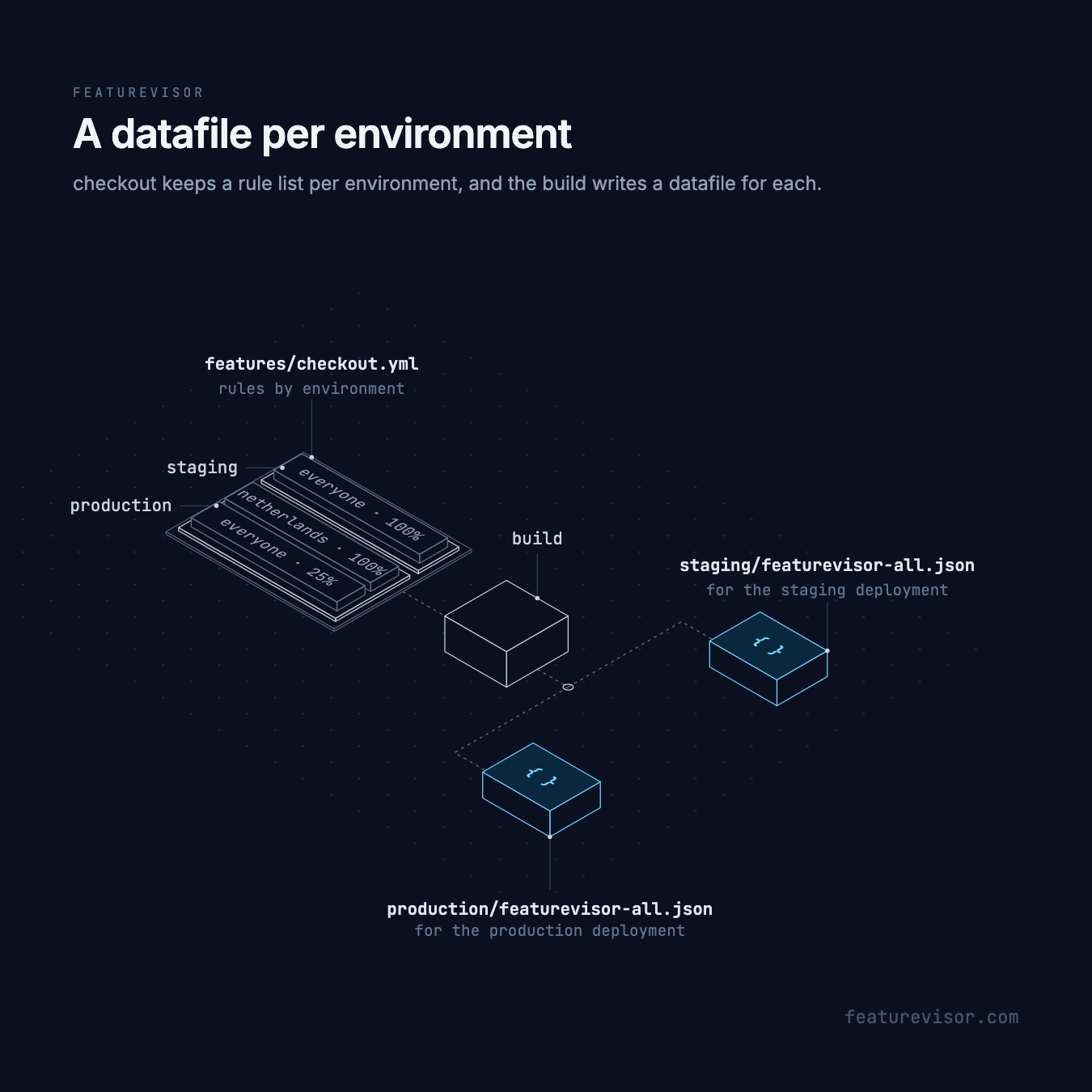
With environments, rules groups its rule lists by environment. This keeps checkout from the Quick start as it is in production, and fully on in staging:
description: Checkout redesignbucketBy: userIdrules: staging: - key: everyone conditions: '*' percentage: 100 production: - key: netherlands conditions: netherlands percentage: 100 - key: everyone conditions: '*' percentage: 25- A feature that leaves out an environment has no rules there, so it is disabled, though
forceentries for that environment still apply. - An empty list such as
staging: []fails lint. Leave the key out instead. forceandexposeare grouped by environment the same way, and so are a global variable'soverrides.- Attributes, segments, schemas and targets are shared by every environment.
Build a datafile per environment#
Building writes each target's datafile once per environment:
tree datafilesdatafiles├── REVISION├── production│ └── featurevisor-all.json└── staging └── featurevisor-all.jsonbuild --environment=staging builds only staging and leaves production untouched, but still moves the shared revision forward. Build every environment before you publish the whole datafiles directory.
Load the right datafile#
Each deployment of your application loads its own environment's file, such as production/featurevisor-all.json. The SDK evaluates whatever datafile it is given, and never picks an environment from the context.
Test and evaluate per environment#
Every feature assertion names its environment:
feature: checkoutassertions: - description: Dutch users, production environment: production at: 90 context: country: nl expectedToBeEnabled: true - description: Everyone, staging environment: staging at: 90 context: country: de expectedToBeEnabled: trueThe CLI's runtime commands take the same choice, such as npx featurevisor evaluate --environment=production. See Testing and the CLI.
Switch an existing project#
Changing environments changes the shape expected throughout the project, not only its build output. Keep the rest of the configuration, including tags and target selectors.
To remove environments, for example from a project made with an older default scaffold:
- Choose which environment's behaviour to keep, such as
production, and removeenvironmentsfromfeaturevisor.config.js. - In every feature, replace the
rulesmap with that environment's rule list, and do the same forforceandexpose. In global variables, replace theoverridesmap with that environment's list. - Remove
environmentfrom feature, segment and variable test assertions, scenario roots, matrices and nested cases. Keep tests for the behaviour you kept. - Remove
--environmentfrom commands, then runnpx featurevisor lint,npx featurevisor testandnpx featurevisor build. - Deploy the new output and point applications at
featurevisor-all.jsoninstead ofproduction/featurevisor-all.json.
Older scaffolds also used tag: all in targets/all.yml. Keep it to include only tagged definitions, or remove it to include everything. Target selection does not depend on environments.
To add environments to a flat project, do the reverse: list their names, move rule lists and global override lists under the environment keys, convert force and expose, and add an environment to tests. Then rebuild, and point deployments and applications at the paths that include the environment.
Release lanes with sets#
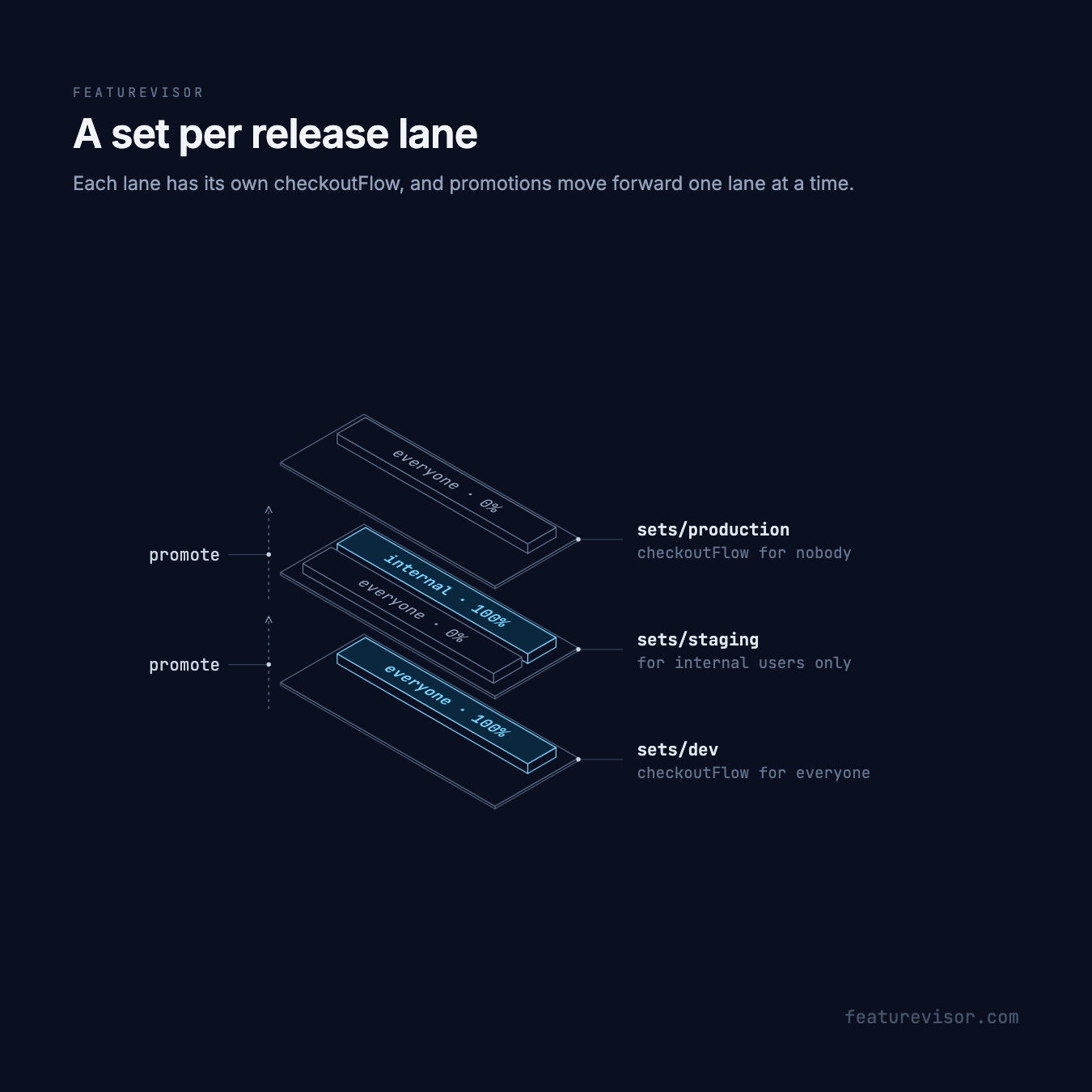
Some teams treat dev, staging and production as separate release lanes rather than environments of one definition. Each lane is a set with its own complete tree, so a feature can differ completely between lanes, and changes move forward only when promoted. The example for this layout keeps its historical name:
npx @featurevisor/cli@latest init --example=environmentsIt enables sets instead of environments, and uses promotionFlows to keep promotions moving forward one lane at a time:
module.exports = { sets: true, promotionFlows: [ { from: 'dev', to: 'staging' }, { from: 'staging', to: 'production' }, ],}Each lane has its own attributes/, segments/, features/, targets/ and tests/ under sets/<lane>/. Rules are plain lists, because there are no environments. The same feature can be fully on in dev and still off in production:
description: New checkout flowbucketBy: userIdrules: - key: everyone conditions: '*' percentage: 100description: New checkout flowbucketBy: userIdrules: - key: everyone conditions: '*' percentage: 0Building writes datafiles/dev/featurevisor-all.json, datafiles/staging/featurevisor-all.json and datafiles/production/featurevisor-all.json. When dev is ready, promote it to staging:
npx featurevisor promote --from=dev --to=staging --applypromotionFlows rejects promoting straight from dev to production. See Sets and Promotions.
In the example, staging sits between the two: its checkoutFlow is on for the internal segment and off for everyone else.