


Receiving Callbacks for Transcoding Jobs
Introduction
A Callback (also known as a webhook) is an asynchronous notification sent to an endpoint designated by the user. This notification provides an update on the job's progress, and includes a payload with additional information about the job.
Events Triggering Callbacks
Your will receive a callback to your designated endpoint if any of the following events occur:
Setting Up Your Callback URL
To set up a callback URL, you must provide an endpoint in your system that is configured to receive event updates. When launching a job using the /v1/start_encode2 method, specify this endpoint as a value for the callback_url attribute of the query object.
Setting Callback URL in a job request:
{
  "query": {
    "callback_url": "http://your-server.com/task_callback_endpoint",
    "source": "...",
    "format": [
      ...
    ]
  }
}
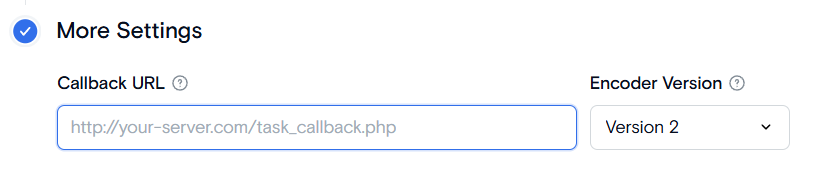
Enter the URL into the "Callback" field on the 4th job setting step.
Callback Notification Payload
For each event, the callback notification includes a payload with the following parameters providing information about the job:
Decoding Callback Data
Qencode sends data to your callback URL in the application/x-www-form-urlencoded format. To use this data, you must first decode it into a format that your application can process.
Below is a brief overview on how to decode and interpret the callback data you receive:
- Extract Data: Upon receiving a POST request at your callback endpoint, extract the payload from the request body.
- Decode URL-encoded String: Use a script to decode the URL-encoded payload and convert it into a readable JSON format.
- Parse JSON: After decoding, parse the JSON string so to access the values assciated with the status, task_token, payload, event, error_code, and event parameters.
An example of callback request sent to your server is shown below.
status=%7B%22status%22%3A+%22completed%22%2C+%22videos%22%3A+%5B%7B%22profile%22%3A+null%2C+%22url%22%3A+%22https%3A%2F%2Fstorage.qencode.com%2Fe2079274fc1c4d12af5cf14affc9ba4e%2Fmp4%2F1%2F00f056d030fc11ebb4f46a9cb6debba1.mp4%22%2C+%22bitrate%22%3A+142%2C+%22output_format%22%3A+%22mp4%22%2C+%22storage%22%3A+%7B%22path%22%3A+%22e2079274fc1c4d12af5cf14affc9ba4e%2Fmp4%2F1%2F00f056d030fc11ebb4f46a9cb6debba1.mp4%22%2C+%22host%22%3A+%22storage.qencode.com%22%2C+%22type%22%3A+%22local%22%2C+%22zip%22%3A+%7B%22region%22%3A+%22sfo2%22%2C+%22bucket%22%3A+%22qencode-temp-sfo2%22%2C+%22host%22%3A+%22prod-nyc3-storage-do.qencode.com%22%7D%2C+%22format%22%3A+%22mp4%22%7D%2C+%22tag%22%3A+%22video-0-0%22%2C+%22meta%22%3A+%7B%22resolution_width%22%3A+256%2C+%22resolution_height%22%3A+144%2C+%22framerate%22%3A+%2230000%2F1001%22%2C+%22height%22%3A+144%2C+%22width%22%3A+256%2C+%22codec%22%3A+%22h264%22%2C+%22bitrate%22%3A+%2278946%22%2C+%22dar%22%3A+%2216%3A9%22%2C+%22sar%22%3A+%221%3A1%22%2C+%22resolution%22%3A+144%7D%2C+%22duration%22%3A+%2210.077%22%2C+%22user_tag%22%3A+%22144p%22%2C+%22size%22%3A+%220.179412%22%7D%5D%2C+%22status_url%22%3A+%22https%3A%2F%2Fapi.qencode.com%2Fv1%2Fstatus%22%2C+%22percent%22%3A+100%2C+%22source_size%22%3A+%2216.6585%22%2C+%22audios%22%3A+%5B%7B%22profile%22%3A+null%2C+%22url%22%3A+%22https%3A%2F%2Fstorage.qencode.com%2Fe2079274fc1c4d12af5cf14affc9ba4e%2Fmp3%2F1%2F00be24b230fc11ebbe666a9cb6debba1.mp3%22%2C+%22bitrate%22%3A+122%2C+%22output_format%22%3A+%22mp3%22%2C+%22storage%22%3A+%7B%22path%22%3A+%22e2079274fc1c4d12af5cf14affc9ba4e%2Fmp3%2F1%2F00be24b230fc11ebbe666a9cb6debba1.mp3%22%2C+%22host%22%3A+%22storage.qencode.com%22%2C+%22type%22%3A+%22local%22%2C+%22zip%22%3A+%7B%22region%22%3A+%22sfo2%22%2C+%22bucket%22%3A+%22qencode-temp-sfo2%22%2C+%22host%22%3A+%22prod-nyc3-storage-do.qencode.com%22%7D%2C+%22format%22%3A+%22mp3%22%7D%2C+%22tag%22%3A+%22audio-1-0%22%2C+%22meta%22%3A+%7B%22index%22%3A+1%2C+%22language%22%3A+%22und%22%2C+%22title%22%3A+null%2C+%22program_id%22%3A+null%2C+%22channels%22%3A+6%2C+%22bit_rate%22%3A+320000%2C+%22codec%22%3A+%22ac3%22%2C+%22sample_rate%22%3A+48000%2C+%22program_ids%22%3A+%5B%5D%7D%2C+%22duration%22%3A+%2230.0669%22%2C+%22user_tag%22%3A+%22audio%22%2C+%22size%22%3A+%220.459226%22%7D%5D%2C+%22duration%22%3A+%2230.017%22%2C+%22error_description%22%3A+null%2C+%22error%22%3A+0%2C+%22images%22%3A+%5B%5D%7D&callback_type=task&task_token=e2079274fc1c4d12af5cf14affc9ba4e&event=saved&payload=%7B%22fileName%22%3A+%22bbb_30s.mp4%22%7DHere's the urldecoded version:
status={"status": "completed", "videos": [{"profile": null, "url": "https://storage.qencode.com/e2079274fc1c4d12af5cf14affc9ba4e/mp4/1/00f056d030fc11ebb4f46a9cb6debba1.mp4", "bitrate": 142, "output_format": "mp4", "storage": {"path": "e2079274fc1c4d12af5cf14affc9ba4e/mp4/1/00f056d030fc11ebb4f46a9cb6debba1.mp4", "host": "storage.qencode.com", "type": "local", "zip": {"region": "sfo2", "bucket": "qencode-temp-sfo2", "host": "prod-nyc3-storage-do.qencode.com"}, "format": "mp4"}, "tag": "video-0-0", "meta": {"resolution_width": 256, "resolution_height": 144, "framerate": "30000/1001", "height": 144, "width": 256, "codec": "h264", "bitrate": "78946", "dar": "16:9", "sar": "1:1", "resolution": 144}, "duration": "10.077", "user_tag": "144p", "size": "0.179412"}], "status_url": "https://api.qencode.com/v1/status", "percent": 100, "source_size": "16.6585", "audios": [{"profile": null, "url": "https://storage.qencode.com/e2079274fc1c4d12af5cf14affc9ba4e/mp3/1/00be24b230fc11ebbe666a9cb6debba1.mp3", "bitrate": 122, "output_format": "mp3", "storage": {"path": "e2079274fc1c4d12af5cf14affc9ba4e/mp3/1/00be24b230fc11ebbe666a9cb6debba1.mp3", "host": "storage.qencode.com", "type": "local", "zip": {"region": "sfo2", "bucket": "qencode-temp-sfo2", "host": "prod-nyc3-storage-do.qencode.com"}, "format": "mp3"}, "tag": "audio-1-0", "meta": {"index": 1, "language": "und", "title": null, "program_id": null, "channels": 6, "bit_rate": 320000, "codec": "ac3", "sample_rate": 48000, "program_ids": []}, "duration": "30.0669", "user_tag": "audio", "size": "0.459226"}], "duration": "30.017", "error_description": null, "error": 0, "images": []}&callback_type=task&task_token=e2079274fc1c4d12af5cf14affc9ba4e&event=saved&payload={"fileName": "bbb_30s.mp4"}And here’s a multi-line version that is easier to read:
status={"status": "completed", "videos": [{"profile": null, "url": "https://storage.qencode.com/e2079274fc1c4d12af5cf14affc9ba4e/mp4/1/00f056d030fc11ebb4f46a9cb6debba1.mp4", "bitrate": 142, "output_format": "mp4", "storage": {"path": "e2079274fc1c4d12af5cf14affc9ba4e/mp4/1/00f056d030fc11ebb4f46a9cb6debba1.mp4", "host": "storage.qencode.com", "type": "local", "zip": {"region": "sfo2", "bucket": "qencode-temp-sfo2", "host": "prod-nyc3-storage-do.qencode.com"}, "format": "mp4"}, "tag": "video-0-0", "meta": {"resolution_width": 256, "resolution_height": 144, "framerate": "30000/1001", "height": 144, "width": 256, "codec": "h264", "bitrate": "78946", "dar": "16:9", "sar": "1:1", "resolution": 144}, "duration": "10.077", "user_tag": "144p", "size": "0.179412"}], "status_url": "https://api.qencode.com/v1/status", "percent": 100, "source_size": "16.6585", "audios": [{"profile": null, "url": "https://storage.qencode.com/e2079274fc1c4d12af5cf14affc9ba4e/mp3/1/00be24b230fc11ebbe666a9cb6debba1.mp3", "bitrate": 122, "output_format": "mp3", "storage": {"path": "e2079274fc1c4d12af5cf14affc9ba4e/mp3/1/00be24b230fc11ebbe666a9cb6debba1.mp3", "host": "storage.qencode.com", "type": "local", "zip": {"region": "sfo2", "bucket": "qencode-temp-sfo2", "host": "prod-nyc3-storage-do.qencode.com"}, "format": "mp3"}, "tag": "audio-1-0", "meta": {"index": 1, "language": "und", "title": null, "program_id": null, "channels": 6, "bit_rate": 320000, "codec": "ac3", "sample_rate": 48000, "program_ids": []}, "duration": "30.0669", "user_tag": "audio", "size": "0.459226"}], "duration": "30.017", "error_description": null, "error": 0, "images": []}
&callback_type=task
&task_token=e2079274fc1c4d12af5cf14affc9ba4e
&event=saved
&payload={"fileName": "bbb_30s.mp4"}
Example Implementations for Handling Callbacks
Below you can find several examples of setting up an endpoint in your application to process callbacks from Qencode.
from Flask import Flask, request
import json

app = Flask(__name__)

@app.route('/task_callback_endpoint', methods=['POST'])
def handle_callback():
    data = request.form.to_dict()
    print("Received callback:", data)
    event = data.get('event')
    status = json.loads(data.get('status'))

    if event == 'saved' and status['error'] == 0:
        print("Task completed successfully.")

    if event == 'saved' and status['error'] == 1:
        print("Task failed: ", status['error_description'])


    return "Callback received", 200

if __name__ == '__main__':
    app.run(debug=True, port=5000)
from flask import Flask, request
app = Flask(__name__)
@app.route('/task_callback_endpoint', methods=['POST'])
def handle_callback():
data = request.form.to_dict()
print("Received callback:", data)
event = data.get('event')
status = json.loads(data.get('status'))
if event == 'saved' and status['error'] == 0:
print("Task completed successfully.")
if event == 'saved' and status['error'] == 1:
print("Task failed: ", status['error_description'])
return "Callback received", 200
if __name__ == '__main__':
app.run(debug=True, port=5000)const express = require('express');
const bodyParser = require('body-parser');
const app = express();
const port = 3000;
// Middleware to parse URL-encoded bodies (as sent by HTML forms)
app.use(bodyParser.urlencoded({ extended: true }));
// POST endpoint to handle the callback
app.post('/callback', (req, res) => {
// Extracting the task token and payload from the request body
const taskToken = req.body.task_token;
const event = req.body.event;
const payload = req.body.payload ? JSON.parse(req.body.payload) : null;
// Logging the task token and payload
console.log('Received Callback');
console.log('Task Token:', taskToken);
console.log('Event:', event)
if (payload) {
console.log('Payload:', payload);
}
// Sending a response back to the caller
res.send('Callback received');
});
app.listen(port, () => {
console.log(`Server running on port ${port}`);
});import org.springframework.boot.SpringApplication;
import org.springframework.boot.autoconfigure.SpringBootApplication;
import org.springframework.web.bind.annotation.PostMapping;
import org.springframework.web.bind.annotation.RequestBody;
import org.springframework.web.bind.annotation.RestController;
@SpringBootApplication
@RestController
public class CallbackApplication {
public static void main(String[] args) {
SpringApplication.run(CallbackApplication.class, args);
}
@PostMapping("/task_callback_endpoint")
public String handleCallback(@RequestBody String data) {
System.out.println("Received callback: " + data);
// Process callback data
return "Callback received";
}
}
<?php
/**
 * Receives a callback from Qencode when a job is completed.
 * Prints out job status and output video URL(s)
 */

$logfile = date('Y-m-d_H-i-s').'.log';
$job_info = json_decode($_POST['status']);
$log = "Job status: {$job_info->status}\n";
if ($job_info->status == 'completed') {
    foreach ($job_info->videos as $video) {
        $log .= "URL: {$video->url}\n";
    }

}
print $log;
file_put_contents($logfile, $log);
using Microsoft.AspNetCore.Mvc;

[Route("api/[controller]")]
[ApiController]
public class CallbackController : ControllerBase
{
    [HttpPost]
    [Route("task_callback_endpoint")]
    public IActionResult HandleCallback([FromForm] string event, [FromForm] string taskToken)
    {
        Console.WriteLine($"Received callback for event: {event} with taskToken: {taskToken}");

        if (event == "saved")
        {
            Console.WriteLine("Video transcoding completed.");
        }

        return Ok("Callback received");
    }
}
Need More Help?
For additional information, tutorials, or support, visit the Qencode Documentation page or contact Qencode Support at support@qencode.com.