
Skip to main content
Usage
Coding tasks
Pullfrog can automatically address review feedback and fix CI failures on pull requests. These are configured in the Coding section of the console.
Auto-address reviews
When someone submits a review on a PR that Pullfrog created, Pullfrog automatically picks up the feedback and pushes updates. This keeps the review-revise loop fast — no one needs to manually re-trigger anything. For the full set of review-driven coding flows (line-level comments, Fix all, Fix 👍s on multi-comment reviews), see PR reviews → Address reviews.Auto-fix CI failures
When a CI check suite fails on a PR, Pullfrog can attempt to fix it automatically. There are two separate toggles:- Fix CI failures on Pullfrog’s PRs — auto-fix when Pullfrog’s own PRs break CI
- Fix CI failures on non-Pullfrog PRs under review — auto-fix when a PR that Pullfrog has reviewed breaks CI
Build instructions
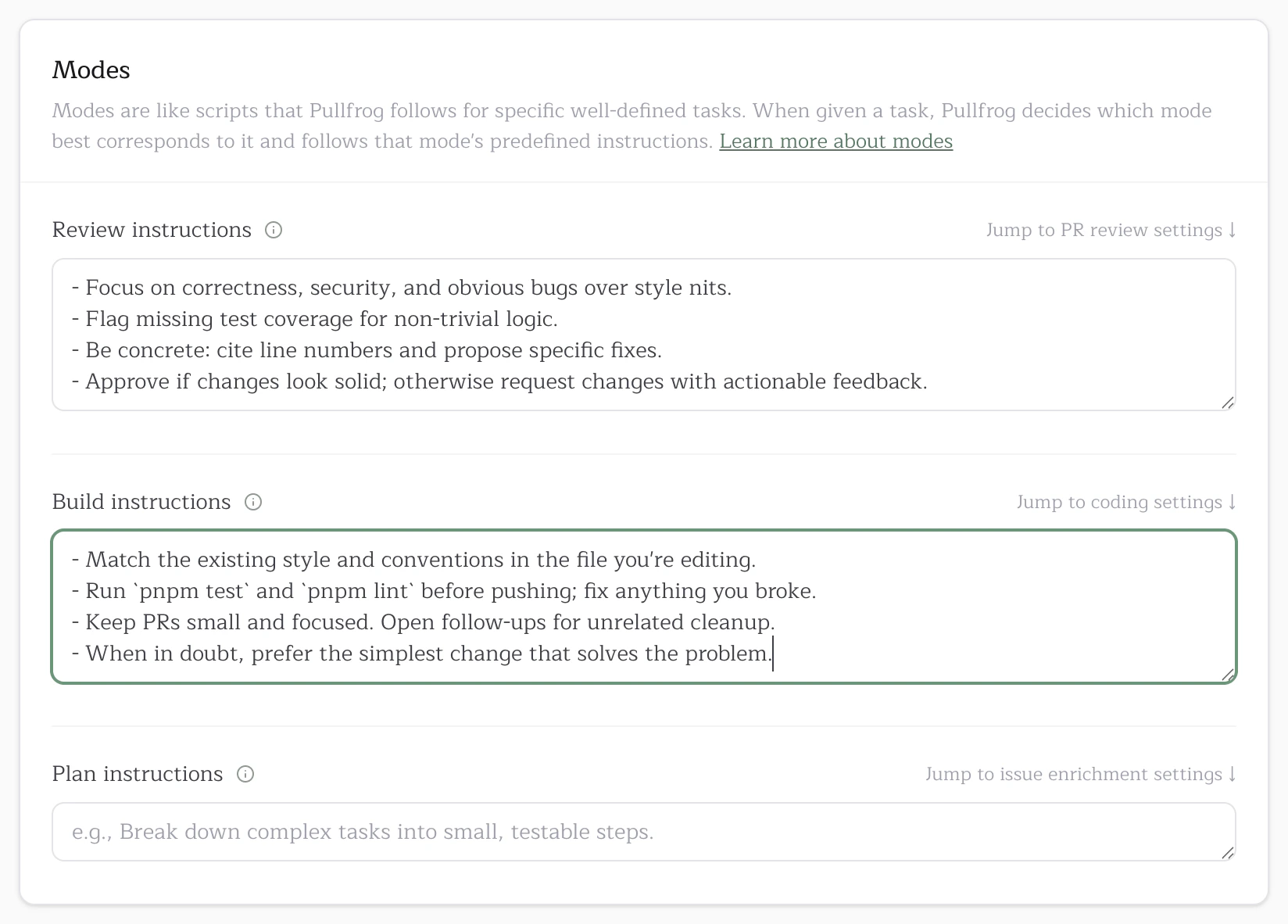
Build instructions guide how Pullfrog writes and modifies code. They apply to every run that produces a code change — auto-address reviews, auto-fix CI, implementing a plan, or a direct@pullfrog mention asking for an edit.
Edit them in the Modes card on the repo console:
pnpm test and pnpm lint before pushing,” “match existing patterns in the file you’re editing,” or “open small, focused PRs and split unrelated cleanup into follow-ups.”