
ConnectorShape.Type Property
Gets or sets the connector shape type.
Namespace: DevExpress.Docs.Presentation
Assembly: DevExpress.Docs.Presentation.v26.1.dll
Declaration
Property Value
Available values:
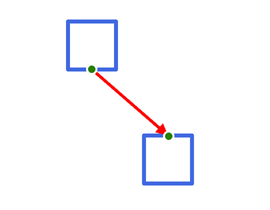
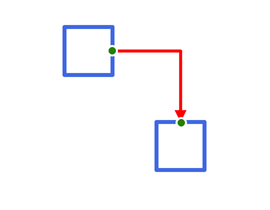
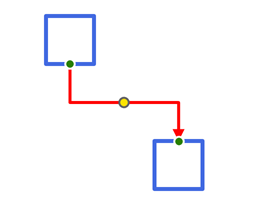
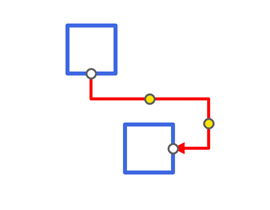
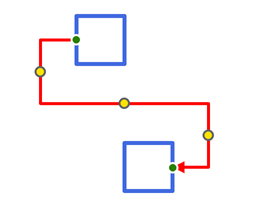
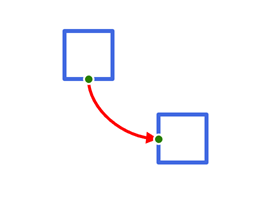
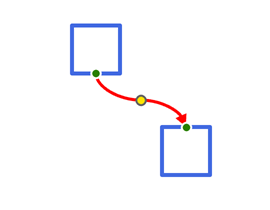
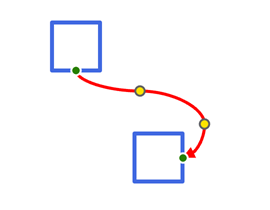
Remarks
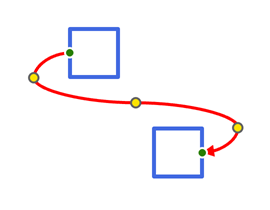
When changing connector settings, the connector type may be automatically simplified (the number of handles may be reduced) depending on the positions of the start and end shapes and their connection sites. For example, a curved connector with three handles might be converted to one with a single handle.
Example
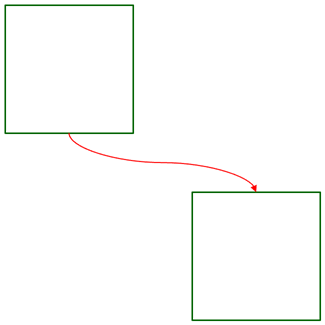
The following code snippet adds a connector between two shapes:
using DevExpress.Docs.Presentation;
using System.Drawing;

namespace PresentationApiSample;

public class Program {
    public static void Main(string[] _) {
        //...

        Shape shape1 = new Shape(ShapeType.Rectangle);
        shape1.Outline = new OutlineStyle { Fill = new SolidFill(Color.DarkGreen), Width = 8 };
        shape1.X = 30;
        shape1.Y = 30;
        shape1.Width = 800;
        shape1.Height = 800;
        slide.Shapes.Add(shape1);

        Shape shape2 = new Shape(ShapeType.Rectangle);
        shape2.Outline = new OutlineStyle { Fill = new SolidFill(Color.DarkGreen), Width = 8 };
        shape2.X = 1200;
        shape2.Y = 1200;
        shape2.Width = 800;
        shape2.Height = 800;
        slide.Shapes.Add(shape2);

        ConnectorShape connector = new ConnectorShape();
        connector.StartShape = shape1;
        connector.EndShape = shape2;
        connector.StartShapeSiteIndex = 2;
        connector.EndShapeSiteIndex = 0;
        connector.Type = ConnectorShapeType.Curved;

        connector.Outline = new LineStyle {
            Fill = new SolidFill(Color.Red),
            Width = 6,
            EndArrowType = ArrowType.TriangleArrow,
            EndLength = ArrowSize.Large,
            EndWidth = ArrowSize.Large
        };
        slide.Shapes.Add(connector);
    }
}
See Also