
Skip to main content


Linear Integration
Connect CodeRabbit to Linear to enrich pull request reviews with issue context, validate changes against acceptance criteria, create issues from review comments, and design Coding Plans.
|
CodeRabbit will fetch the issue details and assess whether your code changes address the requirements specified in the issue. See the Linked issues guide for best practices on linking issues.
CodeRabbit will create a well-structured issue with relevant context from the code review discussion. See the Issue creation guide for more details.
Overview
The Linear integration connects CodeRabbit to your Linear workspace, bringing issue context into every stage of development. Here’s what the integration enables:Context enrichment
Pulls in Linear issue details so CodeRabbit understands why a change is
being made
Requirement validation
Assesses whether code changes address the linked issue’s acceptance criteria
Issue planning
Generates step-by-step Coding Plans from Linear issues for coding agents and
IDE copilots
Issue creation
Creates new Linear issues directly from PR review comments
Prerequisites
Before setting up the Linear integration, ensure you have:- A Linear account with access to the workspace you want to connect
- A CodeRabbit Essentials plan
Install the Linear integration
The Linear integration uses OAuth authentication to securely connect your Linear workspace to CodeRabbit.1
Enable Linear integration
Navigate to
Integrations in
the CodeRabbit app and toggle Linear to enable the integration.
2
Authenticate with Linear
You will be redirected to Linear’s login page. Enter your credentials to
authorize CodeRabbit to access your Linear workspace.
Configure CodeRabbit for Linear
After connecting Linear, configure which Linear teams CodeRabbit should access by adding your team keys. The team key is a short team identifier—for example, if your issue URL ishttps://linear.app/company/issue/DEV-123, the team key is DEV.
- YAML Configuration
- Web Interface
Add the The
team_keys setting under knowledge_base.linear in your .coderabbit.yaml file:.coderabbit.yaml
usage setting controls when the integration is active:auto(default): Disabled for public repositories, enabled for private repositoriesenabled: Always enableddisabled: Always disabled
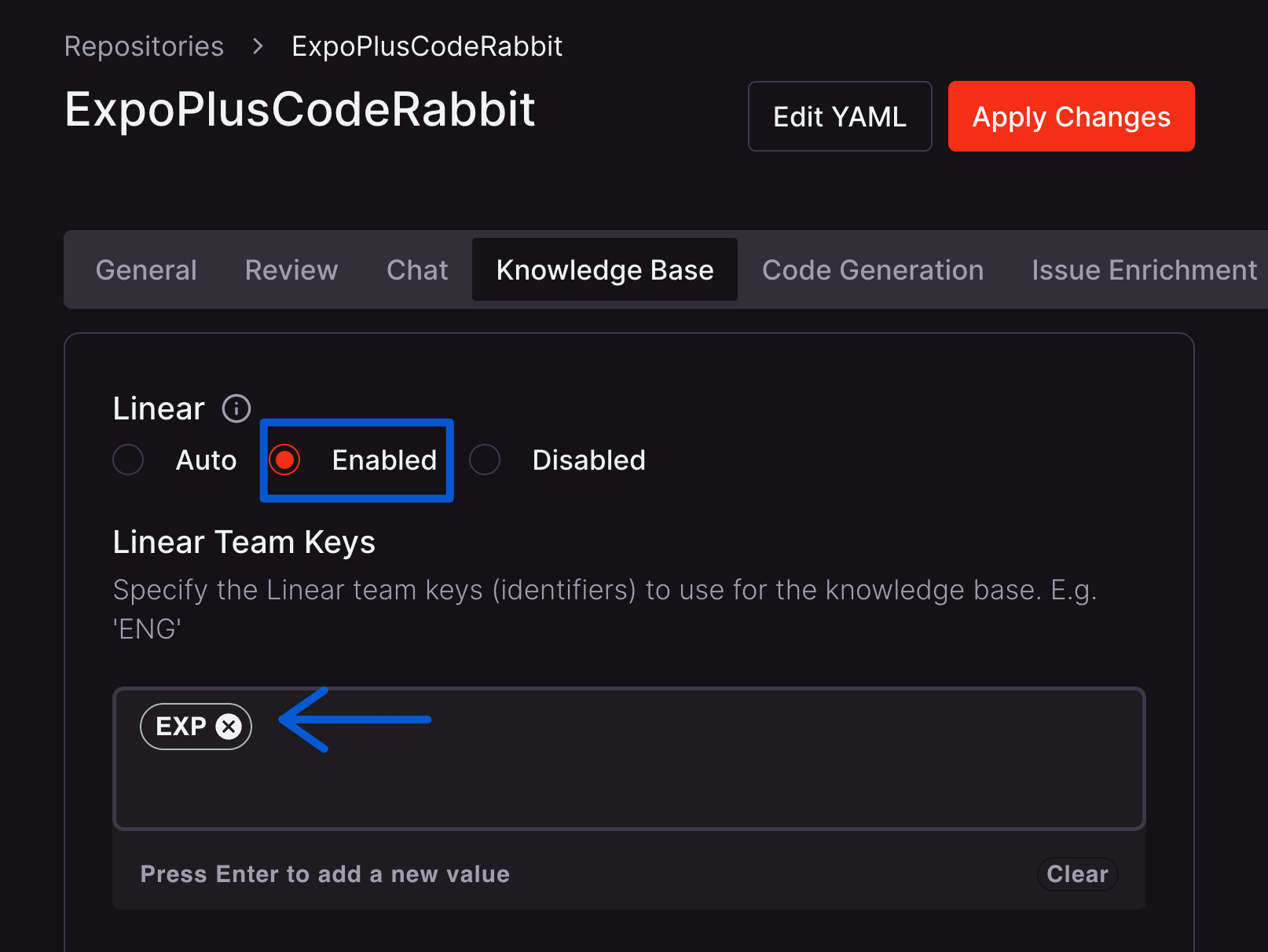
By default, Linear integration is enabled for private repositories and
disabled for public repositories. You can override this behavior by setting
knowledge_base.linear.usage: enabled and chat.integrations.linear.usage: enabled in your .coderabbit.yaml file or using the web interface. See the
Configuration reference for details.Example usage
Linking Linear issues to pull requests
To have CodeRabbit validate requirements from a Linear issue, include the issue URL in your pull request description:Creating Linear issues from reviews
During a code review, you can ask CodeRabbit to create a Linear issue by mentioning@coderabbitai in a comment:
Related resources
Requirement validation
Best practices for linking issues to pull requests
Issue planning
Generate Coding Plans from issues for coding agents
Issue creation
Create issues directly from CodeRabbit reviews