
- Get Playback State
- Transfer Playback
- Get Available Devices
- Get Currently Playing Track
- Start/Resume Playback
- Pause Playback
- Skip To Next
- Skip To Previous
- Seek To Position
- Set Repeat Mode
- Set Playback Volume
- Toggle Playback Shuffle
- Get Recently Played Tracks
- Get the User's Queue
- Add Item to Playback Queue
- Get Playlist
- Change Playlist Details
- Get Playlist Items [DEPRECATED]
- Update Playlist Items [DEPRECATED]
- Add Items to Playlist [DEPRECATED]
- Remove Playlist Items [DEPRECATED]
- Get Playlist Items
- Update Playlist Items
- Add Items to Playlist
- Remove Playlist Items
- Get Current User's Playlists
- Create Playlist
- Get User's Playlists
- Create Playlist for user
- Get Featured Playlists
- Get Category's Playlists
- Get Playlist Cover Image
- Add Custom Playlist Cover Image
Implicit Grant Flow
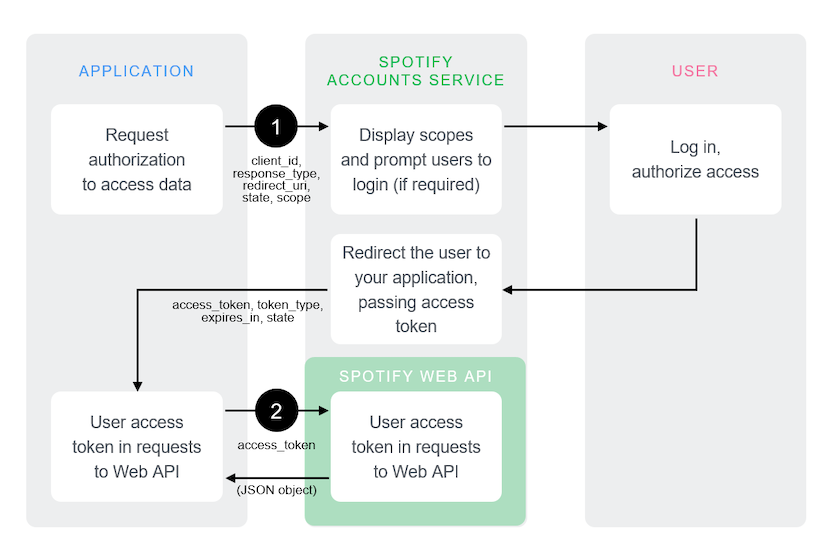
The implicit grant flow is carried out on the client side and it does not involve secret keys. Thus, you do not need any server-side code to use it. Access tokens issued are short-lived with no refresh token to extend them when they expire.
The following diagram shows how the Implicit Grant Flow works:
Pre-requisites
This guide assumes that:
- You have read the authorization guide.
- You have created an app following the app guide.
Source Code
You can find an example app implementing Implicit Grant flow on GitHub in the web-api-examples repository.
Request User Authorization
Our application must build a GET request to the /authorize endpoint with
the following parameters:
The request is typically sent from the browser.
The following JavaScript sample builds the authorization request:
_14var client_id = 'CLIENT_ID';_14var redirect_uri = 'http://127.0.0.1:8888/callback';_14_14var state = generateRandomString(16);_14_14localStorage.setItem(stateKey, state);_14var scope = 'user-read-private user-read-email';_14_14var url = 'https://accounts.spotify.com/authorize';_14url += '?response_type=token';_14url += '&client_id=' + encodeURIComponent(client_id);_14url += '&scope=' + encodeURIComponent(scope);_14url += '&redirect_uri=' + encodeURIComponent(redirect_uri);_14url += '&state=' + encodeURIComponent(state);
Once the request is processed, the user will see the authorization dialog asking to authorize access within the scopes.
The Spotify Accounts service presents details of the scopes for which access is being sought. If the user is not logged in, they are prompted to do so using their Spotify credentials. When the user is logged in, they are asked to authorize access to the resources or actions defined in the scopes.
Finally, the user is redirected back to your specified redirect_uri. After
the user accepts, or denies your request, the Spotify OAuth 2.0 server
redirects the user back to your redirect_uri. In this example, the redirect
address is https://127.0.0.1:8888/callback
Response
If the user grants access, the final URL will contain a hash fragment with the following data encoded as a query string.
| Query Parameter | Value |
|---|---|
| access_token | An access token that can be provided in subsequent calls, for example to Spotify Web API services. |
| token_type | Value: "Bearer" |
| expires_in | The time period (in seconds) for which the access token is valid. |
| state | The value of the state parameter supplied in authorization URI. |
For example:
_10https://example.com/callback#access_token=NwAExz...BV3O2Tk&token_type=Bearer&expires_in=3600&state=123
If the user denies access, access token is not included and the final URL includes a query string containing the following parameters:
For example:
_10https://example.com/callback?error=access_denied&state=123
What's next?
Learn how to use an access token to fetch data from the Spotify Web API by reading the access token guide.