
How a thing that drew triangles became the most important chip on the planet
I work with GPUs every day — running models, doing inference, waiting for yet another experiment to train. But for a long time the GPU was a black box to me: throw in a model, press the button, wait. I want to understand where the AI world is heading — and I realized that's impossible without understanding the hardware. I've already tried to predict when video generation would go real-time — it turned out pretty well, and I wanted to go deeper: what actually stands behind the GPU?
The decisions in the AI world today are made by the same people who designed GPUs. If you figure out why they made those exact decisions at each step — you can learn to predict where everything is heading yourself. And build that mental model of the GPU I've been missing.
(and now some SEO) NVIDIA is worth more than any company on the planet. An H100 sells for $30,000. All because of a chip that 25 years ago was drawing triangles in video games. How did we get here — let's figure it out from scratch. #NVIDIA #GPU #AI
Chapter I
How a computer draws a picture
From text to polygons
It's no secret to me that GPUs were made for gaming — my first encounter with graphics cards was the NVIDIA 9800 GT that let me run my favorite Assassin's Creed and Call of Duty. But why did we need separate hardware just to draw pictures?
Early computers communicated with humans through text only — green letters on a black screen. Zork (1977) was one of the first hits: you type open mailbox and get a text description of what's inside. A DnD-style quest simulator. I'm not a fan, and apparently I'm not alone — because graphical games appeared pretty quickly after.
1977 · text · 0 pixels of graphics
In the early 80s sprites appeared — pre-drawn images that simply move around the screen. Super Mario Bros (1985), Sonic (1991) — entire vibrant worlds built from flat tiles. Way cooler than text games, but the price was higher computational appetite. Though with sprites it was manageable: the computer just copies pre-made blocks to the right positions, 60 times per second. No calculations for "how should this look" — just "where to place the image".
1985 · sprites moving on screen — copying pre-made blocks
But flat images can't convey depth. Wolfenstein 3D (1992) and Doom (1993) worked around this elegantly — the world was stored as a flat map, and the engine drew wall columns based on distance. A brilliant trick, but in Doom you can't even look up — the third dimension literally doesn't exist. The real breakthrough was Quake (1996): a fully 3D world made of polygons. Free camera, textures, lighting — all built from hundreds of triangles, each one needing to be transformed, colored, and rendered. 30 times per second.
1996 · 3D polygons · transform + light every pixel
One frame of Quake
Let's look under the hood. Quake on screen: a player in a corridor, textured walls, a torch, an enemy in the doorway. The camera can turn anywhere. All of this needs to become an image — 640 by 480 pixels, 30 times per second. The computer has 33 milliseconds per frame.
What happens in those 33 milliseconds? We take all the triangles in the scene, convert coordinates from 3D to flat screen space. Figure out which pixels fall inside each triangle. And for each of the 307,200 pixels we compute the color: read the texture, calculate lighting, check depth. That's a ton of math operations — take one number, multiply by another, add a third, and repeat for every single pixel.
Animation — how one frame is drawn
640×480 · 30 fps · ~300M ops/sec. The CPU draws each pixel sequentially.
Let's do the math. 640 × 480 = 307,200 pixels. Each one takes 20–50 operations. One frame comes out to 10–15 million operations. Multiply by 30 fps — 300–450 million operations every second.
The Pentium at 200 MHz — the top CPU of 1996 — could do about 200 million instructions per second. Already at the limit. But in reality it's even worse: each pixel needs a texture lookup — an image mapped onto a triangle. The address is unpredictable, almost certainly not in the data cache. A cache miss — the processor just sits there waiting 50–100 nanoseconds for memory to respond. Dozens of wasted cycles. Per pixel. Real-world performance drops 2–3x. Truly depressing. The CPU clearly can't handle this — we need dedicated hardware for graphics.
Baked into silicon
The market figured this out fast. In the mid-90s the first graphics accelerators appeared: 3dfx Voodoo, ATI Rage, S3 ViRGE. The idea was simple — offload graphics operations from the CPU to a dedicated chip. But transistors were scarce, budgets were tight, so operations were hardwired directly into silicon. The Voodoo could rasterize and apply textures — and that's it. Vertex transforms? Still on the CPU. ATI Rage could do both, but only with a single light source. The S3 ViRGE actually turned out slower than software rendering. Each chip was a fixed set of functions. Want an effect that's not in the chip — keep dreaming.
For developers — a nightmare. Every card speaks its own language: its own registers, its own commands. Wrote a game for 3dfx — it doesn't work on ATI. New card comes out — rewrite everything from scratch.
OpenGL (1992) and DirectX (1995, man, how many times I had to install it) partially solved the compatibility problem: the developer calls a standard function like DrawTriangle, and the driver translates it into commands for the specific chip. One codebase → any hardware.
But the fixed-function problem didn't go anywhere. Each accelerator could only do what was hardwired into it. Want a new effect — wait for the next generation of chips. And none of them covered the entire pipeline: part of the work still fell on the CPU.
A different approach was needed.
Chapter II
Designing a GPU from scratch
Ok, we want to design an accelerator — first we need to understand what exactly we're accelerating. Rendering a frame is a pipeline. First, we transform each triangle vertex from 3D into screen coordinates — a 4×4 matrix multiplication. Then we figure out which pixels fall inside the triangle — rasterization. And for each pixel we compute the color: texture, lighting, depth.
And here's the key observation that gave birth to the GPU: at every stage there are thousands of operations, and they're all independent. One pixel doesn't wait for another's result. One vertex doesn't depend on its neighbor. Same formula, different data, everything is independent. When that word comes up — it's time to think about parallelism. All that's left is to design a processor that does exactly this.
Why not a CPU
Inside a CPU — click a block
So how does the CPU handle parallelism? Spoiler — it's bad. Most of the CPU's transistors aren't for computing, they're for control. Branch prediction, instruction reordering, caches. This makes the CPU incredibly smart for complex sequential tasks — like a lone genius. But it's like making a math professor punch numbers on a calculator. He'll manage, but it's not his strong suit. We don't need branch prediction — the formula is the same for every pixel. No need for instruction reordering — all threads do the same thing. No need for huge caches — the data is unpredictable anyway. The pure compute portion of a CPU takes up ~20% of die area — the ALU, the arithmetic logic unit. The only block that actually computes.
Being a smart person, you'd think — not enough compute? Let's just add more compute. Pack the entire chip with ALUs and we're golden. And you'd be right.
Step 1: Multiply the ALUs
Take a CPU, throw out all the "smart" stuff, keep only the ALU. On the freed-up area you can fit not one ALU with its overhead, but dozens of bare ones. Each is simpler, each is slower — but there are many of them, and they all work simultaneously. Not one smart processor — an entire army of simple ones.
Step 2: One instruction for all
Ok, we've got dozens of ALUs on a single die. But we immediately hit a problem — wait, how do we control them all? If each one gets its own instruction decoder, its own program counter, its own control logic — we'll burn a ton of transistors on control again. Got ahead of ourselves — back to square one.
But remember our task: every pixel is computed with the same formula. Pixel 0's color — same as pixel 31's, just different input data. So we can do it simpler: one instruction decoder per group of ALUs. It reads the instruction once — all ALUs in the group execute it simultaneously, each with its own data. This is SIMD — Single Instruction, Multiple Data. Everyone does the same thing.
In NVIDIA GPUs this group is called a warp — 32 threads. Why 32? It's a tradeoff: larger group — cheaper control, but more issues when threads want to do different things. Bottom line: one decoder, 32 ALUs, one instruction — all computing in parallel. Control problem solved.
But there's a catch. What if the code has an if/else? When rendering Quake we check whether a pixel falls in shadow. Some of the 32 pixels are in shadow, some in light — but there's only one decoder, it can't execute different instructions at the same time.
The solution is elegant: the GPU executes both branches on all 32 ALUs, but with masking. It runs the "in shadow" branch — all 32 compute, but results for lit pixels are discarded. Then "in light" — same thing in reverse. Two cycles instead of one, some work wasted. This is warp divergence. For graphics it's tolerable — neighboring pixels usually take the same branch.
Step 3: Hiding latency
We've got an array of ALUs grouped into warps. They compute fast. But there's a bottleneck: memory. When a shader reads a texture — and this happens for every pixel — it needs to fetch data from video memory. And video memory is slow compared to the processor: a request-response takes 200–400 cycles. During all that time, 32 ALUs in the warp just sit there waiting. Computing nothing. Pure idling. (By the way, the HBM issues with H100 didn't come out of nowhere — moving data from memory to chip was expensive even back then.)
CPUs solve this with caches — keep data close. But we threw out the big caches when designing our GPU. So what do we do?
The solution is beautiful. Instead of hiding the latency — the GPU fills it with useful work. On a single processing block (SM — Streaming Multiprocessor) the GPU keeps register state for not one warp, but dozens. Switching takes a single cycle, zero overhead. Warp A requested a texture and is waiting? The GPU switches to warp B. Then C. Then D. By the time data for A arrives from memory — its turn has come back around. To eliminate stalls, the GPU simply does other work while waiting.
The more warps in flight — the better the latency is hidden. 200 cycles of latency, one warp computes for 60 — so you need at least 4 in the queue. In practice a GPU keeps 32–64 warps on a single SM and almost never idles. Key principle — remember this one.
CPUs hide latency with caches — keep data nearby. GPUs — by switching threads: while one waits, another computes.
More on GPU architecture, warps, and latency hiding — in the free Cornell Virtual Workshop: Understanding GPU Architecture course.
We just built a GPU
Let's look back. In three steps we designed a new type of processor. Threw out everything the CPU had that's unnecessary for graphics — branch prediction, instruction reordering, huge caches. Packed the die area with dozens of simple ALUs. Grouped them with a shared decoder — SIMD. Solved the slow memory problem by switching between threads. That's a GPU.
This is exactly how NVIDIA engineers reasoned in the late 90s. Put it all together — and in 1999 the GeForce 256 arrives. They themselves called it "the world's first GPU." 17 million transistors, 120 MHz, 10 million polygons per second. The key feature — hardware Transform & Lighting: vertex transformations and lighting calculations moved entirely from the CPU to the graphics card for the first time. One chip — the entire rendering pipeline.
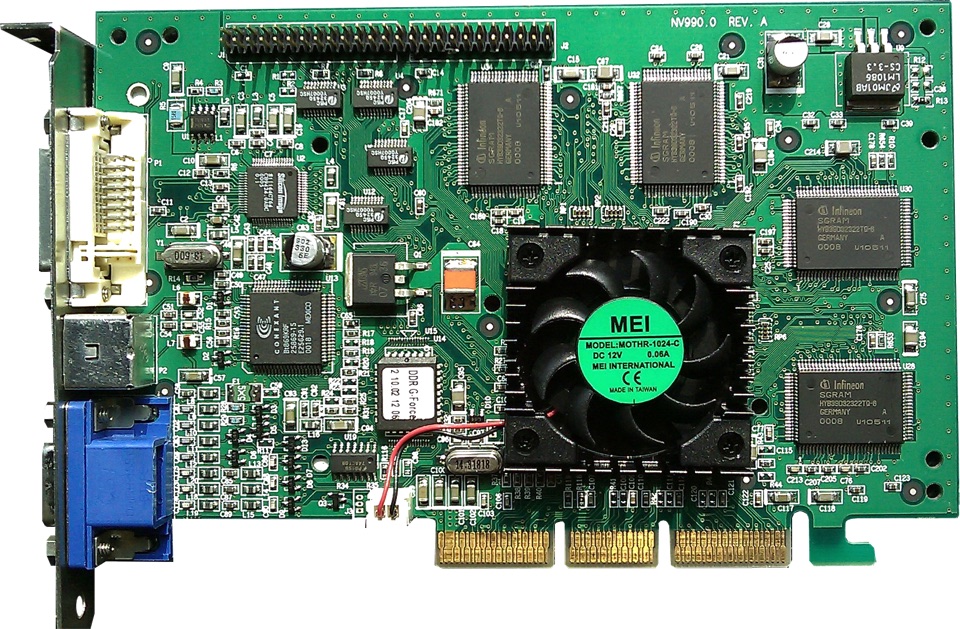
NVIDIA GeForce 256 (1999) · 17M transistors · 120 MHz · 10M polygons/sec · photo: Wikimedia Commons, public domain
Chapter III
From Shaders to CUDA
Shaders: from hardwired to programmable
We hit compute speed hard — more transistors, more ALUs, beautiful. But there was another problem: everything was hardwired into silicon. Want a different effect? Wait for a new chip.
Why hardwire at all? Transistor budget — 17 million, every one counts. Here's a concrete example. Take a single pixel on a wall in Quake near a torch. To compute its color, the chip runs the pixel through a chain of hardwired operations:
The problem is specific. That formula we just saw — it computes wall lighting. Light falls, reflects, you get a specular highlight. For a brick wall in Quake — perfect. But water reflects and refracts light completely differently. Skin scatters light below the surface. Metal gives a sharp highlight, fur gives a soft one. Each material needs its own formula. And the chip has just one hardwired in. And you can't hardwire all variants into silicon — there are way too many.
But transistor count growth helped: 17M (1999) → 57M (2001) → 107M (2002). There was now budget for experimentation.
And that's how shaders appeared — small programs written by the developer that the GPU executes for every vertex or pixel. The difference is fundamental: in fixed-function, transistors are wired together in a specific order — the chip always runs exactly the chain that was soldered at the factory. In the shader model, the chip has a universal ALU + instruction memory. Before rendering, you load your program — any program. The same ALU can compute walls, water, and skin — just load a different formula. They scaled up:
Growth in programmability: from 128 instructions with no branching to a full-fledged processor in 3 years.
Shader Model 1.0 (2001, GeForce 3) — up to 128 instructions, no branching. Basically the same fixed-function, except you could rearrange the steps. The programmable block was 2-3x slower than the hardwired one — flexibility costs a lot.
Shader Model 2.0 (2002, Radeon 9700) — 256 instructions, if/else for the first time. You could now write real logic, less overhead.
Shader Model 3.0 (2004, GeForce 6) — up to 65,000 instructions, loops, dynamic branching. A full-fledged processor. Overhead got so small that drivers started emulating fixed-function via shaders — the hardwired blocks literally lost their purpose.
Why the hell hardwire operations into silicon if software is almost as fast and can do a million more things? Flexibility won.
The GPU went from a "calculator with buttons" to a "programmable calculator".
The next logical step — all blocks on the chip became identical. 128 universal blocks, the scheduler distributes tasks on its own. Utilization close to 100%.
And then NVIDIA engineers realized something even more interesting. If all 128 blocks can do any math — it's no longer a graphics card. It's a massively parallel general-purpose compute engine. Gaming optimization accidentally created a supercomputer on a graphics card.
CUDA: how to even get at this thing
Ok, we've got a supercomputer on a graphics card. But the only way in was through a graphics API — OpenGL or DirectX. Want to solve an equation? Encode your data as a texture, wrap your computation as a shader, read the result back as an image. A scientist literally pretends to draw a picture so the GPU computes physics for them. Reminds me of Infinite Storage Glitch — a project where folks encode files into video pixels and upload them to YouTube as free cloud storage. A video platform, but technically streaming arbitrary bytes.
The solution came pretty fast. In 2004, Ian Buck at Stanford built Brook — the first GPU language without a graphics API. Clunky, limited — but proved the idea works. NVIDIA hired him, and by 2007 CUDA shipped.
What changed fundamentally? Instead of "encode your data as a texture, pretend you're drawing" — three simple ideas:
1. Just write a function — mark it __global__ and say "launch on 10 000 threads". That's it. The GPU distributes across cores on its own.
2. Thread hierarchy — threads group into blocks, blocks into a grid. You think about task structure, not hardware. Remember warps from Chapter II? Here's how it connects: you say "a block of 256 threads", and the GPU internally slices it into warps of 32 — those same groups with a shared decoder and SIMD. The programmer manages blocks, the GPU manages warps.
3. Threads communicate — inside a block there's fast shared memory. Threads can exchange data directly, without routing through slow global memory.
In practice — you write normal C code, mark the function __global__, compile with nvcc, and run it. The same 128 cores crunch your task. No textures, no triangles, no pretending. Just math.
The hardware didn't change — what changed is how you talk to it. And scientists caught on fast, because the pattern is the same as in graphics: one formula across millions of data points.
The GPU became a universal compute engine. But every new workload exposed weak spots — and demanded new solutions in hardware.
Chapter IV
From compute engine to AI chip
Ok, we have a universal parallel compute engine with a decent interface. Victory? Not quite. Every time scientists and engineers started actually using GPUs — they found a new problem. And every architecture generation is a response to a specific pain point of the previous one.
Fermi → Maxwell: GPU learns to be reliable (2010–2014)
The first problem was unexpected. Scientists ran a physics simulation — and the GPU result differed from the CPU. Not because the algorithm was wrong, but because a bit randomly flipped in memory. For games that's invisible — a pixel blinked, who cares. For science — a catastrophe, the calculation is wrong.
Pascal: one card isn't enough (2016)
Models grew faster than memory. One card — 12–16 GB, but you need more. What do you do? Put several side by side. But they talked over PCIe — a universal motherboard slot that connects literally everything. Data went through the CPU: GPU → CPU → GPU, just ~16 GB/s. Pascal made a direct GPU-GPU link without the detour through CPU — NVLink, 160 GB/s, 10x wider. Multiple cards started working almost as one.
Volta: specialization comes back (2017)
Now here's the legendary twist. Remember, in Chapter III we removed fixed-function operations from GPU for flexibility? Now NVIDIA brings them back — but for a different task. ML is essentially matrix multiplication, millions of times in a row. A regular CUDA core does one operation per clock. A whole 4×4 matrix — 64 clocks. Wasteful.
Ampere: two worlds on one chip (2020)
Tensor Cores worked great, but the world changed — models with 175 billion parameters appeared (GPT-3). And it turned out that training and inference are completely different workloads. Training wants maximum compute, inference wants minimum latency. One chip has to handle both.
Ampere A100 solved this with three tricks. TF32 — computes fast like FP16, but nearly as precise as FP32, and crucially without code changes. Sparsity 2:4 — if half the matrix is zeros, GPU skips them in hardware, 2× speedup for free. MIG — one GPU can be sliced into 7 isolated chunks, each running its own workload. The first chip designed for both training and inference.
Hopper: the era of large models (2022)
LLMs — GPT, LLaMA — turned out to be hungry in a whole new way. Different model layers need different precision, but FP16 everywhere is wasteful: we're spending memory and bandwidth on precision that isn't needed.
Blackwell: a chip can't grow forever (2024)
A single monolithic chip hit the physics wall — the bigger the die, the more defects during manufacturing. Plus 700W per chip — a data center with thousands of these consumes as much power as a small town.
What's next: Feynman (2028)
NVIDIA already showed the roadmap. The next big step is Feynman (2028). No room to grow horizontally — so we grow vertically.
The entire evolution at a glance
Chapter V
From drawing pixels to almost AGI
We've traveled from a thing that draws triangles in Quake to chips that train models with hundreds of billions of parameters. The GPU started as a specialized accelerator for a single task, became a general-purpose compute engine — and now it's specializing again, only this time for matrix multiplications. And it's precisely this new specialization that raised the question: maybe the GPU isn't the only answer?
The inference problem
When an LLM generates text — one token at a time. For each token the model reads all its weights from memory: billions of parameters. Compute per byte read — tiny. To fully utilize an H100 you need ~300 ops per byte read, but in practice you get ~1. Thousands of cores and Tensor Cores sit idle, waiting for data from HBM. Utilization 5–15%. You bought a $30K card and you're using 10% of it — that hurts.
The core problem: how to stop waiting on memory. TPU, Groq, Cerebras — they all solve exactly this, but in different ways.
A GPU has thousands of cores, and each one goes to shared memory for data on every step. Computed — wrote back. Computed — wrote back. Universal, but the cores are constantly waiting for memory to respond.
Google TPU: data flows instead of sitting still
The TPU is fundamentally different. Let's walk through it step by step. In a GPU every core goes to memory on every step: fetched a number, multiplied, wrote back, fetched the next one. In a TPU it works like this:
Step 1. We load weights from memory into the array — once. Each element in the array stores its own weight. Element [0,0] stored W₁, element [0,1] stored W₂, and so on. The weights are "frozen" in the array.
Step 2. We feed input data X₁ from the left into the first element. It multiplies X₁ by its W₁ and passes the result to its neighbor on the right. Not to memory — directly to its neighbor.
Step 3. The neighbor receives the result, adds its own W₂×X₂, passes it along. The next one — same thing. On the right side out comes the finished result of a matrix row.
Step 4. While the first row is "passing" through the array, the second one is already being fed in behind it. The elements don't idle for a single cycle.
Bottom line: GPU hits memory on every operation. TPU — once for the entire matrix. The difference in memory accesses is massive, and that's exactly why TPU is faster for matrix multiplications.
Google's main bet is scale: TPU Pods with thousands of chips connected by a fast network. The upside: if you're in the Google Cloud ecosystem — it can be cheaper and faster than GPUs. But you're locked into Google, no running your own.
Groq LPU: removed memory altogether
Groq solved the problem even more radically. Remember from Chapter II — HBM is external memory, sits next to the chip but is physically separate. Every access — hundreds of cycles of latency. SRAM — memory right inside the chip, on the same die, accessible in 1-2 cycles. Groq figured: if during inference we just read weights sequentially and the model fits in SRAM — why go to external memory at all? They removed HBM, everything's on-chip. Latency vanished, inference speed became deterministic. But the limitation is obvious: SRAM is finite, large models don't fit.
Cerebras WSE: a chip the size of a wafer
Cerebras came at it from a third angle: if the problem is that data is far from compute — make the chip gigantic so everything fits. One die the size of an entire silicon wafer — 850,000 cores, 44 GB SRAM. Why slice a wafer into small chips and then connect them back together if you can just leave it whole? The upside: incredible density. But manufacturing is hard and the ecosystem is small.
What this all means
At the start of this post the GPU was a black box to me. Throw in a model, press a button, wait. Not anymore. We've gone from drawing triangles in Quake to chips that train models bringing us closer to AGI. And behind every solution — not magic, but a specific engineering problem and a specific tradeoff.
My main takeaway is this: when you break something down to first principles — you stop being afraid of complexity. The GPU seemed impossibly tangled, but turned out to be a set of clever solutions to physics constraints. Parallelism — because pixels are independent. SIMD — because the formula is the same. Latency hiding — because memory is slow. Tensor Cores — because ML is matrices. Every technology works this way — break it down to first principles and it clicks. And that's a skill that transfers to everything else.
But knowing the architecture is half the battle. The other half — writing code that actually takes advantage of it. How to write a CUDA kernel yourself. What libraries and tools are out there. How to tell that your code is using 10% of the GPU, and what to do about it.
That's what the next post is about.
Sources
- CMU 15-462 — How a GPU Works
- Fabian Giesen — A trip through the Graphics Pipeline
- CMU 15-418 — GPU Architecture
- NVIDIA Blog — 25th Anniversary of GeForce 256
- Wikipedia — CUDA
- Yahoo Finance — Going all-in with Nvidia
- The Chip Letter — Nvidia's Embarrassingly Parallel Success
- Acquired Podcast — Nvidia Part I
- CloudFleet — NVIDIA GPU Architectures
- Google — In-Datacenter Performance Analysis of a Tensor Processing Unit (TPU paper)
- Pope et al. — Efficiently Scaling Transformer Inference
- NVIDIA — Volta Architecture Whitepaper (Tensor Cores)
- NVIDIA — Hopper Architecture Whitepaper (H100, Transformer Engine)
- NVIDIA — Blackwell Architecture Whitepaper (B200, 208B transistors)
- NVIDIA — NVLink & NVSwitch
- Wikipedia — Brook (Ian Buck, Stanford GPGPU)
- Wikipedia — Shader History (Shader Model evolution)
- Groq — LPU Architecture (SRAM-only, deterministic inference)
- Cerebras — Wafer-Scale Engine (850K cores, 44GB SRAM)
- Wikipedia — Systolic Array
Весь сайт для LLM-агентов:The full site for LLM agents: /llms.txt, /llms-full.txt.