admin
6610 Topics
New Outlook - PST file cannot reopen and PST search not working
Hi, Issue 1 – One PST file cannot be reopened I have two PST files, PST A and PST B. PST A can currently be opened and browsed normally in New Outlook. PST B was previously opened in New Outlook and I was able to browse the folders and emails. However, after I closed/removed PST B from New Outlook, I am now unable to open/add the same PST file again. The PST file can still be opened using Classic Outlook. If the PST format is unsupported or too old for New Outlook, why was New Outlook able to open and browse it previously before I closed it? Could this be related to the PST format (ANSI vs Unicode), PST corruption, or a limitation/bug in New Outlook? Issue 2 – Unable to search emails stored in PST For PST A, I can open the PST and manually browse and read the emails in New Outlook. However, when I use Search, emails stored inside the PST do not appear in the search results. This is referring to searching for the email/message itself, not searching for attachments. The same PST can be searched using Classic Outlook. My understanding is that New Outlook now supports searching emails stored in PST files. Is PST search fully supported, or are there still limitations compared with Classic Outlook? I would appreciate any advice on how to troubleshoot both issues, especially whether there is a way to verify PST compatibility with New Outlook.281Views0likes2Comments
Não consigo entrar na minha conta outlook depois de trocar de celular
Depois que eu troquei de celular, e resetaram meu iPhone antigo. O meu atual não está com o autenticador Microsoft funcionando, tento ligar de outras formas com o e-mail de recuperação e número de celular alternativo mas nada funciona15Views0likes0Comments
Conditional formatting
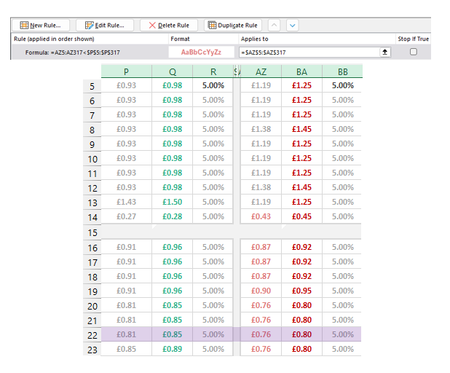
I'm making a rule to Highlight cells in Column AZ when the value is lower than Adjacent cells in Column P. For the most part it works except for two cells in AZ (1 shown as an example) that are higher than P but are being picked up by the conditional formatting. The two cells I'm focusing on here are P14 (£0.27) and AZ14 (£0.43). £0.43 should not be being highlighted pink as it isn't lower than £0.27. This has to be something obvious but I have looked at it too long. Please help if you can :)Solved156Views0likes3Comments
SharePoint user adds random metadata to files
I have a SharePoint Library where we add procedures and documents. There is relevant metadata included (Owner, modified date, keywords, department, etc.), but for one individual contributor, every time she uploads it places oddly specific default values in these metadata fields. I have confirmed on the library settings that there are no column defaults (In this folder or the root folder) and the problem does not occur with any other user. We did have her clear cache and log out and back in, but she is still the only user with this problem. What are we missing?143Views0likes2CommentsOneDrive just opens JPG files others get error 0x80070185 cloud operation was unsuccessful
Hello everyone, we have a problem on a Windows Server 2022 RDS Server with OneDrive. I can login to OneDrive and see all my files. When I try to open the files (e.g. PDF/Word/TXT) I get an error 0x80070185 the cloud operation was unsuccessful When I try to open JPG files its working. I can create folders and move files to this folder. The sync to my local notebook is ok. I tried to reset OneDrive, no success I installed the latest version of OneDrive, we checked the firewall (sophos) no blocked connections, we disabled the local AV software (sophos) to make sure it does not block anything, no success. I reset OneDrive, deleted the App Data folder for OneDrive, deleted the OneDrive folder within my User Account. It is still the same situation, login works I can see all my files and folders I can open JPG files but now word or PDF documents. I can create new folders and TXT files, fill them with content and its synced to OneDrive. Suggested solutions found on the internet are all the same, using reset onedrive and re/install latest version. We had version 26.119.0622.0003 and updated to 26.145.0728.0011 Has anybody another solution for that? Best regards542Views0likes4Comments
OneDrive from Windows Server 2025 for remote users
I have a client that, when I started working with them, had a small staff that kept regular business hours. I set them up with a Windows Server with Active Directory and File and Print Services as well as secure internet access. Over the years, the staff has gotten smaller, and currently consists of the two partners who split their time between working in the office on workstations on their domain and from remote locations on laptop computers connected via WiFi or their cellular provider to the internet. Previously, I had their workstations using OneDrive to store the contents of the server's shared volumes in the cloud so they could be accessed from their laptops. Unfortunately, this didn't work very well presumably because the workstations in the office had to be on in order to update the contents in OneDrive. I upgraded their server to Windows Server 2025 and created an account for the server to directly use OneDrive to store the contents of its shared volumes, and shared those resources in OneDrive with the partners' laptops. Since the server is always on, I presumed that OneDrive would stay up to date. Unfortunately, the shared volumes in OneDrive are still not up to date with the contents of those volumes on the server. What am I missing? Can someone explain the nuts and bolts to me so I can compare them with what I've already done, so I can fix this lag?538Views0likes4CommentsSketchy behaviour from Microsoft on MFA - what gives?
Recently, Microsoft has overwritten our Authentication Method Registration campaign settings, from 'Disabled' to 'Microsoft Managed' for dozens of tenants. Thanks guys. That's not super sketchy at all. /s This was ostensibly done for the Retiring of Voice and SMS based MFA or, as the article puts it 'To help enterprises adopt AI at scale,'.... what? Not because they're garbage MFA methods? But so Microsoft can market-capture MFA? Regardless of that bizarre statement, this article is sub par - like most Microsoft 'help' docs, it appears to have been written by someone in Marketing, with no technical experience. My chief concern is that the term 'OTP' doesn't appear ANYWHERE in here. So, for us and our customers - who block Voice/SMS already - this is alarming. Microsoft's Passkey flow is confusing af to people - and since it includes SYNCED passkeys by default, it faces the same risks as OTP. We specifically HAVEN'T rolled out passkeys because everytime we do, people get confused and frustrated - because they'll have 3-4 different things pop-up, offering to take a sync'd passkey. Really concerned with my 'do not allow microsoft to manage' setting, being explicitly set to 'Microsoft managed', and whatever decisions they're NOT publicly addressing at this point. We've spent years teaching people to use Microsoft Authenticator and password vault-based OTP. Now, Microsoft is pushing everyone to keep using those same tools, but to go through the mess that is the passkey setup interface?82Views0likes0Comments
Microsoft Sign In Loop
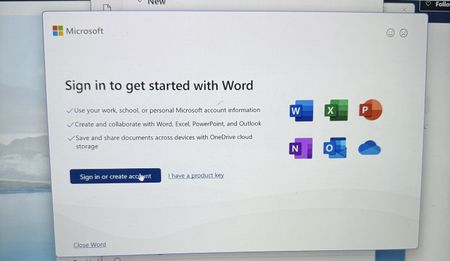
I am trying to sing into Microsoft 365, but every time I do, it takes me back to the login screen. I sing in with my outlook account, but I can't reach the applications. I can sign in on the browser, but not the applications on my computer. I have tried uninstalling and reinstalling M365, but the issue still persists210Views0likes1Comment