Python Error and Performance Monitoring

Python error monitoring with actionable insight into every exception. See the full picture behind any Python error, resolve performance bottlenecks, and get framework-specific coverage that spans Django application monitoring, Flask, FastAPI, and Celery.

Grab the Sentry Python SDK:

Bash
pip install --upgrade sentry-sdk

Initialize the SDK as early as possible in your application:

Python
import sentry_sdk

sentry_sdk.init(
    dsn="https://<key>@sentry.io/<project>",
    # Add data like request headers and IP for users, if applicable;
    # see https://docs.sentry.io/platforms/python/data-management/data-collected/ for more info
    send_default_pii=True,
    # Set traces_sample_rate to 1.0 to capture 100%
    # of transactions for tracing.
    # We recommend adjusting this value in production.
    traces_sample_rate=1.0,
)

Getting Started is Simple

Grab the Sentry Python SDK:

Bash
pip install --upgrade sentry-sdk

Initialize the SDK as early as possible in your application:

Python
import sentry_sdk

sentry_sdk.init(
    dsn="https://<key>@sentry.io/<project>",
    # Add data like request headers and IP for users, if applicable;
    # see https://docs.sentry.io/platforms/python/data-management/data-collected/ for more info
    send_default_pii=True,
    # Set traces_sample_rate to 1.0 to capture 100%
    # of transactions for tracing.
    # We recommend adjusting this value in production.
    traces_sample_rate=1.0,
)

Install our Python SDK using pip:

Bash
pip install --upgrade sentry-sdk

Initialize the SDK in your settings.py file. The Django integration is enabled automatically.

Python
import sentry_sdk

sentry_sdk.init(
    dsn="https://<key>@sentry.io/<project>",
    # Add data like request headers and IP for users, if applicable;
    # see https://docs.sentry.io/platforms/python/data-management/data-collected/ for more info
    send_default_pii=True,
    # Set traces_sample_rate to 1.0 to capture 100%
    # of transactions for tracing.
    # We recommend adjusting this value in production.
    traces_sample_rate=1.0,
)

Install the Sentry Python SDK from PyPI:

Bash
pip install --upgrade sentry-sdk

Initialize the SDK before creating your app. The Flask integration is enabled automatically.

Python
import sentry_sdk
from flask import Flask

sentry_sdk.init(
    dsn="https://<key>@sentry.io/<project>",
    # Add data like request headers and IP for users, if applicable;
    # see https://docs.sentry.io/platforms/python/data-management/data-collected/ for more info
    send_default_pii=True,
    # Set traces_sample_rate to 1.0 to capture 100%
    # of transactions for tracing.
    # We recommend adjusting this value in production.
    traces_sample_rate=1.0,
)

app = Flask(__name__)

Grab the Sentry Python SDK:

Bash
pip install --upgrade sentry-sdk

Initialize the SDK before creating your app. The FastAPI integration is enabled automatically.

Python
import sentry_sdk
from fastapi import FastAPI

sentry_sdk.init(
    dsn="https://<key>@sentry.io/<project>",
    # Add data like request headers and IP for users, if applicable;
    # see https://docs.sentry.io/platforms/python/data-management/data-collected/ for more info
    send_default_pii=True,
    # Set traces_sample_rate to 1.0 to capture 100%
    # of transactions for tracing.
    # We recommend adjusting this value in production.
    traces_sample_rate=1.0,
)

app = FastAPI()

Install the Sentry Python SDK from PyPI:

Bash
pip install --upgrade sentry-sdk

Initialize the SDK before your app is created. The Bottle integration is enabled automatically.

Python
import sentry_sdk
from bottle import Bottle

sentry_sdk.init(
    dsn="https://<key>@sentry.io/<project>",
    # Add data like request headers and IP for users, if applicable;
    # see https://docs.sentry.io/platforms/python/data-management/data-collected/ for more info
    send_default_pii=True,
    # Set traces_sample_rate to 1.0 to capture 100%
    # of transactions for tracing.
    # We recommend adjusting this value in production.
    traces_sample_rate=1.0,
)

app = Bottle()

Install the Sentry Python SDK from PyPI:

Bash
pip install --upgrade sentry-sdk

Initialize the SDK when the Celery worker starts (not only in the module where your tasks are defined). The Celery integration is enabled automatically.

Python
import sentry_sdk
from celery import Celery, signals

app = Celery("tasks", broker="...")

@signals.celeryd_init.connect
def init_sentry(**_kwargs):
    sentry_sdk.init(
        dsn="https://<key>@sentry.io/<project>",
        # Add data like request headers and IP for users, if applicable;
        # see https://docs.sentry.io/platforms/python/data-management/data-collected/ for more info
        send_default_pii=True,
        # Set traces_sample_rate to 1.0 to capture 100%
        # of transactions for tracing.
        # We recommend adjusting this value in production.
        traces_sample_rate=1.0,
    )

If you use Celery with Django and already initialize Sentry in settings.py, no extra setup is needed.

Install the Sentry Python SDK from PyPI:

Bash
pip install --upgrade sentry-sdk

Initialize the SDK before or after your app has been created. The Pyramid integration is enabled automatically.

Python
import sentry_sdk
from pyramid.config import Configurator

sentry_sdk.init(
    dsn="https://<key>@sentry.io/<project>",
    # Add data like request headers and IP for users, if applicable;
    # see https://docs.sentry.io/platforms/python/data-management/data-collected/ for more info
    send_default_pii=True,
    # Set traces_sample_rate to 1.0 to capture 100%
    # of transactions for tracing.
    # We recommend adjusting this value in production.
    traces_sample_rate=1.0,
)

with Configurator() as config:
    # ...

Install the Sentry Python SDK from PyPI:

Bash
pip install --upgrade sentry-sdk

Initialize the SDK before your app starts. The Tornado integration is enabled automatically.

Python
import sentry_sdk

sentry_sdk.init(
    dsn="https://<key>@sentry.io/<project>",
    # Add data like request headers and IP for users, if applicable;
    # see https://docs.sentry.io/platforms/python/data-management/data-collected/ for more info
    send_default_pii=True,
    # Set traces_sample_rate to 1.0 to capture 100%
    # of transactions for tracing.
    # We recommend adjusting this value in production.
    traces_sample_rate=1.0,
)

# Your app code here, without changes

class MyHandler(...):
    # ...

Install the Sentry Python SDK from PyPI:

Bash
pip install --upgrade sentry-sdk

Create a file called mysettings.py with the following content. The RQ integration is enabled automatically.

Python
import sentry_sdk

sentry_sdk.init(
    dsn="https://<key>@sentry.io/<project>",
    # Add data like request headers and IP for users, if applicable;
    # see https://docs.sentry.io/platforms/python/data-management/data-collected/ for more info
    send_default_pii=True,
    # Set traces_sample_rate to 1.0 to capture 100%
    # of transactions for tracing.
    # We recommend adjusting this value in production.
    traces_sample_rate=1.0,
)

Start your worker with:

Bash
rq worker -c mysettings

Install our Python SDK into your deployment package using pip:

Bash
pip install --target ./package --upgrade sentry-sdk

Then use the AWS Lambda integration for the Python SDK like this:

Python
import sentry_sdk
from sentry_sdk.integrations.aws_lambda import AwsLambdaIntegration

sentry_sdk.init(
    dsn="https://<key>@sentry.io/<project>",
    # Add data like request headers and IP for users, if applicable;
    # see https://docs.sentry.io/platforms/python/data-management/data-collected/ for more info
    send_default_pii=True,
    # Set traces_sample_rate to 1.0 to capture 100%
    # of transactions for tracing.
    # We recommend adjusting this value in production.
    traces_sample_rate=1.0,
    integrations=[AwsLambdaIntegration()],
)

def lambda_handler(event, context):
    # ...

Add the Sentry SDK to your requirements.txt:

Text
sentry-sdk

Then use the GCP Functions integration for the Python SDK like this:

Python
import sentry_sdk
from sentry_sdk.integrations.gcp import GcpIntegration

sentry_sdk.init(
    dsn="https://<key>@sentry.io/<project>",
    # Add data like request headers and IP for users, if applicable;
    # see https://docs.sentry.io/platforms/python/data-management/data-collected/ for more info
    send_default_pii=True,
    # Set traces_sample_rate to 1.0 to capture 100%
    # of transactions for tracing.
    # We recommend adjusting this value in production.
    traces_sample_rate=1.0,
    integrations=[GcpIntegration()],
)

def http_function_entrypoint(request):
    # ...

The GCP integration supports the Python 3.7 runtime. On newer runtimes, use the serverless_function decorator instead.

How to install the Python SDK

More than 200K Organizations Trust Sentry with Their Application Monitoring
Python Performance Monitoring
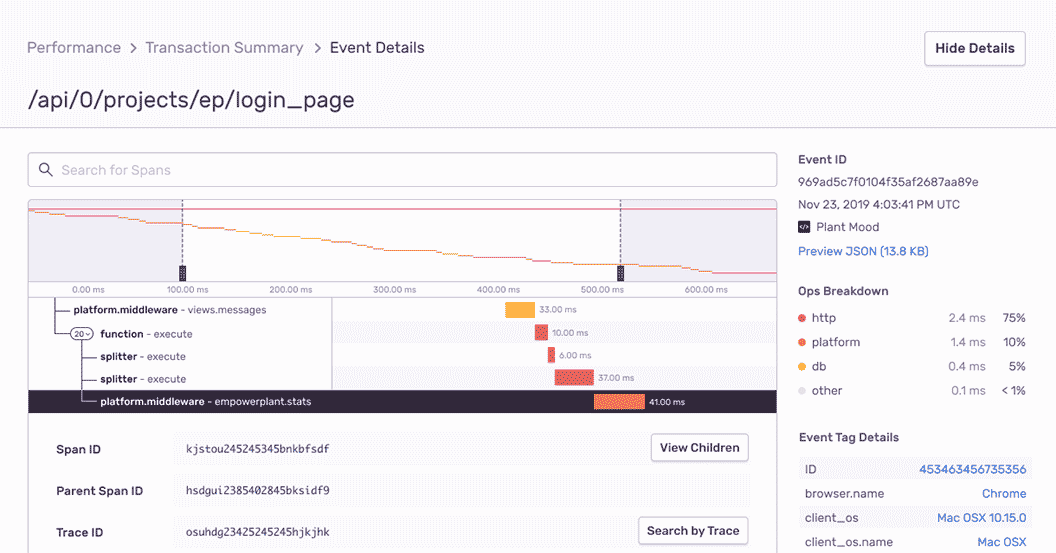
Within minutes after installing Sentry, software teams can trace Python performance issues back to a poor-performing API call and surface every related code error. From Django application monitoring to FastAPI performance, engineering managers and developers get a single tool to optimize their code and deliver fast customer experiences.
See a Sample Transaction

Complete Stack Traces, With Local Variables
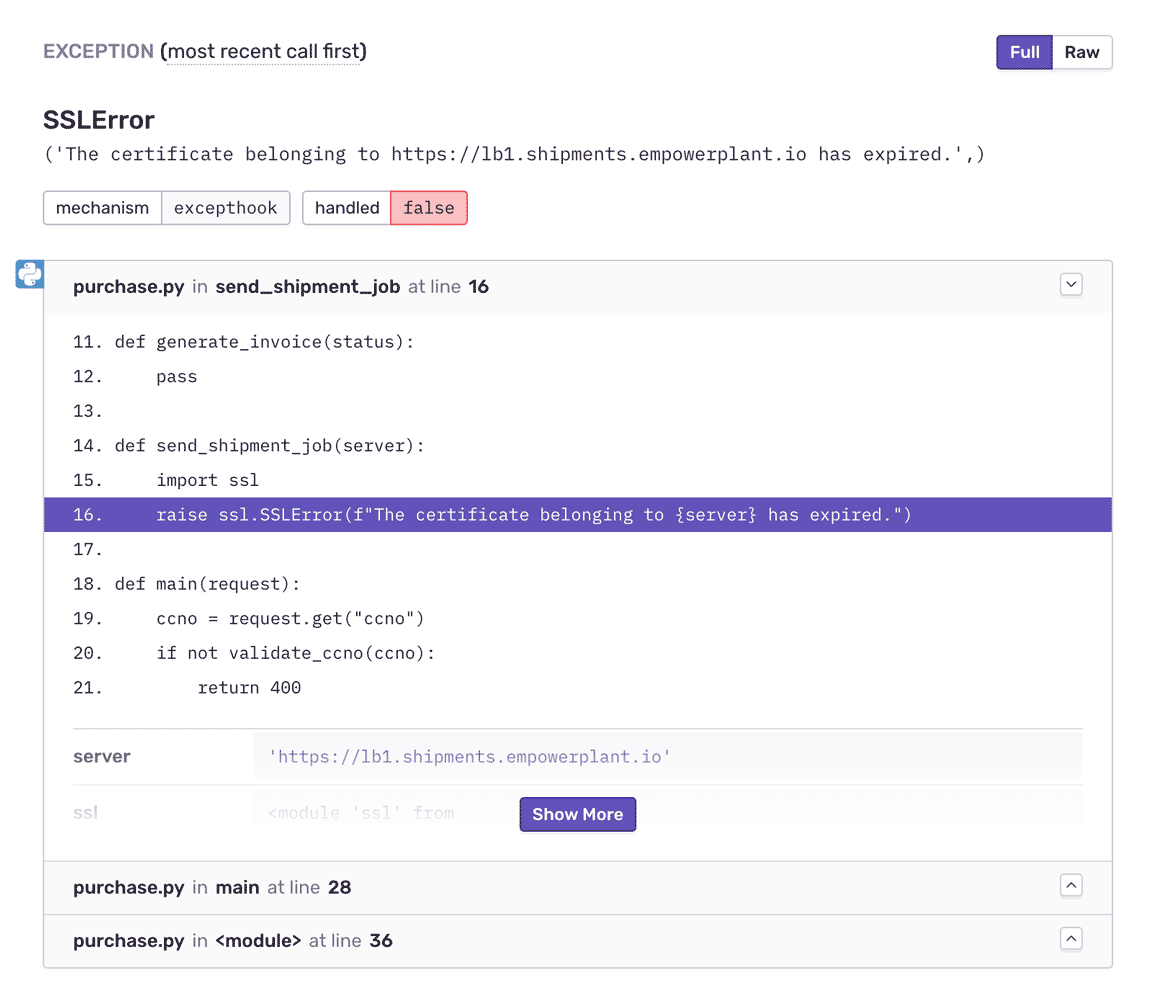
See local variables in the stack for prod errors, just like in your dev environment. Introspect more deeply into the runtime and jump into the frame to get additional data for any local variable. Filter and group Python exceptions intuitively to eliminate noise, whether you're doing Flask error handling, tracking Django views, or monitoring Celery jobs.
See a Sample Stack Trace

Fill In the Blanks

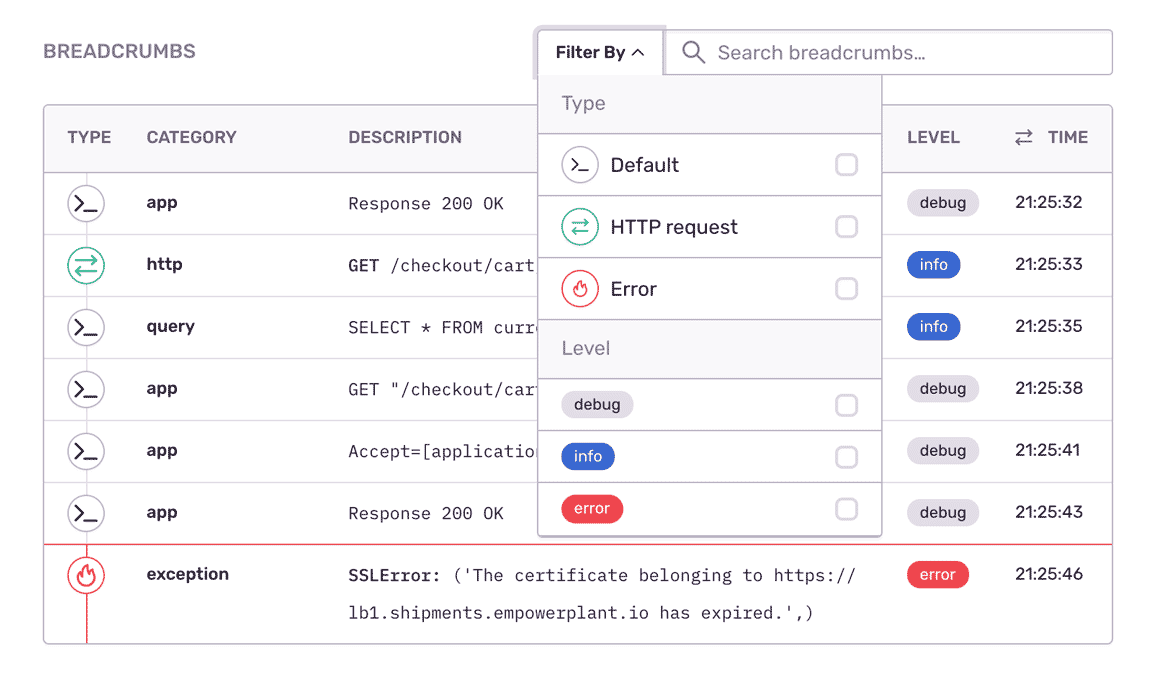
Expose the important events that led to each Python exception: SQL queries, debug logs, network requests, past errors. Improve debugging workflow with a full view of releases so you can mark errors as resolved and prioritize live issues.
Check out Breadcrumbs

Profiling, Down to the Function

Profiling lets you see what parts of your code are consuming the most resources, like CPU or memory, in your application— so you can optimize them before end user experience is impacted. Test your application performance in any environment, including in production, without writing manual tests or extensive troubleshooting.
Try Profiling
Sentry Logs showing structured log output alongside errors and traces

Your Logs, Next to the Trace

Ship your Python logging output to Sentry and query it next to the trace that produced it. The logging calls you already write become searchable context on the exact request that failed, so retries, third-party API failures, and internal state are visible without a second tool.

Learn more about Logs in Sentry.

Explore Logs

"The time to resolve errors went from days to minutes."

Vaidik Kapoor
VP of Engineering at Grofers
Grofers

See the Full Picture of Any Exception

Aggregate errors by details like HTTP request, hostname, and app version to see what's new, a priority, or a trend.

Assign custom tags to reproduce the error environment specific to your application, business, and users.

Answer the most important questions: In which app release did the Python bug occur? Was it the kraken?

FAQs

Traditional logging provides you with a trail of events. Some of those events are errors, but many times they're simply informational. Sentry is fundamentally different because we focus on exceptions, or in other words, we capture application crashes. We discuss in more detail here and on our blog.

Sentry supports every major language, framework, and library. You can browse each of them here.

You can get started for free. Pricing depends on the number of monthly events, transactions, and attachments that you send Sentry. For more details, visit our pricing page.

Sentry doesn't impact a web site's performance.

If you look at the configuration options for when you initialize Sentry in your code, you'll see there's nothing regarding minimizing its impact on your app's performance. This is because our team of SDK engineers already developed Sentry with this in mind.

Sentry is a listener/handler for errors that asynchronously sends out the error/event to Sentry.io. This is non-blocking. The error/event only goes out if this is an error.

Global handlers have almost no impact as well, as they are native APIs provided by the browsers.

Yes. Sentry Logs lets you send, view, and query structured logs from your application alongside your errors and traces. Because logs sit next to the error and the trace that produced them, you get the granular context — retries, API failures, internal state — that spans and stack traces alone can miss, without switching tools.

Learn more about Logs in Sentry.

Seer is Sentry's AI debugging agent. It reads the full context Sentry already has — the error, its stack trace, the surrounding trace, logs, and profiles — to find the root cause of an issue and propose a fix. Seer can open a pull request with that fix, hand the work to an external coding agent, or review your PRs before they ship.

Learn more about Seer and Autofix.

Resolve Python errors with max efficiency, not max effort