
AI Python Code Generator - Free Tool by Refact.ai
Python Coding Made Easy
This Python Code Generator tool is made by Rafect.ai team for you to create, simplify, and explain Python code in a more efficient way. So, whether you're generating random strings, writing scripts… or refactoring code, our tool will help you make it all quicker and easier.
How AI Code Writer Works
Let's shed light on how to write code in Python with AI. Believe it or not, it's simple - you just need to follow these steps
- Select your action: choose to generate, explain, or optimize code.
- Describe your task: enter details about the task you want to complete.
- Choose preferred AI: select from top coding models such as GPT-4o-mini (no login needed), Claude 3.5 Sonnet, and others.
- Generate code: click the magic red button to get the results in a few seconds.
Don't know what to ask? Try your luck - start with a request to generate a random string in Python.
Key features and advantages
With our code helper, you can use different AI models for your coding tasks. That includes GPT-4o-mini, GPT-4o, Claude 3.5 Sonnet.
These models are designed to understand and generate code effectively: you can write, explain, and optimize programming scripts in just several clicks. Each AI model has its own unique capabilities so please choose LLM depending on the complexity and requirements of your project.
There are several options for working with the code.
- You can choose to generate code from scratch. That way, you get clean and intuitive script outputs.
- If you need clarity, the generate and explain option breaks down complex codes into more understandable parts.
- To improve performance, the optimize code feature enhances efficiency, while the refactor code function restructures code for better readability and maintenance.
- Additionally, our tool can generate the shortest code possible. This is ideal for minimizing resource use in small scripts.
Also, our AI tool supports Syntax Highlighting functionality that displays output code components in different fonts and colors, making reading easier.
Who is This Tool For?
This AI to create Python code is useful for anyone needing AI assistance in their coding tasks. Let's determine several personas who can benefit from the service:
- Experienced engineers: save time by quickly generating code snippets instead of writing everything by hand.
- Beginners who just started coding: learn how to write simple scripts and read explanations.
- Students: get homework support and automatically close low/medium level tasks.
- Scientists and Researchers: Python is widely used in science for data analysis and simulations.
- AI enthusiasts interested in coding: don't limit yourself to writing and summarizing texts. Try to build apps, analyze data, or automate tasks, Python is a great choice.
What is Python Language?
Python is a very popular programming language among web developers. It's relatively easy to read and write - it looks like a set of simple instructions that any computer can understand. Python is considered flexible and versatile lang because it can be used for many things:
- To build web apps and websites, especially their back-end parts
- To create machine learning algorithms which can learn and make decisions.
- It's compatible with different frameworks such as Django and Flask.
- Python can help working with big amounts of data, which is useful in science and business analytics. It also can automate repetitive tasks.
Example Prompt
Here's an example of how you can use our AI tool:
Python Code Refactoring
My code is:
    def calculate_area_of_shapes(shapes):
    areas = []
    for shape in shapes:
        if shape['type'] == 'rectangle':
            area = shape['width'] * shape['height']
            areas.append(area)
        elif shape['type'] == 'circle':
            area = 3.14 * (shape['radius'] ** 2)
            areas.append(area)
        elif shape['type'] == 'triangle':
            area = 0.5 * shape['base'] * shape['height']
            areas.append(area)
    return areas
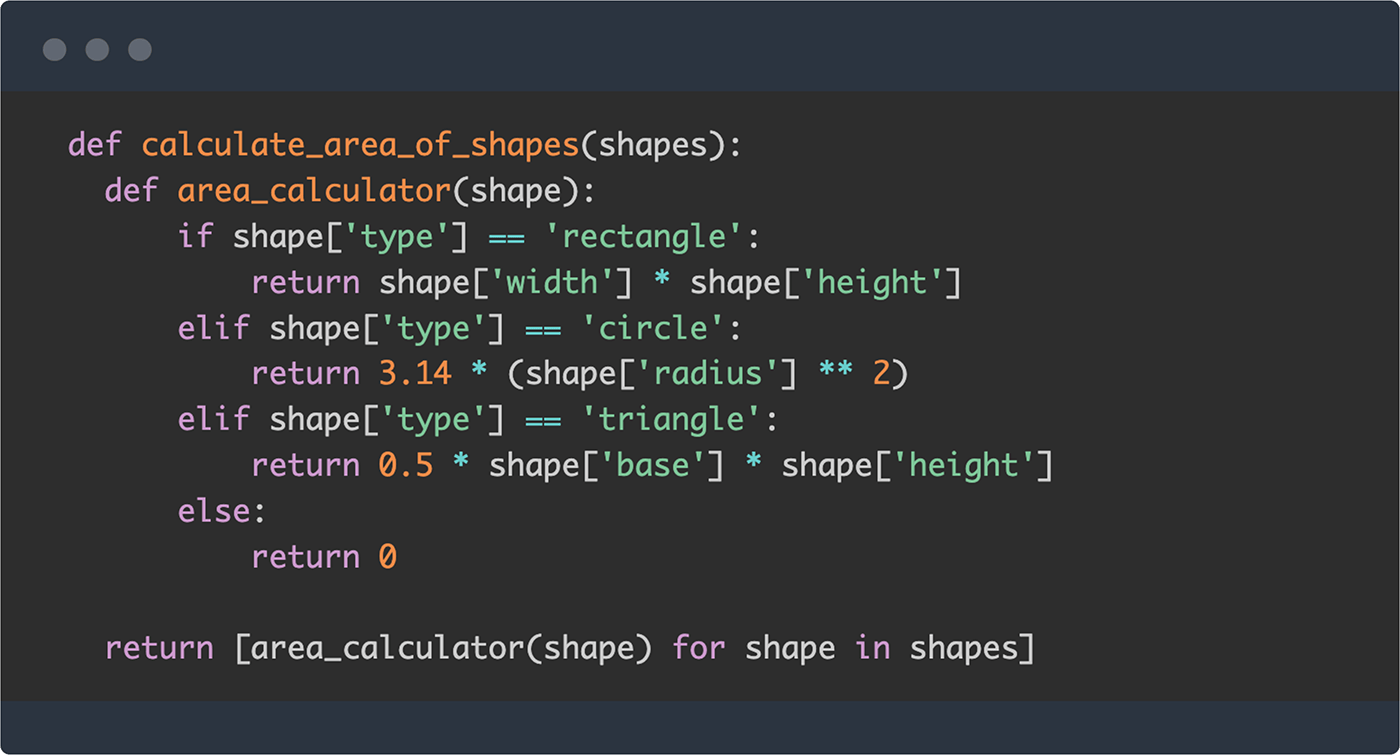
- Our tool created a separate function named
area_calculatorto handle calculations for different shapes. It made the main functioncalculate_area_of_shapesmore understandable. - A list comprehension was used instead of a loop and appending areas. This is a way to create a more concise list of areas which also makes the code easier.
- The statement
elsewas added that returns0if the shape type is not recognized. This helps prevent errors in case of unexpected shape type.
How to Write a Python Script
FAQ
Is the Python Code Generator free?
What languages are supported?
Can it explain the code to me?
What AI does it use?
Can I refactor code with this tool?
Is Python worth learning in 2025?
Useful links and resources
Our team has prepared for you a list of resources that you may find useful.
Refact.ai
- Blog: latest news and tips on AI and coding.
- Docs: how to use AI for code completion, code refactoring, chat, and more.
- AI Agent: delegate your engineering tasks to the developer's "digital twin".