
Repository navigation
IDX40001: Issuer: 'https://tenantname.b2clogin.com/tenantId/v2.0/', does not match any of the valid issuers provided for this application. #51005

Description

Is there an existing issue for this?
- I have searched the existing issues
Describe the bug
Experience setting up Auth using Azure AD B2C in a .NET 8 Blazor Web App has been very painful.
The docs are all over the place. Had to piece together information from so many places and still couldn't make it work. 😩
Problem
I've been trying to setup my .NET 8 Blazor Web App (Server side) to connect to Azure AD B2C to log in users and call a secured API.
I have pieced together instructions mostly from here, here and here.
The web app launches, takes me to the login page and lets me enter my credentials:

After I hit "Sign In", it just keeps on spinning and spinning on this url:
https://munsonpickles3.b2clogin.com/munsonpickles3.onmicrosoft.com/b2c_1_signupsignin/oauth2/v2.0/authorize?client_id=171b3d8f-8ff1-48b7-a5be-31b0413929ee&redirect_uri=https%3A%2F%2Flocalhost%3A7032%2Fsignin-oidc&response_type=code&scope=openid%20profile%20offline_access%20https%3A%2F%2Fmunsonpickles3.onmicrosoft.com%2Fmunson-api%2Fread&code_challenge=abcDe8FGl6jNrCyWPls56yaKjYuohGtD6vUpSgJe6nA&code_challenge_method=S256&response_mode=form_post&nonce=638123410660191340.YjRmNjYkOTOtN2IkNi00YzgxLTg0ZGEtMTRjNTIxZjcxOWJhMzYwZDk1ZDItOGIxNy00NTRiLThiMzgtOWM2MmVkZTlhYjc1&client_info=1&x-client-brkrver=IDWeb.2.14.0.0&state=CfDJ8L8UGyfUjDBErg6qYS34nXD3E0mLxkSA-InrXSkiEcmt8_eHquvuIC-GnidwO47o_SdGzL58675xXvBYP49rsnKjKti0bUUM1FvXyK5N7-AnYGdzo9SqoahAP5Ps7ykpi93LFX-Uis3xf068-S61dmuEn-8FmIKR3TOxzYJrKxAbG6dbymelCxbJ8xpESofmPRBQ9yKCi4flT8yTOFBtOszKtg2GTmxy9MMeX3edKDxpuTniV4YNXzzw-NpSL7DRHRLYSpbrOasGhk_dUrY0WWL3CY_43FmiKUSLiO60JheXpqYL_D53MA6nf0InABDhmkBNroqZgo7Qnv2hpgXSefZOLNgWkdcyTY8Pe-ZvCPX0ncBfkgqFFmQCNjXip-j0PnjRDLgHlldx70qi9ecSKdXgqvuW8a17QjrrEDAHUSCU&x-client-SKU=ID_NET8_0&x-client-ver=7.0.0.0

And ultimately ends up like this on the redirect url (notice the amount of cookies it tried to set which gets too long and runs into 431 error):

The console of my IDE shows this error:
Microsoft.IdentityModel.Tokens.SecurityTokenInvalidIssuerException: IDX40001: Issuer: 'https://munsonpickles3.b2clogin.com/f6c04159-d728-43cd-8ae1-c1f3793844d5/v2.0/', does not match any of the valid issuers provided for this application.
I then checked all the config in my appsettings.json which seems to match what's in the App registration in my AADB2C directory.
  "AzureAdB2C": {
    "Instance": "https://munsonpickles3.b2clogin.com/",
    "Domain": "munsonpickles3.onmicrosoft.com",
    "ClientId": "12345d8f-8ff1-48b7-a5be-31b041312345",
    "CallbackPath": "/signin-oidc",
    "ClientSecret": "12345~6MzNJ3yk.YTq9iP51R1niJFWuxaGx12345",
    "SignedOutCallbackPath": "/signout/B2C_1_SignUpSignIn",
    "SignUpSignInPolicyId": "B2C_1_SignUpSignIn",
    "ResetPasswordPolicyId": "",
    "EditProfilePolicyId": ""
  }

The redirect urls are also set correctly:

I ran the flow by pointing the redirect url to jwt.ms, and looked at the Issuer which is the same one that the app is complaining about:

Issuer: 'https://munsonpickles3.b2clogin.com/f6c04159-d728-43cd-8ae1-c1f3793844d5/v2.0/', does not match any of the valid issuers provided for this application.
I have followed all the steps by going through all the docs I could find, but after spending 2 days on this, I think I need help.
Please take a look at my full source code to see if you can find something.
Expected Behavior
The app should connect to Azure AD B2C, authenticate the user, get the token, log in the user and redirect to homepage.
Steps To Reproduce
Full Source Code:
https://github.com/affableashish/blazor-server-aadb2c
There are 2 projects: one created on net7.0 and the other on net8.0. The net7.0 project works fine. As for net8.0 project, you can hook up your own AD B2C info in its appsettings.json and give it a try which will fail with the error I've reported here.
Exceptions (if any)
fail: Microsoft.IdentityModel.LoggingExtensions.IdentityLoggerAdapter[0]
      IDX40001: Issuer: 'https://munsonpickles3.b2clogin.com/f6c04159-d728-43cd-8ae1-c1f3793844d5/v2.0/', does not match any of the valid issuers provided for this application.
fail: Microsoft.AspNetCore.Authentication.OpenIdConnect.OpenIdConnectHandler[17]
      Exception occurred while processing message.
      Microsoft.IdentityModel.Tokens.SecurityTokenInvalidIssuerException: IDX40001: Issuer: 'https://munsonpickles3.b2clogin.com/f6c04159-d728-43cd-8ae1-c1f3793844d5/v2.0/', does not match any of the valid issuers provided for this application.
         at Microsoft.AspNetCore.Authentication.OpenIdConnect.OpenIdConnectHandler.ValidateTokenUsingHandlerAsync(String idToken, AuthenticationProperties properties, TokenValidationParameters validationParameters)
         at Microsoft.AspNetCore.Authentication.OpenIdConnect.OpenIdConnectHandler.HandleRemoteAuthenticateAsync()
.NET Version
8.0.100-preview.7.23376.3
PII Logs
info: Microsoft.IdentityModel.LoggingExtensions.IdentityLoggerAdapter[0]
      IDX10242: Security token: 'eyJhbGciOiJSUzI1NiIsImtpZCI6Ilg1ZVhrNHh5b2pORnVtMWtsMll0djhkbE5QNC1jNTdkTzZRR1RWQndhTmsiLCJ0eXAiOiJKV1QifQ.eyJ2ZXIiOiIxLjAiLCJpc3MiOiJodHRwczovL211bnNvbnBpY2ts12345mIyY2xvZ2luLmNvbS9mNmMwNDE1OS1kNzI4LTQzY2QtOGFlMS1jMWYzNzkzODQ0ZDUvdjIuMC8iLCJzdWIiOiJjMDg1NTY2My02NjBiLTQ0YTEtOTkwNC00MzM5ZjVlNWU5YTIiLCJhdWQiOiIxNzFiM2Q4Zi04ZmYxLTQ4YjctYTViZS0zMWIwNDEzOTU1ZWUiLCJleHAiOjE2OTYwMj12345sIm5vbmNlIjoiNjM4MzE2MTYxODUxNzIwNjIwLk9UUmtNR0V5WTJRdFlUazROQzAwTjJRMUxUZzVZalV0TnpobU5EZ3dZekZsTlRRM1pHRmpNbVkxT1RRdE9XWTJOaTAwTWpaaUxUaGxaREF0WVRnd1pUYzBNekk0TVdGbCIsImlhdCI6MTY5NjAxOTM4NSwiYXV0aF90aW1lIjoxNjk2MDE5Mzg1LCJjb3VudHJ5IjoiVW5pdGVkIFN0YXRlcyIsIm5hbWUiOiJBc2hpc2ggS2hhbmFsIiwidGZwIjoiQjJDXzFfU2lnblVwU2lnbkluIiwibmJmIjoxNjk2MDE5Mzg1fQ' has a valid signature.
info: Microsoft.IdentityModel.LoggingExtensions.IdentityLoggerAdapter[0]
      IDX10239: Lifetime of the token is valid.
info: Microsoft.IdentityModel.LoggingExtensions.IdentityLoggerAdapter[0]
      IDX10234: Audience Validated.Audience: '12345d8f-8ff1-48b7-a5be-31b041312345'
fail: Microsoft.IdentityModel.LoggingExtensions.IdentityLoggerAdapter[0]
      IDX40001: Issuer: 'https://munsonpickles3.b2clogin.com/f6c04159-d728-43cd-8ae1-c1f3793844d5/v2.0/', does not match any of the valid issuers provided for this application.
fail: Microsoft.AspNetCore.Authentication.OpenIdConnect.OpenIdConnectHandler[17]
      Exception occurred while processing message.
      Microsoft.IdentityModel.Tokens.SecurityTokenInvalidIssuerException: IDX40001: Issuer: 'https://munsonpickles3.b2clogin.com/f6c04159-d728-43cd-8ae1-c1f3793844d5/v2.0/', does not match any of the valid issuers provided for this application.
         at Microsoft.AspNetCore.Authentication.OpenIdConnect.OpenIdConnectHandler.ValidateTokenUsingHandlerAsync(String idToken, AuthenticationProperties properties, TokenValidationParameters validationParameters)
         at Microsoft.AspNetCore.Authentication.OpenIdConnect.OpenIdConnectHandler.HandleRemoteAuthenticateAsync()
Anything else?
Also asked a Stack Overflow question about this.
Activity
akhanalcs commentedon Sep 29, 2023
Hi @danroth27 ,
Could you please help with this issue?
Update 9/29/23:
Looks like the problem is with
.NET 8Blazor app.I created a brand new Blazor Server project with this CLI command:
dotnet new blazorserver -au IndividualB2C -o blazor.server.net7which created my project innet7.0. I then hooked up my B2C to it and it all worked fine ✨.Full source code here:
https://github.com/affableashish/blazor-server-aadb2c/tree/main/blazor.server.net7
But when I changed it to
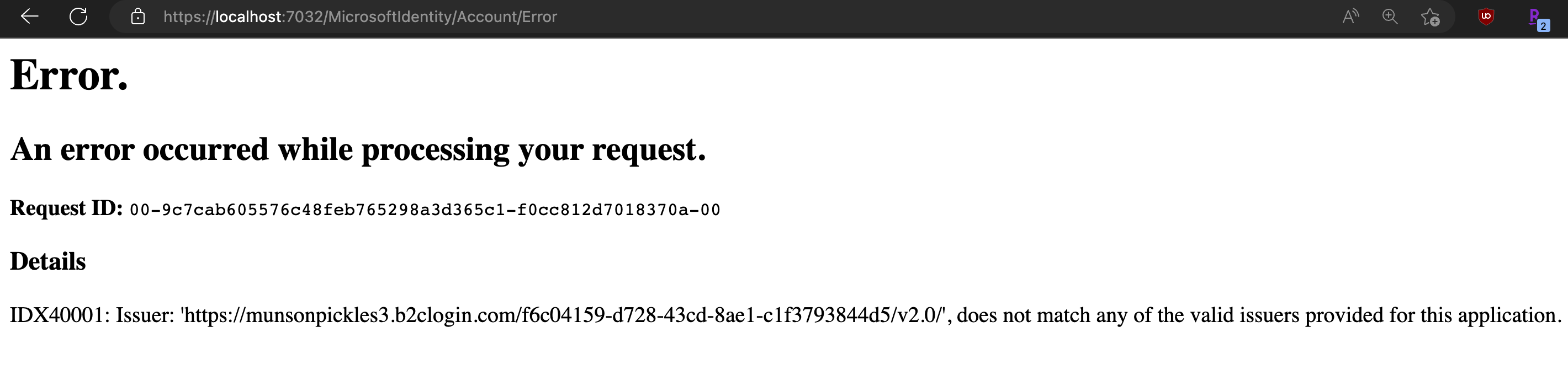
.NET 8, I ran into this error:I then wanted to create a new
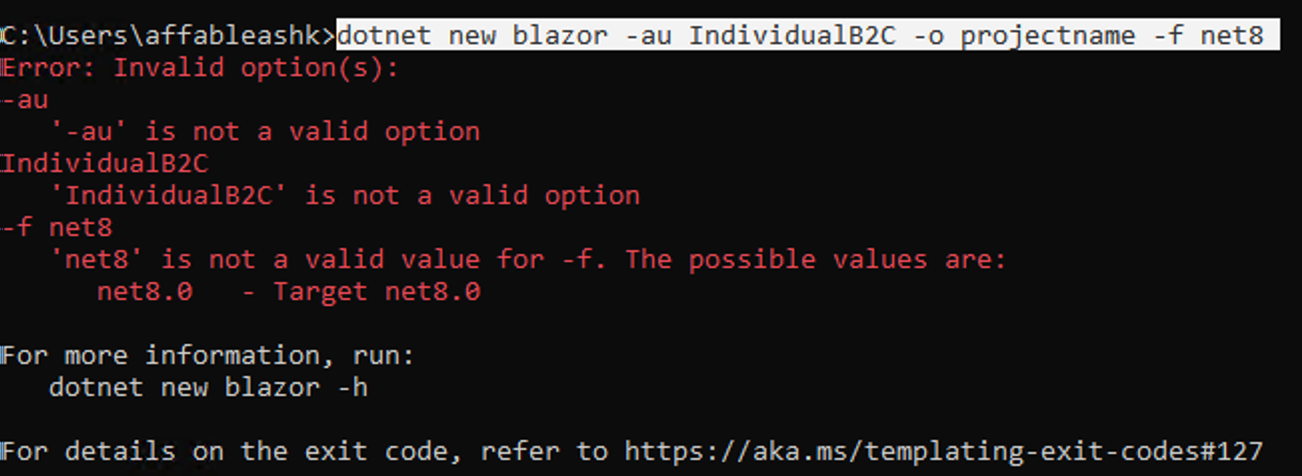
net8.0project using a similar command to get the auth setup for me (-au IndividualB2C) but looks like it doesn't exist for .NET 8 yet:Also Visual Studio Version 17.8.0 Preview 2.0 doesn't present any window to choose Authentication type.
So I created a new
net8.0project using Rider (I'm on a Mac).I added the necessary nuget packages and copied Auth setup from the
net7.0project.The issue persists.
Full source code here:
https://github.com/affableashish/blazor-server-aadb2c/tree/main/blazor.server.net8
dieterdp commentedon Oct 1, 2023
Hello
I have the same problem, migrating a .NET 7 to .NET 8 RC, using Rider on Mac. Same problem when i use VSCode to start the application. After logging in i get the following message in my API project:
Microsoft.IdentityModel.LoggingExtensions.IdentityLoggerAdapter[0]
IDX40001: Issuer: 'https://....b2clogin.com/......./v2.0/', does not match any of the valid issuers provided for this application.
Dieter
ashsubedi commentedon Oct 1, 2023
@affableashish I'm also facing the same issue
kijanawoodard commentedon Oct 12, 2023
I believe this is a .net 8 specific issue, but I think I have a workaround.
Tl;dr - set the IssuerValidator
Insecure, but hopefully quite temporary implementation (accepts any issuer):
More robust version in the code linked below:
AzureAD/microsoft-identity-web#168 (comment)
led to
https://github.com/Azure-Samples/active-directory-aspnetcore-webapp-openidconnect-v2/tree/master/1-WebApp-OIDC/1-2-AnyOrg#how-to-restrict-users-from-specific-organizations-from-signing-in-your-web-app
halter73 commentedon Oct 14, 2023
I submitted a PR to fix this at AzureAD/azure-activedirectory-identitymodel-extensions-for-dotnet#2361. In the meantime, another workaround is the following to go back to pre-.NET 8 behavior:
There's a breaking change announcement at aspnet/Announcements#508 that list this as one of the workarounds, but this was not a scenario that should have broken.
akhanalcs commentedon Oct 16, 2023
@halter73 Thank you!
Update the Microsoft.IdentityModel.* and Microsoft.Identity.Web.* pac…
Update dependency System.IdentityModel.Tokens.Jwt to v7.0.3 (#813)