
Skip to main content


Build a RAG agent with LangChain
One of the most powerful LLM-based applications are sophisticated question-answering (Q&A) chatbots which augment LLMs by providing it with structured access to a set of data.
This might be private data, recent data, or data that is not part of the training data the LLM is trained on.
These applications use a technique known as Retrieval Augmented Generation, or RAG.
This tutorial will guide you through building an app that answers questions about a long unstructured text:
For more details, see our Installation guide.
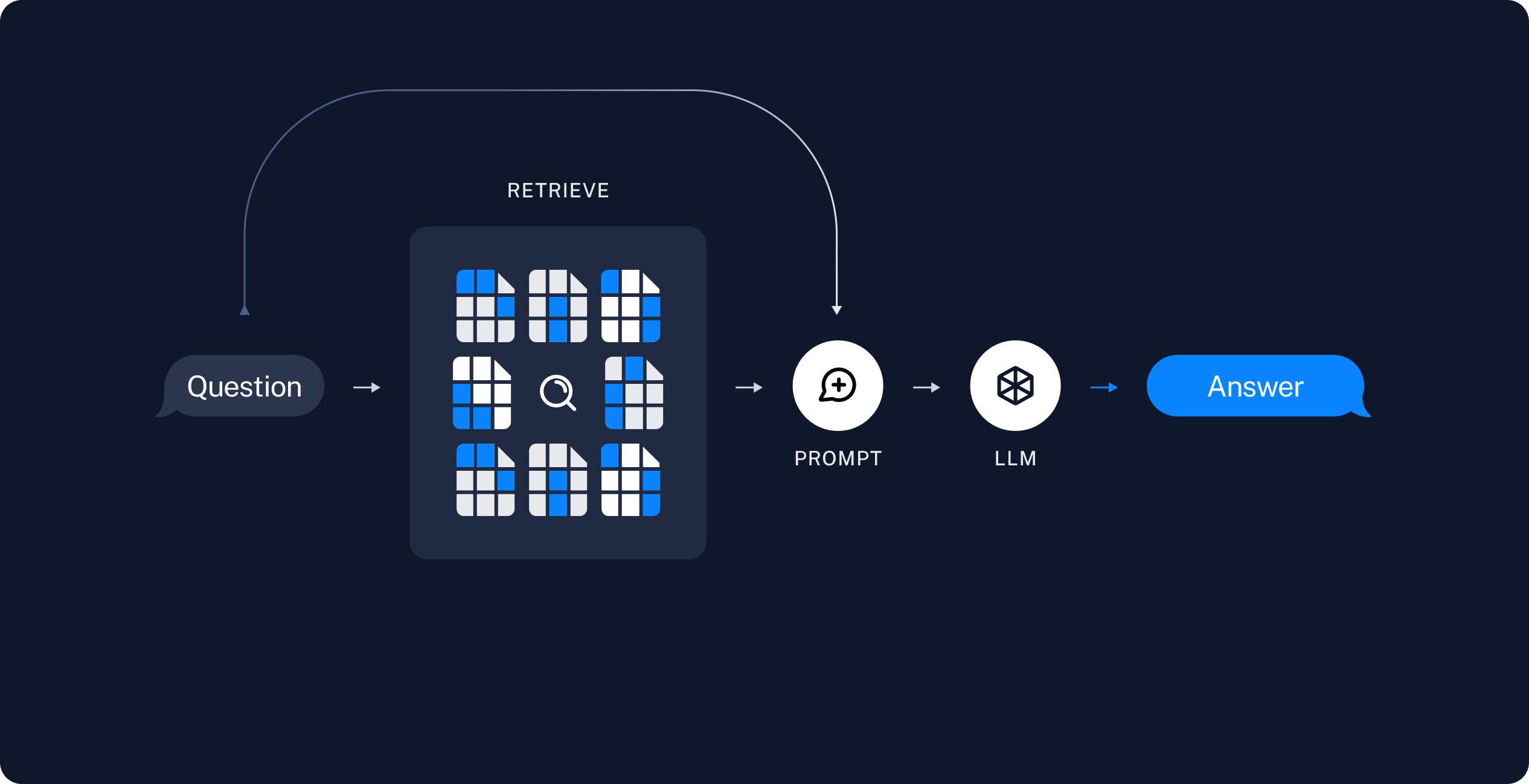
Another common approach is a two-step chain, in which you always run a search, potentially using the raw user query, and incorporate the result as context for a single LLM query. This results in a single inference call per query, trading flexibility for reduced latency.
In this approach we no longer call the model in a loop, but instead make a single pass.
You can implement this chain by removing tools from the agent and instead incorporating the retrieval step into a custom prompt:
The
When you run this, you get the following output:
If you enabled LangSmith in Setup, open LangSmith, select your default project, and open the trace for this run in the Traces tab. Inspect how retrieved context is passed to the model in the Details view. You can also compare your trace with this example LangSmith trace or the multi-step agent trace.
This is a fast and effective method for simple queries in constrained settings, when you almost always want to run user queries through semantic search to pull additional context.
- Indexing content: Creating a pipeline for ingesting data from a source and indexing it.
- RAG agent: A general-purpose implementation that searches indexed content and passes relevant context to an LLM.
- RAG chain: A two-step implementation that uses a single LLM call per query. This is a fast and effective method for simple queries.
Setup
Install core dependencies
Set up LangSmith
RAG applications run retrieval and generation in sequence. When you run the examples in this tutorial, LangSmith logs a trace for each query so you can inspect retrieval, tool calls, and model responses.
After you sign up for LangSmith, set your environment variables to start logging traces:Or, set them in Python:
Index your content
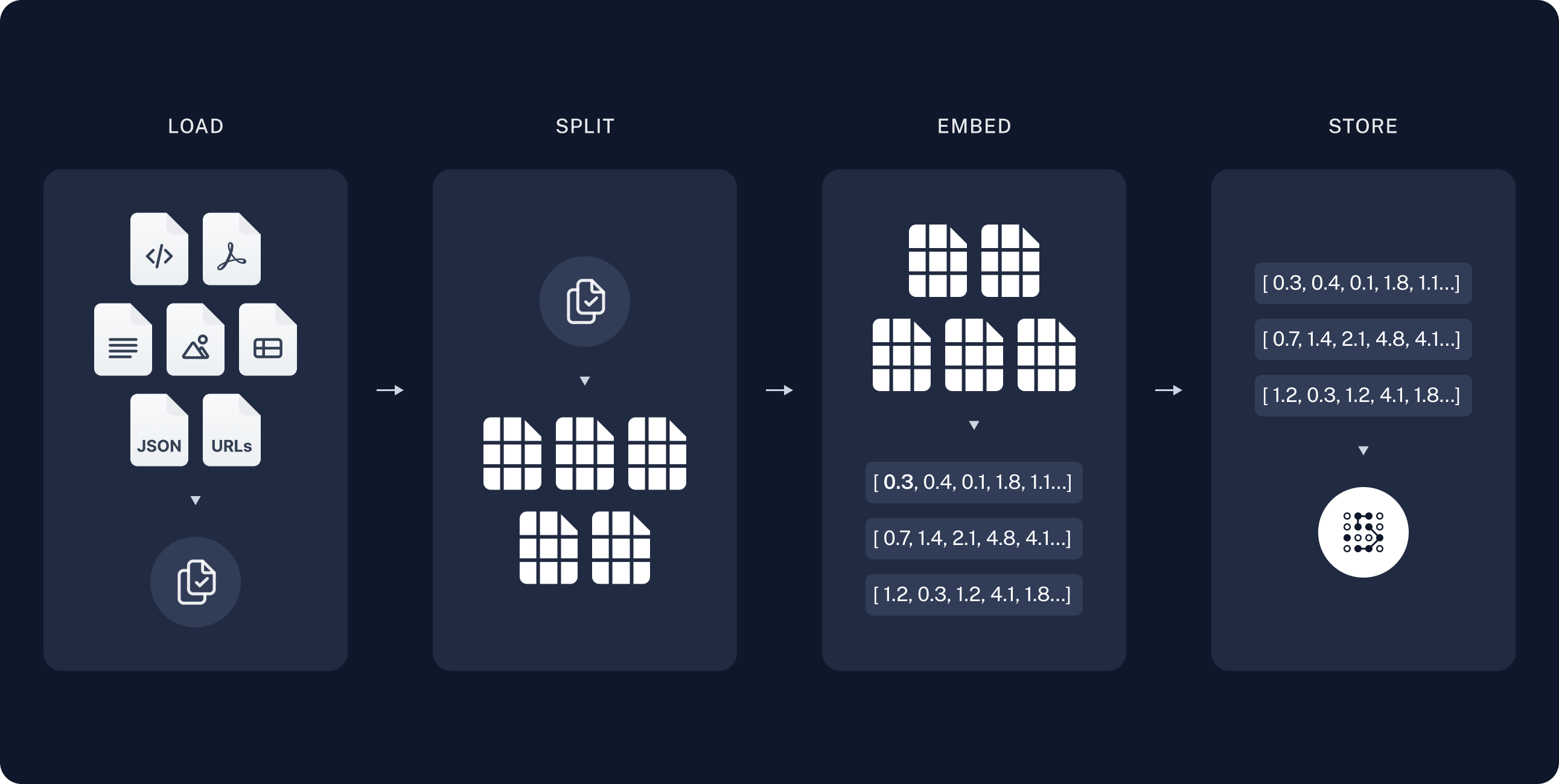
In the indexing step, you’ll take the source content and convert chunks of it into numerical representations. This numerical representation captures the semantic meaning of the chunk. Storing a mapping of these numerical representations and the document chunks in aVectorStore allows you to efficiently retrieve relevant content when a user sends a query based on its own numerical representation.
Indexing commonly works in four steps:
- Load: Load your data sources into
Documentobjects. - Split: Use text splitters to break large
Documents into smaller chunks. This is useful both for indexing data and passing it to a model, as large chunks are harder to search over and either do not fit in a model’s finite context window or use more tokens than necessary. - Embed: Embeddings models convert each chunk into a numeric vector that captures its meaning, enabling similarity search over your content.
- Store: Use a VectorStore to index chunks and their embeddings for retrieval.
If you have completed the semantic search tutorial, you can use the retriever function to execute a search from it and skip to RAG agent.
Load documents
Start by loading the blog post contents into a list of Document objects. Use your libraries of choice to fetch the page contents. This example uses therequests package to fetch the page and BeautifulSoup to parse it to text.
You can customize the HTML-to-text parsing by passing in parameters into the BeautifulSoup parser with the bs_kwargs parameter.
In this case only HTML tags with class “post-content”, “post-title”, or “post-header” are relevant, so you can remove all others:
Split documents
The loaded document is long, which makes it too large to fit into the context window of many models. Even for those models that could fit the full post in their context window, models can struggle to find information in very long inputs. For ease of use, split theDocument into chunks. These chunks will be used for embedding and vector storage in the next steps.
Use the RecursiveCharacterTextSplitter to recursively split the document using common separators like new lines, until each chunk is the appropriate size.
RecursiveCharacterTextSplitter is the recommended TextSplitter for generic text use cases.
TextSplitter interface and text splitter integrations.
Select an embeddings model
An embedding is a numeric vector that captures the meaning of each chunk of your blog post. An Embeddings model converts those chunks into vectors so that similar meanings land close together in vector space, enabling you to retrieve relevant sections when a user asks a question. You can choose from many different embedding integrations which all use the same Interface:- OpenAI
- Azure
- Google Gemini
- Google Vertex
- AWS
- HuggingFace
- Ollama
- Cohere
- MistralAI
- Nomic
- NVIDIA
- Voyage AI
- IBM watsonx
- Fake
- Isaacus
Store chunks and embeddings in VectorStore
AVectorStore persists document chunks and their embeddings, enabling similarity search to retrieve relevant sections when a user asks a question.
You can choose from many different vector store integrations which all use the same Interface.
Use the embeddings model that you selected in the previous step to configure your VectorStore:
- In-memory
- Amazon OpenSearch
- AstraDB
- Chroma
- Milvus
- MongoDB
- PGVector
- PGVectorStore
- Pinecone
- Qdrant
vector_store you initialized above:
- Retrieve: Given a user input, relevant splits are retrieved from storage using a Retriever.
- Generate: A model produces an answer using a prompt that includes both the question and the retrieved data.
RAG agent
The following steps show you how to build a minimal agent with a retrieval tool that wraps your vector store. The agent decides when to search for documents relevant to a user question, passes retrieved documents and the user question to a model, and returns an answer.Create the retrieval tool
Tools are callable functions with well-defined inputs and outputs that get passed to a model, which decides when to invoke them. You can implement a tool that wraps your vector store:The tool decorator configures the tool to attach raw documents as artifacts to each ToolMessage. This will let you access document metadata in your application, separate from the stringified representation that is sent to the model.The
k parameter sets how many document chunks similarity search returns. With k=2, the vector store returns the two chunks whose embeddings are most similar to the query embedding.Select a chat model
You can use any model for the agent you will create in the next step:
- OpenAI
- Anthropic
- Azure
- Google Gemini
- AWS Bedrock
- HuggingFace
- OpenRouter
Create the agent
You can now create the agent using the To test this, construct a question that requires multiple retrieval steps in sequence to answer:When you run this code, you get the following output:When your agent runs it:
model from the previous step and your retrieval tool:- Generates a query to search for a standard method for task decomposition.
- Receives the answer and generates a second query to search for common extensions of it.
- Answers the question after receiving all necessary context.
Full code
Full code
This example is self-contained: it loads the blog post, indexes the content, and runs a query. Copy the setup and run blocks together.If you enabled LangSmith in Setup, open LangSmith, select your default project, and open the trace for this run in the Traces tab. You can also compare your trace with this example LangSmith trace. For more on tracing LangChain apps, see Trace with LangChain.
RAG chain
In the RAG agent you created, you allow the LLM to use its discretion in generating a tool call to help answer user queries. This is a good general-purpose solution, but comes with some trade-offs:@dynamic_prompt middleware injects retrieved context into the system prompt. If you also need raw Document objects with metadata in application state, use a middleware hook such as before_model instead. This lets you access document metadata in your application, separate from the stringified representation that is sent to the model:
Full code
Full code
This example is self-contained: it loads the blog post, indexes the content, and runs a query. Copy the setup and run blocks together.If you enabled LangSmith in Setup, open LangSmith, select your default project, and open the trace for this run in the Traces tab. You can also compare your trace with this example LangSmith trace. For more on tracing LangChain apps, see Trace with LangChain.
Security considerations
To mitigate this:- Use defensive prompts: Explicitly instruct the model to treat retrieved context as data only and to ignore any instructions within it. The prompts in this tutorial include such instructions.
- Wrap context with delimiters: Use clear structural markers (e.g., XML tags like
<context>...</context>) to separate retrieved data from instructions, making it easier for the model to distinguish between them. - Validate responses: Check that the model’s output matches the expected format (e.g., plain text) and handle unexpected formats gracefully.
Next steps
Now that you have implemented a simple RAG application viacreate_agent, you can incorporate new features and go deeper:
- Evaluate a RAG application with LangSmith datasets and evaluators
- Stream tokens and other information for responsive user experiences
- Add conversational memory to support multi-turn interactions
- Add long-term memory to support memory across conversational threads
- Add structured responses
- Deploy your application with LangSmith Deployment
Connect these docs to Claude, VSCode, and more via MCP for real-time answers.