
Skip to main content


Limits
Pipedream imposes limits on source and workflow execution, the events you send to Pipedream, and other properties. You’ll receive an error if you encounter these limits. See our troubleshooting guide for more information on these specific errors.
Some of these limits apply only on the free tier. For example, Pipedream limits the number of credits and active workflows you can use on the free tier. On paid tiers, you can run an unlimited number of credits for any amount of execution time (usage charges apply).
Other limits apply across the free and paid tiers. Please see the details on each limit below.
These limits are subject to change at any time.
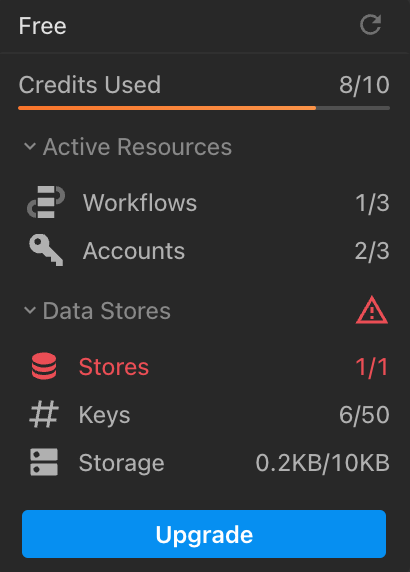
You can view your credits usage at the bottom-left of the Pipedream UI. You can also see more detailed usage in Billing and Usage Settings. Here you’ll find your usage for the last 30 days, broken out by day, by resource (e.g. your source / workflow).
Number of Workflows
The limit of active workflows depends on your current plan. See our pricing page for more details.Number of Event Sources
You can run an unlimited number of event sources, as long as each operates under the limits below.Execution Credits
Free Pipedream account have a limit on the number of execution credits. Paid plans are not capped but are subject to additional usage charges (you can manually set a usage cap if you want to manage costs).You can view your credits usage at the bottom-left of the Pipedream UI. You can also see more detailed usage in Billing and Usage Settings. Here you’ll find your usage for the last 30 days, broken out by day, by resource (e.g. your source / workflow).
Included Credits Usage Notifications
Daily workflow testing limit
You do not use credits testing workflows, but workspaces on the Free plan are limited to 750 of test runtime per day. If you exceed this limit when testing in the builder, you’ll see a Runtime Quota Exceeded error.Data stores
Depending on your plan, Pipedream sets limits on:- The total number of data stores
- The total number of keys across all data stores
- The total storage used across all data stores
HTTP Triggers
The following limits apply to HTTP triggers.HTTP Request Body Size
By default, the body of HTTP requests sent to a source or workflow is limited to 512KB. Your endpoint will issue a413 Payload Too Large status code when the body of your request exceeds 512KB.
Pipedream supports two different ways to bypass this limit. Both of these interfaces support uploading data up to 5TB, though you may encounter other platform limits.
- You can send large HTTP payloads by passing the
pipedream_upload_body=1query string or anx-pd-upload-body: 1HTTP header in your HTTP request. Read more here. - You can upload multiple large files, like images and videos, using the large file upload interface.
QPS (Queries Per Second)
Generally the rate of HTTP requests sent to an endpoint is quantified by QPS, or queries per second. A query refers to an HTTP request. You can send an average of 10 requests per second to your HTTP trigger. Any requests that exceed that threshold may trigger rate limiting. If you’re rate limited, we’ll return a429 Too Many Requests response. If you control the application sending requests, you should retry the request with exponential backoff or a similar technique.
We’ll also accept short bursts of traffic, as long as you remain close to an average of 10 QPS (e.g. sending a batch of 50 requests every 30 seconds should not trigger rate limiting).
This limit can be raised for paying customers. To request an increase, reach out to our Support team with the HTTP endpoint whose QPS you’d like to increase, with the new, desired limit.
Email Triggers
Currently, most of the limits that apply to HTTP triggers also apply to email triggers. The only limit that differs between email and HTTP triggers is the payload size: the total size of an email sent to a workflow - its body, headers, and attachments - is limited to 30MB.Memory
By default, workflows run with 256MB of memory. You can modify a workflow’s memory in your workflow’s Settings, up to 10GB. Increasing your workflow’s memory gives you a proportional increase in CPU. If your workflow is limited by memory or compute, increasing your workflow’s memory can reduce its overall runtime and make it more performant. Pipedream charges credits proportional to your memory configuration. Read more here.Disk
Your code, or a third party library, may need access to disk during the execution of your workflow or event source. You have access to 2GB of disk in the/tmp directory.
This limit cannot be raised.
Workflows
Time per execution
Every event sent to a workflow triggers a new execution of that workflow. Workflows have a default execution limit that varies with the trigger type:- HTTP and Email-triggered workflows default to 30 seconds per execution.
- Cron-triggered workflows default to 60 seconds per execution.
Events that trigger a Timeout error will appear in red in the Inspector. You’ll see the timeout error, also in red, in the cell at which the code timed out.
Event History
The Inspector shows the execution history for a given workflow. Events have a limited retention period, depending on your plan:
The execution details for a specific event also expires after 365 days.
Logs, Step Exports, and other observability
The total size ofconsole.log() statements, step exports, and the original event data sent to the workflow cannot exceed a combined size of 6MB. If you produce logs or step exports larger than this - for example, passing around large API responses, CSVs, or other data - you may encounter a Function Payload Limit Exceeded in your workflow.
This limit cannot be raised.