
- RubyGems Basics
- What is a gem?
- Make your own gem
- Gems with Extensions
- Name your gem
- Publishing your gem
- Security Practices
- Managing owners using UI
- Removing a Published gem
- SSL Certificate Update
- Patterns
- Specification Reference
- Command Reference
- RubyGems.org API
- RubyGems.org API V2.0
- RubyGems.org Compact Index API
- RubyGems.org rate limits
- API key scopes
- Run your own gem server
- Setting up multi-factor authentication
- Using multi-factor authentication in command line
- MFA requirement opt in
- Using S3 as gem source
- Default gems and bundled gems
- Resources
- Contributing to RubyGems
- Frequently Asked Questions
- Plugins
- Common Vulnerabilities and Exposures
- Trusted Publishing
- Organizations
- Credits
Bundler
- Bundler in gems
- Gemfiles
- Getting Started
- How to Upgrade to Bundler 2
- How to deploy bundled applications
- How to install gems from git repositories
- How to manage application dependencies with Bundler
- How to manage groups of gems
- How to manage dependencies with Bundler
- How to troubleshoot RubyGems and Bundler TLS/SSL Issues
- How to update gems with Bundler
- How to use Bundler in a single-file Ruby script
- How to use Bundler with Docker
- How to use Bundler with Rails
- How to use Bundler with Ruby
- How to use Bundler with RubyMotion
- How to use Bundler with Sinatra
- How to use git bisect with Bundler
- How to write a Bundler plugin
- Known Plugins
- Recommended Workflow with Version Control
- Ruby Directive
MFA requirement opt-in
How to opt-in for MFA requirement.
You can make your gems more secure by requiring all owners to enable MFA on their account.
Opt-in to MFA requirement
You can opt-in a gem you are managing by releasing a version that has
metadata.rubygems_mfa_required set to true.
% cat hola.gemspec
Gem::Specification.new do |s|
...
s.metadata       = { "rubygems_mfa_required" => "true" }
...
end
The version being released with rubygems_mfa_required set and all the following versions
will require you to have MFA enabled.
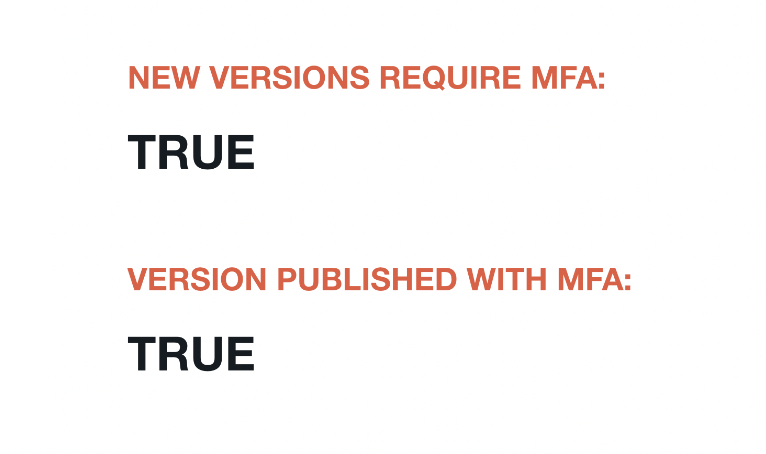
Once enabled, the gem page will show NEW VERSIONS REQUIRE MFA in the sidebar, and all versions published with rubygems_mfa_required set will also show VERSION PUBLISHED WITH MFA:
You will see the following error message if you have not enabled MFA and you are trying to release a new version for a gem that requires MFA:
$ gem push hola-1.0.0.gem
Pushing gem to https://rubygems.org...
Rubygem requires owners to enable MFA. You must enable MFA before pushing new version.
Disabling MFA requirement
You can disable the MFA requirement by setting rubygems_mfa_required to "false" or any ActiveRecord::Type::Boolean::FALSE_VALUES.
Note: We will enforce the MFA requirement on the version being published. MFA requirement will be disabled after you have successfully published a gem with rubygems_mfa_required set to false.