Type: General
Describe the bug
- OS and Version:8.04.5 LTS (Bionic Beaver)
- VS Code Version:1.50.1
- C/C++ Extension Version: v1.1.0-insiders3
- Other extensions you installed (and if the issue persists after disabling them):C++ Intellisense,GitHub Pull Requests and Issues,GitLens
- A clear and concise description of what the bug is.
To Reproduce
Please include code sample and task.json files.
Steps to reproduce the behavior:
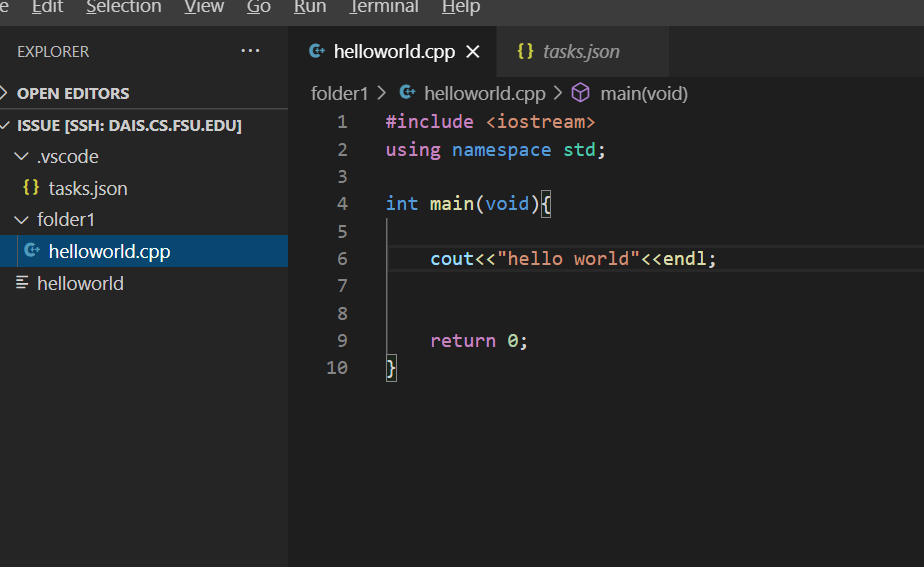
- I open the "issue" folder by remote SSH extension as the root path
- In the "project" folder, there is a "folder1" subfolder.
- In "folder1", there is a "helloworld.cpp"
- When I try " run build task ..." by using "g++ build active file", the active file "helloworld" will appear in the root folder of the "issue" folder instead of the current directory "folder1".
- In the task.json file, the environmental variable is "fileDirname".
6.This issue suddenly happens, everything is fine before.
Expected behavior
A clear and concise description of what you expected to happen.
I hope the generated active file can be generated at the current folder instead of the root folder.
Screenshots
If applicable, add screenshots to help explain your problem.
Additional context
Add any other context about the problem here including log messages from the Output window.
The task.joson is the default file without any modification:


Type: General
Describe the bug
To Reproduce
Please include code sample and
task.jsonfiles.Steps to reproduce the behavior:
6.This issue suddenly happens, everything is fine before.
Expected behavior
A clear and concise description of what you expected to happen.
I hope the generated active file can be generated at the current folder instead of the root folder.
Screenshots

If applicable, add screenshots to help explain your problem.
Additional context

Add any other context about the problem here including log messages from the Output window.
The task.joson is the default file without any modification: