Bug summary
-
Date formatting using strftime format codes should use the current locale's names. While this works as expected on Linux, ConciseDateFormatter by default shows English month names etc. when running on a non-English locale. It only works correctly after explicitly setting the locale to the current one by locale.setlocale(locale.LC_ALL, '').
-
Setting axes.formatter.use_locale to True doesn't have any effect on Windows unless you explicitly set the locale to the current one by locale.setlocale(locale.LC_ALL, '') (again, it works correctly on Linux). I don't understand why this is so as __init__ does exactly the same thing but for some reason without effect on Windows:
|
if rcParams['axes.formatter.use_locale']: |
|
locale.setlocale(locale.LC_ALL, '') |
Code for reproduction
import locale
import platform

import matplotlib as mpl
import matplotlib.pyplot as plt
import numpy as np

dates = np.arange(np.datetime64('2022-12-01'), np.datetime64('2022-12-02'), np.timedelta64(1, 'h'))
values = np.zeros_like(dates, dtype=int)

def plot(title):
    fig, ax = plt.subplots(figsize=(6, 1.5), layout='constrained')
    ax.plot(dates, values, 'white')
    ax.xaxis.set_major_formatter(mpl.dates.ConciseDateFormatter(mpl.dates.AutoDateLocator()))
    ax.text(.5, .5,
            f"{locale.getlocale() = }\n{ax.yaxis.get_major_formatter().get_useLocale() = }\n({platform.system()})",
            transform=ax.transAxes, ha='center', va='center')
    ax.set_title(title)
    fig.savefig(title + '.png')

# use \N{MODIFIER LETTER COLON} instead of regular colon for Windows file names
plot('1꞉ default')

with mpl.rc_context({'axes.formatter.use_locale': True}):
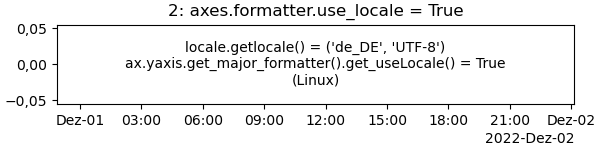
    plot('2꞉ axes.formatter.use_locale = True')

locale.setlocale(locale.LC_ALL, '')
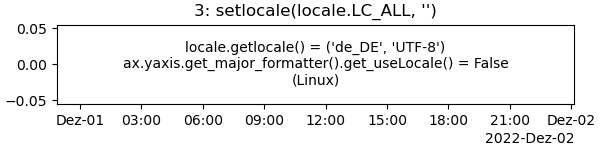
plot("3꞉ setlocale(locale.LC_ALL, '')")

with mpl.rc_context({'axes.formatter.use_locale': True}):
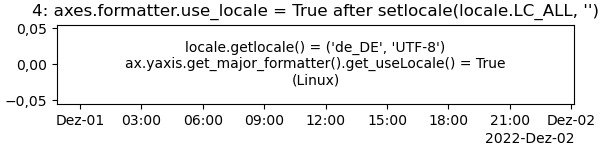
    plot("4꞉ axes.formatter.use_locale = True after setlocale(locale.LC_ALL, '')")
Actual outcome
On Windows:
1꞉ default--> should be Dez instead of Dec

2: axes.formatter.use_locale = True --> should be 0,00 instead of 0.00

3: after setlocale(locale.LC_ALL, '') --> this works correctly

4: axes.formatter.use_locale = True after setlocale(locale.LC_ALL, '') --> this works correctly too

Expected outcome
On Linux
All four cases are correct. The expected outcome on Windows is the same as on Linux.

Additional information
The issue is only on Windows, everything is fine on Linux (can't test it on MacOS but I suppose it'd be the same as on Linux).
Operating system
Windows
Matplotlib Version
3.6.3
Matplotlib Backend
No response
Python version
3.10
Jupyter version
No response
Installation
conda

Bug summary
Date formatting using
strftimeformat codes should use the current locale's names. While this works as expected on Linux,ConciseDateFormatterby default shows English month names etc. when running on a non-English locale. It only works correctly after explicitly setting the locale to the current one bylocale.setlocale(locale.LC_ALL, '').Setting
axes.formatter.use_localetoTruedoesn't have any effect on Windows unless you explicitly set the locale to the current one bylocale.setlocale(locale.LC_ALL, '')(again, it works correctly on Linux). I don't understand why this is so as__init__does exactly the same thing but for some reason without effect on Windows:matplotlib/lib/matplotlib/__init__.py
Lines 972 to 973 in f5ff5d7
Code for reproduction
Actual outcome
On Windows:
1꞉
default--> should be Dez instead of Dec2:
axes.formatter.use_locale = True--> should be 0,00 instead of 0.003: after
setlocale(locale.LC_ALL, '')--> this works correctly4:
axes.formatter.use_locale = Trueaftersetlocale(locale.LC_ALL, '')--> this works correctly tooExpected outcome
On Linux
All four cases are correct. The expected outcome on Windows is the same as on Linux.
Additional information
The issue is only on Windows, everything is fine on Linux (can't test it on MacOS but I suppose it'd be the same as on Linux).
Operating system
Windows
Matplotlib Version
3.6.3
Matplotlib Backend
No response
Python version
3.10
Jupyter version
No response
Installation
conda