Hello maintainers,
Sorry to bother you, I'm not sure if my problem is due to either IPython / Jupyter / Gitlab, so maybe it will be closed soon.
I'm encountering the same problem than in some issues ex: jupyter/nbconvert#145 (and a lot of other on stackoverflow which use markdown to render math functions).
I want to dynamically render some markdown output in a Python cell but all I get when using display(Markdown(<string>) is <IPython.core.display.Markdown object> as shown below:

The code used is:
        name = '## Working on %s' % host["host"]
        display({'text/plain': name, 'text/markdown': name}, raw=True)
        display(Markdown(name))
I'm using the text/plain workaround for the moment which display the text but I would like to have the output rendered if possible :)
I would expect that the process for display.Markdown would render the markdown string into HTML but it seems it does not... or am I missing some call ?
For a markdown object in display I get:
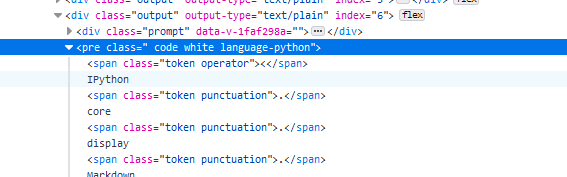
with outpout source for the notebook as:

While a panda table in display is rendered as;


Sorry to bother you and thanks for reading until the end (I cannot seems to find any relevant information from stackoverflow or others T.T).
Regards

Hello maintainers,
Sorry to bother you, I'm not sure if my problem is due to either IPython / Jupyter / Gitlab, so maybe it will be closed soon.
I'm encountering the same problem than in some issues ex: jupyter/nbconvert#145 (and a lot of other on stackoverflow which use markdown to render math functions).
I want to dynamically render some markdown output in a Python cell but all I get when using
display(Markdown(<string>)is<IPython.core.display.Markdown object>as shown below:The code used is:
I'm using the text/plain workaround for the moment which display the text but I would like to have the output rendered if possible :)
I would expect that the process for display.Markdown would render the markdown string into HTML but it seems it does not... or am I missing some call ?
For a markdown object in display I get:
with outpout source for the notebook as:
While a panda table in display is rendered as;
Sorry to bother you and thanks for reading until the end (I cannot seems to find any relevant information from stackoverflow or others T.T).
Regards