
mindmap
)react(
    (JSX rules)
        return<br/>single element
        properties from HTML,className
        lowercase - native html
        array.map<br>for multidimensional
            key properties - unique id
    (Hooks)
        [useState]
            State lift up
            update with<br>previous state
        [useEffect]
    (Components)
        [Properties]
            props<br>forwarding
            props<br>children
            props<br>default value
        [css module]
        [event listener]
    (Route)
        [error route]
        [route with layout]
        [Link]
        [react-router-dom.useNavigate]
- jsx rules
- Return a single root element ( or <> </>)
- Close all the tags
- camelCase all most of the things!
- {} should return array/simple_value/variable_with_JSX
- { booleanExpression && (variableWithJSX) }
- for array.map should be used also key properties for each object
- html-to-jsx converter
- files must have
.jsxsuffix ( extension ), start with capital letter
- function must start with UpperCase ( start with lowercase char - regular html element )
- function must return renderable value ( JSX )
- function/component way of creation
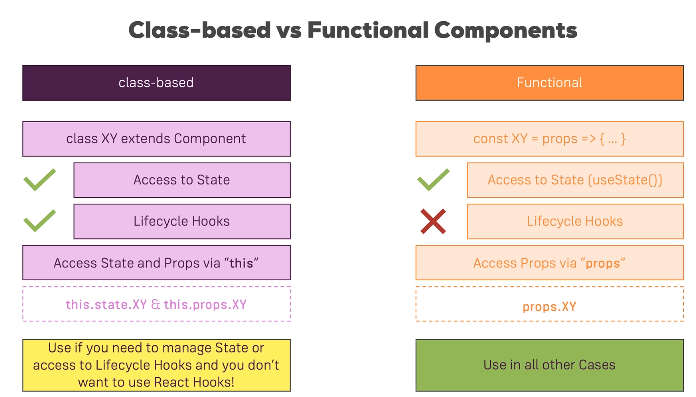
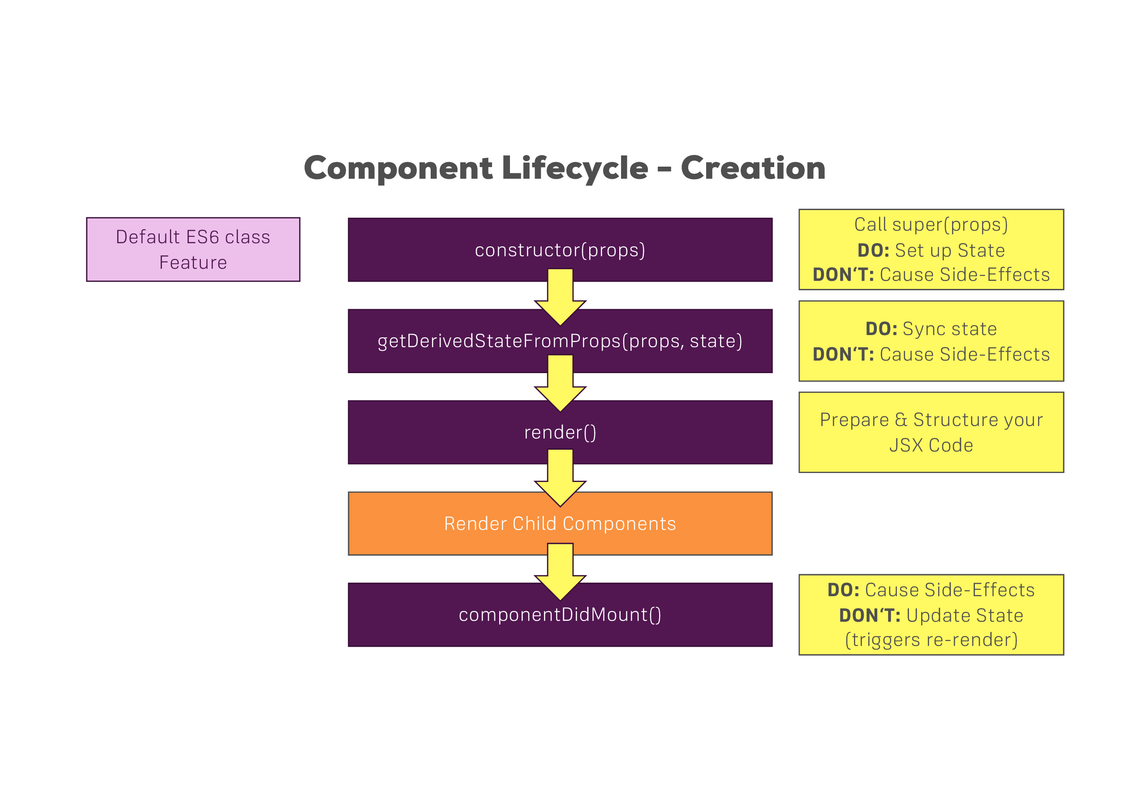
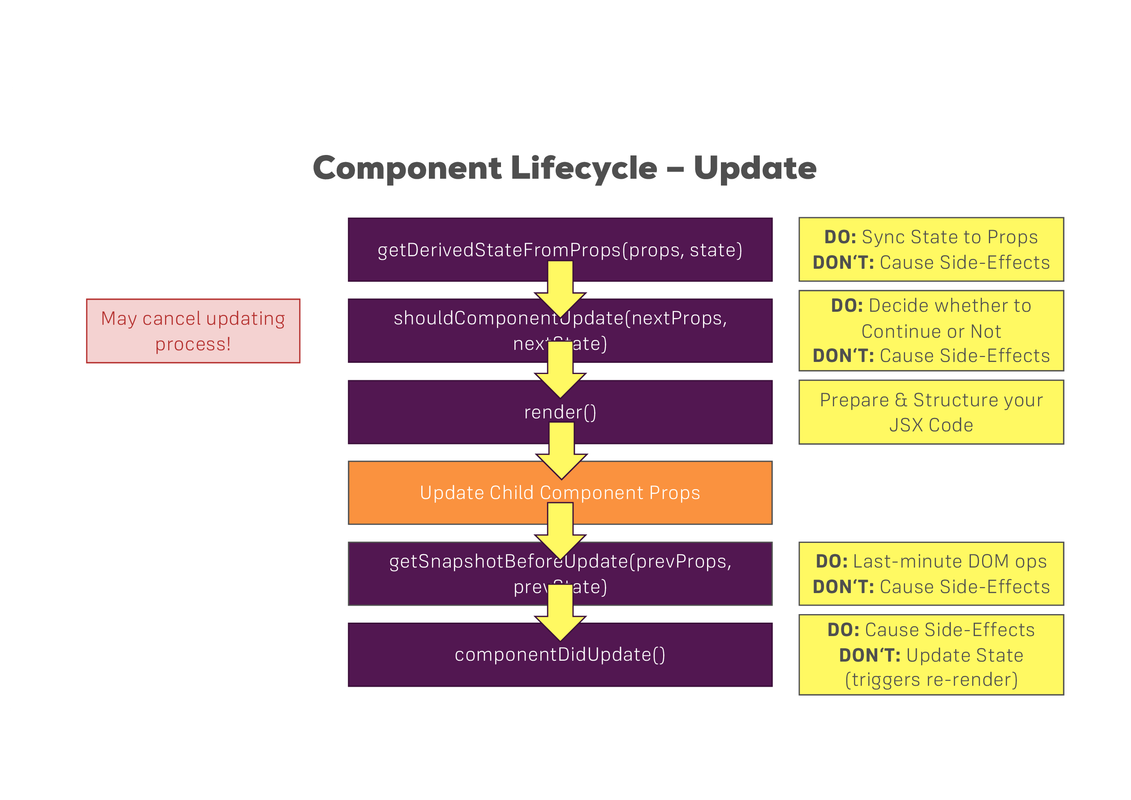
function MyComponent(){
    return <> <div>hello</div> </>
}
export function MyCompositeComponent(){
    return (<div> <MyComponent /> </div>)
}
// if no `export function` previously, then
// export default MyCompositeComponent
// ! import Component from 'react';
import React, { Component } from 'react';
export class MainGoal extends Component {
render(){
// return <div id='my_div_id'><p>my text</p></div>
// create HTML element manually
return React.createElement('div', {id: 'my_div_id'}, React.createElement('p', null, 'my text'))
}
}# npm install --save-dev create-react-component-folder
COMPONENT_NAME=MyComponent
npx crcf $COMPONENT_NAMEimport myImg from './assets/img/1.jpg'
function TableHeader(){
// post-compiled-generated `src` property will be included
// no "" or '' should be added
// <Fragment> with new notation <>
return <> <img src={myImg} /> </>
}parameters for component, put data into component
function TableHeader(props){
    return <> hello {props.name} {props.title} </>
}
function TableHeader({name, title="default_title"}){
    return <> hello {name} {title} </>
}
function Table(){
    const userData={name: "Egor", title="Pilot"}
    return <>
        <TableHeader name="Valerian" title="Gameboy" />
        <TableHeader  {...userData} />
        <TableHeader2 {...userData} />
    </>
}import { useState } from 'react';
// import React from 'react';
function MyComponent(){
// value will be updated after the whole component refresh
// `setValue` is not updating `value` immediatelly,
// `setValue` has 2 options to receive parameters:
// 1. direct value `value`
// 2. function 'oldValue=>newValue' update with previous state
// for Objects: const deepCopy = JSON.parse(JSON.stringify(originalObject));
const [value, setValue]=useState(initValue); // React.useState(); - component field ( ReactJS evaluates stack of the execution)
return { <div> value </div> }
} if your state based on previous value,
Due to scheduled updates: use setValue(value=>!value) instead of setValue(!value)
for reproducing: just duplicate setValue(!value);setValue(!value);
also useful for the conditional output
function App(){
    return (<>
    { isDefinedValue && <b>Value is defined</b>}
    {!isDefinedValue && <i>undefined Value </i>}
    </>);
}
function App(){
if (true){
returnValue = <div>{someValue}</div>
} else {
returnValue = <span>no data</span>
}
return returnValue;
}flowchart LR
ac[parent \n component] --props(state.func)----> cc1[child #1]
ac[parent \n component] --props(state.func)----> cc2[child #2]
s[parent \n state] --o ac
cc1 -----> |state.func|s
cc2 -----> |state.func|s
rules of hooks:
- should be called inside the component
- not inside the nested function
APP_NAME=my_app_name
# use nvm for another version of node
npx create-react-app $APP_NAME

# https://www.npmjs.com/package/cra-template-typescript
npx create-react-app $APP_NAME --template typescript
npx create-react-app $APP_NAME --template cra-template-typescript.

cd $APP_NAME
# `npm install` has already been executed by npx
npm start # `npm run start` - package.json#scripts
alternative: build tool with optimization
APP_NAME=my_app_name
npm create vite@latest $APP_NAME -- --template react
npm create vite@latest $APP_NAME -- --template react-ts

npm install
npm run dev// npm install --save radium
import Radium from 'radium';
style={
':hover': {
backgroundColor:"red"
},
'@media (min-witdh: 480px)':{
width: "350px"
}
}
export default Radium(MyComponent);
// for media - wrap root component with:
// import { StyleRoot } from 'radium';
// <StyleRoot> </StyleRoot>
```.
### import alias
```js
import { Location as LocationModel } from 'src/app/core/models/location.model';