
{{ message }}
This repository was archived by the owner on Mar 3, 2023. It is now read-only.
Repository navigation
This repository was archived by the owner on Mar 3, 2023. It is now read-only.
Update flow on mac poor ux #16385
Description

Prerequisites
- Put an X between the brackets on this line if you have done all of the following:
- Reproduced the problem in Safe Mode: http://flight-manual.atom.io/hacking-atom/sections/debugging/#using-safe-mode
- Followed all applicable steps in the debugging guide: http://flight-manual.atom.io/hacking-atom/sections/debugging/
- Checked the FAQs on the message board for common solutions: https://discuss.atom.io/c/faq
- Checked that your issue isn't already filed: https://github.com/issues?utf8=✓&q=is%3Aissue+user%3Aatom
- Checked that there is not already an Atom package that provides the described functionality: https://atom.io/packages
Description
Updating atom (installed with brew) has been broken on mac for a while now (currently on high sierra, but same for sierra).
Steps to Reproduce
- Click the blue squirrel
- Click restart and install
- Atom closes but doesn't quit
- Wait for a while
- What's going on? Is it stuck?
- Force quit
- Start atom
- Update failed
- Repeat
Expected behavior:
As a user I expect the update process to work as follows:
- Click the blue squirrel
- Click restart and install
- Atom immediately restarts and shows me a progress bar of the new version downloading and then installing
- Done
Actual behavior:
See step to reproduce.
Reproduces how often:
All the time so far.
Versions
Atom    : 1.23.1
Electron: 1.6.15
Chrome  : 56.0.2924.87
Node    : 7.4.0
apm  1.18.11
npm  3.10.10
node 6.9.5 x64
atom 1.23.1
python 2.7.10
git 2.15.1
macos high sierra 10.13.1
Additional Information
I understand that I shouldn't force quit atom while updating, but as a user it's frustrating to not know if it's hanging or actually doing something. Plus, besides that, I've also gotten this error and encountered other snags while updating.
It seems like the update flow needs some attention. The current flow feels broken, even though it might be working well, as a user you just don't know because there's no indication of what's happening.
Activity
winstliu commentedon Dec 14, 2017
Is the account that you use Atom under an administrator?
itsmeduncan commentedon Jan 10, 2018
This is currently happening for me while upgrading from 1.23.2 to 1.23.3. I hit restart and install, and it closed all of the windows but Atom is still running. Here is a sampling from Activity Monitor.txt
jsejcksn commentedon Jan 11, 2018
This has also been my experience for the last 3+ updates and has become expected behavior. 😕
When updating from 1.23.2 to 1.23.3:
After finishing a session of work and ready for a context switch, I clicked Restart, and Atom closed all windows (and stayed open). After 2–3 hours and forgetting about updating earlier, I opened a directory in Atom via Terminal (
open -a Atom <directory>), which opened a new window in Atom having the blue squirrel icon. I clicked it and, noting that the update had not taken place, clicked Restart again, which closed that window and, after a moment, actually quit Atom. When Atom restarted, my original windows reopened, but not the one I had opened from Terminal. This was preferable to losing all of my other windows, but I'm not sure what that says about the state management during updates.romainmenke commentedon Jan 11, 2018
Same here. Came here looking for a fix and got all the time in the world to type this as the update won't come through. To make matters worse
$ atom .spawns extra atom processes when an update has been auto-downloaded. That is actually how I know to update Atom. Not the blue squirrel, but the multitude of atom processes suddenly showing up.Please fix this.
agraubert commentedon Feb 15, 2018
I have been having the same issue, and followed some tips from #2860 which lead me to the ShipIt framework. Looking at the logs, I found that ShipIt was failing to copy a file nested deep in
apm's dependency tree:In the end, I manually updated Atom by downloading the new binary and copying it on top of the original install
jsejcksn commentedon Mar 9, 2018
Update: The experience updating to 1.24.0 and 1.24.1 have both been this:
Atom closes all windows; app stays open indefinitely
Two Atom apps open (not updated version and updated version)
Everything seems ok now
Very frustrating; definitely not a working "auto-updater"
I realize there may not be resources to assign to this presently, but can we get an acknowledgement of this issue?
revelt commentedon Mar 9, 2018
Personally, since the last year I haven't been able to update Atom properly. Either the issue described above happens or nothing happens at all (like now, when I tried to check for updates a second ago).
For example, at this moment, Atom beta 1.25.0-beta3 has been released. I click blue squirrel, "check now" button, it says it's up to date:
But it's not up to date!
These days I resort to obsessively check atom.io/releases page n-times a day and manually download/install latest Atom beta.
jsejcksn commentedon Mar 16, 2018
Now getting error messages after update:
Atom: 1.24.1 x64
Electron: 1.6.16
OS: Mac OS X 10.13.3
Thrown From: Atom Core
Stack Trace
Uncaught Error: The module '/Applications/Atom.app/Contents/Resources/app.asar.unpacked/node_modules/keyboard-layout/build/Release/keyboard-layout-manager.node'
was compiled against a different Node.js version using
NODE_MODULE_VERSION 54. This version of Node.js requires
NODE_MODULE_VERSION 53. Please try re-compiling or re-installing
the module (for instance, using
npm rebuildornpm install).revelt commentedon Mar 17, 2018
For example, Sublime Text uses dedicated modals, themed:
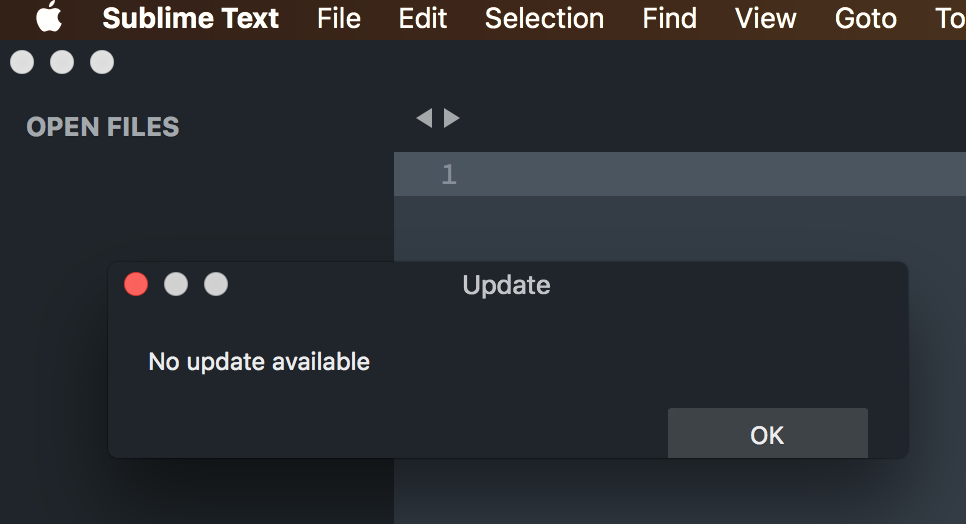
We need something like that, with "loading" indicator bar.
jsejcksn commentedon Mar 17, 2018
@Ismay The errors were only being thrown in the not updated version, during step 3 of my previous post:
No errors before update or after completion of update. Definitely related.
jsejcksn commentedon Apr 6, 2018
Is this issue prevalent for all users of macOS? I am surprised that this issue is so persistent yet has such little acknowledgement.
itsmeduncan commentedon Apr 20, 2018
When attempting to upgrade to
1.26.0from1.25.1it hung and I ended up with a weird copy of Atom running:jsejcksn commentedon Apr 25, 2018
More info on the post by @itsmeduncan: It not only happened to me during the update, but also happens every time I reboot my Mac (macOS reopens all previously open apps/windows after reboot). This is new behavior in Atom 1.26.
Aerijo commentedon May 16, 2018
I get this issue too. I've found quitting immediately after clicking update (when the window closes but the application remains open) will let it update like normal. After waiting a few seconds, the icon started bouncing and the update was a success.
joachim-n commentedon May 16, 2018
That's probably a separate problem though. I saw this too with 1.26, but the most recent version of Atom has fixed it for me.
jsejcksn commentedon May 16, 2018
It was resolved for me in 1.26.1, and now it's just back to the base issue. @joachim-n
evjan commentedon May 31, 2018
I have the same issue and as far as I can remember it's been like this for many months
matiaskorhonen commentedon Sep 28, 2018
This is still happening with Atom 1.31.
At this point I'd be super happy if Atom would just use, for example, Sparkle to update itself on macOS.
joshpuetz commentedon May 15, 2019
Greetings from May 2019 and Atom 1.36.x, where this is STILL happening. I hate that damned blue squirrel icon so much.
w01fgang commentedon Mar 12, 2020
Experiencing this issue on 1.47.0-nightly2 and Mac OS 10.15.3
This happens only if Atom was opened for a while. Never happens when just opened.
My workaround is closing all Atom windows once I see that there is an update. Then open a new empty window and then select Restart and install.
DeeDeeG commentedon Jan 7, 2021
The buggy "Atom never quits/need to Force Quit" situation described in steps to reproduce should be solved now with #21847.
(But this issue is about a nicer update UX, beyond being bug-free. So I think this issue stays open for now.)