New experimental CarPlay branch 🚘📲 · Issue #110 · analogcode/Swift-Radio-Pro · GitHub
Skip to content

New experimental CarPlay branch 🚘📲 #110

Open

Description

@fethica

Hey everyone!

Edit: The CarPlay support is now part of the main project, enabled in the SwiftRaion-CarPlay Target.

I created a new branch that supports CarPlay for the SwiftRadio
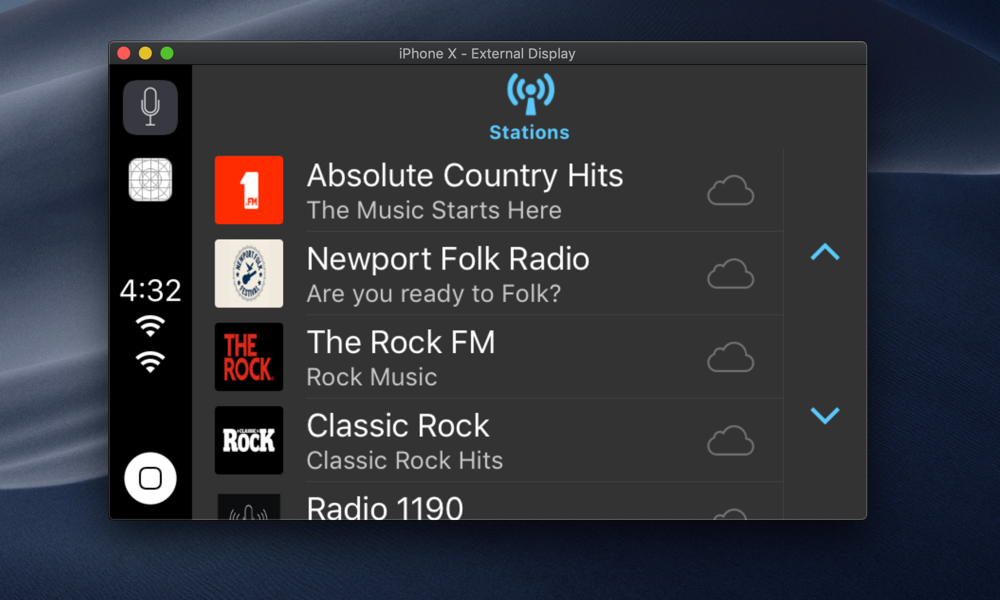
CarPlay SwiftRadio

Also I created a step by step post to show how to implement this feature:

Add CarPlay support to Swift Radio

Cheers 🎉

Activity

  1. losgranos commented on Feb 11, 2019

    @losgranos

    Yes! Thx

  2. iDevelopper commented on Feb 11, 2019

    @iDevelopper

    You don't need a such workaround to make it to work on simulator.

                // Workaround to make the Now Playing working on the simulator:
                // Source: https://stackoverflow.com/questions/52818170/handling-playback-events-in-carplay-with-mpnowplayinginfocenter
                UIApplication.shared.endReceivingRemoteControlEvents()
                UIApplication.shared.beginReceivingRemoteControlEvents()
    

    I have a radios application that support carPlay too and run in simulator without workaround (written in objC).

    - (void)playableContentManager:(MPPlayableContentManager *)contentManager initiatePlaybackOfContentItemAtIndexPath:(NSIndexPath *)indexPath completionHandler:(void (^)(NSError * _Nullable))completionHandler {
        
        SHOUTcastAPI *shout = _appDelegate.shoutCastAPI;
        
        NSUInteger indexCount = indexPath.length;
        NSUInteger tabIndex = [indexPath indexAtPosition:[indexPath length] - 1];
        
        Station *station;
        
        if ([indexPath indexAtPosition:0] == 1 && indexCount == 2) { // FAVORITES
            self.stations = [shout getFavoritesStations];
            station = self.stations[tabIndex];
        }
        else if ([indexPath indexAtPosition:0] == 2 && indexCount == 2) { // TOP 500
            station = [shout getTopStationForIndex:tabIndex];
            self.stations = [shout getTopStations];
        }
        else {
            if (indexCount == 3) {
                station = [shout getStationForIndex:tabIndex indexOfGenre:(unsigned long)[indexPath indexAtPosition:1]];
                self.stations = [shout getStationsForIndexOfGenre:(unsigned long)[indexPath indexAtPosition:1]];
            }
            else {
                station = [shout getStationForIndex:tabIndex indexOfSubgenre:[indexPath indexAtPosition:2] indexOfGenre:(unsigned long)[indexPath indexAtPosition:1]];
                self.stations = [shout getStationsForIndexOfSubgenre:(unsigned long)[indexPath indexAtPosition:2] indexOfGenre:(unsigned long)[indexPath indexAtPosition:1]];
            }
        }
        dispatch_async(dispatch_get_main_queue(), ^{
            _station = station;
            [self play];
            
            completionHandler(nil);
        });
        
        // Update MPNowPlayingInfo
        [self updateUIWithTitle:nil andAlbumTitle:nil andArtwork:nil];
    }
    
    - (void)updateUIWithTitle:(NSString *)title andAlbumTitle:(NSString *)albumTitle andArtwork:(UIImage *)artworkImage
    {
        // UI Update
        dispatch_async(dispatch_get_main_queue(), ^{
                    ...
                    ...
                    NSMutableDictionary *nowPlayingInfo = [[MPNowPlayingInfoCenter defaultCenter].nowPlayingInfo mutableCopy];
                    if (!nowPlayingInfo) {
                        nowPlayingInfo = [[NSMutableDictionary alloc] init];
                    }
                    
                    nowPlayingInfo[MPMediaItemPropertyArtist] = _stationLabel.text;
                    nowPlayingInfo[MPMediaItemPropertyAlbumTitle] = albumTitle ? albumTitle : JMOLocalizedString(@"Unknown album", @"");
                    nowPlayingInfo[MPMediaItemPropertyTitle] = _songLabel.text;
                    nowPlayingInfo[MPMediaItemPropertyArtwork] = itemArtwork;
                    if ([[[UIDevice currentDevice] systemVersion] floatValue] >= 10.0) {
                        nowPlayingInfo[MPNowPlayingInfoPropertyIsLiveStream] = @(1.0);
                        nowPlayingInfo[MPNowPlayingInfoPropertyMediaType] = @(MPNowPlayingInfoMediaTypeAudio);
                    }
                    nowPlayingInfo[MPNowPlayingInfoPropertyPlaybackRate] = self.isPlaying ? @(1.0) : @(0.0);
                    nowPlayingInfo[MPNowPlayingInfoPropertyDefaultPlaybackRate] = self.isPlaying ? @(1.0) : @(0.0);
                    
                    [MPNowPlayingInfoCenter defaultCenter].nowPlayingInfo = nowPlayingInfo;
                    ....
        });
    

    MPNowPlayingInfoPropertyPlaybackRate is very important:

    The documentation say:

    MPNowPlayingInfoCenter
    Use MPNowPlayingInfoCenter to populate the CarPlay Now Playing screen with information. MPNowPlayingInfoCenter allows you to specify metadata such as title, artist, elapsed time, playback queue, playback rate and album artwork.
    When running your app in the Simulator, the media playback features are not the same as running on iPhone. On iPhone running CarPlay, the play button in the CarPlay Now Playing screen is automatically managed by iOS and changes state based on whether audio is playing. In contrast, the play button in the Simulator relies on the state of the playback rate in Now Playing Info Center. You should ensure that Now Playing Info Center always has the correct playback rate. When playback is stopped, be sure to set the MPNowPlayingInfoPropertyPlaybackRate property to 0.0.
    Apple recommends you always supply a MPMediaItemPropertyPersistentID property.
    If your app has the concept of a playback queue, set MPNowPlayingInfoPropertyPlaybackQueueIndex and MPNowPlayingInfoPropertyPlaybackQueueCount. Starting in iOS 10, this information is shown on the Now Playing screen.
    If your app plays live streaming content, set MPNowPlayingInfoPropertyIsLiveStream to YES.

  3. analogcode commented on Feb 11, 2019

    @analogcode
    Owner

    @fethica is the man! 🎉🙏

  4. fethica commented on Feb 12, 2019

    @fethica
    CollaboratorAuthor

    Thanks for the feedback @iDevelopper I will check your code.

  5. urayoanm commented on Feb 12, 2019

    @urayoanm

    The best player and the best tutorial for Apple Car Play. I did try blatantly to implement the same by my own a time ago and now seeing your code so clean and detailed only i can say KUDOS! Thanks for share!

  6. DavidKalajdzic commented on Jun 15, 2019

    @DavidKalajdzic

    @fethica
    But if we have not a paid account developer, we cannot test it with real phone??
    When I opened https://developer.apple.com/contact/carplay/ it said that I have not the permission to view this page 🤨
    Is there a solution for "free" out there ?

  7. fethica commented on Jul 16, 2019

    @fethica
    CollaboratorAuthor

    @DavidKalajdzic if you can't access the CarPlay form page with a regular account, so I think you have to get a paid developer account!

  8. sarafdar commented on Jul 16, 2019

    @sarafdar

    Even with this workaround -
    UIApplication.shared.endReceivingRemoteControlEvents()
    UIApplication.shared.beginReceivingRemoteControlEvents()

    Nowplaying screen not appearing on the simulator, what could be the reason?
    Please help.

  9. nimisis commented on Aug 14, 2019

    @nimisis

    This works beautifully on XCode 10 but not so on XCode 11.0 beta (11M336w) running iOS 13... Anyone else just get a blue button?
    Screen Shot 2019-08-14 at 22 24 44

  10. iDevelopper commented on Aug 15, 2019

    @iDevelopper

    Yes

  11. tester89 commented on Aug 15, 2019

    @tester89

    How can we make carPlayTab colorful instead of blue overlay?

  12. iDevelopper commented on Aug 15, 2019

    @iDevelopper

    This is an Apple Simulator Bug in Xcode 11 beta. It works fine in a car!

  13. adminholic commented on Aug 17, 2019

    @adminholic

    This is an Apple Simulator Bug in Xcode 11 beta. It works fine in a car!

    Hi, I did try in my Hyundai car CarPlay but it still shows blue icon.

  14. iDevelopper commented on Aug 18, 2019

    @iDevelopper

    Please contact Hyundai! I have a BMW and it works fine with my app and with this example!

  15. adminholic commented on Aug 24, 2019

    @adminholic

    Please contact Hyundai! I have a BMW and it works fine with my app and with this example!

    And you being a developer for some reason thought contacting Hyundai will solve the problem? Didn't you said above it was bug in Xcode 11? And I am using latest version of Xcode, not the beta version.

    I tried with another CarPlay head unit, its a some problem. I bet your BMW was custom made with stable Xcode installed lol.

  16. iDevelopper commented on Aug 25, 2019

    @iDevelopper

    I said it is a bug in Xcode 11 using the example on simulator. Works fine in my car either with Xcode 10 or 11.

  17. DanBurkhardt commented on Jan 7, 2020

    @DanBurkhardt

    Works fine using iOS 12, but any version of iOS 13 presents the bugs mentioned above and it is impossible to get it working in the CarPlay simulator.

  18. Sj7800 commented on Jan 30, 2020

    @Sj7800

    Hi Fethica,
    Hope you doing well.
    I made an navigation app for my apple car play. Its icon and start screen is displaying fine over the carplay simulator but the map is not displaying.
    Is there any way by which we can show only map directly to carplay screen instead of home screen.

    Regards
    Sj

  19. DanBurkhardt commented on Jan 30, 2020

    @DanBurkhardt
  20. Sj7800 commented on Jan 30, 2020

    @Sj7800

    Hello, Just offering insight here: the issue is a bug that Apple needs to fix with iOS 13 and CarPlay in the simulator. Instead of using an iOS 13 simulator, choose an iOS 12 simulator and it should work.
    …
    On Jan 30, 2020, at 11:08 AM, Swapangeet @.***> wrote:  Hi Fethica, Hope you doing well. I made an navigation app for my apple car play. Its icon and start screen is displaying fine over the carplay simulator but the map is not displaying. Is there any way by which we can show only map directly to carplay screen instead of home screen. Regards Sj — You are receiving this because you commented. Reply to this email directly, view it on GitHub, or unsubscribe.

    Dan can we run both on same machine or we should remove one of it as the later version will ask for update.
    Thanks

  21. joemcmahon commented on Nov 13, 2025

    @joemcmahon

    @fethica, I just finished doing a number of upgrades to my heavily-modified version of the app, most specifically switching over to UIScene and upgrading to the new non-deprecated CarPlay setup. I will see if I can backport the changes to the current version of HEAD here. Will open a PR if I can get it working. It was a pain. 🤕

  22. bravekingzhang commented on Nov 13, 2025

    @bravekingzhang
Sign up for free to join this conversation on GitHub. Already have an account? Sign in to comment

Metadata

Metadata

Assignees

No one assigned

    Projects

    No projects

      Milestone

      No milestone

      Relationships

      None yet

      Development

      No branches or pull requests

      Issue actions