
{{ message }}
Repository navigation
In VSCode tab-completion doesn't fix the casing as it does in PowerShell ISE #1624
Description

There is one thing that I used to use a lot in ISE, and is missing in PowerShell extension. In ISE, if I type "get-date" (all lower case) and then later position a cursor inside of it and press "TAB", it tab-completes to a proper casing. In VSCode, the "TAB" in that case add a tab. Could you bring back the ISE behavior?
Activity
dsolodow commentedon Dec 1, 2018
It's a configurable setting in VSCode; just off by default.
"Editor: Tab Completion" needs to be set to On under Preferences
{ "editor.tabCompletion": "on" }alexandair commentedon Dec 2, 2018
Damien Solodow (@dsolodow) That settings doesn't work for me.
If you type "get-date" and a space, and then return and put cursor in "get-date", after you press "TAB" does it change it to "Get-Date"?
rjmholt commentedon Dec 2, 2018
Aleksandar Nikolić (@alexandair) If you trigger a completion in another way, does
get-datehave its casing changed? If so, then the remaining work lies with VSCode's completion experience. The enhancement in that case would lie within VSCode, since we don't have any way to change that experience.alexandair commentedon Dec 2, 2018
Rob Holt (@rjmholt)
What would be another way?
Here is one more example when tab-completion is lacking in VSCode editor:
In Windows PowerShell console, PowerShell ISE, PowerShell Core console, and Integrated PowerShell Console, the following works, but not in the VSCode editor:
TAB after Get-Service -Name gives you a list of services.
SeeminglyScience commentedon Dec 2, 2018
Aleksandar Nikolić (@alexandair) CTRL + SPACE forces a completion request. I think VSCode would need to add an option that makes TAB only indent if all the characters to the left of the cursor are whitespace. That would give a similar experience.
alexandair commentedon Dec 2, 2018
Patrick Meinecke (@SeeminglyScience)
For me, tab-completion involves pressing the
TABkey.CTRL+SPACEtriggers the IntelliSense and completion could be performed with the arrows andENTERkey.Now, that you've mentioned
CTRL+SPACE, here is another example where PowerShell ISE behaves better and consistently compared to VSCode.PowerShell ISE:
In both, Script and Console pane,
TABcircles through the list of namespaces andCTRL+SPACEtriggers IntelliSense.VSCode:
In Editor only
CTRL+SPACEworks, but notTAB.In terminal only
TABworks,CTRL+SPACEis ignored.rjmholt commentedon Dec 2, 2018
See also #25.
The completion features for the terminal will be added by #535.
For the remaining Tab-completion desire, you should open a new feature request with VSCode. It's worth noting that the current
"tabCompletion": "on"setting is totally orthogonal to us even though many PowerShell extension users see it as an ISE parity feature -- it just configures VSCode and we are completely agnostic as to its setting.alexandair commentedon Dec 3, 2018
Rob Holt (@rjmholt)
I looked at #25. My latest example is after I set "tabCompletion": "on". I don't see that setting changed anything for me. If I file the original casing issue to the VSCode repo, I have a feeling they will immediately say "Oh, that's PowerShell extension issue". :)
TylerLeonhardt commentedon Dec 3, 2018
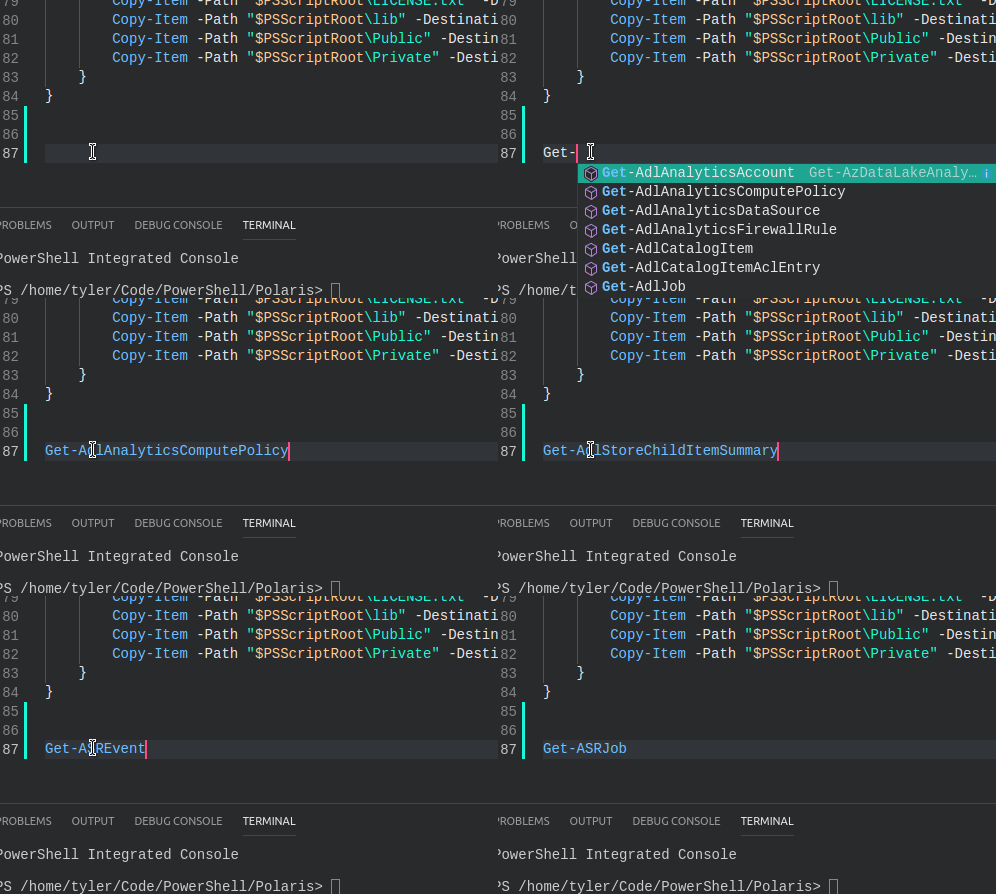
Aleksandar Nikolić (@alexandair) RE: "tabCompletion":"on" I noticed that when you hit TAB, it completes with the first completion... but then AFTER that you can continue to hit TAB to cycle.
I thought it would cycle through the intellisense pop-up but it has a different behavior.
rkeithhill commentedon Dec 3, 2018
I dunno Aleksandar Nikolić (@alexandair). When I try this while monitoring the log file I do not see any
textDocument/completionfrom VSCode. If they don't send us the request, I'm not sure there is much we can do about it by then other than to monkey around with document change notification we get. We already have a command that can expand all aliases in a document. How about we add a command to "properly" cases all commands and their parameters in the document/.TylerLeonhardt commentedon Dec 3, 2018
Current "tabCompletion":"on" behavior for reference.
This makes the most sense. That way we don't have to re-implement completions for our specific use-cases. It still would be good to have an issue on VSCode to give more power over completions.