
{{ message }}
Repository navigation
Export Database as SQL for MSSQL #118
Description

Expected behavior
When exporting a table from an MSSQL database it should create a file with the correct syntax for MSSQL.
Current behavior
The exported backup file creates inserts with MySQL syntax.
Steps to reproduce
Please provide detailed steps for reproducing the issue.
- Connect to an MSSQL database
- Right click a table and choose Export database as SQL
- Set to Insert ignore (do not update existing)
Context
Please provide any relevant information about your setup. This is important in case the issue is not reproducible except for under certain conditions.
- HeidiSQL version: 9.5.0.5196
- Database system + version: I believe this db is running MSSQL 2008 R2
- Operating system: Windows 10
Failure Logs
The exported file has the command INSERT IGNORE INTO which isn't valid MSSQL. Now I'm trying to figure out how to restore these 12000 records that I shouldn't have deleted. :-(
Activity
ipkpjersi commentedon Feb 8, 2018
Have you tried a recent nightly version to see if it still happens? https://www.heidisql.com/installers/HeidiSQL_9.5.0.5245_Setup.exe is the latest nightly version as of the time I am writing this comment.
matthttam commentedon Feb 8, 2018
-- Host: *************************************
-- Server version: Microsoft SQL Server 2014 (SP1-CU4) (KB3106660) - 12.0.4436.0
-- Server OS: Windows NT 6.3 (Build 9600: ) (Hypervisor)
-- HeidiSQL Version: 9.5.0.5196
/*!40101 SET @OLD_CHARACTER_SET_CLIENT=@@CHARACTER_SET_CLIENT /;
/!40101 SET NAMES /;
/!40014 SET @OLD_FOREIGN_KEY_CHECKS=@@FOREIGN_KEY_CHECKS, FOREIGN_KEY_CHECKS=0 /;
/!40101 SET @OLD_SQL_MODE=@@SQL_MODE, SQL_MODE='NO_AUTO_VALUE_ON_ZERO' */;
-- Dumping data for table **************.OLRTranslationLiterals: -1 rows
/*!40000 ALTER TABLE "OLRTranslationLiterals" DISABLE KEYS */;
INSERT IGNORE INTO "OLRTranslationLiterals" ("OLRtranslationLiteralsID", "name", "OLRLiteralsID", "translationGroupID") VALUES
(1, 'Back', 1, 1),
(2, 'Cancel', 2, 1),
(3, 'Delete', 3, 1), ...
Yes
ipkpjersi commentedon Feb 8, 2018
That log you posted indicates that you were using 5196 which is not a nightly build but the latest stable build released like last year. Try a nightly build and see if that helps?
matthttam commentedon Feb 12, 2018
Sorry about that. The Update button in help failed to auto update to the nightly build. It got hung and crashed and I forgot this happened... I've installed the latest nightly build manually.
-- Host: ###################
-- Server version: Microsoft SQL Server 2014 (SP1-CU4) (KB3106660) - 12.0.4436.0
-- Server OS: Windows NT 6.3 (Build 9600: ) (Hypervisor)
-- HeidiSQL Version: 9.5.0.5245
/*!40101 SET @OLD_CHARACTER_SET_CLIENT=@@CHARACTER_SET_CLIENT /;
/!40101 SET NAMES /;
/!40014 SET @OLD_FOREIGN_KEY_CHECKS=@@FOREIGN_KEY_CHECKS, FOREIGN_KEY_CHECKS=0 /;
/!40101 SET @OLD_SQL_MODE=@@SQL_MODE, SQL_MODE='NO_AUTO_VALUE_ON_ZERO' */;
-- Dumping data for table ################.AcceptFDFDownload: -1 rows
/*!40000 ALTER TABLE "AcceptFDFDownload" DISABLE KEYS */;
INSERT IGNORE INTO "AcceptFDFDownload" ("userID", "toolID", "acceptedDate") VALUES
(34, 1043, '2015-10-27 10:50:00'),
(49, 586, '2016-10-26 08:17:00'),
...
So, yes it still does this.
rentalhost commentedon Feb 12, 2018
@matthttam can you provide an "as is" and a "how it should be" SQL code?
matthttam commentedon Feb 14, 2018
Unfortunately, MSSQL doesn't have a neat little construct for INSERT IGNORE. I'll be honest, I don't know the best way to do this type of insert into MSSQL.
Per https://dba.stackexchange.com/questions/30662/how-can-i-ignore-duplicate-inserts
It looks like there should be an IGNORE_DUP_KEY = ON flag set and then do inserts like normal.
If anyone who is better at MSSQL has a suggestion please advise. I just know the INSERT IGNORE INTO that gets generated from Heidi SQL throws errors.
nmoreaud commentedon Feb 27, 2018
Here another buggy export :
CREATE TABLE IF NOT EXISTS : not supported
Type text : too long
Integer type syntax : KO
Here is the original create table :
The code CREATE table tab seems OK.
I also experiment bugs with timestamps and image column fields.
InteliClic commentedon Feb 28, 2018
I am trying to export from our LIVE MSSQL DB to our DEV MSSQL DB. I have tried exporting to file, clipboard and database. The settings we are using are these:
As you can see the issue is something with the syntax. I get this same error if I tried Insert (ignore existing).
Here is a sample of the INSERT IGNORE which throws the same error.
INSERT IGNORE INTO "XYZ" ("Id", "Id2", "Id3") VALUES (1, 6, 32)Might be helpful to add a "db language" drop down to the export page. Ideally it would detect the language by default but based on the value in this field it would give you the applicable options for that language.
CaCTuCaTu4ECKuu commentedon Dec 13, 2018
I get error when trying to export ms sql DB from Azure.
Maybe this bugreport is somehow related to this and will be helpful.
Expected behavior
When right click a database and select "Export database as SQL" table editor window pops up
Current behavior
When right click on database and select "Export database to SQL" error occurs
Steps to reproduce
Connect to an MSSQL database lockated on Azure (Azure DB)
Right click a database and choose Export database as SQL
bugreport.txt
GPHemsley commentedon Jul 22, 2020
Accidentally filed #1101 for this same issue. Still an issue in HeidiSQL Version 11.0.0.6055 (64 Bit).
ansgarbecker commentedon Jul 23, 2020
SQL export was written for MySQL/MariaDB originally. There are so many differences and incompatibilities for DDL queries between MySQL and MSSQL. I suppose it's a good option to first disable structure exporting for MSSQL, so you can just export data.
acuna-public commentedon Jul 23, 2020
@ansgarbecker Please don't disable the import, it's working for data dumps, so I'm using two separated dumps - tables structure which I've converted from MySQL manually, and for data which I'm making in Heidi, so data import is working. And it's not so many differences between MySQL and PostgreSQL (will be for MSSQL too?) - almost all of them with solutions I've fetch in my issue for your convenience.
P. S. I don't believe that there's no any managers for Postgres except yours, and phpPgAdmin which is for php only and discontinued since 2018 and don't working with new versions of php.
GPHemsley commentedon Jul 23, 2020
@acuna-public I think he's only talking about disabling the associated checkboxes in the Export Database as SQL menu:
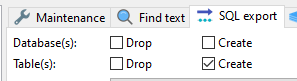
This is separate from the import mechanism.
ansgarbecker commentedon Jul 23, 2020
Yes, I meant the drop and create checkboxes in the export.
acuna-public commentedon Jul 24, 2020
@GPHemsley ah yes, you right :)
geri777 commentedon Jul 9, 2021
I have the same problem with HeidiSQL 11.3.0
This is what it outputs if I let it export a table schema:
This is how I had to change the syntax to make it working on MS SQL SERVER 2016
jhm-ciberman commentedon Jun 27, 2022
Any update on this? Still getting the same issue in v12.0.0.6468
pchambless commentedon Jan 25, 2023
yes, I thought I'd found the elusive diamond in the rough when I saw HeidiSQL supporting MSSQL. I totally love the export to database functionality for MySQL and so would love to see it for MSSQL. All other tools seem, well I don't know of any other tool to do this quite as easily.
tbayart commentedon Sep 27, 2024
v12.8 still have the issue
SQL export for schema generate mySQL like syntax
this can be useful for migrating MSSQL database to MariaDB but to make a save/restore of a MSSQL database
ideally, the export form should ask for the target script syntax
at least, add a warning to the structure checkbox to specify this is mySQL compliant only
meanwhile, I had to reinstall SSMS to allow me restore a MSDB backup
acuna-public commentedon Oct 4, 2024
@tbayart unfortunately Ansgar don't want to support another SQL engines so I don't think it will be fixed even we will write to him every day, it's the best and non-alternative IDE for SQL so I use it even with Postgres so hard and even make simple dumps with it but with some restrictions (I've created an issue here earlier where I've told how you can do it) but if you need more complicated dumps you can use utilites like default
pg_dumpfor this, I think it's better than nothing because if not dumps it works brilliantly even for Postgres (and for another engines too I can guess).igitur commentedon Dec 17, 2024
@ansgarbecker What is the issue with fixing the MSSQL script generation? I'm willing to have a stab at a PR myself, unless there's a very good reason that you feel this shouldn't be fixed. Happy to help out, though. Let me know.
ansgarbecker commentedon Dec 17, 2024
Sorry for the delay. This should be fixed at some point, but suffers from my personal incomplete knowledge about SQL Server syntax. As told above, the export code was written with only MySQL/MariaDB in mind. I might have been able to fix stuff in several places, but the export logic is by far the biggest honey pot for such incompatibilities.
No PRs with huge changes please. I'm open to invite a permanent team member with knowledge in Delphi + MS SQL.