
Navigation

- Home |
- Gallery |
- API Docs »
- wx.lib »
- wx.lib.agw »
- wx.lib.agw.pyprogress »
- wx.lib.agw.pyprogress.PyProgress
- index
- modules |
- next |
- previous |

 wx.lib.agw.pyprogress.PyProgress

PyProgress is similar to ProgressDialog in indeterminated mode, but with a
different gauge appearance and a different spinning behavior. The moving gauge
can be drawn with a single solid colour or with a shading gradient foreground.
The gauge background colour is user customizable.
The bar does not move always from the beginning to the end as in ProgressDialog
in indeterminated mode, but spins cyclically forward and backward.
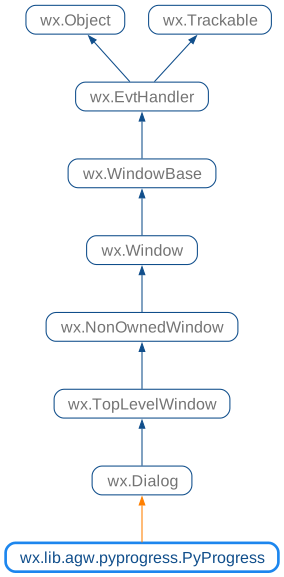
 Class Hierarchy

 Inheritance diagram for class PyProgress:
 Control Appearance


 Known Superclasses

 Methods Summary

 Class API

- class PyProgress(wx.Dialog)
PyProgressis similar toProgressDialogin indeterminated mode, but with a different gauge appearance and a different spinning behavior. The moving gauge can be drawn with a single solid colour or with a shading gradient foreground. The gauge background colour is user customizable. The bar does not move always from the beginning to the end as inProgressDialogin indeterminated mode, but spins cyclically forward and backward.
Methods
- __init__(self, parent=None, id=-1, title='', message='', agwStyle=wx.PD_APP_MODAL | wx.PD_AUTO_HIDE)
Default class constructor.
- Parameters:
parent – parent window;
id – window identifier. A value of -1 indicates a default value;
title – dialog title to show in titlebar;
message – message displayed above the progress bar;
style – the dialog style. This can be a combination of the following bits:
- CreateLabel(self, text, sizer)
Creates the
StaticTextthat holds the elapsed time label.- Parameters:
text – the dialog message to be displayed above the gauge;
sizer – the main
BoxSizerforPyProgress.
- DisableAbort(self)
Disables the
Cancelbutton.
- EnableAbort(self, enable=True)
Enables or disables the
Cancelbutton.- Parameters:
enable –
Trueto enable theCancelbutton,Falseto disable it.
- EnableClose(self, enable=True)
Enables or disables the
Closebutton.- Parameters:
enable –
Trueto enable theClosebutton,Falseto disable it.
- GetAGWWindowStyleFlag(self)
Returns the
PyProgressstyle.See also
The
__init__method for a list of possible style flags.
- GetFirstGradientColour(self)
Returns the gauge first gradient colour.
- GetGaugeBackground(self)
Returns the gauge background colour.
- GetGaugeProportion(self)
Returns the relative proportion between the sliding bar and the whole gauge.
- GetGaugeSteps(self)
Returns the number of steps the gauge performs before switching from forward to backward (or vice-versa) movement.
- GetSecondGradientColour(self)
Returns the gauge second gradient colour.
- OnCancel(self, event)
Handles the
wx.EVT_BUTTONevent for the dialog.- Parameters:
event – a
CommandEventevent to be processed.
Note
This method handles the
Cancelbutton press.
- OnClose(self, event)
Handles the
wx.EVT_CLOSEevent forPyProgress.- Parameters:
event – a
CloseEventevent to be processed.
- OnDestroy(self, event)
Handles the
wx.EVT_WINDOW_DESTROYevent forPyProgress.- Parameters:
event – a
wx.WindowDestroyEventevent to be processed.
- ReenableOtherWindows(self)
Re-enables the other windows if using
wx.WindowDisabler.
- SetFirstGradientColour(self, colour)
Sets the gauge first gradient colour.
- Parameters:
colour – a valid
wx.Colourobject.
- SetGaugeBackground(self, colour)
Sets the gauge background colour.
- Parameters:
colour – a valid
wx.Colourobject.
- SetGaugeProportion(self, proportion)
Sets the relative proportion between the sliding bar and the whole gauge.
- Parameters:
proportion – a floating point number representing the relative proportion between the sliding bar and the whole gauge.
- SetGaugeSteps(self, steps)
Sets the number of steps the gauge performs before switching from forward to backward (or vice-versa) movement.
- Parameters:
steps – the number of steps the gauge performs before switching from forward to backward (or vice-versa) movement.
- SetSecondGradientColour(self, colour)
Sets the gauge second gradient colour.
- Parameters:
colour – a valid
wx.Colourobject.
- SetTimeLabel(self, val, label=None)
Sets the elapsed time label.
- Parameters:
val – the elapsed time since the dialog was shown, in seconds;
label – the new message to display in the elapsed time text.
- ShowDialog(self, show=True)
Show the dialog.
- Parameters:
show –
Trueto show the dialog and re-enable all the other windows,Falseotherwise.
- UpdatePulse(self, newmsg='')
Updates the dialog, setting the progress bar to the new value and, if given changes the message above it. Returns
Trueunless theCancelbutton has been pressed.If
Falseis returned, the application can either immediately destroy the dialog or ask the user for the confirmation.- Parameters:
newmsg – The new messages for the progress dialog text, if it is empty (which is the default) the message is not changed.