
Navigation

- Home |
- Gallery |
- API Docs »
- wx.lib »
- wx.lib.agw »
- wx.lib.agw.flatnotebook »
- wx.lib.agw.flatnotebook.FlatNotebook
- index
- modules |
- next |
- previous |

 wx.lib.agw.flatnotebook.FlatNotebook

The FlatNotebook is a full implementation of the Notebook, and designed to be
a drop-in replacement for Notebook. The API functions are similar so one can
expect the function to behave in the same way.
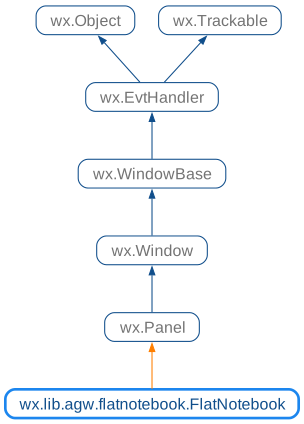
 Class Hierarchy

 Inheritance diagram for class FlatNotebook:
 Control Appearance


 Known Subclasses

wx.lib.agw.flatnotebook.FlatNotebookCompatible
 Known Superclasses

 Methods Summary

 Class API

- class FlatNotebook(wx.Panel)
The
FlatNotebookis a full implementation of theNotebook, and designed to be a drop-in replacement forNotebook. The API functions are similar so one can expect the function to behave in the same way.
Methods
- __init__(self, parent, id=wx.ID_ANY, pos=wx.DefaultPosition, size=wx.DefaultSize, style=0, agwStyle=0, name='FlatNotebook')
Default class constructor.
- Parameters:
parent – the
FlatNotebookparent;id – an identifier for the control: a value of -1 is taken to mean a default;
pos – the control position. A value of (-1, -1) indicates a default position, chosen by either the windowing system or wxPython, depending on platform;
size – the control size. A value of (-1, -1) indicates a default size, chosen by either the windowing system or wxPython, depending on platform;
style – the underlying
Panelwindow style;agwStyle –
the AGW-specific window style. This can be a combination of the following bits:
Window Styles
Hex Value
Description
FNB_VC710x1
Use Visual Studio 2003 (VC7.1) style for tabs.
FNB_FANCY_TABS0x2
Use fancy style - square tabs filled with gradient colouring.
FNB_TABS_BORDER_SIMPLE0x4
Draw thin border around the page.
FNB_NO_X_BUTTON0x8
Do not display the ‘X’ button.
FNB_NO_NAV_BUTTONS0x10
Do not display the right/left arrows.
FNB_MOUSE_MIDDLE_CLOSES_TABS0x20
Use the mouse middle button for cloing tabs.
FNB_BOTTOM0x40
Place tabs at bottom - the default is to place them at top.
FNB_NODRAG0x80
Disable dragging of tabs.
FNB_VC80x100
Use Visual Studio 2005 (VC8) style for tabs.
FNB_X_ON_TAB0x200
Place ‘X’ close button on the active tab.
FNB_BACKGROUND_GRADIENT0x400
Use gradients to paint the tabs background.
FNB_COLOURFUL_TABS0x800
Use colourful tabs (VC8 style only).
FNB_DCLICK_CLOSES_TABS0x1000
Style to close tab using double click.
FNB_SMART_TABS0x2000
Use Smart Tabbing, like
Alt+Tabon Windows.FNB_DROPDOWN_TABS_LIST0x4000
Use a dropdown menu on the left in place of the arrows.
FNB_ALLOW_FOREIGN_DND0x8000
Allows drag ‘n’ drop operations between different
FlatNotebook.FNB_HIDE_ON_SINGLE_TAB0x10000
Hides the Page Container when there is one or fewer tabs.
FNB_DEFAULT_STYLE0x10020
FlatNotebookdefault style.FNB_FF20x20000
Use Firefox 2 style for tabs.
FNB_NO_TAB_FOCUS0x40000
Does not allow tabs to have focus.
FNB_RIBBON_TABS0x80000
Use the Ribbon Tabs style.
FNB_HIDE_TABS0x100000
Hides the Page Container allowing only keyboard navigation
FNB_NAV_BUTTONS_WHEN_NEEDED0x200000
Hides the navigation left/right arrows if all tabs fit
name – the window name.
- AddPage(self, page, text, select=False, imageId=-1)
Adds a page to the
FlatNotebook.- Parameters:
page – specifies the new page;
text – specifies the text for the new page;
select – specifies whether the page should be selected;
imageId – specifies the optional image index for the new page.
- Returns:
Trueif successful,Falseotherwise.
- AdvanceSelection(self, forward=True)
Cycles through the tabs.
- Parameters:
forward – if
True, the selection is advanced in ascending order (to the right), otherwise the selection is advanced in descending order.
Note
The call to this function generates the page changing events.
- AssignImageList(self, imageList)
Assigns the image list for the page control.
- Parameters:
imageList – an instance of
wx.ImageList.
- DeleteAllPages(self)
Deletes all the pages in the
FlatNotebook.
- DeletePage(self, page)
Deletes the specified page, and the associated window.
- Parameters:
page – an integer specifying the new selected page.
Note
The call to this function generates the page changing events.
- DoGetBestSize(self)
Gets the size which best suits the window: for a control, it would be the minimal size which doesn’t truncate the control, for a panel - the same size as it would have after a call to Fit().
Note
Overridden from
Panel.
- EnableTab(self, page, enabled=True)
Enables or disables a tab.
- Parameters:
page – an integer specifying the page index;
enabled –
Trueto enable a tab,Falseto disable it.
- EnsureVisible(self, page)
Ensures that a tab is visible.
- Parameters:
page – an integer specifying the page index.
- GetActiveTabColour(self)
Returns the active tab colour.
- GetActiveTabTextColour(self)
Get the active tab text colour.
- GetAGWWindowStyleFlag(self)
Returns the
FlatNotebookwindow style.See also
SetAGWWindowStyleFlagfor a list of valid window styles.
- GetBorderColour(self)
Returns the border colour.
- GetCurrentPage(self)
Returns the currently selected notebook page or
Noneif none is selected.
- GetCustomPage(self)
Returns a custom panel to show when there are no pages left in
FlatNotebook.
- GetEnabled(self, page)
Returns whether a tab is enabled or not.
- Parameters:
page – an integer specifying the page index.
- GetGradientColourBorder(self)
Gets the tab border colour.
- GetGradientColourFrom(self)
Gets first gradient colour.
- GetGradientColourTo(self)
Gets second gradient colour.
- GetImageList(self)
Returns the associated image list.
- GetNonActiveTabTextColour(self)
Returns the non active tabs text colour.
- GetPadding(self)
Returns the amount of space around each page’s icon and label, in pixels.
- GetPage(self, page)
Returns the window at the given page position, or
None.
- GetPageBestSize(self)
Return the page best size.
- GetPageCount(self)
Returns the number of pages in the
FlatNotebookcontrol.
- GetPageImage(self, page)
Returns the image index for the given page.
- Parameters:
page – an integer specifying the page index.
- GetPageIndex(self, win)
Returns the index at which the window is found.
- Parameters:
win – an instance of
wx.Window.
- GetPageShapeAngle(self, page_index)
Returns the angle associated to a tab.
- Parameters:
page_index – the index of the tab for which we wish to get the shape angle.
- GetPageText(self, page)
Returns the string for the given page.
- Parameters:
page – an integer specifying the page index.
- GetPageTextColour(self, page)
Returns the tab text colour if it has been set previously, or
Noneotherwise.- Parameters:
page – an integer specifying the page index.
- GetPreviousSelection(self)
Returns the previous selection.
- GetSelection(self)
Returns the currently selected page, or -1 if none was selected.
- GetTabArea(self)
Returns the associated page.
- GetTabAreaColour(self)
Returns the area behind the tabs colour.
- GetTileOrientation(self)
Returns the orientation when on tiling mode. This method can return
wx.VERTICALwhen the panels are vertically stacked,wx.HORIZONTALwhen they are horizontally stacked panels orNonewhen there is no stacking andFlatNotebookbehaves like a normal notebook.
- HasAGWFlag(self, flag)
Returns whether a flag is present in the
FlatNotebookstyle.- Parameters:
flag – one of the possible
FlatNotebookwindow styles.
See also
SetAGWWindowStyleFlagfor a list of possible window style flags.
- HideTabs(self)
Hides the tabs.
- Init(self)
Initializes all the class attributes.
- InsertPage(self, indx, page, text, select=True, imageId=-1)
Inserts a new page at the specified position.
- Parameters:
indx – specifies the position of the new page;
page – specifies the new page;
text – specifies the text for the new page;
select – specifies whether the page should be selected;
imageId – specifies the optional image index for the new page.
- Returns:
Trueif successful,Falseotherwise.
- OnDropTarget(self, x, y, nTabPage, wnd_oldContainer)
Handles the drop action from a drag and drop operation.
- Parameters:
x – the x position of the drop action;
y – the y position of the drop action;
nTabPage – the index of the tab being dropped;
wnd_oldContainer – the
FlatNotebookto which the dropped tab previously belonged to.
Handles the
wx.EVT_NAVIGATION_KEYevent forFlatNotebook.- Parameters:
event – a
NavigationKeyEventevent to be processed.
- RemovePage(self, page)
Deletes the specified page, without deleting the associated window.
- Parameters:
page – an integer specifying the page index.
- SetActiveTabColour(self, colour)
Sets the active tab colour.
- Parameters:
colour – a valid
wx.Colourobject or any typemap supported by wxWidgets/wxPython to generate a colour (i.e., a hex string, a colour name, a 3 or 4 integer tuple).
- SetActiveTabTextColour(self, textColour)
Sets the text colour for the active tab.
- Parameters:
textColour – a valid
wx.Colourobject or any typemap supported by wxWidgets/wxPython to generate a colour (i.e., a hex string, a colour name, a 3 or 4 integer tuple).
- SetAGWWindowStyleFlag(self, agwStyle)
Sets the
FlatNotebookwindow style flags.- Parameters:
agwStyle –
the AGW-specific window style. This can be a combination of the following bits:
- SetAllPagesShapeAngle(self, angle)
Sets the angle associated to all the tab.
- Parameters:
angle – the new shape angle for the tab (must be less than 15 degrees).
- SetCustomPage(self, panel)
Sets a custom panel to show when there are no pages left in
FlatNotebook.- Parameters:
panel – any subclass of
wx.Windowwill do, as long as it is suitable to be used as a notebook page. Examples includePanel,ScrolledWindow, and so on.
- SetGradientColourBorder(self, border)
Sets the tab border colour.
- Parameters:
border – the border colour, an instance of
wx.Colour.
- SetGradientColourFrom(self, fr)
Sets the starting colour for the gradient.
- Parameters:
fr – the first gradient colour, an instance of
wx.Colour.
- SetGradientColours(self, fr, to, border)
Sets the gradient colours for the tab.
- SetGradientColourTo(self, to)
Sets the ending colour for the gradient.
- Parameters:
to – the second gradient colour, an instance of
wx.Colour;
- SetImageList(self, imageList)
Sets the image list for the page control.
- Parameters:
imageList – an instance of
wx.ImageList.
Set the icon used by the
TabNavigatorWindow.- Parameters:
bmp – a valid
wx.Bitmapobject.
- SetNonActiveTabTextColour(self, colour)
Sets the non active tabs text colour.
- Parameters:
colour – a valid
wx.Colourobject or any typemap supported by wxWidgets/wxPython to generate a colour (i.e., a hex string, a colour name, a 3 or 4 integer tuple).
- SetPadding(self, padding)
Sets the amount of space around each page’s icon and label, in pixels.
- Parameters:
padding – the amount of space around each page’s icon and label, in pixels.
Note
Only the horizontal padding is considered.
- SetPageImage(self, page, image)
Sets the image index for the given page.
- Parameters:
page – an integer specifying the page index;
image – an index into the image list which was set with
SetImageList.
- SetPageShapeAngle(self, page_index, angle)
Sets the angle associated to a tab.
- Parameters:
page_index – the index of the tab for which we wish to get the shape angle;
angle – the new shape angle for the tab (must be less than 15 degrees).
- SetPageText(self, page, text)
Sets the text for the given page.
- Parameters:
page – an integer specifying the page index;
text – the new tab label.
- SetPageTextColour(self, page, colour)
Sets the tab text colour individually.
- Parameters:
page – an integer specifying the page index;
colour – a valid
wx.Colourobject or any typemap supported by wxWidgets/wxPython to generate a colour (i.e., a hex string, a colour name, a 3 or 4 integer tuple). You can passNoneorNullColourto return to the default page text colour.
- SetRightClickMenu(self, menu)
Sets the popup menu associated to a right click on a tab.
- Parameters:
menu – an instance of
wx.Menu.
- SetSelection(self, page)
Sets the selection for the given page.
- Parameters:
page – an integer specifying the new selected page.
Note
The call to this function does not generate the page changing events.
- SetTabAreaColour(self, colour)
Sets the area behind the tabs colour.
- Parameters:
colour – a valid
wx.Colourobject or any typemap supported by wxWidgets/wxPython to generate a colour (i.e., a hex string, a colour name, a 3 or 4 integer tuple).
- ShowCustomPage(self, show=True)
Hides the custom panel which is shown when there are no pages left in
FlatNotebook.
- ShowTabs(self)
Shows the tabs if hidden previously.
- Tile(self, orient=None)
Shows pages in column/row mode (one panel after the other in columns/rows).
- Parameters:
orient – this parameter represents the orientation of the stacked panels. Pass
wx.VERTICALto get vertically stacked panels,wx.HORIZONTALto get horizontally stacked panels orNoneto return to the defaultFlatNotebookbehaviour with tabs.