


 wx.CheckBox

A checkbox is a labelled box which by default is either on (checkmark is visible) or off (no checkmark).
Optionally (when the wx.CHK_3STATE style flag is set) it can have a third state, called the mixed or undetermined state. Often this is used as a “Does Not Apply” state.
 Window Styles

This class supports the following styles:
wx.CHK_2STATE: Create a 2-state checkbox. This is the default.wx.CHK_3STATE: Create a 3-state checkbox.wx.CHK_ALLOW_3RD_STATE_FOR_USER: By default a user can’t set a 3-state checkbox to the third state. It can only be done from code. Using this flags allows the user to set the checkbox to the third state by clicking.wx.ALIGN_RIGHT: Makes the text appear on the left of the checkbox.
 Events Emitted by this Class

Handlers bound for the following event types will receive a wx.CommandEvent parameter.
EVT_CHECKBOX: Process a
wxEVT_CHECKBOXevent, when the checkbox is clicked.
See also
 Class Hierarchy

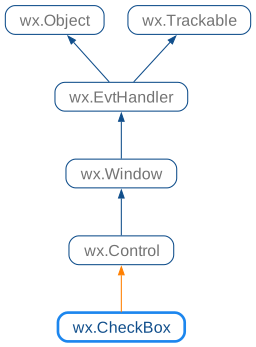
 Inheritance diagram for class CheckBox:
 Control Appearance


 Methods Summary

 Properties Summary

 Class API

- class wx.CheckBox(Control)
Possible constructors:
CheckBox() -> None

CheckBox(parent, id=ID_ANY, label='', pos=DefaultPosition,
         size=DefaultSize, style=0, validator=DefaultValidator,
         name=CheckBoxNameStr) -> None
A checkbox is a labelled box which by default is either on (checkmark is visible) or off (no checkmark).
Methods
- __init__(self, *args, **kw)
 Overloaded Implementations:
__init__ (self)
Default constructor.
- Return type:
None
See also
__init__ (self, parent, id=ID_ANY, label=’’, pos=DefaultPosition, size=DefaultSize, style=0, validator=DefaultValidator, name=CheckBoxNameStr)
Constructor, creating and showing a checkbox.
- Parameters:
parent (wx.Window) – Parent window. Must not be
None.id (wx.WindowID) – Checkbox identifier. The value
wx.ID_ANYindicates a default value.label (string) – Text to be displayed next to the checkbox.
pos (wx.Point) – Checkbox position. If
wx.DefaultPositionis specified then a default position is chosen.size (wx.Size) – Checkbox size. If
wx.DefaultSizeis specified then a default size is chosen.style (long) – Window style. See wx.CheckBox.
validator (wx.Validator) – Window validator.
name (string) – Window name.
- Return type:
None
See also
- Create(self, parent, id=ID_ANY, label='', pos=DefaultPosition, size=DefaultSize, style=0, validator=DefaultValidator, name=CheckBoxNameStr)
Creates the checkbox for two-step construction.
See wx.CheckBox for details.
- Parameters:
parent (wx.Window)
id (wx.WindowID)
label (string)
pos (wx.Point)
size (wx.Size)
style (long)
validator (wx.Validator)
name (string)
- Return type:
bool
- Get3StateValue(self)
Gets the state of a 3-state checkbox.
Asserts when the function is used with a 2-state checkbox.
- Return type:
- static GetClassDefaultAttributes(variant=WINDOW_VARIANT_NORMAL)
- Parameters:
variant (WindowVariant)
- Return type:
- GetValue(self)
Gets the state of a 2-state checkbox.
- Return type:
bool
- Returns:
Returns
Trueif it is checked,Falseotherwise.
- Is3State(self)
Returns whether or not the checkbox is a 3-state checkbox.
- Return type:
bool
- Returns:
Trueif this checkbox is a 3-state checkbox,Falseif it’s a 2-state checkbox.
- Is3rdStateAllowedForUser(self)
Returns whether or not the user can set the checkbox to the third state.
- Return type:
bool
- Returns:
Trueif the user can set the third state of this checkbox,Falseif it can only be set programmatically or if it’s a 2-state checkbox.
- IsChecked(self)
This is just a maybe more readable synonym for
GetValue: just as the latter, it returnsTrueif the checkbox is checked andFalseotherwise.- Return type:
bool
- Set3StateValue(self, state)
Sets the checkbox to the given state.
This does not cause a
wxEVT_CHECKBOXevent to get emitted.Asserts when the checkbox is a 2-state checkbox and setting the state to
wx.CHK_UNDETERMINED.- Parameters:
state (CheckBoxState)
- Return type:
None
- SetValue(self, state)
Sets the checkbox to the given state.
This does not cause a
wxEVT_CHECKBOXevent to get emitted.- Parameters:
state (bool) – If
True, the check is on, otherwise it is off.- Return type:
None
Properties
- ThreeStateValue
See
Get3StateValueandSet3StateValue
